css
CSS : html을 꾸며주는 언어
- css 문법
h1 --> 선택자
{
color : yellow; --> 속성
font-size: 2em;
} --> {}:선언부
--> 규칙- 주석
/* 내용 */- css적용방식
(1) inline
<div style="..."> 내용 </div><!DOCTYPE html>
<html lang="ko">
<head>
<meta charset="UTF-8">
<title>inline css</title>
</head>
<body>
<p style="color: yellow;"> Hello, CSS</p>
<p style="color: yellow;"> O Mistress mine where are you roaming? O stay and hear, your true love's coming,
That can sing both high and low. Trip no further pretty sweeting. Journeys end in lovers' meeting,
Every wise man's son doth know. </p>
<p style="color: yellow;"> O Mistress mine where are you roaming? O stay and hear, your true love's coming,
That can sing both high and low. Trip no further pretty sweeting. Journeys end in lovers' meeting,
Every wise man's son doth know. </p>
<p style="color: yellow;"> O Mistress mine where are you roaming? O stay and hear, your true love's coming,
That can sing both high and low. Trip no further pretty sweeting. Journeys end in lovers' meeting,
Every wise man's son doth know. </p>
</body>
</html>(2) Internal
<style> ... <style><!DOCTYPE html>
<html lang="ko">
<head>
<meta charset="UTF-8">
<title>css</title>
<style>
p {color: yellow;}
</style>
</head>
<body>
<p> Hello, CSS</p>
<p> O Mistress mine where are you roaming? O stay and hear, your true love's coming,
That can sing both high and low. Trip no further pretty sweeting. Journeys end in lovers' meeting,
Every wise man's son doth know. </p>
<p> O Mistress mine where are you roaming? O stay and hear, your true love's coming,
That can sing both high and low. Trip no further pretty sweeting. Journeys end in lovers' meeting,
Every wise man's son doth know. </p>
<p> O Mistress mine where are you roaming? O stay and hear, your true love's coming,
That can sing both high and low. Trip no further pretty sweeting. Journeys end in lovers' meeting,
Every wise man's son doth know. </p>
</body>
</html>(3) External : 외부 파일을 만들어서 그 안에 넣는 방식
<link rel="stylesheet" href="css/style.css">#style.css
p {
    color : yellow;
}
#html
<!DOCTYPE html>
<html lang="ko">
    <head>
        <meta charset="UTF-8">
        <title>External</title>
        <link href="./style.css" rel="stylesheet">
    </head>
    <body>
        <p> Hello, CSS</p>
        <p> O Mistress mine where are you roaming? O stay and hear, your true love's coming,
             That can sing both high and low. Trip no further pretty sweeting. Journeys end in lovers' meeting,
            Every wise man's son doth know. </p>

        <p> O Mistress mine where are you roaming? O stay and hear, your true love's coming,
            That can sing both high and low. Trip no further pretty sweeting. Journeys end in lovers' meeting,
            Every wise man's son doth know. </p>

        <p> O Mistress mine where are you roaming? O stay and hear, your true love's coming,
            That can sing both high and low. Trip no further pretty sweeting. Journeys end in lovers' meeting,
            Every wise man's son doth know. </p>

    </body>
</html>- 선택자
- 선택자의 그룹화
h1, h2, h3, h4, h5, h6 {color : yellow; } * {color : yellow;} --> '*' 문서 내에 있는 전체 선택자에 스타일을 적용
h1 {color : yellow; font-size: 2em; background-color; gray;}--> 선택자 뿐만 아니라 선언들도 그룹화가 가능하다.
h1,h2,h3,h4,h5,h6 {color: yellow; font-size:2em; background-color: gray;}- CLASS 선택자
#css
 .foo {font-size: 30px;}
 .bar {color: blue; }
#html
<p class ="foo bar">...</p>- ID선택자
#css
#bar {background-color: yellow;}#html
<p id="bar"> ... </p>- 선택자의 조합
-요소와 클래스의 조합
p.bar{...}-다중 클래스
.foo bar {...}-아이디와 클래스의 조합
#foo.bar {...}- 속성 선택자
-단순 속성으로 선택
#css
p[class] {color:silver;}
p[class][id] {text-decoration: underline;}
#html
<p class="foo">Hello</p>
<p class="bar">CSS</p>
<p class="baz" id="title">HTML</p>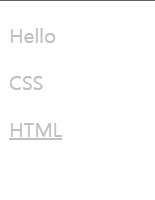
<!DOCTYPE html>
<html lang="ko">
    <head>
        <meta charset="utf-8">
        <title>css</title>
        <style media="screen">
            p[class] {color:silver;}
            p[class][id] {text-decoration: underline;}
        </style>
    </head>
    <body>
        <p class="foo">Hello</p>
        <p class="bar">CSS</p>
        <p class="baz" id="title">HTML</p>
    </body>
</html>
-정확한 속성값으로 선택
#css
p[class="foo"] {color:silver;}
p[id="title"] {text-decoration: underline;}
#html
<p class="foo">Hello</p>
<p class="bar">CSS</p>
<p class="baz" id="title">HTML</p>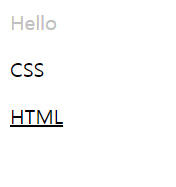
<!DOCTYPE html>
<html lang="ko">
    <head>
        <meta charset="utf-8">
        <title>css</title>
        <style media="screen">
            p[class="foo"] {color:silver;}
            p[id="title"] {text-decoration: underline;}
        </style>
    </head>
    <body>
        <p class="foo">Hello</p>
        <p class="bar">CSS</p>
        <p class="baz" id="title">HTML</p>
    </body>
</html>
-부분 속성값으로 선택
- [class~="bar"]: class 속성의 값이 공백으로 구분한 "bar" 단어가 포함되는 요소 선택
- [class^="bar"] : class 속성의 값이 "bar"로 시작하는 요소 선택
- [class$="bar"] : class 속성의 값이 "bar"로 끝나는 요소 선택
- [class*="bar"]: class속성의 값이 "bar"문자가 포함되는 요소 선택
- 문서 구조 관련 선택자
- 자손 선택자
div span {color: red;}-> div요소의 자손, span 요소를 선택하는 선택자
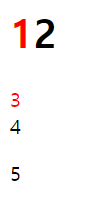
<!DOCTYPE html>
<html lang="ko">
    <head>
        <meta charset="utf-8">
        <title>css</title>
        <style media="screen">
            div span {color: red;}
        </style>
    </head>
    <body>
        <div>
            <h1><span>1</span>2</h1>
            <span>3</span>
        </div>
        <span>4</span>
        <p>5</p>
    </body>
</html>- 자식 선택자
div span {color: red;}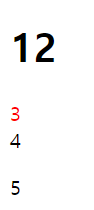
<!DOCTYPE html>
<html lang="ko">
    <head>
        <meta charset="utf-8">
        <title>css</title>
        <style media="screen">
            div > span {color: red;}
        </style>
    </head>
    <body>
        <div>
            <h1><span>1</span>2</h1>
            <span>3</span>
        </div>
        <span>4</span>
        <p>5</p>
    </body>
</html>- 인접형제 선택자 : 뒤에 나오는 형제 요소를 선택하는 선택자
div span {color: red;}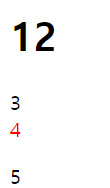
<!DOCTYPE html>
<html lang="ko">
    <head>
        <meta charset="utf-8">
        <title>css</title>
        <style media="screen">
            div + span {color: red;}
        </style>
    </head>
    <body>
        <div>
            <h1><span>1</span>2</h1>
            <span>3</span>
        </div>
        <span>4</span>
        <p>5</p>
    </body>
</html>- 가상선택자 : 지금 문서 내에 존재하지 않는 요소에 스타일을 부여할 수 도 있고 특정 요소의 상태를 미리 추정해서 가상의 클래스로 스타일을 적용시킬 수도 있는 선택자이다.
- 가상 클래스 (pseudo class) : 우리가 요소에 직접 클래스를 입력하는 것이 아니고 브라우저 스스로가 특정한 상황이 되면 자동적으로 클래스를 적용시켜주는 것이다.
:pseudo-class {
	property: value;
}
<!DOCTYPE html>
<html lang="ko">
    <head>
        <meta charset="utf-8">
        <title>css</title>
        <style media="screen">
            li:first-child{color:red;}
            li:last-child{color:blue;} /*li:last-child는 띄어쓰기하면 안됨*/
        </style>
    </head>
    <body>
       <ul>
        <li>1</li>
        <li>2</li>
        <li>3</li>
        </ul>
    </body>
</html>- link 가상 클래스 : 하이퍼링크이면서 아직 방문하지 않은 앵커
a:link {color: blue;}- visited 가상 클래스 : 이미 방문한 하이퍼링크를 의미
a:visited {color: gray;}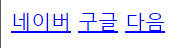
▲ 방문전

▲ 방문후
<!DOCTYPE html>
<html lang="ko">
    <head>
        <meta charset="utf-8">
        <title>css</title>
        <style media="screen">
            a:link {color: blue;}
            a:visited {color: gray;}
        </style>
    </head>
    <body>
        <a href="https://naver.com/">네이버</a>
        <a href="http://google.com/">구글</a>
        <a href="https://daum.net">다음</a>
    </body>
</html>- 사용자 동작 관련 가상 클래스
- :focus : 현재 입력 포커스를 갖고 있는 요소에 적용
- :hover :마우스 포인터가 위치해 있는 요소에 적용
- :active : 사용자 입력에 의해 활성화된 요소에 적용
a:focus {background-color: yellow;}
a:hover {font-weight: bold;}
a:active {color:red;}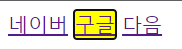
▲focus

▲hover

▲active
<!DOCTYPE html>
<html lang="ko">
    <head>
        <meta charset="utf-8">
        <title>css</title>
        <style media="screen">
            a:focus {background-color: yellow;}
            a:hover {font-weight: bold;}
            a:active {color:red;}
        </style>
    </head>
    <body>
        <a href="https://naver.com/">네이버</a>
        <a href="http://google.com/">구글</a>
        <a href="https://daum.net">다음</a>
    </body>
</html>- 가상 요소 : 미리 정의해놓은 위치에 삽입이 되도록 약속되어있는 보이지 않는 요소

- :before : 가장 앞에 요소를 삽입
        <style media="screen">
            p:before {
                color: red;
                content: "before가상요소를 사용한 내용"
            }
        </style>

- :after: 가장 뒤에 요소를 삽입
        <style media="screen">
            p:after {
                color: red;
                content: "after가상요소를 사용한 내용"
            }
        </style>

- :first-line: 요소의 첫번째 줄에 있는 텍스트
        <style media="screen">
            p:first-line {
                color: red;
                content: "first-line가상요소를 사용한 내용"
            }
        </style>

- first-letter : 블록 레벨 요소의 첫번째 문자
        <style media="screen">
            p:first-letter {
                color: red;
                content: "first-letter가상요소를 사용한 내용"
            }
        </style>
- 구체성(명시도) : 선택자를 얼마나 명시적으로 선언했느냐를 수치화한 것, 구체성의 값이 높을수록 우선되어 적용된다.
0,0,0,0
왼쪽이 높을수록 구체성이 높음
- 0,1,0,0 : 선택자에 있는 모든 id속성값
- 0,0,1,0 : 선택자에 있는 모든 class속성값, 기타 속성, 가상 클래스
- 0,0,0,1 : 선택자에 있는 모든 요소, 가상 요소
- 전체 선택자는 0,0,0,0을 갖는다.
조합자는 구체성에 영향을 주지 않는다.
p#page {color: red !important;}!important : 모든 구체성을 무시하고 우선권을 가짐
- 상속 : 어떤 스타일이 특정 요소만이 아니라 자손 요소에까지 적용되는 방식
- 박스 모델 속성들(margin, padding, background, border ···)은 상속되지 않는다.
- 상속된 값의 구체성은? 상속된 값에는 구체성이 없다.
- 케스케이딩(=단계적인)
구체성이 같은 두 규칙이 동일한 요소에 적용된다면?
-기본적으로 !important로 선언된 모든 규칙은 그렇지 않는 규칙보다 우선한다.
-출처는 제작자(사이트 개발자가 작성한 css), 사용자(사이트를 방문하는 일반 사용자들이 작성한 css) , 사용자 에이전트(브라우저에 내장된 css)로 구분한다.우선 순위
1.사용자 !important 스타일
2.제작자 !important 스타일- 제작자 스타일
- 사용자 스타일
- 사용자 에이전트 스타일
- css 단위
절대길이
- px : pixels
- pt : points
상대길이
- % : percentage
- em : font size of the element
- rem : font size of the root element
- vw : 1% of viewport's width
- 미디어쿼리 : 각 미디어 매체에 따라 다른 스타일 시트를 적용할 수 있게 만드는 것
@media media queries{...}-> media queries(미디어 쿼리문)가 참이면 실행된다.
- Media Types(미디어 타입)
-all,screen,print···
2.Media Features(미디어 특성)
-width(가로 뷰포트), orientation(미디어가 세로or가로)···
media_query_list(여러개의 미디어 쿼리로 이루어진 리스트로 작성 가능하며 쉼표를 이용해서 구분한다.)
 : S* [media_query [ ',' S* media_query ]* ]?
 ;
media_query
- A 형태 - 미디어 타입에 and를 이용해서 미디어 표현식을 붙일 수 있다. 미디어 타입 앞에는 only 또는 not 키워드가 올 수 있다. 미디어 표현식은 생략 가능하기 때문에 미디어 타입 단독으로 사용될 수 있다.
- B 형태 - 미디어 타입 없이 미디어 표현식이 바로 나올 수 있다.(미디어 타입이 명시되지 않으면 all로 간주)미디어 표현식은 and를 이용해서 계속해서 나올 수 있다.
 : [ONLY | NOT]? S* media_type S* [ AND S* expression ]*
 | expression [ AND S* expression ]*
 ;
expression : 미디어 표현식은 괄호로 감싸야 하며 특성 이름과 해당하는 값으로 이루어진다. 이름과 값은 : 기호로 연결한다. 값이 없이 특성 이름만으로도 작성할 수 있다.
 : '(' S* media_feature S* [ ':' S* expr ]? ')' S*
 ;
[ a ] : a가 나올 수도 있고 나오지 않을 수도 있다
a | b : a or b
a? : a가 0번 나오거나 1번 나올 수 있다
a* : a가 0번 나오거나 2번 이상 계속 나올수 있다
- 미디어 쿼리 선언 방법
(1) CSS 파일 내부,
media screen and (color)(2) < link> 태그의 media 속성에 미디어 쿼리를 선언한다. 미디어 쿼리가 참이면 뒤에 css 파일 규칙이 적용된다.
<link rel="stylesheet" media="screen and (color)" href="example.css">(3) CSS 파일 내부에 또는 < style> 태그 내부에 사용가능, @import문 뒤에 미디어 쿼리를 선언하면 된다.
@import url(example.css) screen and (color);