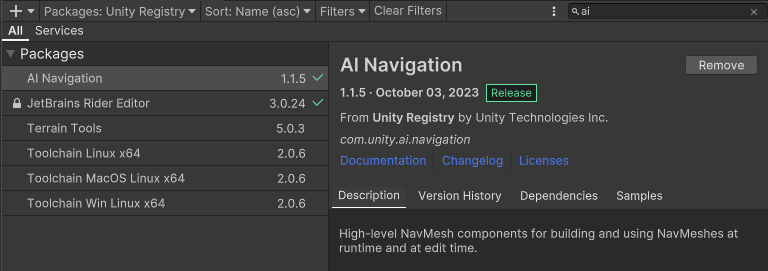
Packages - Unity Registry - AI Navigation - Import
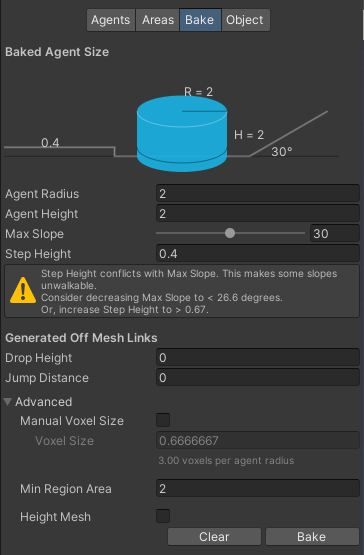
AI 이동시킬 범위 내의 Terrain 또는 Object를 Bake
계산에 포함되는 Mesh 는 Navigation Static 속성을 가져야한다.
이동 가능한 범위는 Walkable 그렇지 않은 범위는 Not Walkable로 설정
Agent Radius - 에이전트의 NavMesh 영역.
Agent Height - 에이전트의 높이.
Max Slope - 에이전트가 횡단할 수 있는 NavMesh 경사의 최대 각도.
Step Height - 에이전트가 오를 수 있는 계단의 높이.
using System.Collections;
using System.Collections.Generic;
using UnityEngine;
// NavMeshAgent 를 사용하기 위해 추가
using UnityEngine.AI;

public class Monster : MonoBehaviour
{
   public Transform target;

   NavMeshAgent nmAgent;

   {
      nmAgent = GetComponent<NavMeshAgent>();
   }

   {
      nmAgent.SetDestination(target.position);
   }
}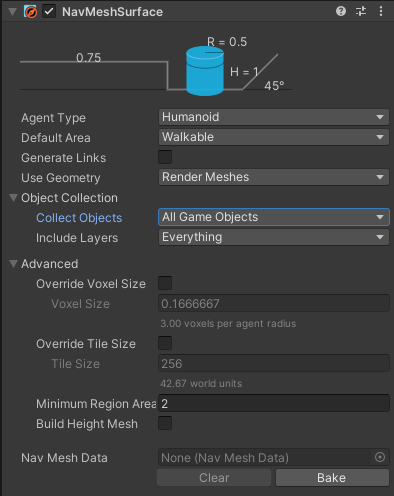
하이어라키에 NavMesh Surface 오브젝트 생성 후 Bake
Object Collection 옵션
1. All Game Objects = 하이어라키상의 모든 오브젝트에 적용
2. Volume = 선택시 생성되는 박스 안의 모든 오브젝트에 적용 (플레이어에 붙여 오픈월드 등에 활용)
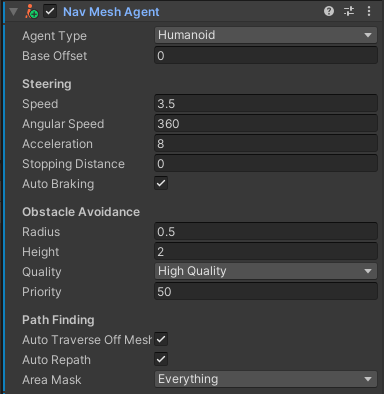
이동시킬 오브젝트에 Nav Mesh Agent 컴포넌트 추가
Base Offset - 에이전트가 자신의 경로를 찾을 때 사용하는 충돌 실린더의 위치.
Speed - 에이전트가 이동하는 속도.
Angular Speed - 에이전트가 회전하는 속도.
Acceleration - 가속도를 나타내며, 이 값을 높이면 에이전트가 최대 속도에 빠르게 도달.
Stopping Distance - 목표 지점에서 얼마나 떨어진 위치에서 멈출 것인지를 결정.
Auto Braking - 자동으로 충돌 전에 감속하는 옵션.
Obstacle Avoidance - 다른 에이전트 및 NavMeshObstacle와의 충돌을 피하기 위해 구성하는 부분. Radius와 Height는 해당하는 대로 사용. 품질(Quality)이 높을수록 충돌을 피하는 능력이 향상.
Priority - 우선순위를 나타내며, 우선순위가 낮으면 무시. 동일한 우선순위인 경우 피하려고 노력하지만 불가능하면 무시. 자신의 우선순위가 높으면 다른 에이전트를 밀어내지 못함.
Auto Repath - 에이전트가 길을 따라 이동 중에 네비게이션 메시에 문제가 발생하면 자동으로 경로를 다시 찾을지 여부를 선택하는 영역.
Area Mask - 에이전트가 이동 가능하고 불가능한 지역을 지정하는 영역.
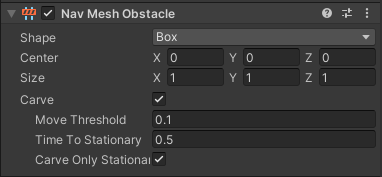
경로를 가로막을 오브젝트에 Nav Mesh Obstacle 컴포넌트 추가
Carve - 움직이는 오브젝트(ex.문)에 적용 가능
Move Threshold - 얼마나 움직였을 때
Time To Stationary - 얼마나 시간이 흐른 후
Carve Only Stationary - 정지 상태에서만 Carve를 수행
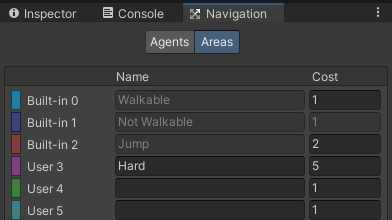
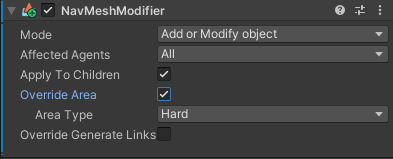
높은 코스트(물 속, 진흙길 등)를 가지는 지역을 만들고 싶을 때
Navigation - Areas 에 신규 지역 코스트 지정 후
해당 오브젝트에 NavMeshModifier 컴포넌트 추가 후 Override Area 체크
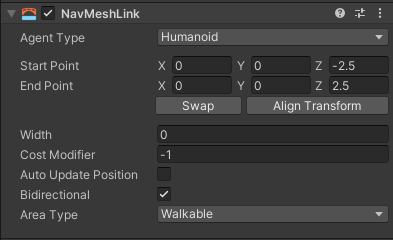
NavMeshLink 생성시 나타나는 두 개의 상자로 좌표 연결
두 좌표 사이를 이동 가능한 경로로 인식함 (ex. 사다리)
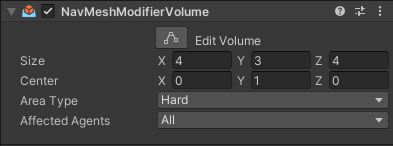
박스 안의 지역을 특정 Area로 취급하게끔 변경
- 코드
using System.Collections;
using System.Collections.Generic;
using Unity.AI.Navigation;
using UnityEngine;
using UnityEngine.AI;

public class ClickMove : MonoBehaviour
{
    private NavMeshAgent agent; // 네비에이전트
    private Animator anim;  // 애니메이터
    private LineRenderer line;  // 라인렌더러

    public Transform spot;  // 이동 목표 좌표
    // public NavMeshSurface nms;
    public Transform nms;

    Coroutine draw; // 경로표시 코루틴
    void Start()
    {
        agent = GetComponent<NavMeshAgent>();
        anim = GetComponent<Animator>();
        line = GetComponent<LineRenderer>();
        line.startWidth = 0.1f; // 라인렌더러 굵기
        line.material.color = Color.red;
        line.enabled = false;

        // NavMeshSurface 생성
        // nms.BuildNavMesh();
    }

    void CheckDistance()
    {   // 플레이어 좌표와 Navigation Box 좌표 간의 거리가 10 이상 벌어질 경우
        if (Vector3.Distance(this.transform.position, nms.position) > 10.0f)
        {   // Navigation Box 좌표를 플레이어 좌표로 옮기고
            nms.transform.position = this.transform.position;
            // NavMesh 새로 빌드
            nms.GetComponent<NavMeshSurface>().BuildNavMesh();
        }
    }

    // Update is called once per frame
    void Update()
    {
        CheckDistance();

        if (Input.GetMouseButtonDown(0))
        {   // 마우스 클릭시 카메라에서 마우스 위치로 Ray
            Ray ray = Camera.main.ScreenPointToRay(Input.mousePosition);

            if (Physics.Raycast(ray, out RaycastHit hit))
            {   // Ray 위치로 Nav agent 이동 및 이동 애니메이션 실행
                agent.SetDestination(hit.point);
                anim.SetFloat("Speed", 2.0f);
                anim.SetFloat("MotionSpeed", 2.0f);

                // 목표 지점에 이미지 출력
                spot.gameObject.SetActive(true);
                spot.position = hit.point;

                // 실행 중이던 라인렌더러를 종료시키고 새 경로로 재활성화
                if(draw!=null) StopCoroutine(draw);
                draw = StartCoroutine(DrawPath());
            }
        }

            // 목표 지점에 근접(도달)할 경우
        if (agent.remainingDistance < 0.1f)
        {   // 이동 애니메이션 중지
            anim.SetFloat("Speed", 0.0f);
            anim.SetFloat("MotionSpeed", 0.0f);

            // 목표 이미지 및 경로 렌더링 중지
            spot.gameObject.SetActive(false);
            line.enabled = false;
            if (draw != null) StopCoroutine(draw);
        }
    }

    IEnumerator DrawPath()
    {
        line.enabled = true;
        yield return null;
        while (true)
        {   // 네비게이션 경로를 활용하여 라인 렌더러 표시
            // agent.path.corners.Length == 네비게이션 경로
            int cnt = agent.path.corners.Length;
            line.positionCount = cnt;
            for (int i = 0; i < cnt; i++)
            {
                line.SetPosition(i, agent.path.corners[i]);
            }
            yield return null;
        }
    }
}