렌더 텍스쳐 생성하여 카메라에 넣기
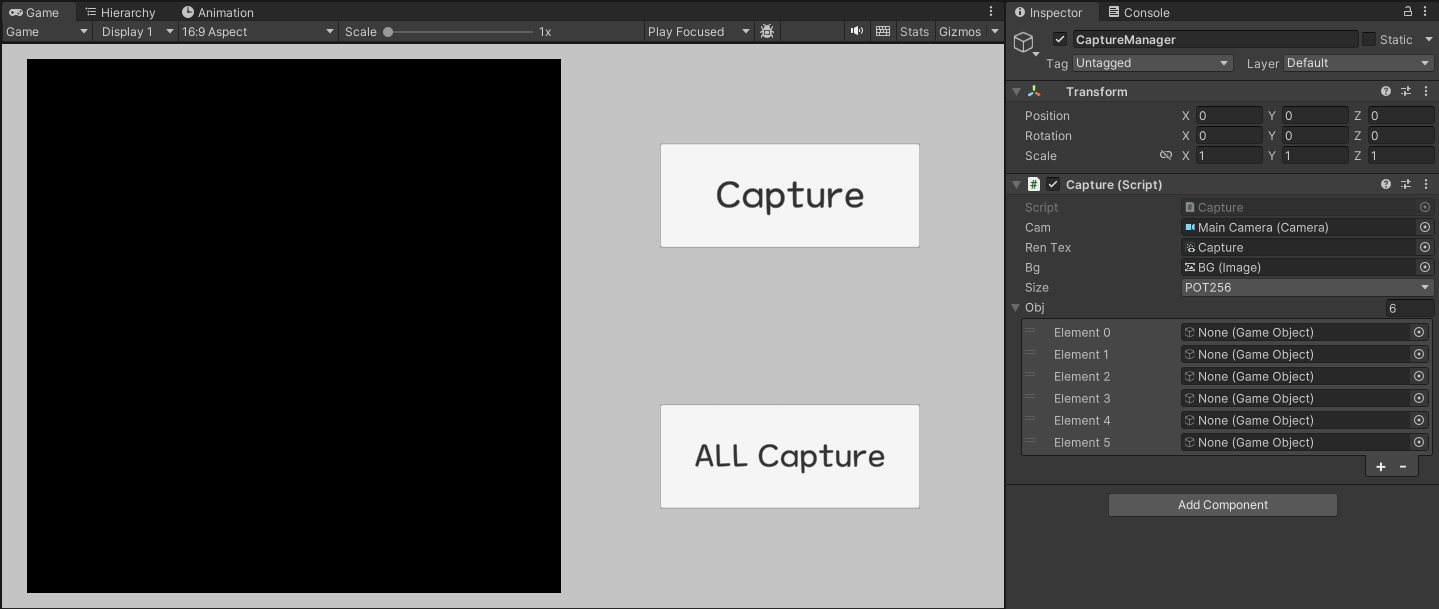
캔버스에 배경, 출력화면, 버튼 추가
출력화면에 렌더 텍스쳐 삽입
아래 스크립트 적용
using System.Collections;
using System.Collections.Generic;
using System.IO;
using UnityEngine;
using UnityEngine.UI;


public enum Size
{
    POT64,
    POT128,
    POT256,
    POT512,
    POT1024
}

public class Capture : MonoBehaviour
{
    public Camera cam;  // 카메라
    public RenderTexture renTex;    // 렌더 텍스쳐
    public Image bg;    // 배경 이미지

    public Size size;

    public GameObject[] obj;    // 모두 캡쳐용 오브젝트 그룹
    private int curCnt = 0;

    void Start()
    {
        cam = Camera.main;

        SettingSize();
    }

    public void CreateImage()
    {
        StartCoroutine(CaptureImage());
    }

    public void CreateAllImage()
    {
        StartCoroutine(AllCapture());
    }

    IEnumerator CaptureImage()
    {
        yield return null;
        // 카메라로 보여지는 렌더 텍스쳐를 캡쳐
        Texture2D tex2D = new Texture2D(renTex.width, renTex.height, TextureFormat.ARGB32, false, true);
        RenderTexture.active = renTex;
        tex2D.ReadPixels(new Rect(0, 0, renTex.width, renTex.height), 0, 0);

        yield return null;
        // 위 결과물을 출력
        var data = tex2D.EncodeToPNG();
        string name = "Thumbnail";
        string extention = ".png";
        string path = Application.persistentDataPath + "/Thumbnail";

        print(path);

        if (!Directory.Exists(path)) Directory.CreateDirectory(path);

        File.WriteAllBytes(path + name + extention, data);

        yield return null;
    }

    IEnumerator AllCapture()
    {
        while (curCnt < obj.Length)
        {
            var curObj = Instantiate(obj[curCnt].gameObject);

            yield return null;

            Texture2D tex2D = new Texture2D(renTex.width, renTex.height, TextureFormat.ARGB32, false, true);
            RenderTexture.active = renTex;
            tex2D.ReadPixels(new Rect(0, 0, renTex.width, renTex.height), 0, 0);

            yield return null;

            var data = tex2D.EncodeToPNG();
            string name = $"Thumbnail_{obj[curCnt].gameObject.name}";
            string extention = ".png";
            string path = Application.persistentDataPath + "/Thumbnail";

            print(path);

            if (!Directory.Exists(path)) Directory.CreateDirectory(path);

            File.WriteAllBytes(path + name + extention, data);

            DestroyImmediate(curObj);
            curCnt++;

            yield return null;
        }
    }

    void SettingSize()
    {
        switch (size)
        {
            case Size.POT64:
                renTex.width = 64;
                renTex.height = 64;
                break;
            case Size.POT128:
                renTex.width = 128;
                renTex.height = 128;
                break;
            case Size.POT256:
                renTex.width = 256;
                renTex.height = 256;
                break;
            case Size.POT512:
                renTex.width = 512;
                renTex.height = 512;
                break;
            case Size.POT1024:
                renTex.width = 1024;
                renTex.height = 1024;
                break;
        }
    }
}