목표: nginx와 DB를 연동시키기
5번 서버에 nginx + PHP(wordpress)를 설치하고 mysql이 설치되어있는 4번서버와 연동시켜보자.
조건:
- 1번 서버에서 ansible로 yml을 파일을 실행시켜서 원격으로 서버를 설정
- wordpress 디렉토리 내부 파일들을 nginx/html/ 디렉토리로 복사
- php-fpm이 nginx을 인식하도록 www.conf 파일 내용 수정(apache를 nginx로 수정)
- DB 서버에 연결시키기 위해, nginx 디렉토리에 복사된 wp-conf.php의 내용 수정 필요
실행 전 준비: yum으로 rdate 설치 후 시간 설정 필요.
참고자료: https://docs.ansible.com/ansible/2.9/modules/blockinfile_module.html#blockinfile-module
초기 코드
---
- name: nginx + wordpress + mysql
  hosts: nginx
  tasks:
  - name: install wget + yum utils + epel-release
    yum:
      name: "{{ item }}"
      state: latest
    loop:
      - wget
      - yum-utils
      - epel-release
      - http://rpms.remirepo.net/enterprise/remi-release-7.rpm

  - name: install php7.4
    yum:
      name: "{{ packages }}"
      state: present
    vars:
      packages:
        - php
	- php-common
	- php-cli
	- php-curl
	- php-mcrypt
	- php-gd
	- php-opcache
	- php-fpm
	- php-mysqlnd

  - name: url file download - wordpress
    get_url:
      url: https://ko.wordpress.org/wordpress-5.8.6-ko_KR.tar.gz
      dest: ./

  - name: unarcive tar file
    unarchive:
      src: wordpress-5.8.6-ko_KR.tar.gz
      dest: ./
      remote_src: yes

  - name: copy wordpress to nginx
    copy:
      src: "{{ item.src }}"
      dest: "{{ item.dest }}"
      remote_src: yes
    loop:
      - {src: "./wordpress/", dest: "/usr/share/nginx/html/"}
      - {src: "/usr/share/nginx/html/wp-config-sample.php", dest: "/usr/share/nginx/html/wp-config.php"}

  - name: port 80/tcp open
    firewalld:
      port: 80/tcp
      permanent: yes
      immedinate: yes
      state: enabled

  - name: nginx + php started
    service:
      name: "{{ item }}"
      state: started
    loop:
      - nginx
      - php-fpm
이 yml파일을 적용했을 때, 정상적인 동작이 되지 않음.
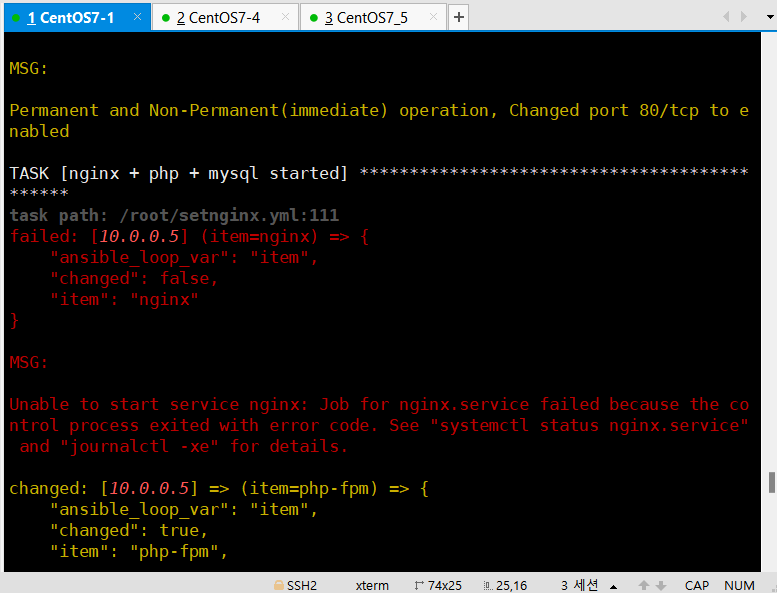
문제: /etc/nginx/nginx.conf 파일에 내용 추가를 위해 blockinfile 모듈을 사용했는데, 내용이 의도대로 추가 되지 않음
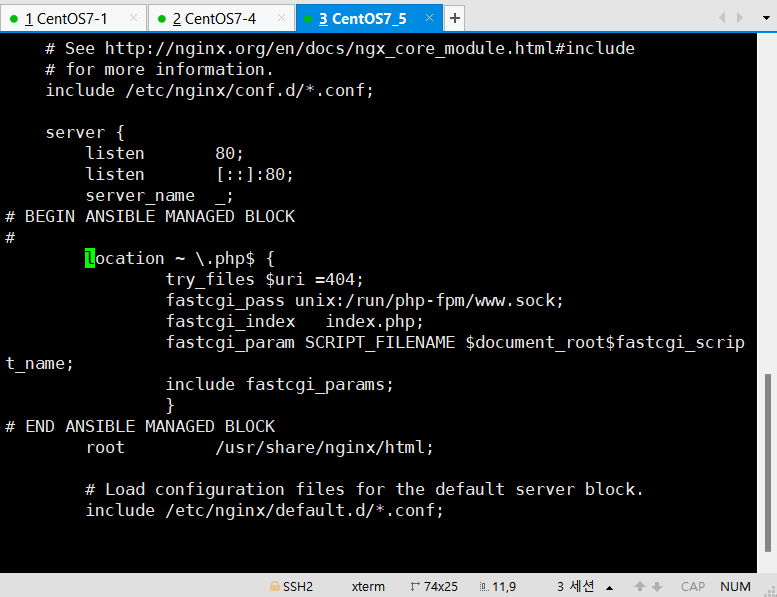
원인: blockinfile 모듈은 동일 파일에 중첩이 안되기 때문에 문제가 발생함.
해결 방안: 함수 내부에 있으면 위치는 상관없는 코드들이므로, 두 개의 blockinfile 모듈의 내용을 하나로 통합해서 작성.
  - name: block in /etc/nginx/nginx.conf - 1
    blockinfile:
      path: /etc/nginx/nginx.conf
      insertafter: '^(\s+server_name\s+)_;'
      block: |
	#
        	index   index.php;
        	location ~ \.php$ {
            		try_files $uri =404;
            		fastcgi_pass unix:/run/php-fpm/www.sock;
            		fastcgi_index   index.php;
            		fastcgi_param SCRIPT_FILENAME $document_root$fastcgi_script_name;
            		include fastcgi_params;
        		}
1차 수정
오류 수정 + mysql 연결 추가한 코드
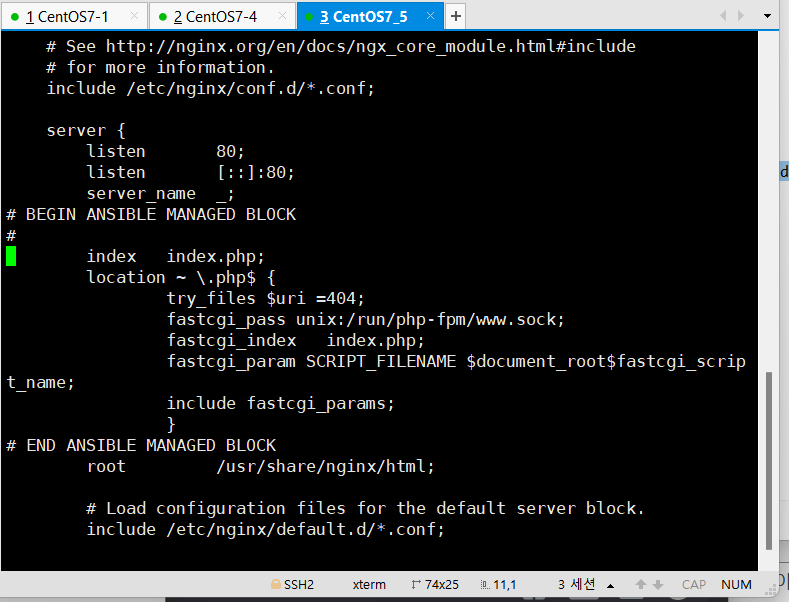
blockinfile 모듈 사용시 regexp 대상이 여러개인 경우, 이상한 위치에 입력되므로 유일한 대상('^(\s+error_page\s+)404 /404.html;')을 지정해서 해당 라인의 윗 줄에 추가 하도록 코드 수정(insertafter를 insertbefore로 변경).
---
- name: nginx + wordpress + mysql
  hosts: nginx
  tasks:
  - name: install wget + yum utils + epel-release
    yum:
      name: "{{ item }}"
      state: latest
    loop:
      - wget
      - yum-utils
      - epel-release
      - http://rpms.remirepo.net/enterprise/remi-release-7.rpm
      - nginx

  - name: install php7.4
    yum:
      name: "{{ packages }}"
      state: present
    vars:
      packages:
        - php
        - php-common
        - php-cli
        - php-curl
        - php-mcrypt
        - php-gd
        - php-opcache
        - php-fpm
        - php-mysqlnd

  - name: url file download - wordpress
    get_url:
      url: https://ko.wordpress.org/wordpress-5.8.6-ko_KR.tar.gz
      dest: ./

  - name: unarcive tar file
    unarchive:
      src: wordpress-5.8.6-ko_KR.tar.gz
      dest: ./
      remote_src: yes

  - name: copy wordpress to nginx
    copy:
      src: "{{ item.src }}"
      dest: "{{ item.dest }}"
      remote_src: yes
    loop:
      - {src: "./wordpress/", dest: "/usr/share/nginx/html/"}
      - {src: "/usr/share/nginx/html/wp-config-sample.php", dest: "/usr/share/nginx/html/wp-config.php"}

  - name: change /etc/php-fpm.d/www.conf
    replace:
      path: /etc/php-fpm.d/www.conf
      regexp: "{{ item.src }}"
      replace: "{{ item.dest }}"
    loop:
      - {src: 'apache', dest: 'nginx' }
      - {src: ';listen.owner = nobody',dest: ';listen.owner = nginx'}
      - {src: ';listen.group = nobody',dest: ';listen.group = nginx'}
      - {src: 'listen = 127.0.0.1',dest: ';listen = 127.0.0.1'}

  - name: block in /etc/nginx/nginx.conf - 1
    blockinfile:
      path: /etc/nginx/nginx.conf
      insertafter: '^(\s+server_name\s+)_;'
      block: |
	#
        	index   index.php;
        	location ~ \.php$ {
            		try_files $uri =404;
            		fastcgi_pass unix:/run/php-fpm/www.sock;
            		fastcgi_index   index.php;
            		fastcgi_param SCRIPT_FILENAME $document_root$fastcgi_script_name;
            		include fastcgi_params;
        		}

  - name: change wp-config.php
    replace:
      path: /usr/share/nginx/html/wp-config.php
      regexp: "{{ item.src }}"
      replace: "{{ item.dest }}"
    loop:
      - {src: "database_name_here", dest: "wordpress" }
      - {src: "username_here", dest: "root" }
      - {src: "password_here", dest: "It12345@" }
      - {src: "localhost", dest: "10.0.0.4" }

  - name: install mysql
    shell: "yum install -y http://dev.mysql.com/get/mysql57-community-release-el7-11.noarch.rpm"
    ignore_errors: yes

  - name: mysql client repo gpg_check disable
    yum:
      name: "{{ item }}"
      disable_gpg_check: yes
      state: present
    loop:
        - mysql-community-client
        - mysql-community-server

  - name: mysql port open
    firewalld:
      port: "{{ item }}"
      permanent: yes
      immediate: yes
      state: enabled
    loop:
      - 80/tcp

  - name: nginx + php + mysql started
    service:
      name: "{{ item }}"
      state: started
    loop:
      - nginx
      - php-fpm
      - mysqld
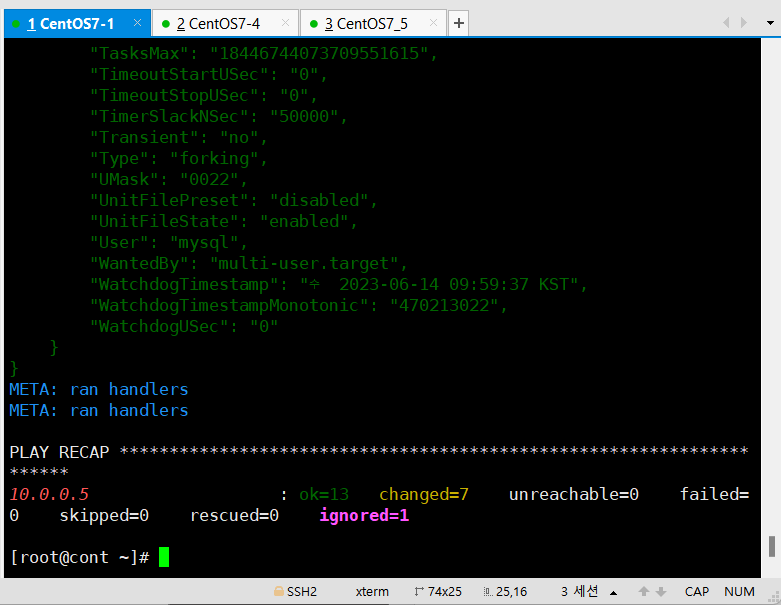
yml 파일이 정상적으로 실행됨 확인
5번 서버의 nginx.conf 파일 역시 지정한 위치에 입력됨을 확인
2차 수정
- 입력되는 위치가 마음에 들기 때문에 입력 위치 변경.
- mysql는 다른 서버에 설치하고 사용할 것이므로 mysql 설치 코드는 제거.
- php7.4 사용을 위한 코드 추가.
---
- name: nginx + wordpress
  hosts: nginx
  tasks:
  - name: install wget + yum utils + epel-release
    yum:
      name: "{{ item }}"
      state: latest
    loop:
      - wget
      - yum-utils
      - epel-release
      - http://rpms.remirepo.net/enterprise/remi-release-7.rpm
      - nginx

  - name: install php7.4
    yum:
      name: "{{ packages }}"
      state: present
    vars:
      packages:
        - php
        - php-common
        - php-cli
        - php-curl
        - php-mcrypt
        - php-gd
        - php-opcache
        - php-fpm
        - php-mysqlnd

  - name: install php74
    shell: yum-config-manager --enable remi-php74

  - name: url file download - wordpress
    get_url:
      url: https://ko.wordpress.org/wordpress-5.8.6-ko_KR.tar.gz
      dest: ./

  - name: unarcive tar file
    unarchive:
      src: wordpress-5.8.6-ko_KR.tar.gz
      dest: ./
      remote_src: yes

  - name: copy wordpress to nginx
    copy:
      src: "{{ item.src }}"
      dest: "{{ item.dest }}"
      remote_src: yes
    loop:
      - {src: "./wordpress/", dest: "/usr/share/nginx/html/"}
      - {src: "/usr/share/nginx/html/wp-config-sample.php", dest: "/usr/share/nginx/html/wp-config.php"}

  - name: change /etc/php-fpm.d/www.conf
    replace:
      path: /etc/php-fpm.d/www.conf
      regexp: "{{ item.src }}"
      replace: "{{ item.dest }}"
    loop:
      - {src: 'apache', dest: 'nginx' }
      - {src: ';listen.owner = nobody',dest: ';listen.owner = nginx'}
      - {src: ';listen.group = nobody',dest: ';listen.group = nginx'}
      - {src: 'listen = 127.0.0.1',dest: 'listen =  /run/php-fpm/www.sock'}

  - name: block in /etc/nginx/nginx.conf
    blockinfile:
      path: /etc/nginx/nginx.conf
      insertbefore: '^(\s+error_page\s+)404 /404.html;'
      block: |
	#
        	index   index.php;
        	location ~ \.php$ {
            		try_files $uri =404;
            		fastcgi_pass unix:/run/php-fpm/www.sock;
            		fastcgi_index   index.php;
            		fastcgi_param SCRIPT_FILENAME $document_root$fastcgi_script_name;
            		include fastcgi_params;
        	}

  - name: change wp-config.php
    replace:
      path: /usr/share/nginx/html/wp-config.php
      regexp: "{{ item.src }}"
      replace: "{{ item.dest }}"
    loop:
      - {src: "database_name_here", dest: "wordpress" }
      - {src: "username_here", dest: "root" }
      - {src: "password_here", dest: "It12345@" }
      - {src: "localhost", dest: "10.0.0.4" }

  - name: mysql port open
    firewalld:
      port: 80/tcp
      permanent: yes
      immediate: yes
      state: enabled

  - name: nginx + php started
    systemd:
      name: "{{ item }}"
      state: started
      enabled: yes
    loop:
      - nginx
      - php-fpm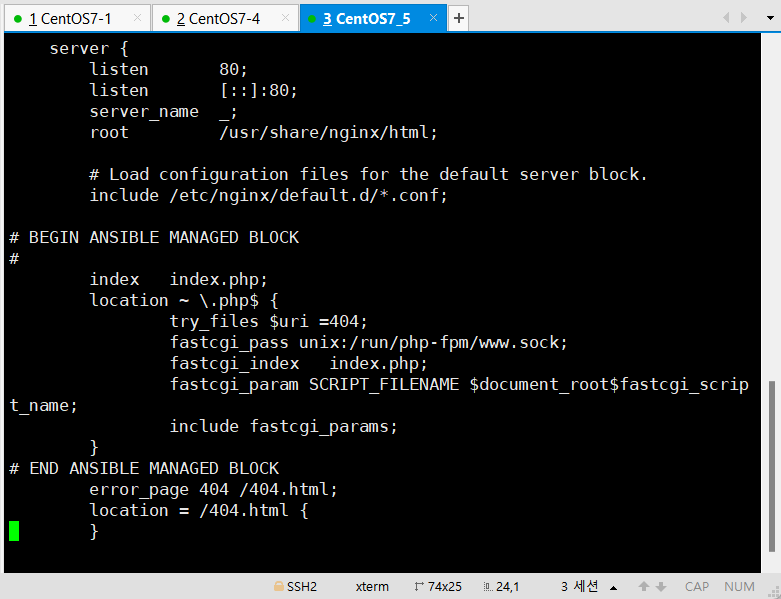
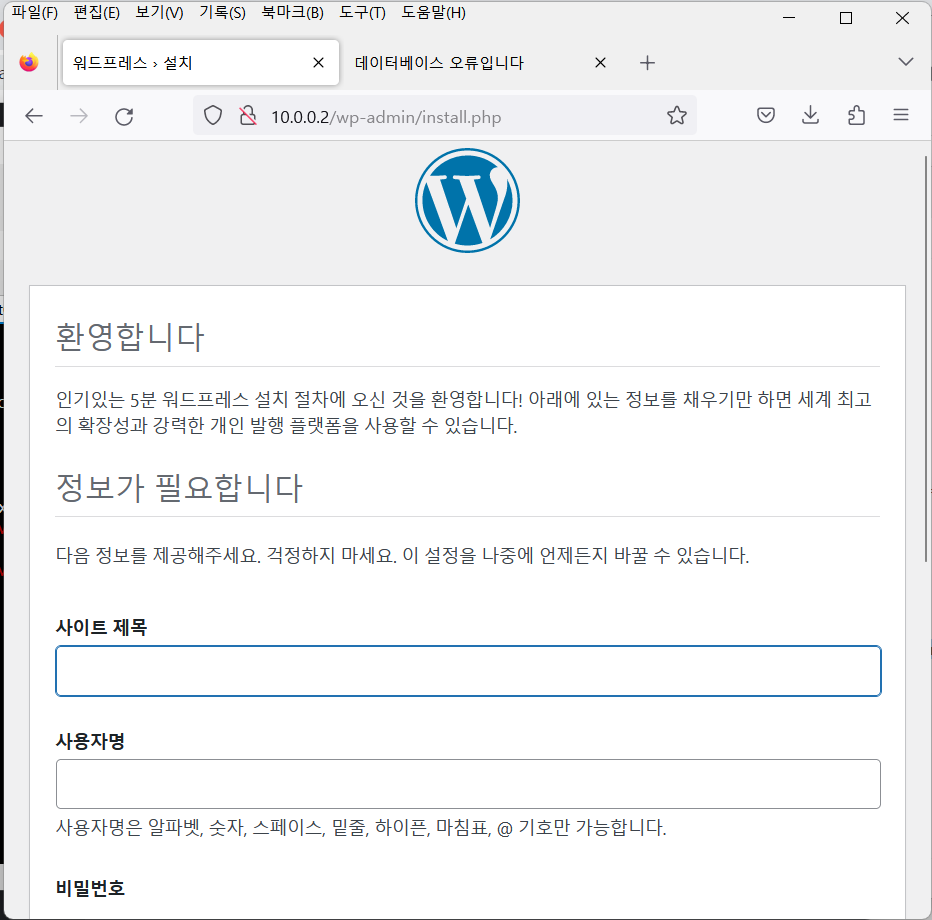
결과 화면
정상적으로 DB서버와 연동되어 nginx 화면이 아닌 wordpress 화면이 정상적으로 출력됨.
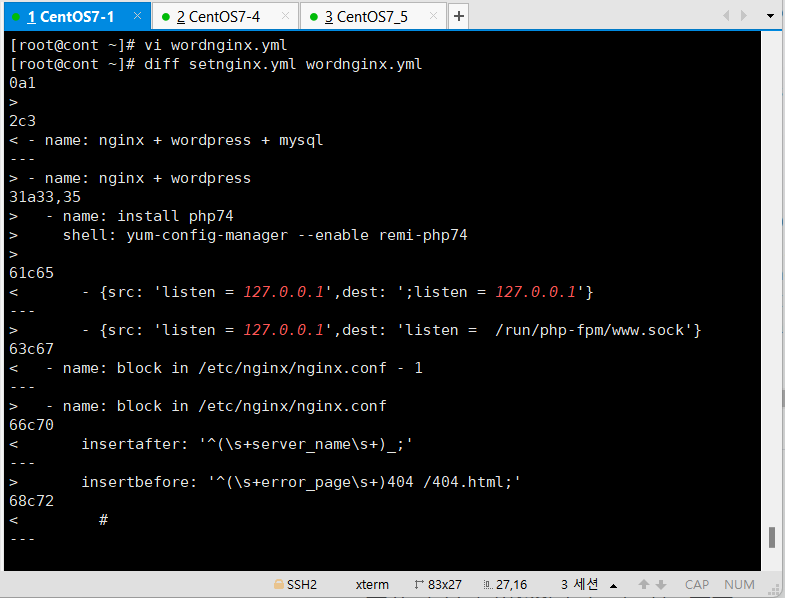
Linux 명령어 공부 - diff 명령어
diff 파일1, 파일2: 두 파일의 내용을 비교하는 명령어
사용자 생성(useradd = usermod)과 연관된 파일들
1. /etc/passwd
 1.1. 원본 root:x:0:0:root:/root:/bin/bash
 1.2. 분석
 	root 		- ID
    :x			- 패스워드
    :0			- UID			-u
    :0			- GID			-g(기본그룹) -G(추가그룹)
    :root		- comment		-c
    :/root		- 홈디렉토리		-d
    :/bin/bash	- Login shell	-s(/bin/bash, /bin/sh, /bin/false(로그인 불허 이유 설명 X), /sbin/nologin(로그인 불허 이유 설명 O))

/etc/shadow
/etc/group
/etc/default/useradd
/etc/login.defs
/etc/skell/
UID, GID 확인
/etc/login.defs 파일을 통해 UID 및 GID 설정값 확인 가능
기본적으로 1000으로 저장되어있지만, 값을 변경하면 useradd 시 사용자의 uid랑 gid 값이 설정값이 파일의 설정값에 따라 바뀜.
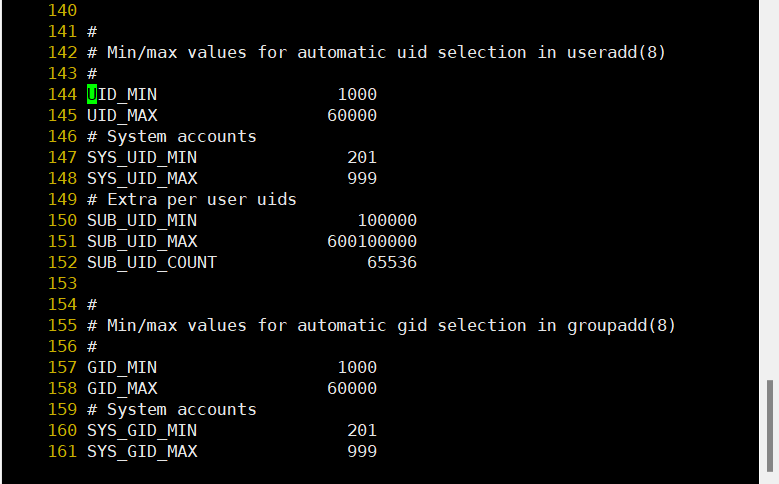
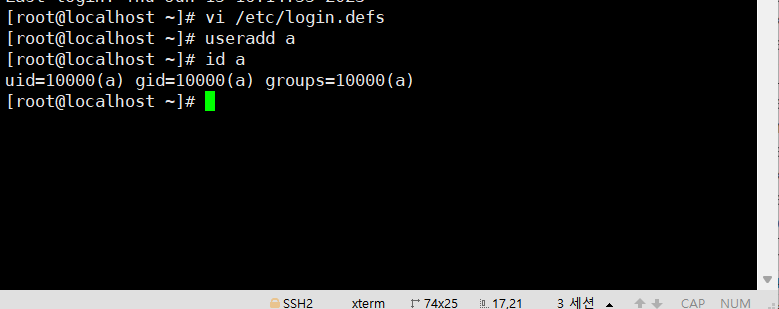
주의점: GID는 UID 생성시 자동적으로 생성되기 때문에 없는 useradd할 때 없는 GID를 생성하면(useradd -u 옵션과 -g 옵션을 동시에 사용하면) 오류가 발생(-u 사용시 group은 자동적으로 생성됨).
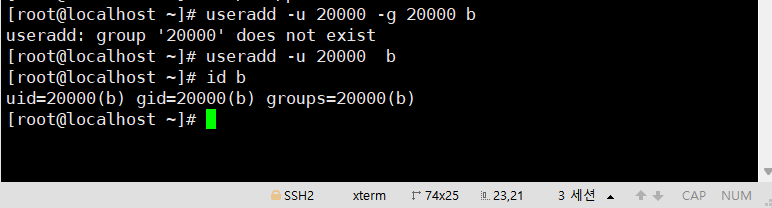
UID 설정
옵션 없이 useradd 실행 시 마지막으로 추가된 사용자의 UID 뒷 번호로 추가됨.

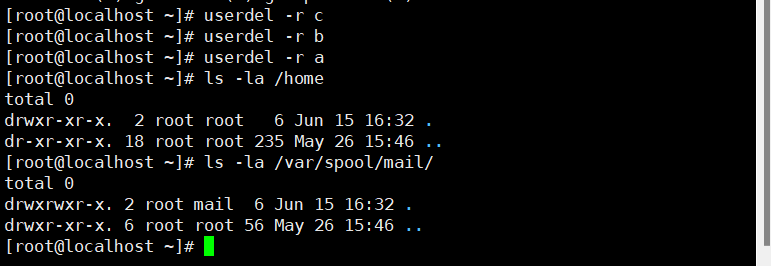
useradd 설정.
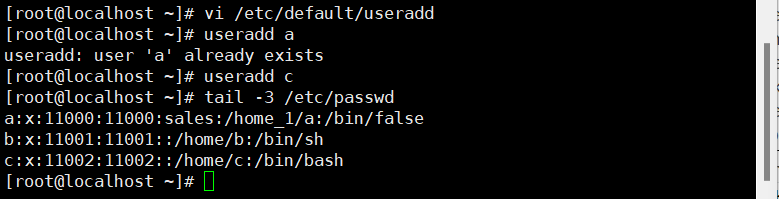
- 옵션을 통해 사용자의 'UID', '저장 위치', '설명(comment)', '로그인 할 shell' 및 '거부 설명 표시 여부'를 설정할 수 있음
- /home_1 디렉토리를 만들고 user a를 추가 후,
tail명령어를 이용해서 a에 대한 useradd 설정 확인 가능.
-s 옵션을 /sbin/nologin 지정하면
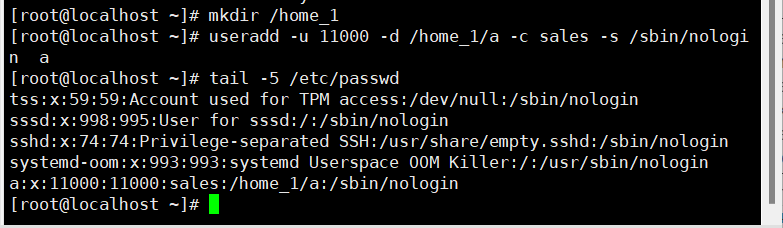
로그인 거부에 대한 설명을 출력함.

-s 옵션을 /bin/false 지정하면
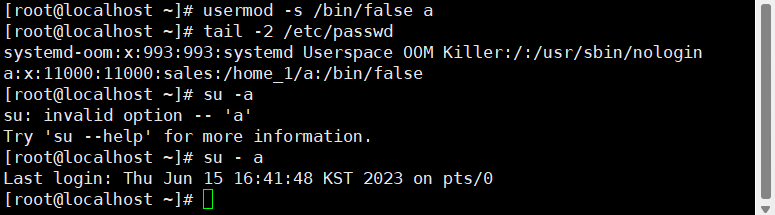
로그인 거부에 대한 설명을 출력하지 않음.
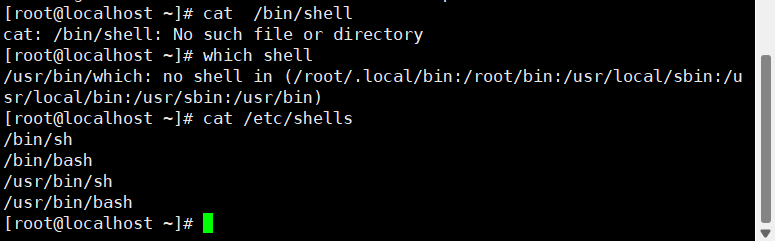
cat /etc/shells를 통해 어떤 shell이 있는지 확인할 수 있음
로그인하는 shell 지정
CentOS에서는 chsh 명령어를 통해 다음 로그인하는 shell을 지정 가능
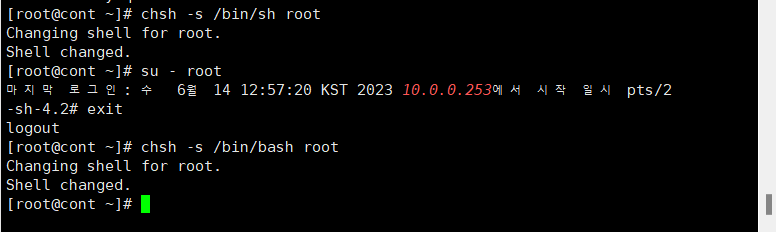
사용자의 shell 지정
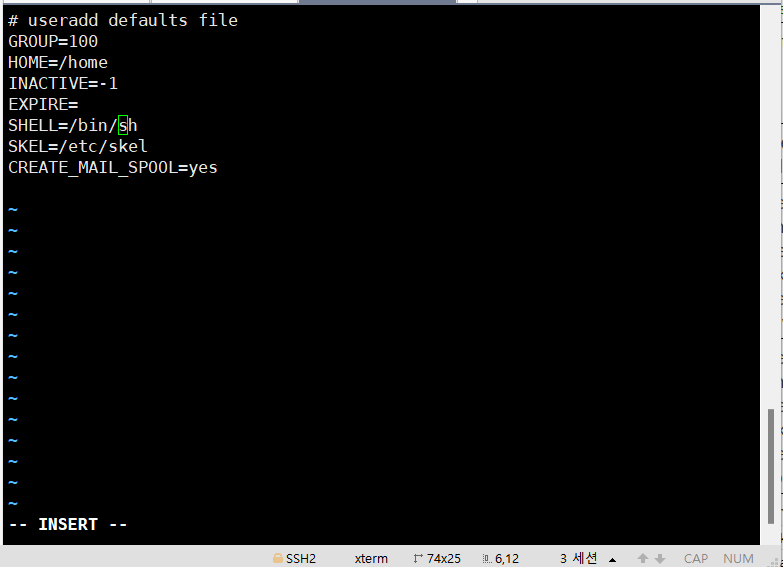
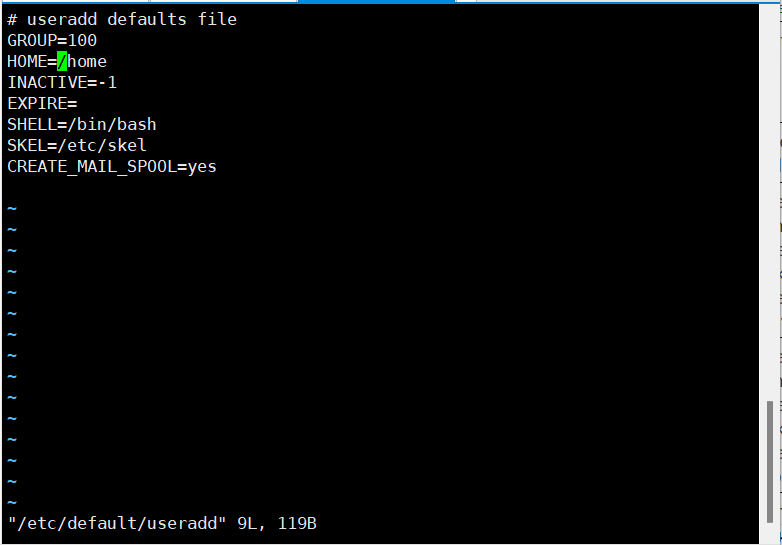
/etc/default/useradd 파일 설정을 통해 추가되는 사용자의 shell 설정을 변경 가능.