레거시 코드 리팩토링으로 OCP 지키기

원래 fcm 서버의 코드는 뉴스레터 아티클의 도착을 알리는 알림 용도로 구현되었다. 당시 빠르게 기능을 구현하는 것에 초점이 맞추었다보니 다른 알림이 추가됐을 때의 상황을 많이 고려하지 못했다.
그리고 이번에 이벤트 시작 알림, 챌린지 시작 알림, 챌린지 TODO 미완료 알림까지 여러 종류의 알림이 늘어나게 되면서 fcm 서버 코드를 전반적으로 재사용할 수 없게 되었다. 코드 내에서 if-else/switch문을 반복하는 코드가 되어 확장에 매우 불리한 구조였고, 이 레거시를 리팩토링 해야겠다고 생각했다.
지금 구조를 유지하면 ‘알림 타입 증가’에 따라 변경 영향 범위가 계속 커져서, 지속적으로 개발 속도와 운영 안정성이 함께 떨어질 것이라 판단했다. 따라서 기존의 기능은 유지하되, 알림 별 정책을 도메인 별로 분리할 수 있도록 "구조 정리" 관점의 리팩토링을 진행하는 것이 좋을 것이다.
그래서 “확장성을 확보하자”는 목표로 fcm 레거시를 리팩토링 하기로 했다.
🚨 리팩토링 전 핵심 문제
리팩토링 전 fcm 서버 코드의 핵심 문제들은 다음과 같았다.
아티클 도착시 알림에 대해 도메인이 한정적인 코드이다.
메서드 파라미터로 articleId를 넘기는 등 다른 종류의 알림이 추가되면 재사용할 수 없는 메서드들이 많았다.메세지 생성 로직이 data payload 생성 로직에 강결합 되어있어, 알림 종류별로 payload를 다르게 만들 수 없었다.
알림의 상태를 변경하는 책임의 서비스가 아티클 도착 알림에 강결합 되어있어, 다른 종류의 알림이 추가될 시 상태 변경 서비스의 메서드가 선형으로 증가하는 구조이다.
위 점들을 통합하면 “기존 알림 도메인과의 강결합”이 문제이며, 이로 인한 “확장성 부재”가 가장 큰 특징이다.
😶🌫️ 기존 fcm 서버 코드 구조
전체 흐름도는 다음과 같다.
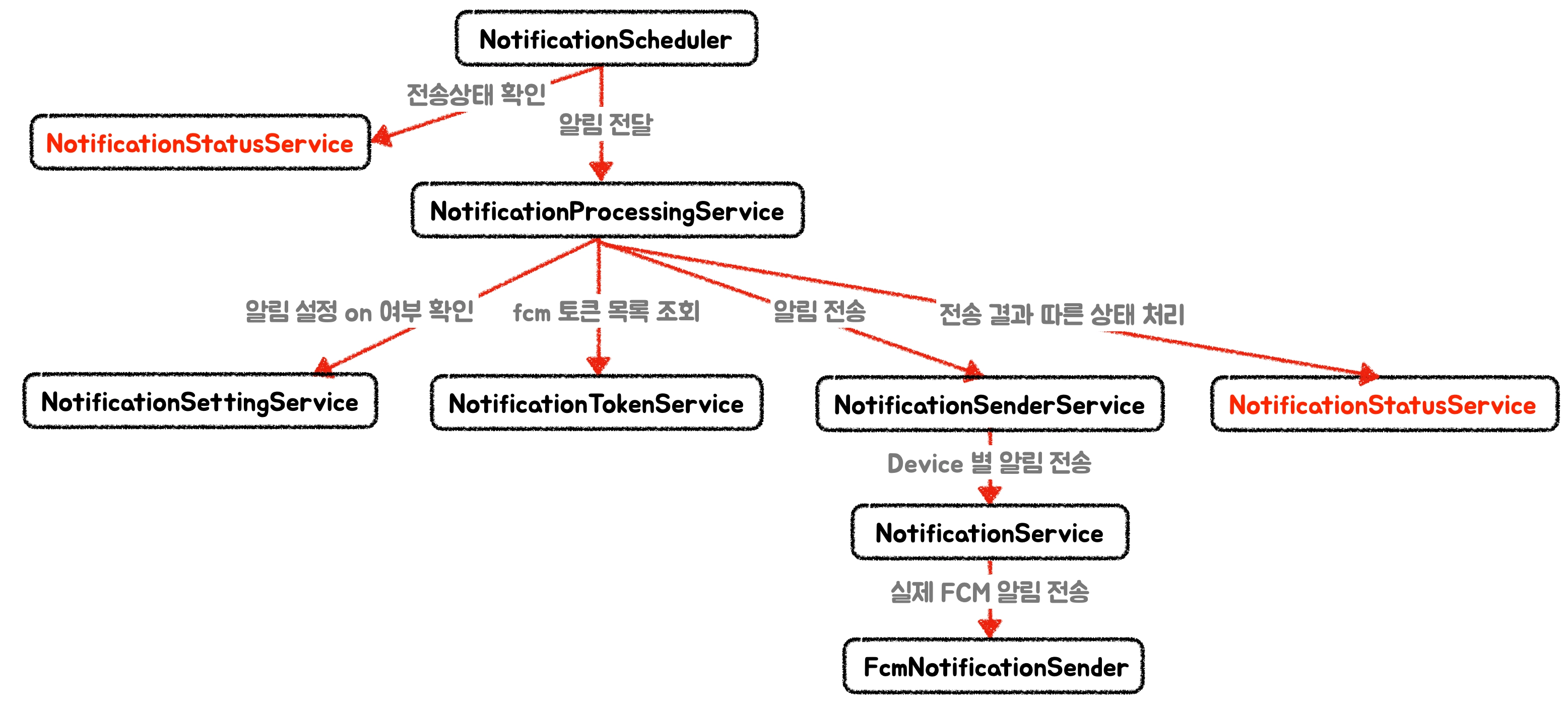
1. NotificationScheduler
- 알림을 30초마다 전송하는 역할
- 백오프 시간을 지났으며 PENDING / FAILED 상태인 알림들을 가져와 전송/재전송을 시도
- 최대 재시도 횟수를 넘겼을 경우 Failed로 격리
- 시도하는 알림들은 NotificationProcessingService로 위임
2. NotificationProcessingService
- 받은 알림 전송에 대한 오케스트레이션 역할
- 알림 수신 동의 여부를 판단하고, FCM 토큰이 존재하는지 확인한 후 이 토큰들에게 알림 전송
- 한 명의 회원 당 여러 개의 디바이스를 가질 수 있으므로 FCM 토큰은 여러 개 존재 가능
- 알림 전송 후 결과로 알림 상태 업데이트
3. NotificationSenderService
- 토큰들을 순회하며 디바이스 별 해당 알림을 전송
- 전송하면서 성공/실패/스킵 개수 결과들을 집계하는 역할
4. NotificationService
- 토큰/제목/내용 유효성 체크 후 Message를 만들어 fcm 전송 메서드를 호출하는 역할
- 토큰,제목,내용을 구성하고 payload에 notificationType을 설정
5. FcmNotificationSender
- FirebaseMessaging의 send로 최종 전송하고 결과 반환하는 역할
6. NotificationStatusService
- 알림 전송 결과에 따른 상태 지정 역할
- 성공/전체 스킵일 경우 SENT
- 전부 실패하면 FAILED 및 재시도 백오프 계산해서 nextRetryAt 업데이트
🤔 개선할 점
1. 메세지 생성
기존 코드에서 메세지 생성 역할을 NotificationService에서 수행하고 있었다. 메서드 파라미터로 articleId를 넘기고 notificationType으로 ARTICLE이 고정이었기에, 이를 추상화해 각 알림 타입에 맞는 데이터와 notificationType을 지정할 필요가 있었다.
2. 알림 상태 업데이트
알림은 종류마다 중요도/재시도의미/시간에 따른 유효성이 모두 다르다. 이 정책들은 ‘알림’이라는 하나의 도메인이 아닌, 각 종류별 가져야할 도메인 특성일 것이다. 따라서 알림의 상태전이는 공통 로직이 아닌 도메인 별 로직으로 분리하는 것이 합리적이다.
아티클 알림은 전송에 성공하면 SENT로 상태를 업데이트하고 최대 시도 횟수 이상 실패하면 FailedRepository로 이동한다. 이 역할을 NotificationStatusService에서 하고 있다. 최대 횟수까지 실패한 알림의 경우 모니터링 및 원인 추적을 위해서 FailedRepository에 보관하는데, 모니터링용 데이터를 보관하기 위해서는 lastError, failedAt, memberId, 그리고 알림 타입을 저장하는 것이 모니터링에 효율적일 것이라고 판단한다.
지금 아티클 전용인 FailedRepository를 NotificationFailedRepository 하나로 통합하고 컬럼들을 더 통용적으로 구성해서 테이블도 효율적으로 관리할 수 있겠다고 생각했다.
3. 알림 카테고리 지정
알림 수신 동의 여부를 판단하는 메서드가 NotificationProcessingService에 있다. 이 때 카테고리를 ARTICLE로 고정해 NotificationSettingService로 넘겨주고 있어서 다른 알림에 대한 설정 판단이 어려웠다. 이제 알림 별 카테고리를 파라미터로 넘겨주고 수신 동의 여부를 판단하는 것이 바람직할 것이다.
이들을 리팩토링해서 알림 전송의 공통 파이프라인은 유지하되,
새로운 알림 종류가 늘어날수록 플러그인처럼 끼워넣듯이 클래스를 추가만 하면 되도록 구성하고자 했다.
1️⃣ Notification 자체를 하나의 엔티티로 만들 것인가?
ArticleArrivedNotification 외의 다른 알림들이 생겨나면서, “알림”이라는 도메인 자체에 대한 추상화에 고민했다.
알림이란 크게 수신자, 제목, 내용, 그리고 그 외에 발송 상태, 재시도 일시 등을 포함하는 도메인이다.
따라서 Notification이라는 큰 도메인 하나 아래, 각 카테고리 별 필요한 제목, 내용을 삽입하고 category를 컬럼으로 저장해 구분하는 방식을 고민하게 되었다.
1. Notification 도메인 하나로 통일하기
- 장점: 하나의 테이블로 통일해 어떤 종류의 알림이 추가돼도 이 형태만 유지한다면 쉽게 추가할 수 있다.
- 단점: 알림 데이터의 정합성을 확보하기 어렵다(너무 자유로운 형식의 컬럼),
현재ArrivedArticleNotification의 테이블에서 마이그레이션 하는 것도 비용이 든다.2. 알림 종류 별로 알림 도메인을 추가하기
- 장점: 각 도메인 알림 별 필요한 데이터를 컬럼으로 정규화할 수 있고, 정합성 확보가 좋다.
각 알림에 필요한 데이터만을 저장할 수 있다.- 단점: 매번 알림 종류가 늘어날 때마다 엔티티 추가가 필요하다.
결과적으로 2. 알림 종류 별로 알림 도메인을 추가하기 방식을 채택했다.
알림 도메인에 따라서 각자 필요한 데이터 컬럼이 다를 것이라고 생각했다. 예를 들자면 아티클 관련된 알림은 articleId를 data payload에 포함해주어야 하지만, 챌린지 관련 알림은 challengeId를 포함해주어야 한다.
“content 내용에 추가해주면 되는 것 아닌가?” 라는 의문이 생길 수 있지만, 이는 곧 알림 payload의 유효성 검증 역할을 알림 서버가 아닌 본서버가 갖게 해야하는 것이다. 본서버에서 비즈니스 로직을 돌리며 알림 데이터를 outbox 테이블에 저장해야하는데, 이 경우 Notification의 데이터를 삽입할 때부터 payload에 필요한 데이터를 본서버에서 책임을 갖고 있어야 하므로 강결합이 발생한다.
또한, 기존 아티클 알림 데이터를 마이그레이션 하는 것도 큰 비용이 발생할 것이라고 예상해 2번 방법을 택하게 되었다.
대신 memberId, 재시도 횟수나 다음 재시도 일시, lastError 등의 컬럼은 모든 알림이 공통적으로 필요한 컬럼이라고 판단해 Notification 추상클래스로 빼서 다른 알림 엔티티들이 이를 상속해 사용하도록 재구성했다. 그리고 Notification 추상클래스에 재시도 정책이나 백오프 정책을 메서드로 갖게 해 오버라이드 해서 구현할 수 있도록 구현했다.
@Getter
@MappedSuperclass
@NoArgsConstructor(access = lombok.AccessLevel.PROTECTED)
public abstract class Notification extends BaseEntity {

    @Id
    @GeneratedValue(strategy = GenerationType.IDENTITY)
    protected Long id;

    @Column(nullable = false)
    protected Long memberId;

    @Column(nullable = false)
    @Enumerated(EnumType.STRING)
    protected NotificationStatus status;

    @Column(nullable = false, columnDefinition = "INT DEFAULT 0")
    protected int attempts = 0;

    protected LocalDateTime nextRetryAt;

    @Column(length = 1024)
    protected String lastError;

    ...

    /**
     * 기본은 재시도 없음. 필요한 경우 하위 클래스 override.
     */
    public boolean shouldRetry() {
        return attempts < getMaxRetryAttempts();
    }

    /**
     * 기본은 0회(재시도 안 함). 필요한 경우 하위 클래스 override.
     */
    protected int getMaxRetryAttempts() {
        return 0;
    }

    /**
     * 기본은 재시도 없음. 필요한 경우 하위 클래스 override.
     */
    public LocalDateTime calculateNextRetryTime(int attempts) {
        return null;
    }
}
이제는 새로운 종류의 알림이 추가되면 Notification 추상클래스를 상속하는 알림 엔티티를 추가해주면 된다.
2️⃣ 메세지 생성의 추상화
각 알림 종류에 따라 메세지 생성을 다르게 할 수 있다. 이를 유연하게 지원하기 위해 전략패턴을 생각했다.
전략 패턴을 도입해 각 알림 도메인 별 지원하는 MessageBuilder를 갖도록 설계했다. MessageBuilder라는 인터페이스로 추상화 해 각 알림 도메인 별로 필요한 메세지를 생성하도록 구성했다.
public interface NotificationMessageBuilder {

    boolean supports(Notification notification);

    NotificationMessage build(Notification notification, MemberFcmToken token);
}
위처럼 지원하는 Notification type을 supports()로 판단하고 필요한 NotificationMessage에 대해 Notification을 받아 구성할 수 있도록 구현한다.
예를 들어 챌린지 시작 알림의 MessageBuilder는 다음과 같다.
@Component
public class ChallengeStartMessageBuilder implements NotificationMessageBuilder {

    @Override
    public boolean supports(Notification notification) {
        return notification instanceof ChallengeStartNotification;
    }

    @Override
    public NotificationMessage build(Notification notification, MemberFcmToken token) {
        ChallengeStartNotification startNotification = (ChallengeStartNotification) notification;
        String title = startNotification.getChallengeName() + " 오늘부터 시작!";
        String content = "1일차가 열렸어요 ✅ 오늘 미션부터 가볍게 출발해요!";

        return NotificationMessage.builder()
                .recipient(token.getFcmToken())
                .title(title)
                .content(content)
                .type(NotificationType.FCM)
                .data(Map.of(
                        "challengeId", String.valueOf(startNotification.getChallengeId()),
                        "notificationType", NotificationPayloadType.CHALLENGE_START
                ))
                .build();
    }
}MessageBuilder의 역할은 자신의 알림 도메인을 가지고 실제 알림 전송을 위해 필요한 NotificationMessage를 구성하는 역할이다. title, content, type, data를 만든다.
전략 선택은 다음과 같이 진행된다.
NotificationMessageBuilder를 구현한 bean 모두 등록resolveBuilder()를 통해 현재 알림에 맞는MessageBuilder선택- 찾은
MessageBuilder에서 메세지를 생성해 반환 후 전송
@Service
@RequiredArgsConstructor
public class NotificationSenderService {

    private final NotificationService notificationService;
    private final List<NotificationMessageBuilder> messageBuilders; // Bean으로 등록된 모든 builder가 List로 저장됨

    private SendResult sendToDevice(Notification notification, MemberFcmToken fcmToken) {
        ...
        try {
            NotificationMessageBuilder messageBuilder = resolveBuilder(notification); // MessageBuilder 선택
            NotificationMessage message = messageBuilder.build(notification, fcmToken); // 각 알림에 맞는 Message 생성
            NotificationResult result = notificationService.send(message); // 알림 전송
            ...
        }
        ...
    }

    /*
    * 현재 Notification 타입과 매핑되는 MessageBuilder 선택
    */
    private NotificationMessageBuilder resolveBuilder(Notification notification) {
        return messageBuilders.stream()
                .filter(b -> b.supports(notification))
                .findFirst()
                .orElseThrow(() -> new IllegalArgumentException(
                        "지원하지 않는 알림 타입: " + notification.getClass().getSimpleName()));
    }
}NotificationMessageBuilder로 메세지 생성을 추상화 함으로써, 이제 새로운 알림이 추가돼도 NotificationMessageBuilder 구현체만 추가하면 된다.
3️⃣ 알림 관련 상수들의 역할 구체화 및 분리
기존 코드에서 NotificationCategory는 알림 카테고리 ENUM이었다. ARTICLE과 EVENT를 갖고 있었고, 필드로 알림 수신 동의에 대한 default 값, topic 사용 여부, topic 이름이 포함되어 있다.
/**
 * 회원 알림 설정 및 전송 정책(토픽/개별 발송)을 구분하는 카테고리
 */
@Getter
@RequiredArgsConstructor
public enum NotificationCategory {

    ARTICLE(true, false, null),
    EVENT(false, true, "bombom_event"),
    CHALLENGE_TODO_REMINDER(true, false, null),
    CHALLENGE_START(true, false, null),
    ;

    private final boolean defaultSetting;
    private final boolean useTopic;         // FCM 토픽 사용 여부
    private final String topicName;         // FCM 토픽 이름 (null이면 토픽 사용 안함)

    public boolean getDefaultSetting() {
        return defaultSetting;
    }
}
data payload에서는 우리가 자체적 비즈니스 데이터로 payload에 'notificationType'이라는 키를 전송한다. 이 type에 따라 알림을 통해 우리 서비스를 접속했을 때 프론트에서 어디로 분기처리할지 구분하는 키이다. notificationType에 DEFAULT 값을 넣으면 분기처리 없이 그냥 앱을 켜는 형태로 처리할 수 있다.
NotificationCategory는 ENUM 역할 상 알림 ‘설정’의 분류이다. ARTICLE, EVENT 알림의 커스텀 수신 설정에 대한 값들을 다루고 있다.
위의 'notificationType'을 NotificationCategory 값으로 관리할까 고민했다. 하지만 NotificationCategory와 payload의 'notificationType'은 엄연히 다른 역할이라고 생각해 둘을 서로 다른 상수로 관리하도록 분리했다.
따라서 기존 NotificationCategory는 알림 설정용 카테고리, 그리고 payload에 담길 상수는 NotificationPayloadType으로 추가했다.
/**
 * FCM data 영역에서 분기를 위한 비즈니스 알림 타입
 */
@Getter
public enum NotificationPayloadType {

    ARTICLE,
    EVENT,
    CHALLENGE_START,
    DEFAULT
}
여기에는 ARTICLE, EVENT, CHALLENGE_START, DEFAULT를 갖도록 했다.
아직 합의된 바는 없지만, CHALLENGE_START의 경우 challengeId를 함께 넘겨주면 첫 날의 각오 작성 페이지를 리다이렉트 해주면 좋을 것 같아 상수를 추가했다.
챌린지 TODO 리마인더는 DEFAULT로 넘겨주어 따로 리다이렉트 하지 않도록 'notificationType'을 구성했다.
 return NotificationMessage.builder()
                .recipient(token.getFcmToken())
                .title(article.getNewsletterName())
                .content(article.getArticleTitle())
                .type(NotificationType.FCM) // NotificationType은 알림 전송 수단 타입을 관리 (ex: fcm, email 등..)
                .data(Map.of(
                        "articleId", String.valueOf(article.getArticleId()),
                        "notificationType", NotificationPayloadType.ARTICLE
                ))
                .build();
따라서 두 상수의 역할을 정리해보자면 다음과 같다.
- NotificationCategory: 수신설정/전송정책
- NotificationPayloadType: 클라이언트 라우팅 전용 상수
4️⃣ 알림 도메인 별 StatusHandler 분리
기존에는 알림 상태를 NotificationStatusService에서 제어했다. 아티클 도착 알림에 대해 도메인 및 로직이 한정적이었고, 이 로직을 다른 알림이 추가됐을 때도 OCP를 확보할 수 있도록 구성하는 것이 목표이다.
알림의 상태는 알림의 중요도 및 정보의 유효기간에 따라 성공/부분실패/전체스킵/실패 시
상태 전이 정책이 달라질 수 있다.
예를 들자면, 아티클 도착 알림의 경우 한 번 실패했어도 재시도 정책에 따라 백오프 이후 전송해도 정보의 유효도가 떨어지지 않아 재시도가 의미있을 것이다.
하지만 선착순 실시간 이벤트 알림이 제시간에 성공하지 못했을 경우, 백오프에 따라 뒤늦게 보내진다 하더라도 정보의 가치가 떨어져 재시도의 의미가 하락할 것이다.
따라서 도메인별로 상태를 다르게 관리할 수 있도록 StatusService를 추상화했다.
NotificationStatusHandler<T extends Notification>으로 알림 상태를 변경할 인터페이스를 추상화하고, 이를 구현하도록 구조화했다.
public interface NotificationStatusHandler<T extends Notification> {

    void updateStatus(T notification, NotificationResultResponse result);
    void markAsFailed(T notification, String reason);
}
@Slf4j
@Service
@RequiredArgsConstructor
@Transactional(readOnly = true)
public class ChallengeStartNotificationStatusService
implements NotificationStatusHandler<ChallengeStartNotification> {
private final ChallengeStartNotificationRepository notificationRepository;
@Override
@Transactional
public void updateStatus(ChallengeStartNotification notification, NotificationResultResponse result) {
}
@Override
@Transactional
public void markAsFailed(ChallengeStartNotification notification, String reason) {
}
}현재 아티클 도착 알림의 경우, 실패하면 Failed 테이블로 마이그레이션 된다. 이 경우 StatusService의 markAsFailed() 및 updateStatus()에서 최대 시도 횟수를 초과했을 때 Failed 테이블로 이전하는 작업도 포함될 것이다. 챌린지 관련 알림은 최대 재시도 횟수 초과 시 별도 처리가 없으므로 상태만 변경해주는 역할을 갖는다.
5️⃣ 알림 도메인 별 Processor 분리
기존 NotificationProcessingService는 알림 전송에 대한 오케스트레이션 역할을 하고 전송 결과를 기반으로 알림 상태를 업데이트 하는 역할이었다.
기존에는 NotificationProsessingService가 NotificationStatusService를 갖는 구조였다. 또한 NotificationProcessingService가 직접 ArticleArrivedNotificationRepository를 갖고있어, 전송 대상을 가져오는 역할도 겸했다.
여기서 알림의 종류가 많아질수록 NotificationProcessingService는 늘어나는 알림 도메인에 대한 repository를 계속해서 의존해야하고, 이로인해 알림 종류가 늘어날수록 NotificationProcessingService와 도메인간 강결합이 발생할 것이다.
그래서 NotificationProcessingService를 진입하기 전, 각자의 도메인 repository에서 전송할 알림 대상을 직접 조회하고 검증하는 로직을 갖도록 도메인 별 NotificationProcessor를 도입했다.
알림 전송하는 메서드를 추상화한 NotificationProcessor 인터페이스를 생성했다.
public interface NotificationProcessor {

    String type(); // 지원 타입
    void processPendingNotifications(LocalDateTime now); // 알림 전송
}
챌린지 시작 알림에 대한 Processor 구조는 다음과 같다.
이를 통해 조회하려는 알림 대상을 도메인 별로 다르게 조회할 수도 있고,
알림 Category를 넘겨서 NotificationProcessingService를 재사용할 수 있도록 구성했다.
@Slf4j
@Component
@RequiredArgsConstructor
public class ChallengeStartNotificationProcessor implements NotificationProcessor {

    private final ChallengeStartNotificationRepository notificationRepository;
    private final NotificationProcessingService notificationProcessingService;
    private final ChallengeStartNotificationStatusService challengeStatusService;

    @Override
    public String type() {
        return NotificationCategory.CHALLENGE_START.name();
    }

    @Override
    public void processPendingNotifications(LocalDateTime now) {
        List<ChallengeStartNotification> pendingNotifications =
                notificationRepository.findRetryCandidates(
                        List.of(NotificationStatus.PENDING, NotificationStatus.FAILED),
                        now
                );

        log.info("[{}] 처리할 알림 개수: {}", type(), pendingNotifications.size());

        for (ChallengeStartNotification notification : pendingNotifications) {
            try {
                if (!notification.shouldRetry()) {
                    log.warn("[{}] 최대 재시도 횟수 초과로 처리 중단: notificationId={}, attempts={}",
                            type(), notification.getId(), notification.getAttempts());
                    continue;
                }

                notificationProcessingService.processNotification(
                        notification,
                        NotificationCategory.CHALLENGE_START,
                        challengeStatusService
                );
            } catch (Exception e) {
                log.error("[{}] 알림 처리 중 오류 발생: notificationId={}", type(), notification.getId(), e);
            }
        }
    }
}NotificationProcessingService의 메서드 파라미터를 변경했다.
NotificationStatusHandler<T>를 넘겨서 FCM 토큰이 없는 경우에 따른 상태 처리도 ProcessingService에서 수행할 수 있도록 만들었다.
@Transactional
    public <T extends Notification> void processNotification(T notification,
                                                             NotificationCategory category,
                                                             NotificationStatusHandler<T> statusHandler) {
        Long memberId = notification.getMemberId();
        if (!notificationSettingService.isEnabled(memberId, category)) {
            log.info("알림 수신 동의하지 않음: memberId={}, category={}", memberId, category);
            return;
        }

        List<MemberFcmToken> fcmTokens = notificationTokenService.resolveTokens(memberId);
        if (fcmTokens.isEmpty()) {
            statusHandler.markAsFailed(notification, "FCM 토큰 없음");
            return;
        }

        NotificationResultResponse result = notificationSender.sendToAllDevices(notification, fcmTokens);
        statusHandler.updateStatus(notification, result);
}‘NotificationProcessor랑 NotificationProcessingService의 역할 차이가 뭐냐?’라고 할 수 있지만, 둘은 “알림 도메인 정책을 다루는지”에 대한 여부가 다르다.
NotificationProcessor: “어떤 알림들을 언제/무엇으로 처리할지”를 결정하는 오케스트레이터로, 구현체가 도메인별로 존재하고, pending 조회, category 선택, 재시도 초과 정책 같은 도메인 정책을 가진다.NotificationProcessingService: “한 건의 알림을 실제로 처리하는 공통 파이프라인”으로,
수신 동의 체크 → 토큰 조회 → 발송 → 상태 핸들러 호출까지 공통 로직을 수행한다.
🏆 레거시 리팩토링 결과
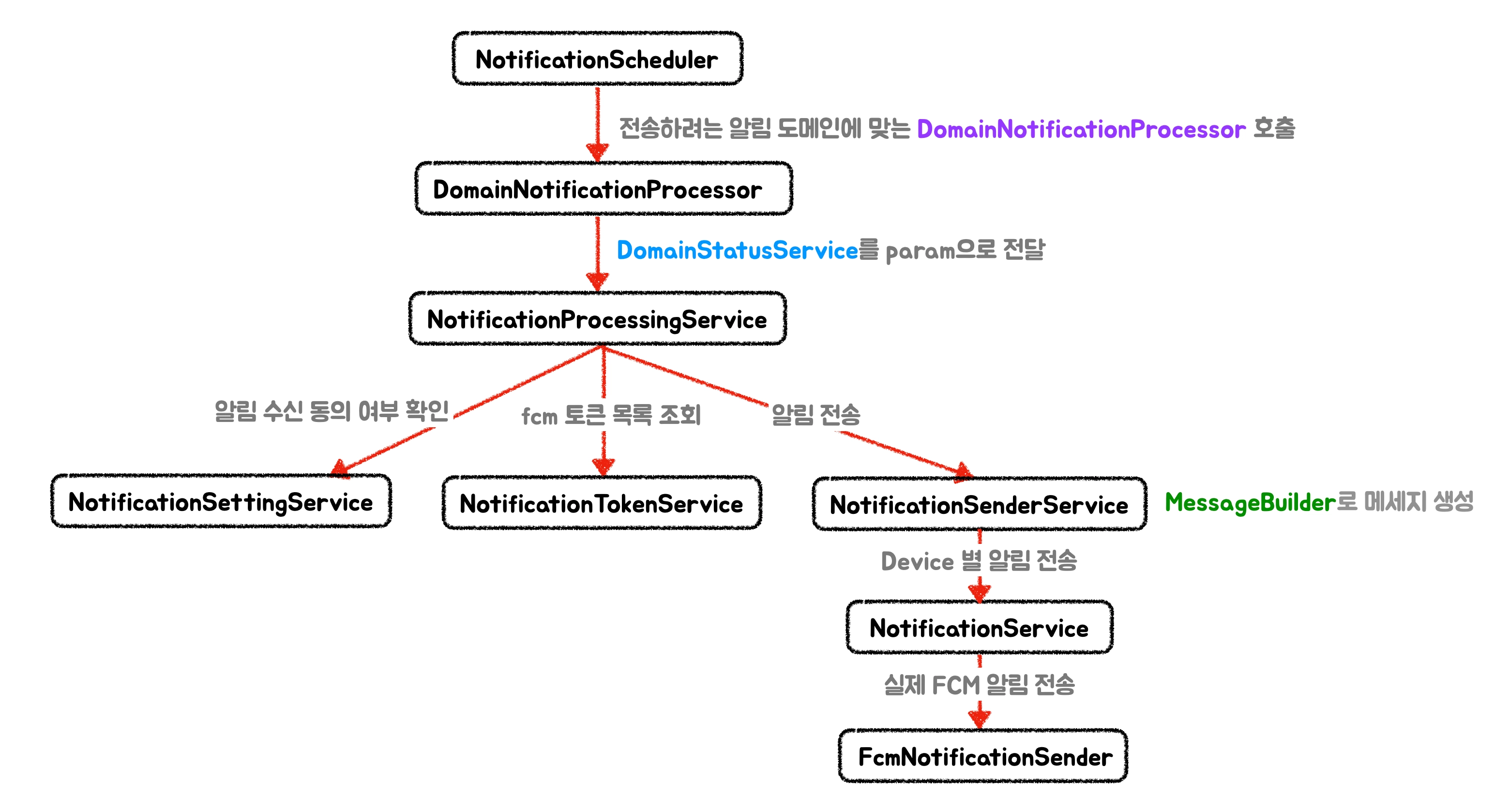
기존의 NotificationProcessingService의 오케스트레이션 역할은 유지하면서도, 의존성을 최대한 필요한 것들 위주로 구성해서 계층적 구조를 이루었다.
이제는 새로운 종류의 알림이 생성될 경우, 크게 아래 4가지를 추가해주면 된다.
1. DomainNotification
- 새로운 종류의 알림 정보가 저장될 엔티티
2. DomainNotificationProcessor
- 해당 도메인의 알림 전송 전체 로직 오케스트레이션 역할
- 전송하려는 알림 대상을 조회해오고, 정책에 따라 전송 대상을 필터링 하기도 함
- 실제 알림을 보내기 전 도메인 정책 핸들링
3. DomainStatusService
- 알림 전송 후 성공/부분 실패/실패/재시도 등 상태에 따른 로직 추가
- 최종 재시도 실패 후 마이그레이션 작업 추가 가능
4. DomainMessageBuilder
- 알림 종류에 따라 전송하는 메세지 빌드
최종적으로, 새로운 알림 추가에 대해서는 4개 클래스 추가만으로 열려있고, 변경에는 일부 도메인에 대해서만 관리하면 되는 OCP를 확보할 수 있었다.