database 생성, 선택 후에 실행할 수 있다.
▶ table 생성, data 추가
- table 생성
create table test1(
-> id int auto_increment,
-> name varchar(10) not null,
-> age int default 20,
-> address varchar(20),
-> primary key(id));
- 생성한 table 목록 확인
: show tables;show tables;
결과물 :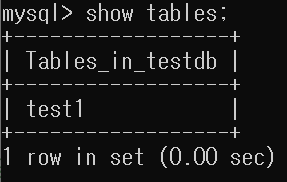
- 생성한 테이블 구조 확인
: desc 테이블 명;desc test1;
결과물 :
- 데이터 추가
insert into 테이블명(필드명, 필드명)
values(값, 값);1) 하나씩 넣기
insert into test1(name, address)
values('hong','seoul');
insert into test1(name, address)
values('kim','suwon');
insert into test1(name, address)
values('lee','seoul');
insert into test1(name, address)
values('choi','suwon');
insert into test1(name, address)
values('park','incheon');
2) 여러 개 넣기
insert into test1 values
(7, 'jo', 23, 'seoul'),
(9, 'yun', 22, 'incheon');
3) 여담
구조를 지정하지 않고 여러 개 넣을 때는 구조에 맞춰서 넣어야 하는 거 같다. id를 auto로 돌려서 되는 줄...
아이디 없이 값 입력했을 때 :
매치가 안 된다고 어쩌구저쩌구 에러 뜸..
* select : 데이터를 조회할 때 사용
- 테이블 내용 확인
select * from 테이블명select * from test1;
결과물 :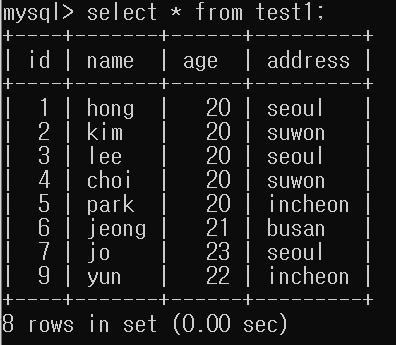
▶ table 구조 변경
- 필드 추가(add)
alter table 테이블명 add 필드명 속성;alter table test1 add tell varchar(20);
- 필드명 변경(change)
alter table 테이블명 change 기존필드명 변경필드명 속성;alter table test1 change tell tel varchar(20);
- 필드 수정(modify)
-- 특정 필드 뒤에 추가(after)
alter table 테이블명 modify 필드명 속성명 after 특정필드명;alter table test1 modify tel varchar(20) after age;
결과물 :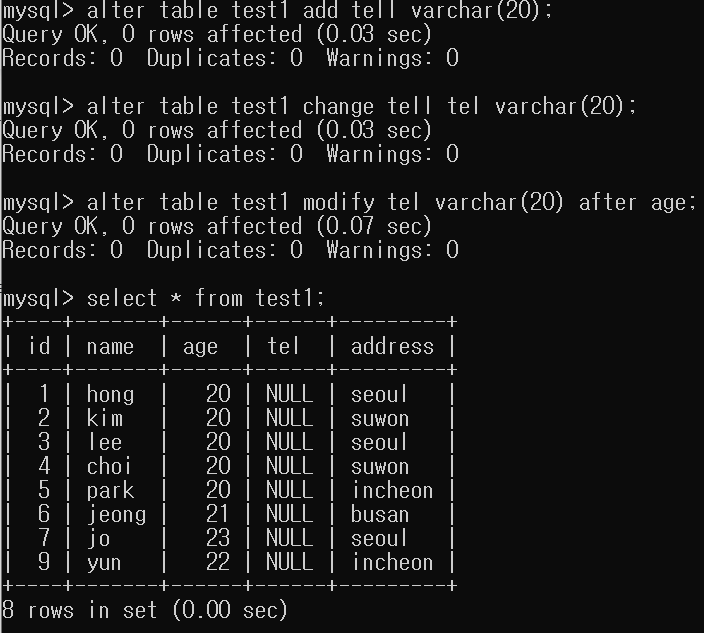
- 데이터 변경
update 테이블명
set 변경할 필드 = 값
where 조건;update test1
set age = 23
where name in ('hong', 'lee');
결과물 :
- 추가된 필드에 값 추가
update test1
set tel = '010-1111-1111'
where id = 1;
update test1
set tel = '010-2222-2222'
where id = 2;
update test1
set tel = '010-3333-3333'
where id = 3;
...
이런 식으로 계속 넣어준다
한 번에 넣는 방법 좀 알려주세요 ㅠ_ㅠ
- 데이터 1열 삭제하기
delect from 테이블명 where 조건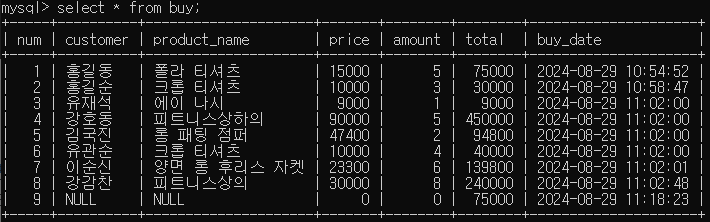 삭제 전
삭제 전
delect from buy where num = 9;
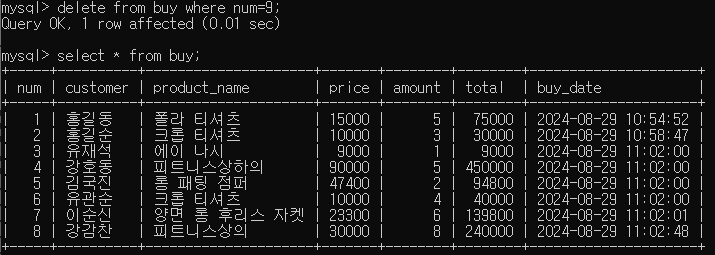 삭제 후
삭제 후
- 테이블명 변경
rename table 변경전 to 변경후rename table test1 to peopel1;
결과물 :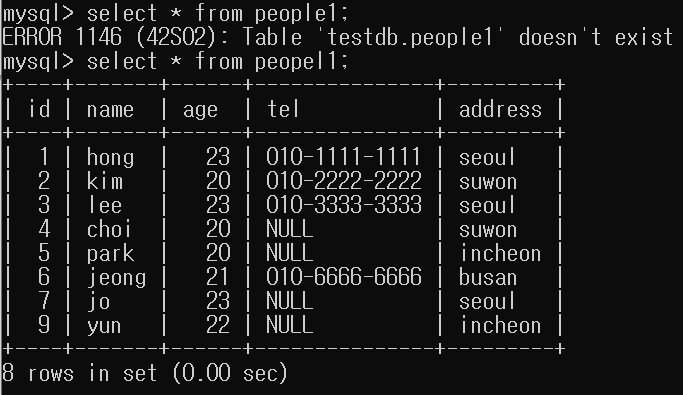
- 테이블 삭제
drop table 테이블명;
(같은 방법으로 database도 삭제할 수 있다)drop table peopel1;
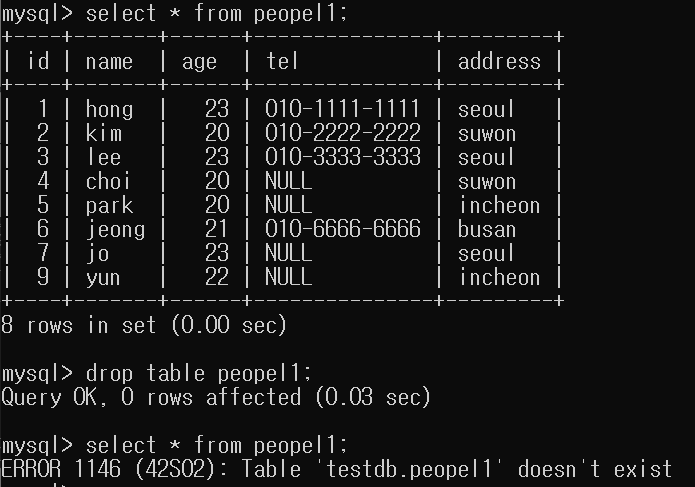
people1 테이블이 잘 삭제되어 출력되지 않는 것을 확인할 수 있다.