학교에서 프로젝트 수업을 듣는데 드디어 구현 시작~
휠체어 이용자들이 사용하기 편리한 지도 앱을 주제로 정해 이름하여 ERA: Easy Route Assistant라는 앱을 제작하기로 하고, 백엔드를 맡았다.
Java 언어를 사용하고 프레임워크로는 SpringBoot, DB로는 MySQL을 사용하기로 했다. 가장 기본적이고 만연한 백엔드 프레임워크가 SpringBoot라고 생각했고, 데이터베이스는 학교 실습 때 써봤던 로컬 데이터베이스 그대로 사용.
원래 스프링부트의 MVC 패턴이라든가, 패키지 구조라든가 다 포스트하고 싶었지만 출처가 다른 벨로그 글들이라 생략.. 하지만 생각 바뀌면 올릴 수도 있음.ㅋ
일단 오늘은 회원가입을 위해, 그리고 프로젝트 시작 전 가장 기본적으로 SpringBoot와 MySQL을 연동하기 위한 과정을 설명하겠다!
🚀패키지 구조

🚀MySQL Workbench로 DB 세팅
- Database 만들어두기만 하면 됨. 이름 기억~
🚀SpringBoot MVC 패턴
-
index.html
<!DOCTYPE html> <html lang="ko"> <head> <meta charset="UTF-8"> <title>Index</title> </head> <body> <h1>Index Page!</h1> <a href="/save">회원가입</a> <!--<a href="/user/login">로그인</a>--> </body> </html>- 회원가입 버튼 click → src > main > resources > templates > save.html로 이동
-
save.html
<!DOCTYPE html> <html lang="ko"> <head> <meta charset="UTF-8"> <title>Save</title> </head> <body> <form action="/save" method="post"> 아이디: <input type="text" name="userID"> <br> 비밀번호: <input type="password" name="pwd"> <br> 이름: <input type="text" name="userName"> <br> 이메일: <input type="email" name="userEmail"> <br> <input type="submit" value="회원가입"> </form> </body> </html>- action=”/save”를 통해 submit 하면 /save로 mapping된 controller로 이동
-
UserDTO
-
일단 request가 들어오면 DTO 형태로 받기 때문에 UserDTO 먼저 작성
package com.founder.easy_route_assistant.DTO;

import com.founder.easy_route_assistant.Entity.UserEntity;
import lombok.*;

@Getter
@Setter
@NoArgsConstructor
@ToString
public class UserDTO {
    private String userID;
    private String pwd;
    private String userName;
    private String userEmail;

    public static UserDTO toUserDTO(UserEntity userEntity) {
        UserDTO userDTO = new UserDTO();

        userDTO.setUserID(userEntity.getUserID());
        userDTO.setPwd(userEntity.getPwd());
        userDTO.setUserName(userEntity.getUserName());
        userDTO.setUserEmail(userEntity.getUserEmail());

        return userDTO;
    }
}
-
-
UserEntity
-
UserDTO를 UserEntity로 변환 후 DB에 저장할 것이므로 Entity도 작성
-
이때 Entity는 DTO와는 다르게 내부 속성 보호를 위해
@setter사용을 지양하고@Builder사용package com.founder.easy_route_assistant.Entity; import com.founder.easy_route_assistant.DTO.UserDTO; import jakarta.persistence.*; import lombok.Builder; import lombok.Getter; import lombok.NoArgsConstructor; import lombok.Setter; import org.springframework.security.crypto.password.PasswordEncoder; @Entity @Getter @Setter @NoArgsConstructor @Table(name = "user") public class UserEntity { // @GeneratedValue(strategy = GenerationType.IDENTITY) 지금은 안 쓸 건데 자동으로 값 1씩 증가해주며, pk 속성을 가짐 @Id // primary key private String userID; @Column(length = 100) private String pwd; @Column(length = 100) private String userName; @Column(length = 100) private String userEmail; @Builder public static UserEntity toUserEntity(UserDTO userDTO) { UserEntity userEntity = new UserEntity(); userEntity.userID = userDTO.getUserID(); userEntity.pwd = userDTO.getPwd(); userEntity.userName = userDTO.getUserName(); userEntity.userEmail = userDTO.getUserEmail(); return userEntity; } }
-
-
UserController
package com.founder.easy_route_assistant.Controller; import com.founder.easy_route_assistant.DTO.UserDTO; import com.founder.easy_route_assistant.Service.UserService; import lombok.RequiredArgsConstructor; import org.springframework.stereotype.Controller; import org.springframework.web.bind.annotation.GetMapping; import org.springframework.web.bind.annotation.ModelAttribute; import org.springframework.web.bind.annotation.PathVariable; import org.springframework.web.bind.annotation.PostMapping; @Controller @RequiredArgsConstructor public class UserController { private final UserService userService; // 회원가입 페이지 출력 요청 - GetMapping으로 출력 요청 -> PostMapping에서 form에 대한 action 수행 @GetMapping("/save") public String saveForm() { return "save"; } @PostMapping("/save") public String join(@ModelAttribute UserDTO userDTO) { System.out.println("UserController.save"); System.out.println("userDTO = " + userDTO); userService.save(userDTO); return "index"; } }- save.html에서 /save 호출 → @GetMapping으로 페이지 출력 요청 → @PostMapping에서 action 수행
- request → Service에서 DB에 저장. 이때 DTO → Entity 변환 → Repository의 save 호출
- 즉, request → Controller에서 받기 → DTO 형태로 변환 → Entity로 변환 → Service에서 Repository를 사용하여 DB 저장
-
UserRepository
-
@Repository 어노테이션으로 각종 메소드를 직접 구현하지 않아도 됨
-
<> 안에는 db에 들어갈 객체 형식, pk 데이터타입
package com.founder.easy_route_assistant.Repository;

import com.founder.easy_route_assistant.Entity.UserEntity;
import org.springframework.data.jpa.repository.JpaRepository;
import org.springframework.stereotype.Repository;

@Repository // <객체 type, pk type>
public interface UserRepository extends JpaRepository<UserEntity, String> {

}
-
-
UserService
package com.founder.easy_route_assistant.Service;

import com.founder.easy_route_assistant.DTO.UserDTO;
import com.founder.easy_route_assistant.Entity.UserEntity;
import com.founder.easy_route_assistant.Repository.UserRepository;
import lombok.RequiredArgsConstructor;
import org.springframework.stereotype.Service;

@Service
@RequiredArgsConstructor
public class UserService {
    private final UserRepository userRepository; // jpa, MySQL dependency 추가
    public void save(UserDTO userDTO) {
        // request -> DTO -> Entity -> Repository에서 save
        UserEntity userEntity = UserEntity.toUserEntity(userDTO);
        userRepository.save(userEntity);
        //Repository의 save메서드 호출 (조건. entity객체를 넘겨줘야 함)
    }
}
🚀SpringBoot dependencies 추가
- build.gradle.kts(난 컴파일이 kotlin.java라 build.gradle.kts이고, 보통 build.gradle일 것)
dependencies { implementation("org.springframework.boot:spring-boot-starter-data-jpa") implementation("org.springframework.boot:spring-boot-starter-oauth2-client") implementation("org.springframework.boot:spring-boot-starter-security") implementation("org.springframework.boot:spring-boot-starter-web") implementation("org.springframework.boot:spring-boot-starter-thymeleaf") compileOnly("org.projectlombok:lombok") // runtimeOnly("com.h2database:h2") runtimeOnly("com.mysql:mysql-connector-j") annotationProcessor("org.projectlombok:lombok") testImplementation("org.springframework.boot:spring-boot-starter-test") testImplementation("org.springframework.security:spring-security-test") } // 이 중에 뭐가 jdbc, mysql 관련이었는지 기억 안 남 ㅎ - 참고 @SpringBootApplication(exclude = SecurityAutoConfiguration.class) 추가하면
localhost:8080접속했을 때 개발자 login 페이지 안 뜸// [프로젝트명].java 즉, main class package com.founder.easy_route_assistant; import org.springframework.boot.SpringApplication; import org.springframework.boot.autoconfigure.SpringBootApplication; import org.springframework.boot.autoconfigure.security.servlet.SecurityAutoConfiguration; @SpringBootApplication(exclude = SecurityAutoConfiguration.class) public class EasyRouteAssistantApplication { public static void main(String[] args) { SpringApplication.run(EasyRouteAssistantApplication.class, args); } }
🚀application.yaml 파일에 sql db 정보 넣어주기
- src > java > resources > application.properties 지우고 같은 위치에 application.yaml 파일 생성
- url에 jdbc:mysql://127.0.0.1:3306/[db이름]?serverTimezone=Asia/Seoul&characterEncoding-UTF-8
- username에는 DB 사용자 이름. 나는 root
- password는 영문, 숫자, 특수문자가 포함되어야 하는 것 같다. 초기 세팅이 0000이었는데 이렇게 해서는 연동이 안 됨.
spring:
  datasource:
    driver-class-name: com.mysql.cj.jdbc.Driver
    url: jdbc:mysql://127.0.0.1:3306/era?serverTimezone=Asia/Seoul&characterEncoding=UTF-8
    username:
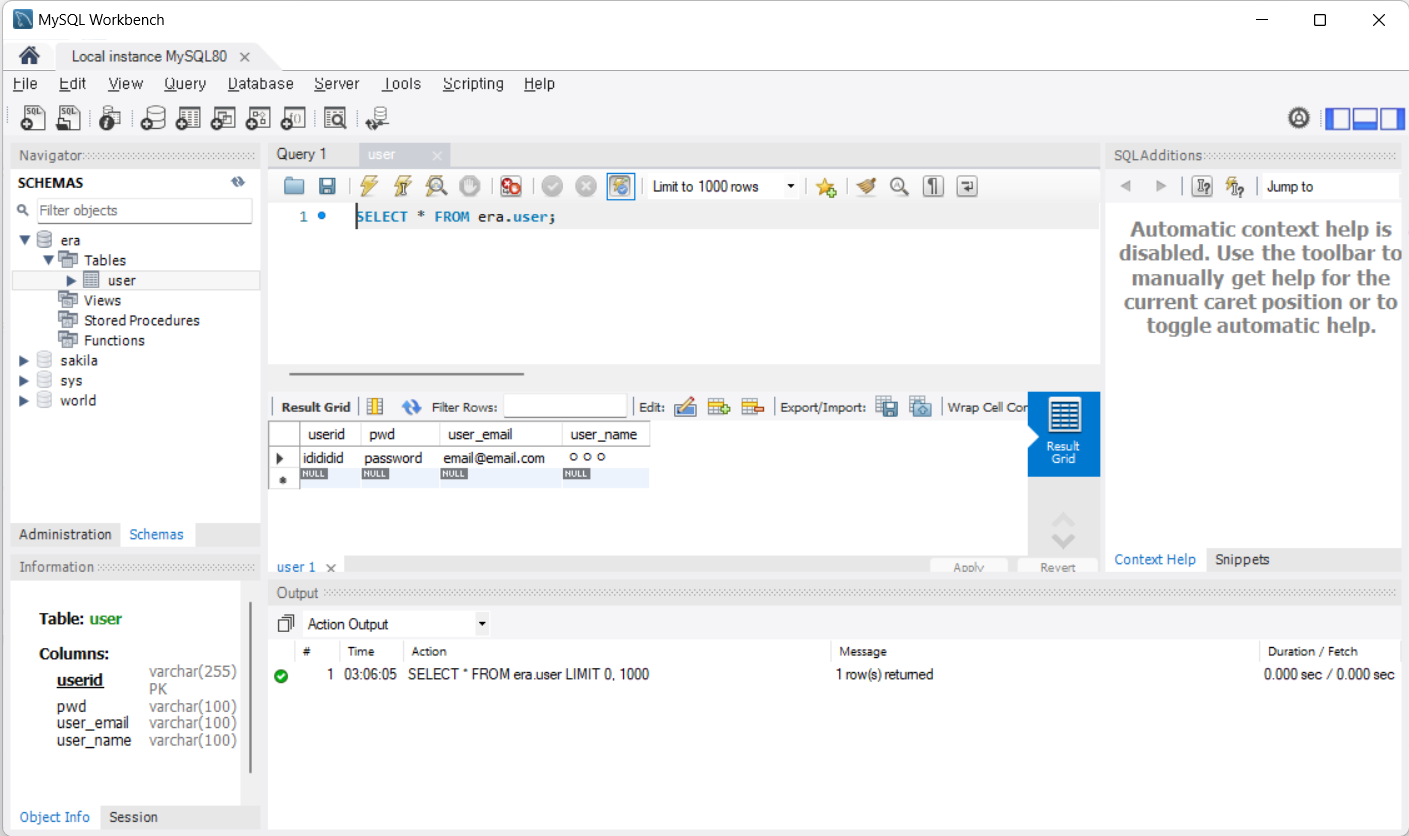
password:- debug & start하면 UserEntity대로 Repository를 통해 mysql 안에 table 생성

🌈🌼🌸☀️