HTML 요소 기본 이벤트 제거
<h1>HTML 요소 기본 이벤트 제거</h1>

<h3>a태그 기본 이벤트 제거</h3>
<a href="https://www.naver.com" id="moveNaver">네이버로 이동</a>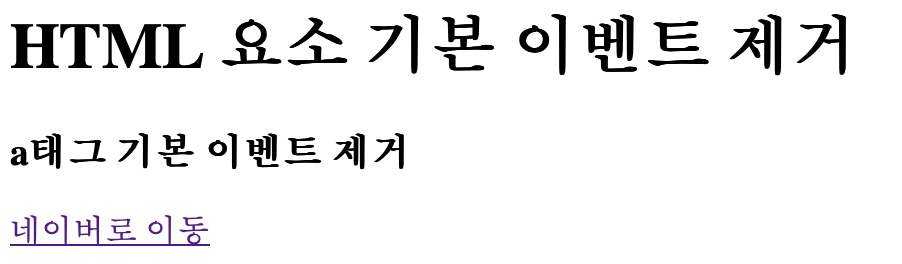
form 태그 기본 이벤트 제거
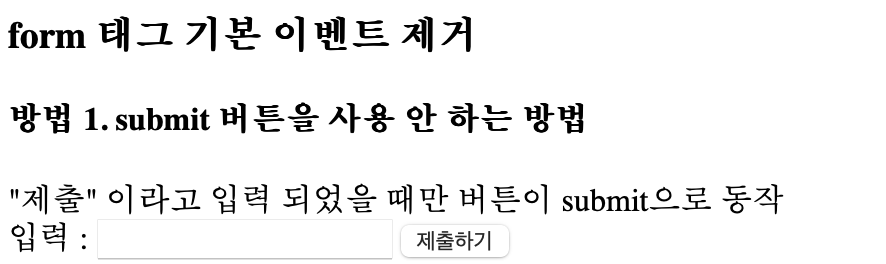
- 1️⃣ 방법 1. submit 버튼을 사용 안 하는 방법
<h3>form 태그 기본 이벤트 제거</h3>
<!-- 내부에서 submit 버튼이 클릭되면 action 경로로 제출 -->

<h4>방법 1. submit 버튼을 사용 안 하는 방법</h4>
<form action="01_js개요.html" name="testForm1">
  "제출" 이라고 입력 되었을 때만 버튼이 submit으로 동작<br>
  입력 : <input type="text" name="in1" id="in1">

  <button type="button" id="testBtn1">제출하기</button>
</form>
- 2️⃣ 방법2. onsubmit을 이용해서 form 태그 제출되는 것을 막는 방법
<h4>방법2. onsubmit을 이용해서 form 태그 제출되는 것을 막는 방법</h4>
<!--
        onsubmit : form 태그가 제출이 되었을 떄
                  -> 제출하기 버튼이 클릭되었을 때를 의미
        onsubmit = "return false"
        -> submit을 막는 방법
     -->

<form action="01_js개요.html" onsubmit="return checkIn2()">

  "제출" 이라고 입력 되었을 때만 버튼이 submit으로 동작<br>

  입력 : <input type="text" name="in2" id="in2">

  <button type="submit">제출하기</button>
</form>

전체코드
<!DOCTYPE html>
<html lang="en">

<head>
    <meta charset="UTF-8">
    <meta name="viewport" content="width=device-width, initial-scale=1.0">
    <title>06_이벤트</title>

    <style>
        #test3 {
            width: 200px;
            height: 200px;
            border: 1px solid black;
            background-color: darkgreen;
            cursor: pointer;
        }

        /* 연습문제 */
        #div1 {
            width: 200px;
            height: 200px;
            border: 1px solid black;
            background-color: lightgreen;
        }
    </style>

</head>

<body>

    <h1>이벤트(Event)</h1>

    <pre>
        이벤트(Event): 동작, 행위
        -> 브라우저에서의 동작, 행위 : click, keydown, keyup, mouseover, drag, submit, change, ...

        이벤트 리스너(Event Listener)
        -> 이벤트가 발생하는 것을 대기하고 있다가
           이벤트가 발생하는 것이 감지되면 연결된 기능(함수)를 수행하는 것

           ex) onclick, onkeyup, onchange, onsubmit ... (on 이벤트명)

           onclick-"함수명()";

        이벤트 핸들러(Event Handler)
        -> 이벤트 리스너에 연결된 기능으로
           이벤트 발생 시 수행하고자 하는 내용을 작성해둔 함수(function)
    </pre>

    <hr>

    <h3>인라인 이벤트 모델</h3>
    <pre>
        요소 내부에 이벤트를 작성하는 방법으로
        on이벤트명 = 함수명() 형태로 작성함
    </pre>

    <button onclick="test1(this)">인라인 이벤트 모델 확인</button>

    <hr>

    <h3>고전 이벤트 모델</h3>
    <pre>
        요소가 가지고 있는 이벤트 속성(이벤트 리스너)에
        이벤트 핸들러를 연결하는 방법으로

        인라인 모델처럼 HTML 요소에 JS 코드가 포함되는 것이 아닌
        script에만 이벤트 관련 코드를 작성할 수 있다.
    </pre>
    <button id="test2-1">고전 이벤트 모델 확인</button>
    <button id="test2-2">test2-1 이벤트 제거</button>
    <button id="test2-3">고전 이벤트 모델의 단점</button>
    <hr>

    <h3>표준 이벤트 모델</h3>

    <pre>
        - W3C (HTML, CSS, JS 웹 표준 지정 단체)에서
          공식적으로 지정한 이벤트 모델(이벤트 동작 지정 방법)

        - 한 요소에 여러 이벤트 핸들러를 설정할 수 있다.
            -> 고전 이벤트 모델 단점 보완
    </pre>

    <div id="test3">클릭하면 크기가 늘어나요~</div>

    <hr>

    <h3>이벤트 복습 문제</h3>

    색상을 영어로 입력한 후 변경 버튼을 클릭하면 #div1의 배경색이 변경되도록 하시오

    <div id="div1"></div>

    <input type="text" id="input1">

    <button id="changeBtn1">변경</button>

    <hr>

    <h1>HTML 요소 기본 이벤트 제거</h1>

    <h3>a태그 기본 이벤트 제거</h3>
    <a href="https://www.naver.com" id="moveNaver">네이버로 이동</a>

    <hr>

    <h3>form 태그 기본 이벤트 제거</h3>
    <!-- 내부에서 submit 버튼이 클릭되면 action 경로로 제출 -->

    <h4>방법 1. submit 버튼을 사용 안 하는 방법</h4>
    <form action="01_js개요.html" name="testForm1">
        "제출" 이라고 입력 되었을 때만 버튼이 submit으로 동작<br>
        입력 : <input type="text" name="in1" id="in1">

        <button type="button" id="testBtn1">제출하기</button>
    </form>

    <hr>

    <h4>방법2. onsubmit을 이용해서 form 태그 제출되는 것을 막는 방법</h4>
    <!--
        onsubmit : form 태그가 제출이 되었을 떄
                  -> 제출하기 버튼이 클릭되었을 때를 의미
        onsubmit = "return false"
        -> submit을 막는 방법
     -->

    <form action="01_js개요.html" onsubmit="return checkIn2()">

        "제출" 이라고 입력 되었을 때만 버튼이 submit으로 동작<br>

        입력 : <input type="text" name="in2" id="in2">

        <button type="submit">제출하기</button>
    </form>


    <!--
        * JS 코드를 body태그 마지막에 작성하는 이유
        1. 고전/표준 이벤트 모델 방식의 코드 수행을 위해
           (HTML 요소 먼저 랜더링 -> JS 코드 해석)

        2. head에 용량이 큰 JS를 추가하면
           페이지 로딩 시간(흰 화면)이 길어지게 된다.

           -> body 마지막으로 옮기면
              일단 화면부터 랜더링 후 JS 코드를 나중에 해석한다.
     -->
    <script src="js/06_이벤트.js"></script>
</body>

</html>
Hello! My Name is oYJo