연산자 (Variable)
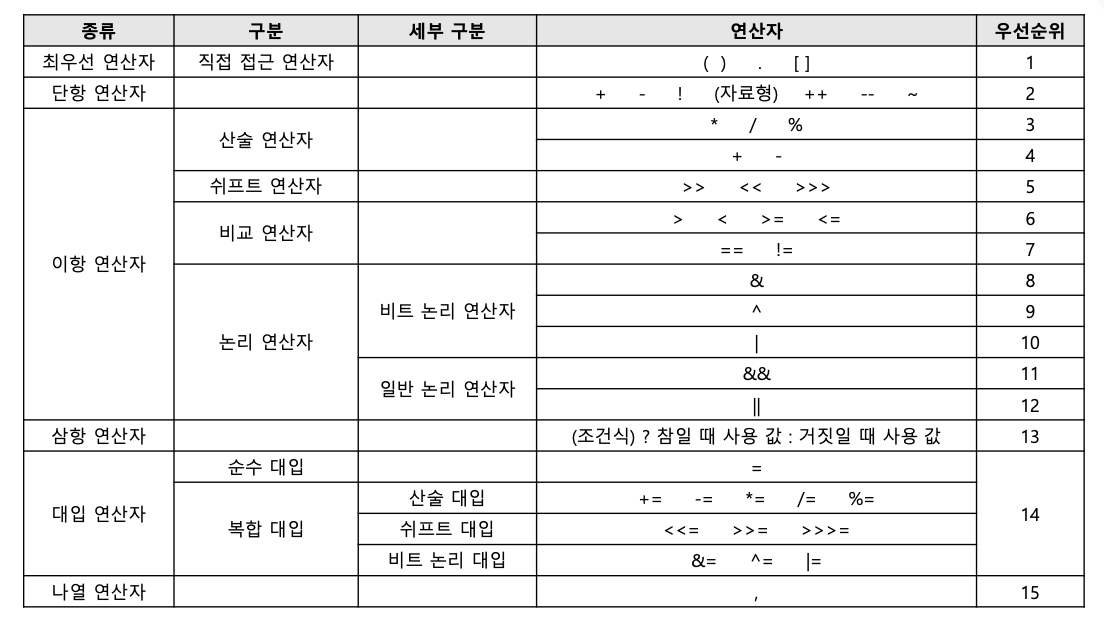
연산자 종류, 우선순위
class ExampleRun
package edu.kh.op.ex;

public class ExampleRun { // 코드 실행용 클래스
	public static void main(String[] args) {

		// OpExample 생성
		OpExample ex = new OpExample();
		ex.ex1(); // ex가 가지고 있는 ex1() 메소드 실행
		ex.ex2();
		ex.ex3();
		ex.ex4();
		ex.ex5();
		ex.ex6();
		ex.ex7();
		ex.ex8();

	}
}
산술 연산자
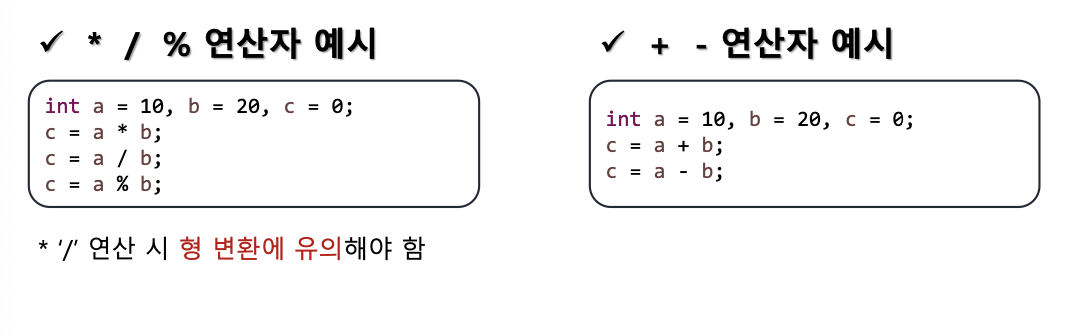
일반 수학과 동일한 연산 방법, 우선순위. 단, %는 나누기의 나머지 값을 구하는 연산
class OpExample (ex1, ex2)
	// ex1() 메소드
	// OpExample이 가지고 있는 기능 중 ex1()이라는 기능
	public void ex1( ) {

		// syso 작성 후 ctrl + space
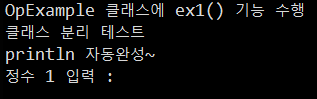
		System.out.println("OpExample 클래스에 ex1() 기능 수행");
		System.out.println("클래스 분리 테스트");
		System.out.println("println 자동완성~");
	}
// ex2() 메소드(기능)
	public void ex2() {
		Scanner sc = new Scanner(System.in);

		System.out.print("정수 1 입력 : ");
		int input1 = sc.nextInt(); // 다음 입력되는 정수를 읽어옴

		System.out.print("정수 2 입력 : ");
		int input2 = sc.nextInt();

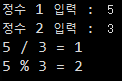
		System.out.printf("%d / %d = %d\n", input1, input2, input1 / input2);
		System.out.printf("%d %% %d = %d\n", input1, input2, input1 % input2);
	}
증감 연산자
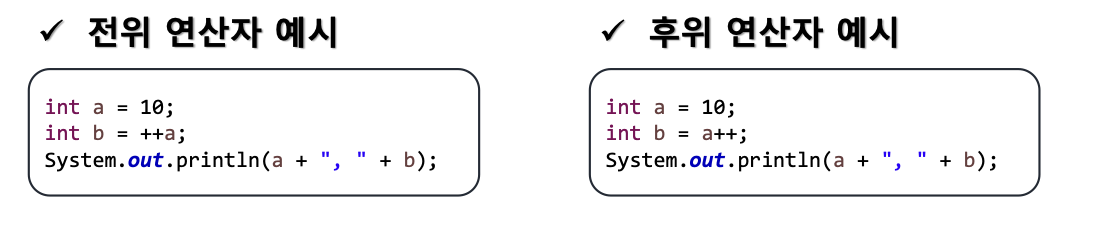
피연산자의 값에 1을 더하거나 빼는 연산자로 위치에 따라 결과 값이 다르게 나타남
- 전위 연산 : 먼저 연산 후 다른 연산 실행
- 후위 연산 : 다른 연산 우선 실행 후 연산
class OpExample(ex3)
public void ex3() {
		// 증감(증가, 감소) 연산자 : ++, --
		// -> 피연산자(값)를 1 증가 or 감소 시키는 연산자

		int iNum1 = 10;
		int iNum2 = 10;

		iNum1++;
		iNum2--;

		System.out.println("iNum1 : " + iNum1);
		System.out.println("iNum2 : " + iNum2);


		// 전위 연산 : ++3, --2 연산자가 앞쪽에 배치
		int temp1 = 5;
		System.out.println(++temp1 + 5); // 11
						// ++5 + 5
						// 6 + 5 == 11

		System.out.println("temp1 : " + temp1); // 6


		// 후위 연산 : 10++, 6-- 연산자가 뒤쪽에 배치
		// - 다른 연산자보다 나중에 증가/감소
		int temp2 = 12;
		System.out.println(temp2-- +3); // 15
						// 12-- + 3 == 15
						// temp2 == 11; (1감소)
		System.out.println("temp2 : " + temp2); // 11


		int a = 3;
		int b = 5;
		int c = a++ + --b;

		// 	   (a)3++ + --5(b)
		// c = (a)3++ + 4(b)
		// c = 7

		// 미뤄놨던 a 후위연산 a++ == 3++ == 3+1 == 4

		// 최종적으로 a, b, c는 각각 얼마인가?
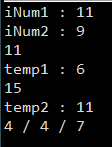
		System.out.printf("%d / %d / %d\n", a, b, c);

} 
비교 연산자
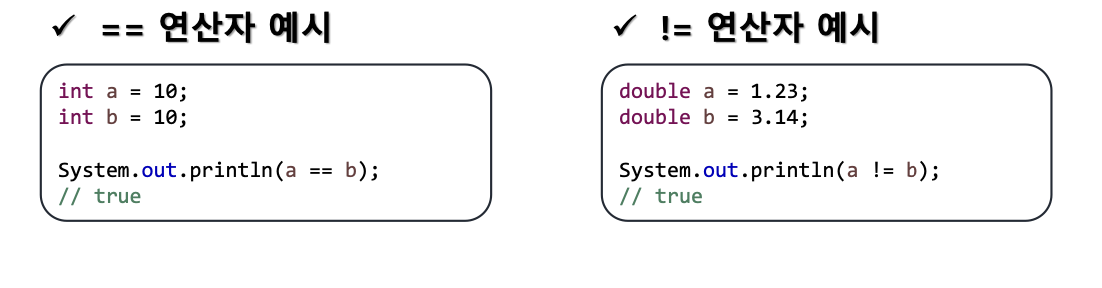
데이터가 같은지, 다른지 비교할 때 쓰이며 항상 결과값은 논리 값(true, false)으로 나타남.
a == b : a와 b가 같으면 true
a != b : a와 b가 다르면 true
두 피연산자의 값의 크기 비교
기본형 boolean과 참조형을 제외하고 나머지 자료형에 모두 사용 가능
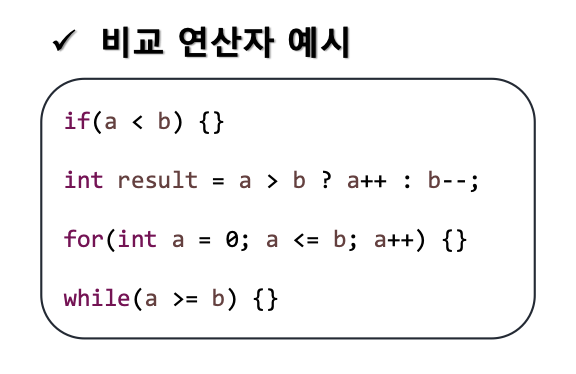
비교 연산자 : >, <, >=, <==, ==, !=
비교 연산자의 결과는 항상 논리값(true / false)
등호(=)가 포함된 연산자에서 등호는 항상 오른쪽!
같다 기호는 =, == 어떤 것?
→ ==
왜? 등호 1개(=) 대입 연산자로 사용
→ 구분을 위해서 두개(==)를 "같다"라는 의미로 사용
class OpExample(ex4)
	public void ex4() {
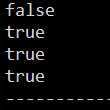
		int a = 10;
		int b = 20;

		System.out.println(a > b); // false
		System.out.println(a < b); // true
		System.out.println(a != b); // true
		System.out.println((a == b) == false); // true

		System.out.println("---------------------------------------");
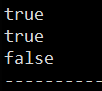
		int c = 4;
		int d = 5;

		System.out.println(c < d); // true
		System.out.println(c + 1 <= d); // true
		System.out.println((++c != d) == (--c != d));
						// (++4 != 5) -> false
						// 				 (--5 != 5) -> true
						//   false	  == 	true -> false

		System.out.println("---------------------------------------");
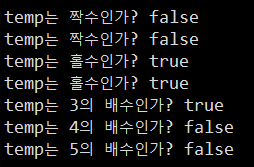
		int temp = 723;
		System.out.println("temp는 짝수인가? " + (temp % 2 == 0) );
		System.out.println("temp는 짝수인가? " + (temp % 2 != 1) );

		System.out.println("temp는 홀수인가? " + (temp % 2 != 0) );
		System.out.println("temp는 홀수인가? " + (temp % 2 == 1) );

		System.out.println("temp는 3의 배수인가? " + (temp % 3 == 0));
		System.out.println("temp는 4의 배수인가? " + (temp % 4 == 0));
		System.out.println("temp는 5의 배수인가? " + (temp % 5 == 0));
	}
논리 연산자
논리 값 두 개를 비교하는 연산자
&& : 두 피연산자가 모두 true일 때 true 반환 (AND)
|| : 두 피연산자 중 하나만 true여도 true 반환 (OR)
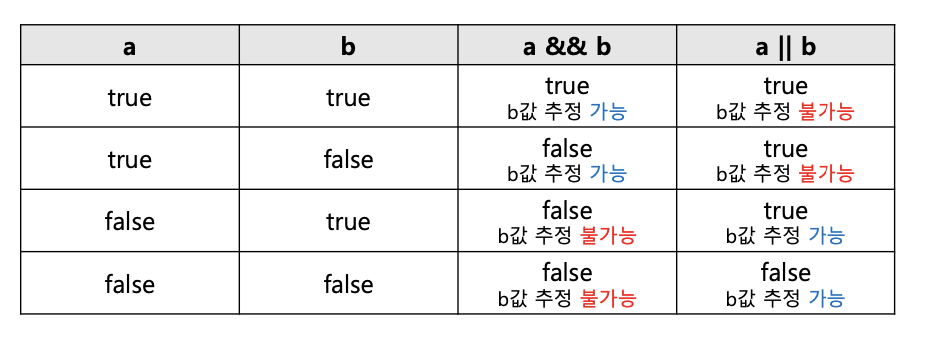
논리 연산자 : &&(AND), ||(OR)
&&(AND) 연산자 : 둘 다 true 일 때만 true, 나머지 false
와, 그리고(~이고), ~면서, ~이면서, ~부터, ~까지, ~사이
ex) 사과와 바나나, 사과 그리고 바나나, 사과 이면서 바나나
|| (OR) 연산자 : 둘 다 false 이면 false, 나머지는 true(AND의 반대)
~또는, ~거나, ~이거나
class OpExample(ex5)
	public void ex5() {

		// 논리 연산자 : &&(AND), ||(OR)

		// &&(AND) 연산자 : 둘 다 true 일 때만 true, 나머지 false
		// 와, 그리고(~이고), ~면서, ~이면서, ~부터, ~까지, ~사이

		// ex) 사과와 바나나, 사과 그리고 바나나, 사과 이면서 바나나

		int a1 = 100;

		// a는 100 이상 이면서 짝수인가?

		System.out.println(a1 >= 100); // a는 100 이상? true
		System.out.println(a1 % 2 == 0); // a는 짝수? true
		System.out.println(a1 >= 100 && a1 % 2 == 0); // true


		int a2 = 101;

		// a는 100 이상 이면서 짝수인가?

		System.out.println(a2 >= 100); // a는 100 이상? true
		System.out.println(a2 % 2 == 0); // a는 짝수? false
		System.out.println(a2 >= 100 && a2 % 2 == 0); // false


		int b = 5;

		// b는 1부터 10까지 숫자 범위 안에 포함되어 있는가?
		System.out.println(1 <= b); // b는 1이상인가? true
		System.out.println(b <= 10); // b는 10이하인가? true
		System.out.println(1 <= b && b <= 10); // true

		System.out.println("-------------------------");

		// || (OR) 연산자 : 둘 다 false 이면 false, 나머지는 true(AND의 반대)
		// ~또는, ~거나, ~이거나

		int c = 10;

		// c는 10을 초과했거나 짝수인가?
		System.out.println(10 < c || c % 2 == 0); // true
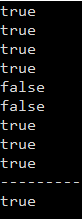
	}
논리 부정 연산자
논리 부정 연산자 : !
논리 값을 부정하여 반대 값으로 변경
제어문을 활용할 때 많이 쓰임
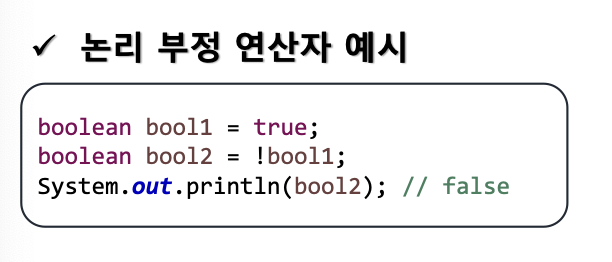
class OpExample(ex6)
	public void ex6() {

		// 논리 부정 연산자 : !
		// -> 논리 값을 반대로 바꾸는 연산자

		boolean bool1 = true;
		boolean bool2 = !bool1; // false

		System.out.println("bool1 : " + bool1);
		System.out.println("bool2 : "+ bool2);

		System.out.println("----------------------------------");

		// 정수를 하나 입력 받았을 때
		// 1) 해당 정수가 1부터 100 사이 값이 맞는지 확인(1이상 100이하)
		// 2) (반대) 1부터 100 사이 값이 아닌지 확인

		Scanner sc = new Scanner(System.in);

		System.out.print("정수 입력 : ");
		int input = sc.nextInt();

		// 1 <= input <= 100
		boolean result1 = 1 <= input && input <= 100;
		System.out.printf("%d은/는 1 이상, 100 이하의 정수인가? : %b\n", input, result1);

		// 1 이상 이면서 100 이하 <-> 1 미만 또는 100 초과
		boolean result2 = 1 > input || input > 100;
		boolean result3 = !(1 <= input && input <= 100);
		System.out.printf("%d은/는 1 미만, 100 초과 정수인가? : %b / %b\n", input, result2, result3);
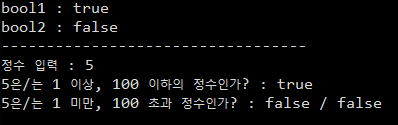
	}
복합 대입 연산자
다른 연산자와 대입 연산자가 결합한 것으로
자기 자신과 연산 후 연산 결과를 자기 자신에게 누적 대입
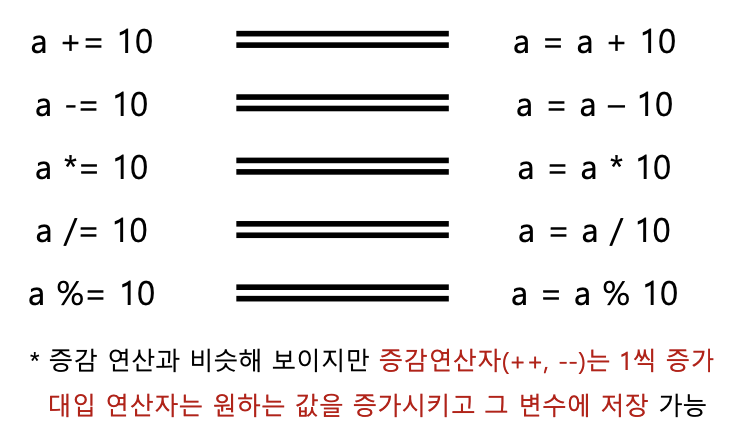
class OpExample(ex7)
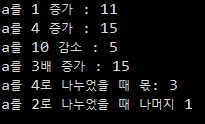
	public void ex7() {

		// 복합 대입 연산자 :  +=, -=, *=, /=, %=
		// -> 피연산자가 자기 자신과 연산 후 결과를 다시 자신에게 대입

		int a = 10;

		// a를 1 증가
		a++; // a = a + 1, a += 1
		System.out.println("a를 1 증가 : " + a); // 11

		// a를 4 증가
		a += 4; // a = a + 4
		System.out.println("a를 4 증가 : " + a); // 15

		// a를 10 감소
		a -= 10;
		System.out.println("a를 10 감소 : " + a); // 5

		// a를 3배 증가
		a *= 3;
		System.out.println("a를 3배 증가 : " + a); // 15

		// a를 4로 나누었을 때 몫
		a /= 4;
		System.out.println("a를 4로 나누었을 때 몫: " + a); // 3

		// a를 2로 나누었을 때 나머지
		a %= 2;
		System.out.println("a를 2로 나누었을 때 나머지 " + a); // 1
	}
삼항 연산자
조건식 ? 식1 : 식2;
조건식의 결과 값에 따라 연산을 처리하는 방식으로 결과 값이 참일 경우 식1, 거짓일 경우 식2 수행
삼항 연산자 안에 삼항 연산자를 중첩하여 쓰는 것도 가능
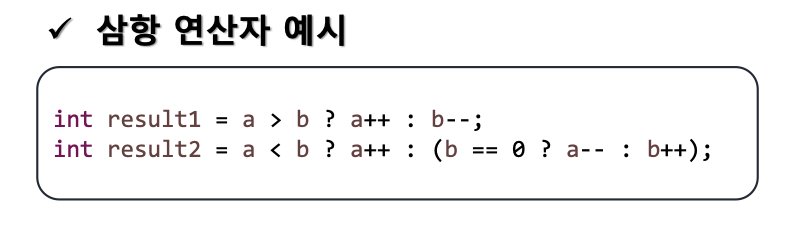
삼항 연산자 : 조건식? 식1 : 식2
단항 연산자 : 연산자가 1개 ex)+3, -5 !true
이항 연산자 : 1+3, true || false
class OpExample(ex8)
	public void ex8() {

		// 삼항 연산자 : 조건식? 식1 : 식2

		// = 조건식의 결과가 true이면 식1,
		// false이면 식2를 수행하는 연산자

		// * 조건식 : 연산 결과가 true / false인 식
		//			(비교, 논리, 논리 부정 연산이 포함)

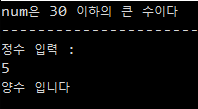
		int num = 30;

		// num이 30보다 크면(초과) : "num은 30보다 큰 수이다."
		// 아니면				   : "num은 30 이하의 수이다." 출력

		String str1 = "num은 30보다 큰 수이다";
		String str2 = "num은 30 이하의 큰 수이다";

		String result = num > 30 ? str1 : str2;
						//   조건식 ? 식1 :  식2
						//             t     f

		// num 값이 30을 초과하면 str1
		// num 값이 30을 초과하지 못하면 str2를
		// result 변수에 저장

	System.out.println(result);

	System.out.println("-------------------------------------");

	// 입력 받은 정수가 음수인지 양수인지 구분
	// 단, 0은 양수로 처리

	// ex)
	// 정수 임력 : 4
	// 양수 입니다.

	// 정수 입력 : -8
	// 음수 입니다.

	Scanner sc = new Scanner(System.in);
	System.out.println("정수 입력 : ");
	int input = sc.nextInt();


	String str3 = "양수 입니다";
	String str4 = "음수 입니다";

	String result2 = input >= 0 ? str3 : str4;
	System.out.println(result2);
	}
}