
출력메소드
System.out.print( )
() 안의 변수, 문자, 숫자, 논리 값을 모니터에 출력해주는 메소드
System.out.println( )
print문과 동일하게 출력은 해주지만 출력 후 자동으로 출력창에 줄바꿈을 해주는 메소드
System.out.printf("%형식", 변수 등)
정해져 있는 형식에 맞춰서 그 형식에 맞는 값(변수)을 줄바꿈 하지 않고 출력
%d : 정수형, %o : 8진수, %x : 16진수
%c : 문자, %s : 문자열
%f : 실수(소수점 아래 6자리), %e : 지수형태표현, %g : 대입 값 그대로
%A : 16진수 실수
%b : 논리형
정렬방법
- %5d : 5칸을 확보하고 오른쪽 정렬
- %-5d : 5칸을 확보하고 왼쪽 정렬
- %.2f : 소수점 아래 2자리까지만 표시
package edu.kh.variable.ex2;

public class PrintExample {
	public static void main(String[] args) {
		// System.out.print() : 단순 출력(출력 후 줄바꿈 X)
		// System.out.println() : 한 줄 출력(출력 후 줄바꿈 O)

		// System.out.printf() : 출력될 문자열 형식을 패턴으로 지정하는 출력구문

		System.out.println("테스트1");
		System.out.println("테스트2");

		System.out.print("테스트3");
		System.out.println(); // 내용 없는 println(줄바꿈)
		System.out.print("테스트4");

		System.out.println();

		int iNum1 = 10;
		int iNum2 = 5;

		// 10 + 5 = 15
		System.out.println(iNum1 + " + " + iNum2 + " = " + (iNum1 + iNum2));


		// System.out.printf("패턴", 패턴에 들어갈 값);
		System.out.printf("%d + %d = %d\n", iNum1, iNum2, iNum1+iNum2);

		// 10 + 10 * 5 / 2 = 35
		System.out.println(iNum1 + " + " + iNum1 + " * " + iNum2 + " / " + 2 + " = " + (iNum1+iNum1*iNum2/2));
		System.out.printf("%d + %d * %d / 2 = %d\n", iNum1, iNum1, iNum2, iNum1+iNum1*iNum2/2);

		// 패턴 연습
		int iNum3 = 3;
		System.out.printf("%d\n", iNum3);
		System.out.printf("%7d\n", iNum3); // 7칸 공간 확보 후 오른쪽 정렬
		System.out.printf("%-7d\n", iNum3); // 7칸 공간 확보 후 왼쪽 정렬

		// 소수점 자리 제어 (반올림처리)
		System.out.printf("%f\n", 10 / 4.0);
		System.out.printf("%.2f\n", 10 / 4.0);
		System.out.printf("%.0f\n", 10 / 4.0);


		// 문자, 문자열, boolean
		boolean isTrue = false;
		char ch = '가';
		String str = "내일주말"; // String은 참조형(기본자료형을 뺀 나머지)

		// '' : char 리터럴 표기법
		// "" : String 리터럴 표기법

		System.out.printf("%b / %c / %s\n", isTrue, ch, str);
	}
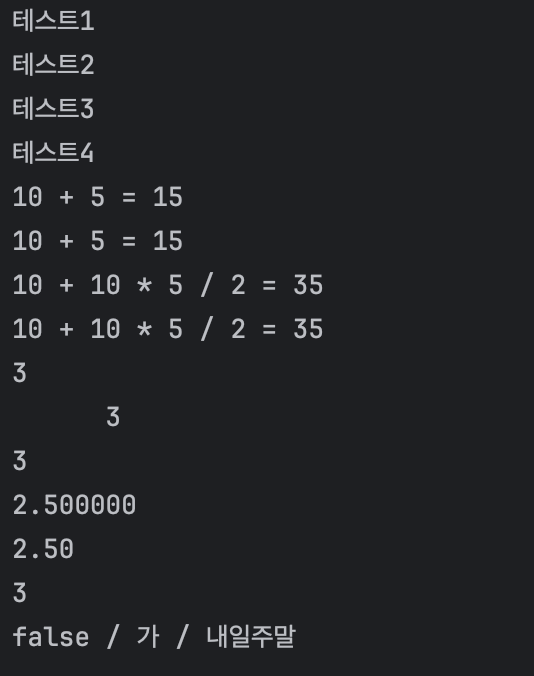
}
escape 문자
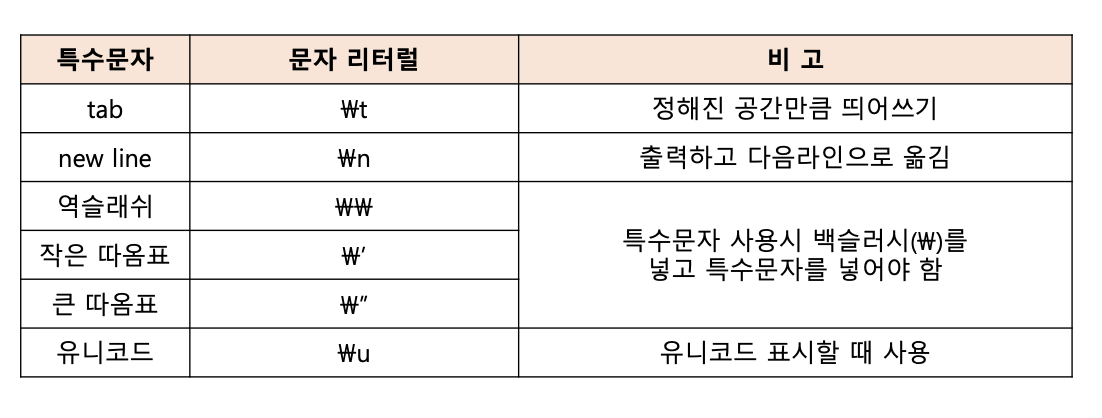
		// escape 문자 : 일반 문자가 아닌 특수 문자 표현
		System.out.println("\\"); // 백슬래시 출력 방법

		System.out.println("a\tb\tc\td"); // tab 출력

		System.out.println(" \" "); // 쌍따움표 단순 문자 출력
		System.out.println('\''); // 홑따움표 단순 문자 출력
		System.out.println("\u0041"); // 유니코드(16진수)번호로 출력
Scanner
Scanner Class
사용자로부터 입력되는 정수, 실수, 문자열을 처리하는 클래스
💧Scanner : 프로그램 실행 중 키보드 입력을 받을 수 있게 하는 역할
오류 Scanner cannot be resolved to a type
설계도(class)가 없어서 못 만들고 있음 → import 구문 작성 시 오류 해결
package edu.kh.variable.ex2;

import java.util.Scanner;

public class ScannerExample1 {
	public static void main(String[] args) {

		// Scanner : 프로그램 실행 중 키보드 입력을 받을 수 있게 하는 역할

		// Scanner 생성
		// -> 프로그램 안에 스캐너라는 기계를 만드는 것
		Scanner sc = new Scanner(System.in);
		//Scanner cannot be resolved to a type
		// 오류 원인 -> 민들고 싶은데 설계도(class)가 없어서 못 만들고 있음

		// 망고가 없으면 수입해 오는 것처럼 수입해오기 = 설계도 수입하기 = import
		// -> import 구문 작성 시 오류 해결

		System.out.print("정수 1 입력 : ");
		int input1 = sc.nextInt();
		// nextInt() : 다음 입력된 정수를 읽어옴 (키보드로 입력된 정수를 읽어옴)


		System.out.print("정수 2 입력 : ");
		int input2 = sc.nextInt();


		System.out.printf("%d + %d = %d", input1, input2, input1 + input2);
		// 애플리케이션이라고 부르는 이유 : 입력한 값에 따라 값이 다르기 때문
	}
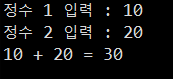
}
package edu.kh.variable.ex2;

import java.util.Scanner;

public class ScannerExample2 {
	public static void main(String[] args) {

		Scanner sc = new Scanner(System.in);

		// 사칙연산 계산기
		// -> 두 실수를 입력 받아 사칙연산 결과를 모두 출력

		System.out.print("실수 1 입력 : ");
		double input1 = sc.nextDouble();

		// nextDouble() : 입력 받은 다음 실수를 읽어옴

		System.out.print("실수 2 입력 : ");
		double input2 = sc.nextDouble();

		// 소수점 2번째까지만 표시
		System.out.printf("%.2f + %.2f = %.2f\n", input1, input2, input1 + input2);
		// ctrl + alt + 방향키 위 or 아래 : 라인 복사
		System.out.printf("%.2f - %.2f = %.2f\n", input1, input2, input1 - input2);
		System.out.printf("%.2f * %.2f = %.2f\n", input1, input2, input1 * input2);
		System.out.printf("%.2f / %.2f = %.2f\n", input1, input2, input1 / input2);
	}

}
package edu.kh.variable.ex2;

import java.util.Scanner;
public class ScannerExample3 {
	public static void main(String[] args) {

		Scanner sc = new Scanner(System.in);

		// 문자열(String) 입력
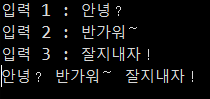
		System.out.print("입력 1 : ");
		String input1 = sc.next();
		// The method nextString() is undefined for the type Scanner
		// next() : 다음 입력된 한 단어를 읽어옴

		// 문자열을 3번 입력 받아 한 줄로 출력하기

		// ex)
		// 입력 1 : 안녕?
		// 입력 2 : 반가워~
		// 입력 3 : 잘지내자!
		// 안녕? 반가워~ 잘지내자!
		System.out.print("입력 2 : ");
		String input2 = sc.next();

		System.out.print("입력 3 : ");
		String input3 = sc.next();

		System.out.printf("%s %s %s\n", input1, input2, input3);
	}

}
package edu.kh.variable.ex2;

import java.util.Scanner;

public class ScannerExample4 {
	public static void main(String[] args) {

		Scanner sc = new Scanner(System.in);

		System.out.print("입력 1 : ");
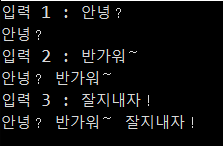
		String input = sc.next() + " "; // 띄어쓰기 추가
						// 안녕?_
		System.out.println(input);


		System.out.print("입력 2 : ");
		input = input + sc.next() + " ";
						// 안녕?_반가워~
		// 대입 연산자(=) : 오른쪽에 작성된 값을 왼쪽 변수에 대입
		System.out.println(input);


		System.out.print("입력 3 : ");
		input = input + sc.next() + " ";
						// 안녕?_반가워~_잘지내자!
		System.out.println(input);
		// 누적 효과 (변수의 재사용성)
	}
}
package edu.kh.variable.ex2;

import java.util.Scanner;

public class ScannerExample5 {
	public static void main(String[] args) {


		Scanner sc = new Scanner(System.in);

		// 1) next() : 한 단어(띄어쓰기, 엔터enter를 만나면 입력 종료)
		// 	  nextLine() : 한 문장(엔터enter를 만나면 입력 종료)

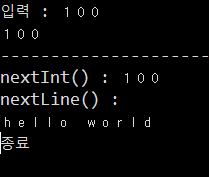
		System.out.print("입력 : ");
		String str = sc.nextLine();

		System.out.println(str); // next() : hello
								 // nextLine() : hello world


		// 2) 스캐너 입력 버퍼와 nextXXX의 의미
		// 입력 -> 입력 버퍼에 저장 -> nextXXX() 통해 버퍼 내용을 읽어옴


		// 					입력 버퍼		     	nextXXX()		후처리
		// nextLine() : hello world(엔터) -> hello world(엔터) -> 엔터 제거

		// nextInt() : 		100(엔터)		 -> 	100
		// ** next(), nextDouble(), nextInt() 등
		// 모두 입력 버퍼에서 (엔터)를 제외하고 내용만 읽어옴

		System.out.println("------------------------------");

		System.out.print("nextInt() : "); // 입력버퍼 : [ 100 (엔터) ]
		int a = sc.nextInt();
		// 100 입력버퍼 : [ (엔터) ]

		// !문제 해결!
		sc.nextLine(); // 입력버퍼 : []

		System.out.println("nextLine() : "); // 입력버퍼 : [ a b c (엔터) ]
		String s = sc.nextLine();

		System.out.println("종료");

		// [문제점]
		// nextInt() 이후 입력 버퍼에 남아있는 (엔터) 때문에
		// 다음 nextLine()을 수행 시 버퍼에 남아있는 (엔터)를 읽어버리기 때문에
		// 추가적인 입력을 시도하지 못하고 다음 코드로 넘어가는 문제 발생

		// [해결방법]
		// 입력을 위한 nextLine() 수행 전
		// 입력 버퍼에 남아있는 (엔터)를 제거
		// -> 빈 공간에 sc.nextLine() 구문을 한번 작성하면 (엔터)가 제거됨
	}
}

Hello! My Name is oYJo