- "정관장"으로 검색한 뉴스를 최신순으로 가져오기
package com.example.demo.controller;

import java.io.BufferedReader;
import java.io.BufferedWriter;
import java.io.FileOutputStream;
import java.io.FileReader;
import java.io.FileWriter;
import java.io.IOException;
import java.io.OutputStreamWriter;
import java.nio.charset.StandardCharsets;
import java.time.Duration;
import java.util.ArrayList;
import java.util.List;
import java.util.StringTokenizer;

import javax.persistence.EntityManager;
import javax.persistence.EntityManagerFactory;
import javax.persistence.EntityTransaction;
import javax.persistence.Persistence;

import org.openqa.selenium.By;
import org.openqa.selenium.WebDriver;
import org.openqa.selenium.WebElement;
import org.openqa.selenium.chrome.ChromeDriver;
import org.openqa.selenium.chrome.ChromeOptions;
import org.openqa.selenium.support.ui.ExpectedConditions;
import org.openqa.selenium.support.ui.WebDriverWait;
import org.springframework.stereotype.Component;
import org.springframework.stereotype.Controller;
import org.springframework.ui.Model;
import org.springframework.web.bind.annotation.PostMapping;
import org.springframework.web.bind.annotation.RequestMapping;
import org.springframework.web.bind.annotation.ResponseBody;

import com.example.demo.vo.News;
import com.example.demo.vo.Schedule;

@Component
public class UsrCrawlingController3 {

	public List<News> crawl() {
		System.setProperty("webdriver.chrome.driver", "C:\\work\\sts-4.21.0.RELEASE-workspace\\myproject\\chromedriver.exe");

		ChromeOptions options = new ChromeOptions();
		options.addArguments("--headless"); // 브라우저를 표시하지 않고 실행할 경우

		List<News> newsList = new ArrayList<>();

		// 웹 드라이버 초기화
		WebDriver driver = new ChromeDriver(options);

		try {
			String url = "https://search.naver.com/search.naver?where=news&ie=utf8&sm=nws_hty&query=%EC%A0%95%EA%B4%80%EC%9E%A5+%EB%A0%88%EB%93%9C%EC%8A%A4%ED%8C%8C%ED%81%AC%EC%8A%A4";

			driver.get(url);

			 WebElement button = driver.findElement(By.cssSelector("#snb > div.mod_group_option_filter._search_option_simple_wrap > div > div.option_area.type_sort > a:nth-child(2)"));
			 button.click();

			List<WebElement> Elements = driver.findElements(By.cssSelector("#main_pack > section > div.api_subject_bx > div.group_news > ul > li"));

			for (WebElement Element : Elements) {
	            String company_img = Element.findElement(By.cssSelector(".bx > .news_wrap.api_ani_send > div > div.news_info > div.info_group > a.info.press > span > img")).getAttribute("src");
	            String company_name = Element.findElement(By.cssSelector(".bx > .news_wrap.api_ani_send > div > div.news_info > div.info_group > a.info.press")).getText();
	            String date = Element.findElement(By.cssSelector(".bx > .news_wrap.api_ani_send > div > div.news_info > div.info_group > span")).getText();
	            String title = Element.findElement(By.cssSelector(".bx > .news_wrap.api_ani_send > div > div.news_contents > a.news_tit")).getText();
	            String content = Element.findElement(By.cssSelector(".bx > .news_wrap.api_ani_send > div > div.news_contents > div")).getText();
	            String title_img = Element.findElement(By.cssSelector(".bx > .news_wrap.api_ani_send > div > div.news_contents > a.dsc_thumb > img")).getAttribute("src");
	            String news_url = Element.findElement(By.cssSelector(".bx > .news_wrap.api_ani_send > div > div.news_contents > a.news_tit")).getAttribute("href");
	            News news = new News(company_img, company_name, date, title, content, title_img, news_url);
	            newsList.add(news);
	        }

		} catch (Exception e) {
			e.printStackTrace();

		} finally {
			// 웹 드라이버 종료
			driver.quit();
		}
		return newsList;
	}

}
- "정관장"을 검색한 URL주소를 받아온다
- 최신순 데이터를 가져올거라 최신순 버튼을 클릭해준다
(버튼 요소를 찾아서 클릭시켜주기!)
- 클릭한 상태의 화면에서 요소를 찾아오면 되는데 우클릭해서 선택자를 복사하는 방법으로 했다
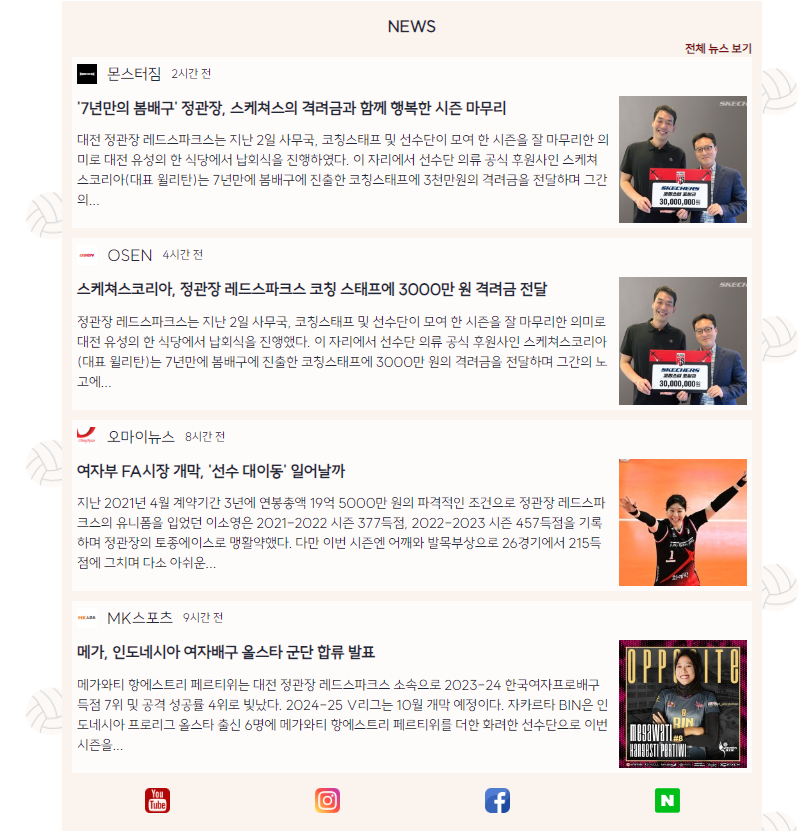
- 그리고 나는 가져온 데이터를 DB에 안넣고 보여주려한다.
- DB에 안넣어주고 바로 jsp로 넘길꺼라서 크롤링 시키는 메서드에 리스트값을 반환시키고 해당 메서드를 controller에서 실행시킬 수 있도록 했음
- 문제1. 뉴스를 10개까지는 끌어오는데 이미지를 4개까지만 가져온다
//			 System.out.println("**********************" + newsList.get(0).getCompany_img());
//			 System.out.println("**********************" + newsList.get(2).getCompany_img());
//			 System.out.println("**********************" + newsList.get(4).getCompany_img());
//			 System.out.println("**********************" + newsList.get(6).getCompany_img());

//			 String a = driver.findElement(By.cssSelector("#sp_nws1 > .news_wrap.api_ani_send > div > div.news_contents > a.dsc_thumb > img")).getAttribute("src");
//			 System.err.println("**********************" + a);
//			 String b = driver.findElement(By.cssSelector("#sp_nws3 > .news_wrap.api_ani_send > div > div.news_contents > a.dsc_thumb > img")).getAttribute("src");
//			 System.err.println("**********************" + b);
//			 String c = driver.findElement(By.cssSelector("#sp_nws5 > .news_wrap.api_ani_send > div > div.news_contents > a.dsc_thumb > img")).getAttribute("src");
//			 System.err.println("**********************" + c);
//			 String d = driver.findElement(By.cssSelector("#sp_nws7 > .news_wrap.api_ani_send > div > div.news_contents > a.dsc_thumb > img")).getAttribute("src");
//			 System.err.println("**********************" + d);
- 따로 하나하나 크롤링 시켜도 이미지를 끌어오지 못한다..(for문이 문제가 아니라는말~)
- 네이버에서 막은거? 같다.. 그래서 4개까지만 기사 가져오고 전체 기사 보여줄 수 있도록 버튼 만들어줬다
- 나중에 언론사 태그도 가져와서 넘겨줄까...진짜 나중에 너무너무너무 여유로우면 해야지~