일자 : 24-2 10주차 (2)
1. CSS & list
[1] CSS3로 리스트 꾸미기
- list-style-type : 아이템 마커 타입 지정
- list-style-image : 아이템 마커 이미지 지정
- list-style-position : 아이템 마커의 출력 위치 지정 (아이템 영역 내 혹은 영역 바깥)
- list-style : 앞의 세 개의 프로퍼티 값을 한 번에 지정하는 단축 프로퍼티
[2] list-style-position
list-style-position : inside / outside- inside : 안쪽에 배치
- outisde : 바깥에 배치 (default)
[3] list-style-type (마커 종류)
`list-style type : {마커 종류}1) 마커 종류
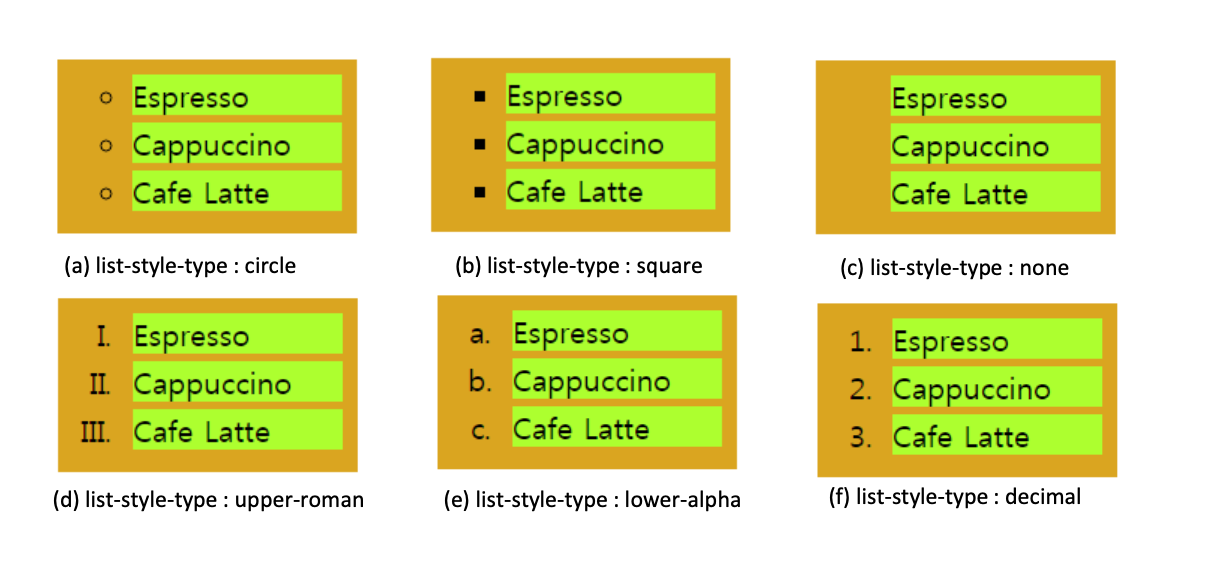
- circle : 원형
- square : 사각형
- none : 없음
- upper-roman : 로마
- lower-alpha : 알파벳
- decimal : 숫자
[4] list-style-image
list-style-image : url("경로");2. CSS & table
[1] 표 테두리 제어, border
border : 테두리 두께 실선 파란색[2] 셀 크기 제어, width / height
width : 크기;
height : 크기;
[3] 셀 여백 및 정렬
- padding : 여백
- text-align : 정렬 (left, center, right)
[4] 배경색과 테두리 효과
- background
- color
- border
[5] N 번째 행 지정
{태그명}:nth-child(even){
	스타일
}
3. CSS & form
[1] 폼 꾸미기
- input[type=text]로 폼 요소의 글자 색 지정
input[type=text]{
	color : red;
}- input[type=text]로 폼 요소의 테두리 만들기
input[type=text]{
	border : 2px solid skyblue;
	border-radius : 5px;
}
[2] 폼 요소에 마우스 처리
- 마우스 올라올 때 :hover
input[type=text]:hover{
	스타일 지정
}- 포커스를 받을 때 :focus
input[type=text]:focus{
	스타일 지정
}

안녕하세요, 사용자들의 문제 해결을 중심으로 하는 프론트엔드 개발자입니다. 티스토리로 전환했어요 : https://pangil-log.tistory.com