
데이터 변경을 위한 SQL
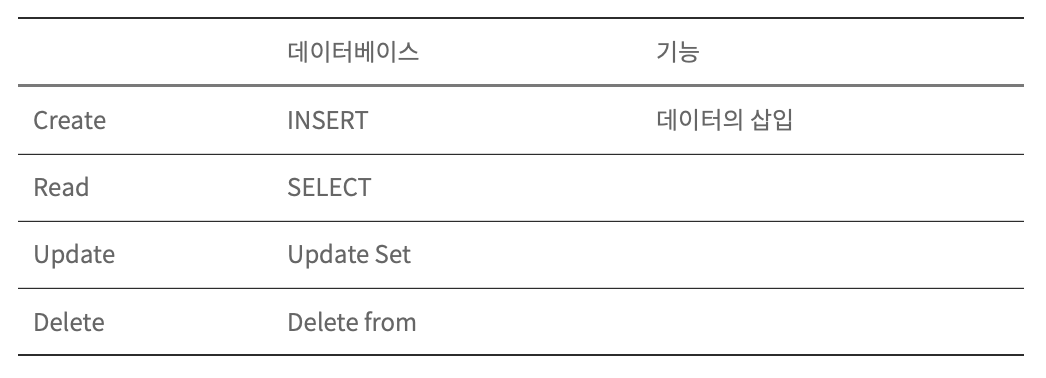
1. INSERT
1️⃣ 삽입할 열 이름과 값을 저장
INSERT INTO table_name (column1, column2, column3, ...)
VALUES (value1, value2, value3, ...);
2️⃣ 테이블의 모든 열에 대한 값을 추가하는 경우 SQL 조회에서 열 이름을 지정할 필요가 없다.
INSERT INTO table_name
VALUES (value1, value2, value3, ...);
💡 예시
create table testTbl1 (
	id int,
    userName char(3),
    age int
); -- 테이블 생성

-- 테이블 구조 확인
desc testTbl1;

-- 값을 입력하여 insert 하는 방식
insert into testTbl1 values (1, '홍길동', 20);

-- 열 이름을 지정하여 insert 하는 방식
insert into testTbl1 (id, userName, age)
values (2, '김선우', 24);

-- 입력하고 싶은 열만 지정해서 insert
insert into testTbl1 (id, userName)
values (3, '이재현');

-- 열 순서를 변경하여 insert
insert into testTbl1 (userName, age, id)
values ('김영훈', 27, 4);
**-- 주의사항: 이 경우는 입력될 수도 있고 아닐 수도 있다. (필드의 데이터 타입이 틀리면 입력이 안 된다.)**

-- 여러 개의 데이터 입력
insert into testTbl1 (id, userName, age)
values (5, '이주연', 26),
	   (6, '최창민', 26),
       (7, '주학년', 25);
select * from testTbl1;
가. AUTO_INCREMENT
-- 기본 세팅
create table testTbl2 (
	id int auto_increment primary key,
    userName char(3),
    age int
);
desc testTbl2;
show create table testTbl2; -- 테이블 만드었을 때의 코드를 확인할 수 있다.
insert into testTbl2 values (null, '이재현', 27);
insert into testTbl2 values (null, '정재현', 27);
insert into testTbl2 values (null, '김재현', 30);
insert into testTbl2 values (null, '봉재현', 25);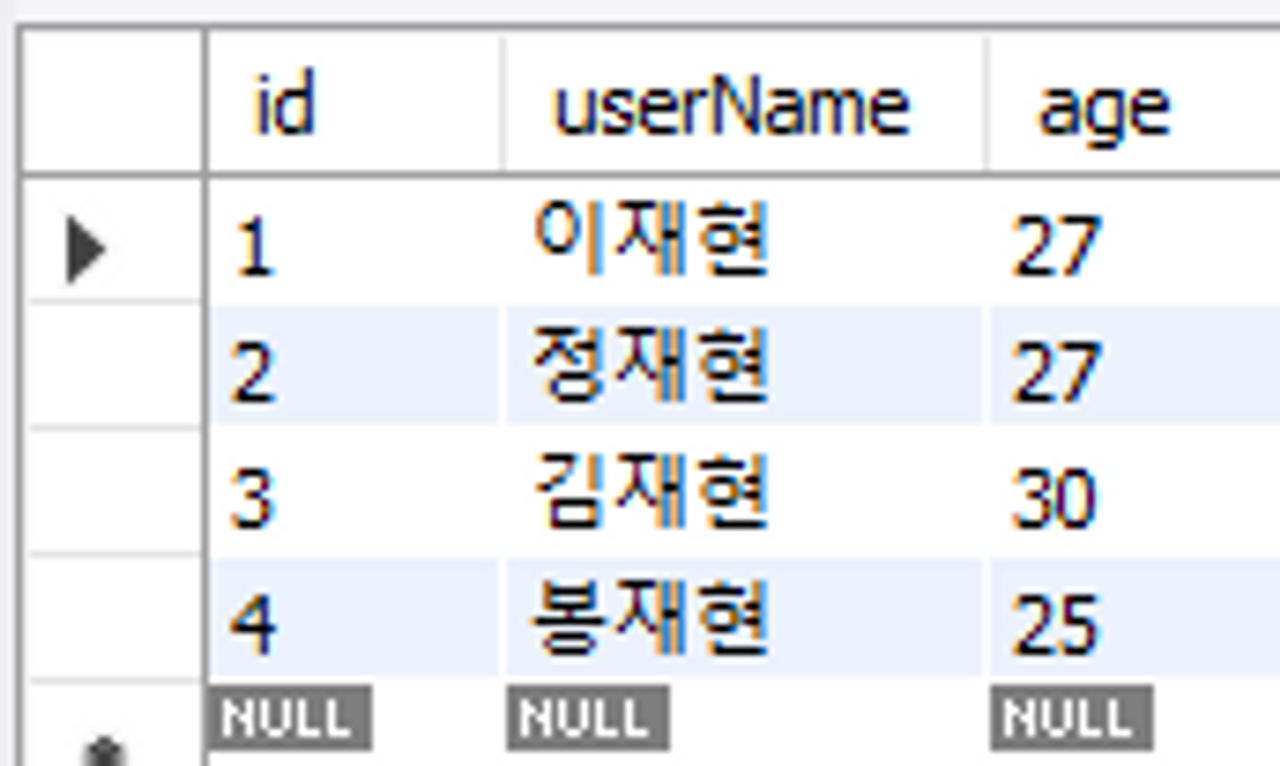
- null로 입력했지만 상수 값(자동으로 숫자 카운트)으로 설정한 열이기 때문에 값이 저장되어 있다. (필드 자동 증가)
- 자동 증가 숫자의 기능은 주로 primary key와 사용함 (고유번호)
-- 원하는 값만 입력했을 경우
insert into testTbl2 (username, age)
values ('재현', 100);

-- auto_increment 기능으로 인해 자동으로 값이 추가된다.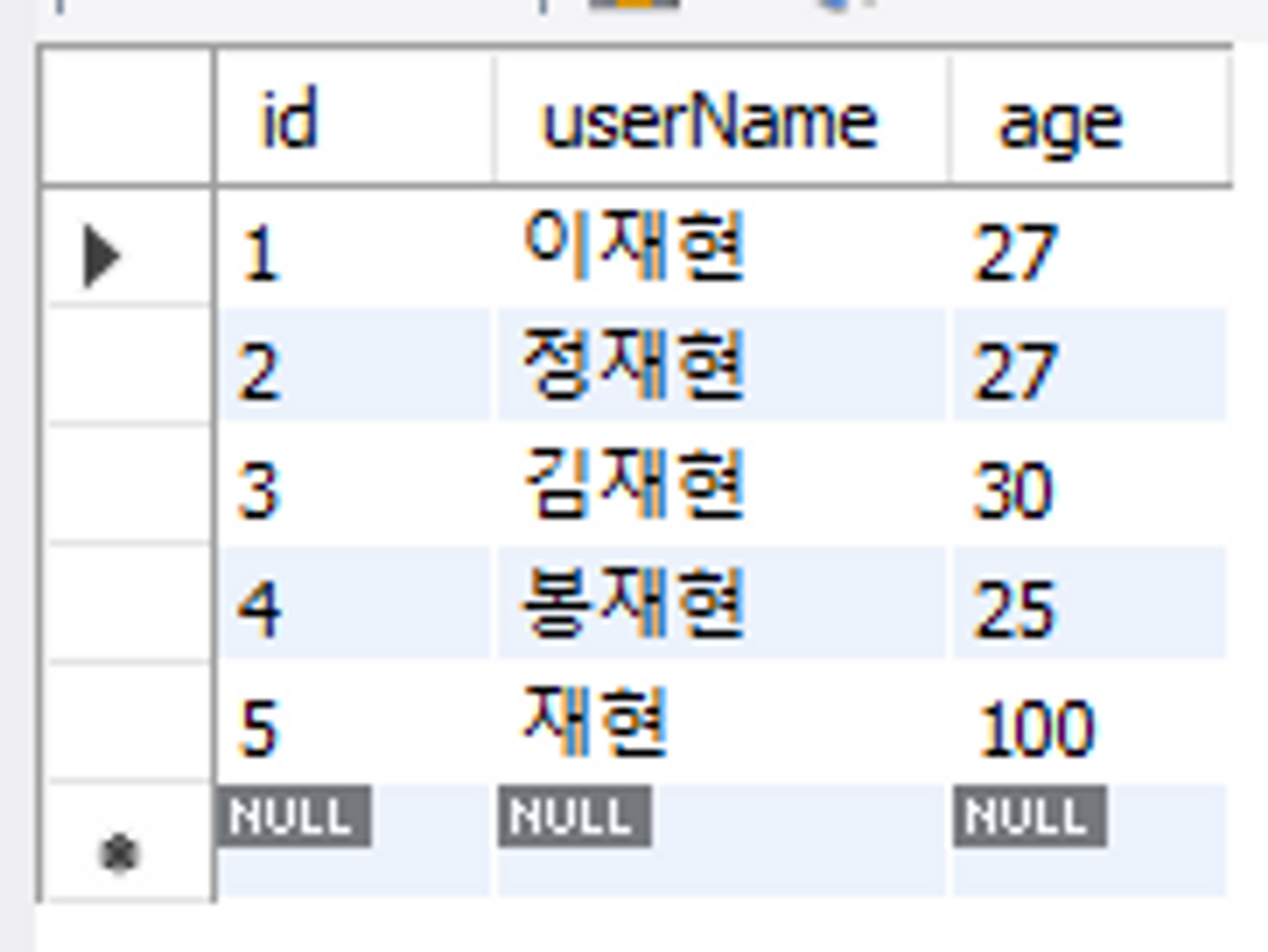
-- 자동증가숫자의 마지막 숫자 조회하는 방법.
select last_insert_id();

-- 추가로 tlter talbe을 이용하여 자동 증가 숫자의 시작을 100으로 바꾼다.
alter table testTbl2 auto_increment = 100;
-- insert 해서 확인하기
insert into testTbl2
values (null, '김선우', 24);
새로운 테이블을 생성하여 AUTO_INCREMENT 속성 자유롭게 사용하기
create table testTbl3 (
	id int auto_increment primary key,
    userName char(3),
    age int
);

-- auto_increment 속성 시작값 설정
alter table testTbl3 auto_increment 1000;
-- auto_increment 증가값 설정
set @@auto_increment_increment = 3;
나. INSERT INTO문
- 삽입할 열 이름과 값을 저장
INSERT INTO table_name (column1, column2, column3, ...)
VALUES (value1, value2, value3, ...);- 테이블의 모든 열에 대한 값을 추가하는 경우 SQL 조회에서 열 이름을 지정할 필요가 없다.
INSERT INTO table_name VALUES (value1, value2, value3, ...);
💡 예시
create table testTbl1 (
	id int,
    userName char(3),
    age int
); -- 테이블 생성

-- 테이블 구조 확인
desc testTbl1;

-- 값을 입력하여 insert 하는 방식
insert into testTbl1 values (1, '홍길동', 20);

-- 열 이름을 지정하여 insert 하는 방식
insert into testTbl1 (id, userName, age)
values (2, '김선우', 24);

-- 입력하고 싶은 열만 지정해서 insert
insert into testTbl1 (id, userName)
values (3, '이재현');

-- 열 순서를 변경하여 insert
insert into testTbl1 (userName, age, id)
values ('김영훈', 27, 4);
**-- 주의사항: 이 경우는 입력될 수도 있고 아닐 수도 있다. (필드의 데이터 타입이 틀리면 입력이 안 된다.)**

-- 여러 개의 데이터 입력
insert into testTbl1 (id, userName, age)
values (5, '이주연', 26),
	   (6, '최창민', 26),
       (7, '주학년', 25);
select * from testTbl1;
2. UPDATE
- update 문은 테이블의 기존 레코드를 수정하는데 사용된다.
✅ 형식
UPDATE table_name
SET column1 = value1, column2 = value2, ...
where condition
✦ 참고
→ 업데이트할 때는 where절을 확인하여 업데이트 한다.
→ where절을 생략하면 모든 레코드가 업데이트 된다.
💡예시 1
select *
from testTbl4
where Fname = 'Kyoichi';

update testTbl4
set Lname = '없음'
where Fname = 'Kyoichi';

-- 업데이트 전에 꼭 원하는 데이터가 나오는지 확인하고 진행한다.
💡예시 2
UPDATE buytbl SET price = price * 1.5;
-- update 에서는 대입연산자 / where에서는 비교연산자
-- 다양하게 사용된다는 걸 알아두기
select * from buytbl;
3. DELETE
테이블의 기존 레코드를 삭제하는데 사용된다.
✅ 형식
DELETE FROM table_name WHERE condition;
예제 1️⃣
-- 상위 5건만 삭제해보기
delete from testTbl4
where Fname = 'Asmer'
limit 5;

select * from testTbl4
where Fname = 'Aamer';
예제 2️⃣
use sqldb;
create table bihTbl1 as
	select * from employees.employees;
create table bihTbl2 (select * from employees.employees);
create table bihTbl3 (select * from employees.employees);

delete from bihTbl1; -- 실행시간 : 1.640sec
drop table bihTbl2; -- 실행시간 : 0.015sec
truncate table bihTbl3; -- 실행시간 : 0.031sec
-- DML인 delete는 트랜젝션 로그를 기록하는 작업 떄문에 삭제가 오래 걸린다.
-- DDL인 drop은 테이블 자체를 삭제한다. (트랜젝션 발생 x)
-- DDL TRUNCATE 문의 효과는 delete와 동일하지만 트랜젝션을 발생시키지 않으므로 속도가 빠르다.
예제 3️⃣
use sqldb;
create table memberTBL (
	select userID, name, addr
    from usertbl
    limit 3
);
desc memberTBL; -- 확인해보면 primary 키는 복사 안 됨 = 추가적인 작업이 필요함.

-- userID를 primary key로 수정하기 위한 구조 변경
alter table memberTBL
add constraint pk_memberTML primary key (userID); -- 제약 조건 추가하기
desc memberTBL;

-- 데이터 입력 (중복 에러)
insert into memberTBL value ('BBK', '비비코', '미국'); -- 에러
insert into memberTBL value ('SJH', '서장훈', '서울');
insert into memberTBL value ('HJY', '현주엽', '경기');
select * from memberTBL;

-- insert ignore 문으로 변경
insert ignore into memberTBL value ('BBK', '비비코', '미국');
insert ignore into memberTBL value ('SJH', '서장훈', '서울');
insert ignore into memberTBL value ('HJY', '현주엽', '경기');
select * from memberTBL;
-- pk 중복이더라도 오류를 발생시키지 않고 무시하면서 넘어간다. [패널에는 중복 키 경고 메시지가 보임]
-- 입력시에 기본 키가 중복되면 데이터를 수정
insert into memberTBL values ('BBK', '비비코', '미국')
	on duplicate key update name = '비비코', addr = '미국';
insert into memberTBL values ('DJM', '동짜몽', '일본')
	on duplicate key update name = '동짜몽', addr = '일본';
select * from memberTBL;
-- pk 중복은 update / pk 중복이 아닐 경우 insert 문이 실행된다.
큐트걸