🌿 Controls
컨트롤은 화면의 동작과 모양을 정의하는데 사용됩니다
🌱 Text 클래스로 Hello World 찍기
sap.ui.define([
    "sap/ui/core/mvc/Controller",
    "sap/m/Text"
],
function (Controller, Text) {
    "use strict";

    return Controller.extend("class05.ui501.controller.View1", {
        onInit: function () {
            new Text({
                text: "Hello World"
            }).placeAt("content");
        }
    });
});
패키지 경로 추가
define 배열에 "sap/m/Text" 추가
매개변수에 Text 추가
이때 JS에서 [대괄호]는 배열을 의미하므로 순서대로 맵핑하여 작성해야한다
Text 프로퍼티 설정
onInit에 placeAt 메소드 사용하여 Hello World 입력
placeAt : 화면에 나타내는 메소드
onInit : MVC 방식에서 View 나타나기 전 호출
🌿 패키지 경로
"sap/m/Text": sap 밑에 m 경로에 Text 폴더 쓴다고 미리 선언
sap.m.Text: 미리 선언하지 않고 class 경로 직접 쓸 때
상단에 "sap/m/Text"선언하지 않는다면, 아래와 같이 클래스마다 함수 내부에 sap.m.Text선언하여 경로 알려주기
sap.ui.define([
    "sap/ui/core/mvc/Controller"
],
function (Controller) {
    "use strict";

    return Controller.extend("js.edu.jsedu.controller.View1", {
        onInit: function () {
        	new sap.m.Text({
                text: "Hello SYNC Class 5"
            }).placeAt("content");
        }
    });
});
🌿 API에서 메소드 찾기
🔗 API 에서 sap.m.text 검색
        onInit: function () {
        	var t = new Text();

            t.setText("Class 5 Fighting!")
            t.placeAt("content");
            //두 메소드의 순서가 바뀌어도 정상 작동
        }
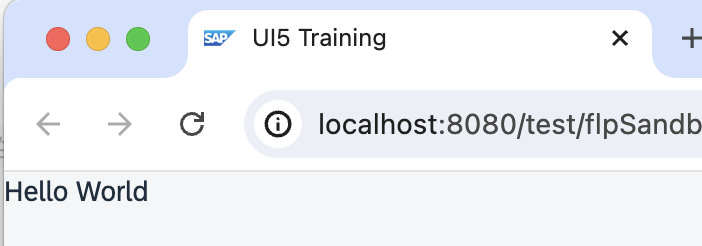
결과
다음 경로 통해 결과 확인
Webapp > Preview Application > open index
멋쟁이 토마토