객체들을 트리 구조로 구성해 해당 구조를 개별 객체처럼 다룰 수 있게 해주는 구조 패턴문제
앱의 핵심 모델이 트리로 표현될 수 있을 때만 컴포지트 패턴 사용 가능
Product와 Box 두 종류의 객체가 있다고 가정
Box에는 여러 개의 Product와 더 작은 Box들을 넣을 수 있음
해당 클래스들을 사용해 주문 시스템을 만들 때, 박스 안에 제품들이 있는 박스 등등의 주문의 총 가격을 어떻게 계산할 것인가?
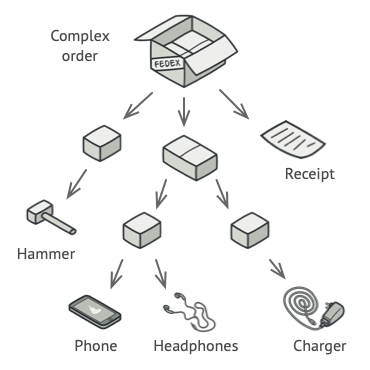
현실에서는 박스를 모두 열어 안에 들어있는 제품들의 총 가격을 계산하면 되지만, 프로그램에서는 Product와 Box의 클래스들, 상자의 중첩 수준 등등의 세부 사항들을 미리 알고 있어야 하기 때문에 어렵거나 불가능
해결책
컴포지트 패턴 - 총 가격을 계산하는 메서드를 선언하는 공통 인터페이스를 통해 Product와 Box들을 다룸
Product - 단순히 제품의 가격 반환
Box - 박스 내부의 각각의 요소에게 가격을 물어보고 총 가격 반환, 박스 안에 박스가 또 있으면 모든 내부 요소들의 가격이 계산될 때까지 재귀적으로 반복
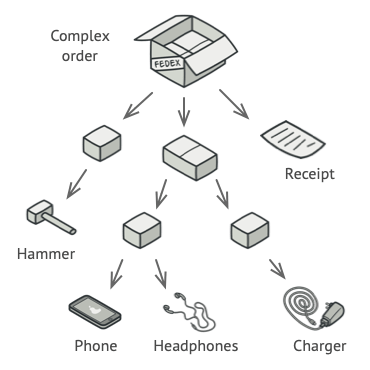
가장 큰 이점 - 트리를 구성하는 객체들의 concrete 클래스를 신경 쓰지 않아도 됨, 모두 공통 인터페이스를 통해 똑같이 처리
구조
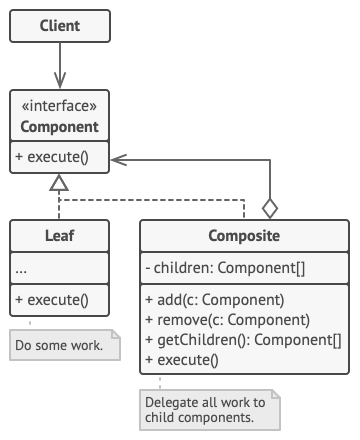
1. 컴포넌트 인터페이스 - 트리의 단순한 요소와 복잡한 요소에게 모두 공통되는 작업 묘사

2. 리프 - 자식 요소가 없는 트리의 기본 요소
    - 더 이상 작업을 위임할 곳이 없기 때문에 주로 리프가 대부분의 실제 작업 수행

3. 컨테이너 (컴포지트) - 자식 요소(리프 또는 다른 컨테이너)를 가지는 요소
    - 자식의 concrete 클래스를 알지 못함
    - 모든 자식 요소들과 컴포넌트 인터페이스를 통해서만 소통
    - 요청을 받으면 컨테이너는 자식 요소에게 작업을 위임하고 중간 결과를 처리해 최종 결과를 클라이언트에게 반환

4. 클라이언트 - 컴포넌트 인터페이스를 통해 모든 요소를 다룸
               → 트리의 단순한 요소와 복잡한 요소 모두 같은 방식으로 다루게 됨
적용
트리와 같은 객체 구조를 구현해야 하는 경우
- 컴포지트 패턴 - 공통 인터페이스를 공유하는 리프와 컨테이너 요소 제공
                → 트리를 닮은 중첩된 재귀 객체 구조를 만들 수 있게 해줌
클라이언트 코드가 단순한 요소와 복잡한 요소를 동일하게 취급해야 하는 경우
- 컴포지트 패턴에 의해 정의된 모든 요소들은 공통 인터페이스를 공유
  → 클라이언트는 공유 인터페이스를 사용하면 다루고자 하는 객체의 concrete 클래스를 신경쓰지 않아도 됨
구현방법
1. 앱의 핵심 모델이 트리로 표현될 수 있는지 확인
    - 단순한 요소와 컨테이너들로 나누기
    - 컨테이너들은 단순한 요소와 다른 컨테이너 모두 포함할 수 있어야 함

2. 단순한 요소와 복잡한 요소 모두에게 적용되는 메서드들의 리스트를 포함한 컴포넌트 인터페이스 선언

3. 단순한 요소를 나타내는 리프 클래스 생성
    - 여러 다른 종류의 리프 클래스가 있을 수 있음

4. 복잡한 요소를 나타내는 컨테이너 클래스 생성
    - 클래스 내부에 자식 요소들에 대한 참조를 저장할 배열 필드 제공
    - 배열은 리프와 컨테이너 모두 저장할 수 있어야 하기 때문에 컴포넌트 인터페이스 타입으로 선언
    - 컴포넌트 인터페이스 메서드를 구현할 때, 컨테이너는 대부분의 일을 자식 요소에 위임해야 한다는 걸 고려

5. 컨테이너에 자식 요소를 추가/삭제하는 메서드 정의
    - 해당 작업들은 컴포넌트 인터페이스 안에 정의될 수 있음
      → 리프 클래스에서 해당 메서드들이 비어있게 되기 때문에 ISP를 위반하게 됨,
        하지만 클라이언트가 트리를 구성할 때에도 모든 요소를 동등하게 처리할 수 있게 됨
장단점
장점
- 다형성과 재귀를 이용하며 복잡한 트리 구조를 더 쉽게 다룰 수 있음
- OCP - 객체 트리와 작동하는 기존 코드를 훼손하지 않고 새로운 유형의 요소를 도입할 수 있음
단점
- 기능이 많이 다른 클래스들에게 공통 인터페이스 제공하기 어려움,
  특정 상황에서는 컴포넌트 인터페이스를 과도하게 일반화하게 돼서 이해하기가 어려워질 수 있음
다른 패턴과의 관계
- 복잡한 컴포지트 패턴의 트리를 생성할 때 생성 단계를 재귀적으로 구성한 빌더 패턴 사용 가능

- 책임 연쇄 패턴 - 종종 컴포지트 패턴과 함께 사용
  - 리프 요소가 요청을 받으면, 객체 트리의 루트까지 연쇄적으로 전달

- 이터레이터 패턴을 사용해 컴포지트 트리 순회 가능

- 비지터 패턴을 사용해 컴포지트 트리 전체에 작업 실행 가능

- 컴포지트 트리의 공유된 리프 노드들을 플라이웨이트 패턴으로 구현해 RAM 절약 가능

- 컴포지트 패턴과 데코레이터 패턴 모두 재귀적 구성에 의존해
  다수의 객체들을 정리하기 때문에 비슷한 구조 다이어그램을 가짐
  - 데코레이터 패턴 - 컴포지트 패턴과 비슷하지만 하나의 자식 컴포넌트만 가짐
  - 데코레이터 패턴 - 래핑된 객체에 추가적인 책임을 부여
  - 컴포지트 패턴 - 자식들의 결과를 종합하기만 함
  - 서로 협력 가능 - 데코레이터를 사용해 컴포지트 트리의 특정 객체의 행위를 확장

- 컴포지트 패턴과 데코레이터 패턴을 많이 사용하는 설계는 프로토타입 패턴을 통해 이득을 볼 수 있음
  → 복잡한 구조를 처음부터 재구축하는 대신 복제할 수 있게 해줌
TypeScript 예제
/**
 * The base Component class declares common operations for both simple and
 * complex objects of a composition.
 */
abstract class Component {
    protected parent!: Component | null;

    /**
     * Optionally, the base Component can declare an interface for setting and
     * accessing a parent of the component in a tree structure. It can also
     * provide some default implementation for these methods.
     */
    public setParent(parent: Component | null) {
        this.parent = parent;
    }

    public getParent(): Component | null {
        return this.parent;
    }

    /**
     * In some cases, it would be beneficial to define the child-management
     * operations right in the base Component class. This way, you won't need to
     * expose any concrete component classes to the client code, even during the
     * object tree assembly. The downside is that these methods will be empty
     * for the leaf-level components.
     */
    public add(component: Component): void { }

    public remove(component: Component): void { }

    /**
     * You can provide a method that lets the client code figure out whether a
     * component can bear children.
     */
    public isComposite(): boolean {
        return false;
    }

    /**
     * The base Component may implement some default behavior or leave it to
     * concrete classes (by declaring the method containing the behavior as
     * "abstract").
     */
    public abstract operation(): string;
}

/**
 * The Leaf class represents the end objects of a composition. A leaf can't have
 * any children.
 *
 * Usually, it's the Leaf objects that do the actual work, whereas Composite
 * objects only delegate to their sub-components.
 */
class Leaf extends Component {
    public operation(): string {
        return 'Leaf';
    }
}

/**
 * The Composite class represents the complex components that may have children.
 * Usually, the Composite objects delegate the actual work to their children and
 * then "sum-up" the result.
 */
class Composite extends Component {
    protected children: Component[] = [];

    /**
     * A composite object can add or remove other components (both simple or
     * complex) to or from its child list.
     */
    public add(component: Component): void {
        this.children.push(component);
        component.setParent(this);
    }

    public remove(component: Component): void {
        const componentIndex = this.children.indexOf(component);
        this.children.splice(componentIndex, 1);

        component.setParent(null);
    }

    public isComposite(): boolean {
        return true;
    }

    /**
     * The Composite executes its primary logic in a particular way. It
     * traverses recursively through all its children, collecting and summing
     * their results. Since the composite's children pass these calls to their
     * children and so forth, the whole object tree is traversed as a result.
     */
    public operation(): string {
        const results = [];
        for (const child of this.children) {
            results.push(child.operation());
        }

        return `Branch(${results.join('+')})`;
    }
}

/**
 * The client code works with all of the components via the base interface.
 */
function clientCode(component: Component) {
    // ...

    console.log(`RESULT: ${component.operation()}`);

    // ...
}

/**
 * This way the client code can support the simple leaf components...
 */
const simple = new Leaf();
console.log('Client: I\'ve got a simple component:');
clientCode(simple);
console.log('');

/**
 * ...as well as the complex composites.
 */
const tree = new Composite();
const branch1 = new Composite();
branch1.add(new Leaf());
branch1.add(new Leaf());
const branch2 = new Composite();
branch2.add(new Leaf());
tree.add(branch1);
tree.add(branch2);
console.log('Client: Now I\'ve got a composite tree:');
clientCode(tree);
console.log('');

/**
 * Thanks to the fact that the child-management operations are declared in the
 * base Component class, the client code can work with any component, simple or
 * complex, without depending on their concrete classes.
 */
function clientCode2(component1: Component, component2: Component) {
    // ...

    if (component1.isComposite()) {
        component1.add(component2);
    }
    console.log(`RESULT: ${component1.operation()}`);

    // ...
}

console.log('Client: I don\'t need to check the components classes even when managing the tree:');
clientCode2(tree, simple);
// Output.txt
Client: I've got a simple component:
RESULT: Leaf
Client: Now I've got a composite tree:
RESULT: Branch(Branch(Leaf+Leaf)+Branch(Leaf))
Client: I don't need to check the components classes even when managing the tree:
RESULT: Branch(Branch(Leaf+Leaf)+Branch(Leaf)+Leaf)참고 자료: Refactoring.guru