Automating Feedback Analysis Using n8n: A Technical Guide to Smarter Customer Insights
Introductio
In today's digital landscape, the volume of customer feedback is overwhelming—from support tickets to surveys and reviews. Manually analyzing this data is time-consuming, inefficient, and prone to errors. Enter n8n, the open-source automation tool that allows you to create powerful, no-code/low-code workflows to automate this process.
In this article, we will explore how to automate feedback analysis with n8n, including technical steps, sample workflow code, and best practices. If you're aiming to scale your customer feedback process, this guide is for you.
Why Automate Feedback Analysis?
Benefits:
- ✅ Real-time analysis of customer sentiment.
- ✅ Eliminate repetitive tasks like data export/import.
- ✅ Direct integration with tools like Google Sheets, Slack, Notion, and CRMs.
- ✅ Customize text analysis using AI (OpenAI, Hugging Face) or keyword extraction.
Step-by-Step: Building a Feedback Analyzer in n8n
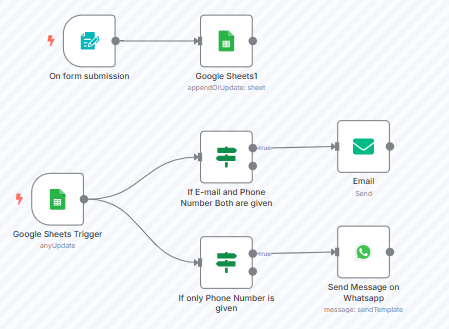
Let’s create a sample n8n workflow that:
- Fetches feedback from Google Sheets.
- Processes text using Sentiment Analysis API.
- Sends categorized feedback to Slack.
n8n Workflow Nodes Overview:
nodes:
  - name: Google Sheets
    type: GoogleSheets
    credentials: GoogleSheetsOAuth2Api
    parameters:
      operation: read
      sheetId: "your-sheet-id"
      range: "Feedback!A2:A100"
  - name: Sentiment Analysis
    type: HTTP Request
    parameters:
      url: "https://api.text-processing.com/sentiment/"
      method: POST
      bodyParameters:
        text: "{{$node['Google Sheets'].json['feedback']}}"
  - name: Slack Message
    type: Slack
    credentials: SlackOAuth2Api
    parameters:
      channel: "#feedback-channel"
      message: "New feedback: {{$node['Google Sheets'].json['feedback']}} | Sentiment: {{$node['Sentiment Analysis'].json['label']}}"
Best Practices for n8n Feedback Workflows:
1. Add Error Handling:
Use the 'Error Trigger' node to catch failed requests or API downtime gracefully.
2. Filter Irrelevant Data:
Implement 'IF' nodes to discard short or irrelevant feedback entries.
3. Enrich Data:
Use the 'OpenAI' node for deeper text classification like tagging or summarization.
Pro Tip: Make Your Workflow Modular
Split your n8n workflow into reusable parts:
- Input Block: Fetch from forms, sheets, or Typeform.
- Processing Block: Text analysis, sentiment scoring.
- Output Block: Push to Slack, Email, CRM.
This keeps maintenance and scaling easy!
Conclusion
Feedback analysis is no longer a tedious chore. With tools like n8n, developers and business teams can automate the entire pipeline—from data collection to insights delivery—without touching a line of backend code.
If you’re building custom automation for customer insights, check out n8n's community nodes and workflow templates to get started faster.