
소스코드 위치
/home/overwell24/Documents/assignment-remindergit clone
git clone https://github.com/overwell24/assignment-reminder.git .python 가상환경
python3 -m venv venv # 가상 환경 생성
source venv/bin/activate # 가상 환경 실행
pip install -r requirements.txt # 의존 모듈 설치
config.py 생성
# config.py

# 텔레그램 API
class TelegramConfig:
    API_TOKEN = ""
    CHAT_ID = 1234

# 로그인 정보
class TodoConfig:
    user_id = ""
    user_pw = ""
flask 가동 테스트
python main.pyWaring 발견

상용 서버로 사용한다면 WSGI 서버를 사용하라는 경고를 발견했다.
WSGI에 대해 검색해보니 정의는 아래와 같다.
Web Server Gateway Interface의 축약으로, 웹 서버와 파이썬으로 작성된 WAS 간의 표준 인터페이스이다.
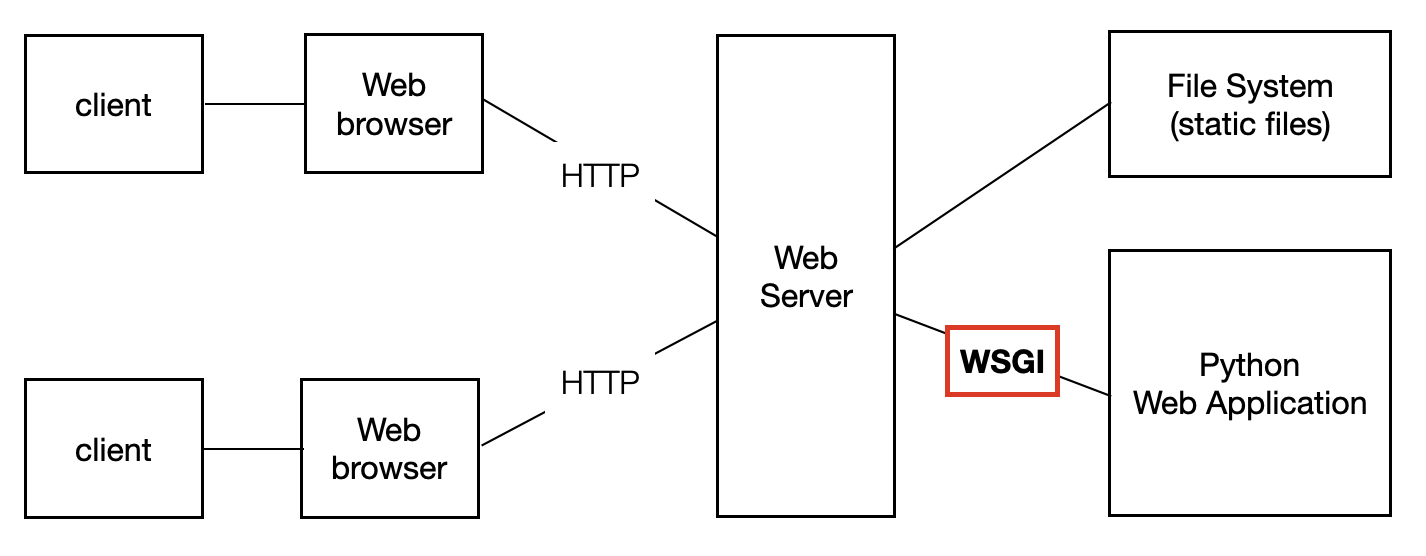
Flask에서 기본적으로 사용하는 WSGI Middleware는 Werkzeug으로 아주 간단한 기능만을 내장하고 있기 때문에 상용 서버에서는 Gunicorn 사용한다고 한다.
WSGI 서버
gunicorn 설치
pip install gunicorn wsgi.py 생성
# wsgi.py
from main import app

if __name__ == '__main__':
	app.run(host='127.0.0.1',port='5000')
테스트
gunicorn -w 1 --bind 127.0.0.1:5000 wsgi:app경고 메세지가 사라진다!

ubuntu 서비스 등록
service 위치 / 생성
cd /etc/systemd/system/
sudo vim assignment-reminder.service
assignment-reminder.service
# assignment-reminder.service
[Unit]
Descriptiogn=Flask assignment-reminder
After=network.target

[Service]
User=overwell24
Group=overwell24
ExecStart= /home/overwell24/Documents/assignment-reminder/venv/bin/python /home/overwell24/Documents/assignment-reminder/main.py /home/overwell24/Documents/assignment-reminder/venv/bin/gunicorn -w 1 --bind 0.0.0.0:5000 wsgi:app
WorkingDir=/home/overwell24/Documents/assignment-reminder
Restart=on-failure
RuntimeDirectoryMode=755

[Install]
WantedBy=multi-user.target
등록된 서비스 적용 및 사용법
sudo systemctl daemon-reload
sudo systemctl enable assignment-reminder.service  # 재부팅시 자동으로 서비스 재시작 (선택)
sudo systemctl start assignment-reminder.service
sudo systemctl status assignment-reminder.service
결과