
안드로이드 개발을 하면서 스크롤을 하여 데이터를 보여주는 UI는 한번쯤은 보셨을 것 같습니다. Paging Library에 대해서 아시는 분들은 페이징을 적용하여 한번에 데이터를 호출하는 것이 아닌 페이지 단위로 데이터를 호출하고 보여주면서 리소스를 효율적으로 사용을 하셨을텐데 BuddyCon에서도 동일하게 Paging Library를 사용하여 기프티콘 이미지들을 보여주었습니다.
Paging
사실 Paging 이라는 단어 자체는 안드로이드에서만 사용하는 것이 아닌 컴퓨터 분야 전반적인 곳에서 다양하게 사용합니다. 운영체제에서 Paging 기법을 통해 메모리 관리를 한다는 등 여러 곳에서 사용하지만 의미는 비슷하게 해석될 수 있습니다.
Android Jetpack Paging 라이브러리는 API 호출하거나 로컬 DB를 통해서 큰 데이터를 페이지 단위로 쪼개어 로드하고 표시할 수 있도록 하는 라이브러리입니다.
Paging Library Architecture
구글에서 Paging 라이브러리의 구성요소를 3가지 레이어를 통해 소개하고 있습니다.
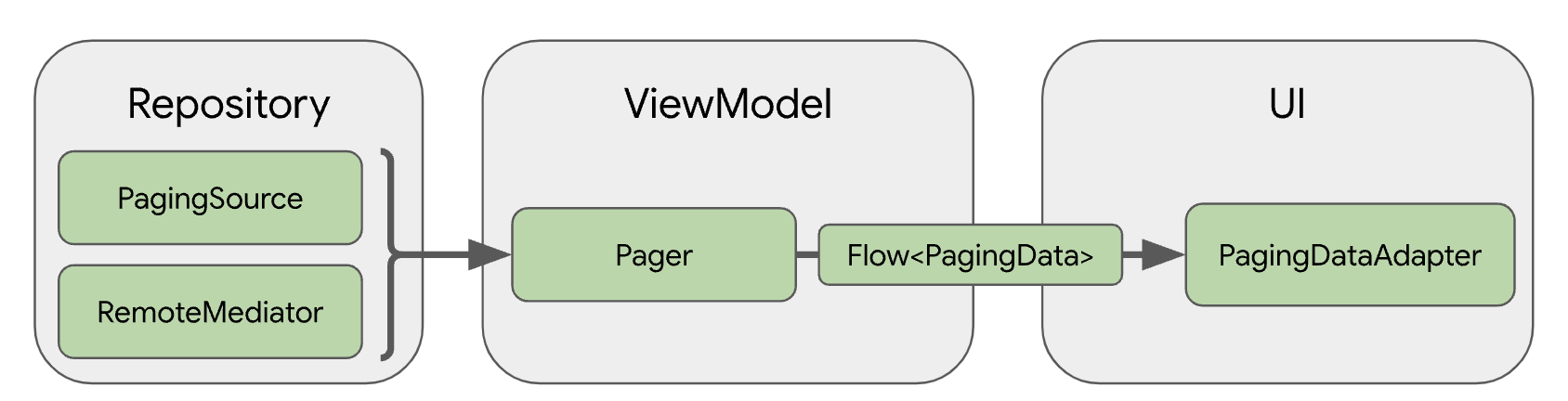
Repository
- PagingSource : 네트워크 또는 로컬 DB 와 같은 단일 데이터 소스
- RemoteMediator : 로컬 DB 캐시가 있는 네트워크 데이터 소스
ViewModel
- Pager : PagingSource와 PagingConfig 기반으로 Flow 형태로 PagingData를 제공
- PagingData : 페이지로 나눈 데이터 스냅샷을 보유하고 있는 Container
UI
- PagingDataAdapter : PagingData를 처리하는 RecyclerView의 어댑터
Compose의 경우에는 State 형태로 변경하는 API 제공하여 이를 통해 UI 갱신
정리하면, 데이터 소스(PagingSource or RemoteMediator)를 정의하고 Pager에 데이터 소스와 페이징 관련 Configuration 객체인 PagingConfig를 전달하여 생성합니다. 그렇게 하면 Pager를 통해 페이지로 나눈 데이터 스냅샷을 보유하고 있는 Container인 PagingData를 비동기 데이터 스트림(Flow) 형태로 제공하는 API를 사용할 수 있습니다.
BuddyCon 에서는 RemoteMediator를 데이터 소스로 채택하였습니다. 네트워크가 불안정한 상황에서라도 기프티콘은 사용을 할 수 있어야하므로 로컬 DB를 캐시로 하여 데이터를 제공하는 RemoteMediator를 사용하기로 하였습니다.
RemoteMediator
RemoteMediator는 앞서 서술했듯이 로컬 DB를 캐시로 가지고 있는 네트워크 데이터 소스입니다. 앱이 캐시된 데이터를 모두 사용한 경우 네트워크에서 추가 데이터를 로드하고 로컬 DB에 저장합니다.
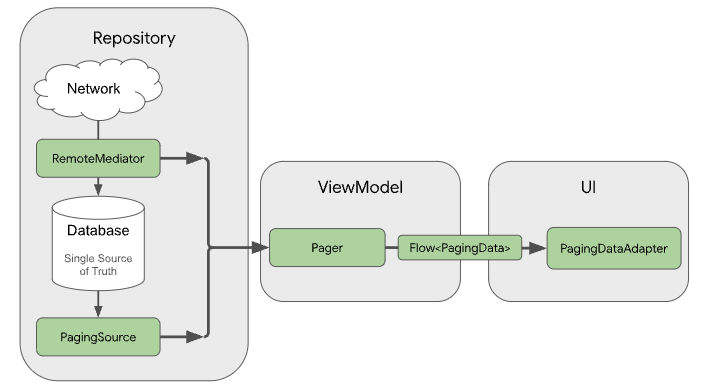
RemoteMediator는 네트워크에서 페이징된 데이터를 데이터베이스로 저장하지만 네트워크에서 전달받은 데이터를 가지고 UI를 갱신시키지는 않습니다. 데이터베이스에 저장 후 UI에서는 쿼리를 통해서 캐시된 데이터를 가져오고 UI에 로드하는 작업을 합니다. 공식 문서에서도 나와있지만 BuddyCon에서는 어떻게 RemoteMediator를 적용했는지 단계적으로 보여드리려고 합니다.
1. Room Entity 및 Database 생성
@Entity(tableName = "coupon")
data class CouponEntity(
    @PrimaryKey val id: Int,
    val imageUrl: String,
    val name: String,
    val expireDate: String,
    val createdAt: String,
    val usable: Boolean = false,
    val shared: Boolean = true,
    val couponType: CouponType = CouponType.GiftCon
) {
    fun toModel() = CouponItem(
        id = id,
        imageUrl = imageUrl,
        name = name,
        expireDate = expireDate,
        createdAt = createdAt,
        usable = usable,
        shared = shared,
        couponType = couponType
    )
}
Entity 클래스를 생성하여 데이터베이스 테이블 스키마를 정의해야합니다. Room 라이브러리에 대해서는 기본적으로 알고 있따는 전제하에 설명을 드리도록 하겠습니다. BuddyCon 에서는 기프티콘 데이터를 보여주어야 하기 때문에 CouponEntity를 다음과 같이 정의하였고 id를 Primary Key로 하였습니다.
@Dao
interface CouponDao {
    @Insert(onConflict = OnConflictStrategy.REPLACE)
    suspend fun insertAll(coupons: List<CouponEntity>)

    @Query("SELECT * FROM coupon ORDER BY shared, createdAt DESC")
    fun getCouponByShared(): PagingSource<Int, CouponEntity>

    @Query("SELECT * FROM coupon WHERE usable = :usable ORDER BY expireDate")
    fun getCouponByExpireDate(usable: Boolean): PagingSource<Int, CouponEntity>

    @Query("SELECT * FROM coupon WHERE usable = :usable ORDER BY name")
    fun getCouponByName(usable: Boolean): PagingSource<Int, CouponEntity>

    @Query("SELECT * FROM coupon WHERE usable = :usable ORDER BY createdAt")
    fun getCouponByCreatedAt(usable: Boolean): PagingSource<Int, CouponEntity>

    @Query("DELETE FROM coupon")
    suspend fun clearCoupon()
}
Room DAO를 정의하여 데이터와 상호작용을 할 수 있습니다. 각 DAO에는 앱 데이터베이스에 관한 추상 메소드가 포함되어 있고 컴파일 타임에 DAO가 자동으로 구현됩니다. 그래서 다음과 같이 CouponDao를 정의하였고 데이터 추가, 조회, 삭제 메소드들을 추가하였습니다. 또한 PagingSource를 반환하는 메소드가 존재하는데 RemoteMediator는 캐시된 데이터로 UI에 보여지기 때문에 DAO에 정의를 해야하며 Pager 생성 시에 사용하게 됩니다.
@Database(entities = [CouponEntity::class], version = 1)
@TypeConverters(Converters::class)
abstract class BuddyConDataBase : RoomDatabase() {
    abstract fun couponDao(): CouponDao
}
마지막으로 데이터베이스 구성을 정의하고 데이터에 대한 액세스 포인트 역할을 합니다.
2. RemoteMediator 구현
RemoteMediator의 기본 역할은 Pager가 데이터를 모두 사용했거나 기존 데이터가 무효화되었을 때 네트워크에서 더 많은 데이터를 로드하는 것입니다.
RemoteMediator<Key, Value> 구현을 위해 Key와 Value 두 유형 매개변수를 정의해야합니다.
- Key : 데이터를 로드하는데 사용되는 식별자
- Value : 데이터 자체 유형
@OptIn(ExperimentalPagingApi::class)
class CouponRemoteMediator(
    private val usable: Boolean,
    private val sort: SortMode,
    private val couponType: CouponType,
    private val service: CouponService,
    private val buddyConDataBase: BuddyConDataBase
) : RemoteMediator<Int, CouponEntity>() {
    override suspend fun load(
        loadType: LoadType,
        state: PagingState<Int, CouponEntity>
    ): MediatorResult {
    	// ...
    }
}
BuddyCon에서는 CouponEntity의 Primary Key를 id로 Int를 설정했기에 Key 는 Int, Value는 CouponEntity로 설정했습니다. RemoteMediator에서 데이터를 로드하는 load 메소드를 재정의해야합니다.
load()
parameter
- LoadType : REFRESH, APPEND, PREPEND 로 어느 페이지 또는 갱신 여부인지를 결정하는 로드 유형
- PagingState : 로드한 페이지, 가장 최근에 액세스한 index, 페이징 스트림 초기화에 관한 PagingConfig 정보 포함
Return
MediatorResult
- MediatorResult.Success(endOfPaginationReached = false) : 페이징 로드 성공, 수신된 항목이 비어있지 않고, 마지막 페이지 색인이 아닌 경우
- MediatorResult.Success(endOfPaginationReached = true) : 페이징 로드 성공, 수신된 항목 비어 있거나 마지막 페이지 색인
- MediatorResult.Error : 요청 에러
class CouponRemoteMediator(
    private val usable: Boolean,
    private val sort: SortMode,
    private val couponType: CouponType,
    private val service: CouponService,
    private val buddyConDataBase: BuddyConDataBase
) : RemoteMediator<Int, CouponEntity>() {
    override suspend fun load(
        loadType: LoadType,
        state: PagingState<Int, CouponEntity>
    ): MediatorResult {
        val page: Int = when (loadType) {
            LoadType.REFRESH -> {
                val remoteKey = getRemoteKeyInCurrentItem(state)
                remoteKey?.nextKey?.minus(1) ?: COUPON_START_PAEGING_INDEX
            }
            LoadType.APPEND -> {
                val remoteKey = getRemoteKeyInLastItem(state)
                val nextKey = remoteKey?.nextKey ?: return MediatorResult.Success(
                    endOfPaginationReached = remoteKey != null
                )
                nextKey
            }
            LoadType.PREPEND -> {
                val remoteKey = getRemoteKeyInFirstItem(state)
                val prevKey = remoteKey?.prevKey ?: return MediatorResult.Success(
                    endOfPaginationReached = remoteKey != null
                )
                prevKey
            }
        }

        try {
            val couponList = when (couponType) {
                CouponType.GiftCon -> service.requestGiftConList(
                    usable,
                    page,
                    state.config.pageSize,
                    sort.value
                )
                CouponType.Custom -> service.requestCustomCouponList(
                    usable,
                    page,
                    state.config.pageSize,
                    sort.value
                )
                CouponType.Made -> service.requestMadeCouponList(
                    page,
                    state.config.pageSize,
                    sort.value,
                    sort == SortMode.NoShared
                )
            }

            buddyConDataBase.withTransaction {
                if (loadType == LoadType.REFRESH) {
                    buddyConDataBase.couponDao().clearCoupon()
                    buddyConDataBase.couponRemoteKeysDao().clearCouponRemoteKeys()
                }

                val prevKey = if (page == COUPON_START_PAEGING_INDEX) null else page - 1
                val nextKey = if (couponList.isEmpty()) null else page + 1
                val keys = couponList.map { CouponRemoteKeysEntity(it.id, prevKey, nextKey) }
                buddyConDataBase.couponDao().insertAll(couponList.map {
                    it.toEntity(usable, couponType)
                })
                buddyConDataBase.couponRemoteKeysDao().insertAll(keys)
            }
            return MediatorResult.Success(couponList.isEmpty())
        } catch (e: IOException) {
            return MediatorResult.Error(e)
        } catch (e: HttpException) {
            return MediatorResult.Error(e)
        }
    }
	// ...
}
RemoteMediator load 구현은 살짝 복잡한데 단계별로 뜯어서 살펴보겠습니다. 하지만 아직 page 키 값을 정하는 것은 별도로 원격 키를 관리하도록 하였고 추후에 설명드리겠습니다. 간단하게 REFRESH 일 때는 가장 최근 액세스한 페이징 인덱스이고 APPEND는 다음 페이지, PREPEND는 이전 페이지 인덱스라고 생각하시면 됩니다.
그리고 계산된 page 값으로 API 호출 후 데이터베이스에 저장을 하시면 됩니다. BuddyCon 프로젝트에서는 couponType에 따라 API가 다양하지만 결국 반환된 값은 CouponEntity 로 동일합니다. 네트워크 요청 후 DB에 저장을 하거나 LoadType이 REFRESH 일 경우 기존에 저장된 데이터베이스를 초기화 후에 저장하도록 하였습니다.
Remote Key 관리
RemoteMediator 로드하는데 page 키 값이 필수로 있어야 하는데 현재까지 페이징된 데이터를 가지고 다음 page 키를 알아내도록 하기가 쉽지 않아 원격 키를 별도로 저장하고 관리해야 합니다. (서버에서 다음 키를 제공해준다거나 하지 않으면 클라이언트에서는 어려움..😢)
따라서 BuddyCon에서는 페이지 키도 로컬 DB에서 저장하고 관리하여 RemoteMediator 로드하는데 참조할 키를 조회하도록 구현을 하였습니다.
@Entity(tableName = "coupon_remote_keys")
data class CouponRemoteKeysEntity(
    @PrimaryKey val id: Int,
    val prevKey: Int?,
    val nextKey: Int?
)

@Dao
interface CouponRemoteKeysDao {
    @Insert(onConflict = OnConflictStrategy.REPLACE)
    suspend fun insertAll(remoteKeys: List<CouponRemoteKeysEntity>)

    @Query("SELECT * FROM coupon_remote_keys WHERE id = :id")
    suspend fun getCouponRemoteKey(id: Int): CouponRemoteKeysEntity

    @Query("DELETE FROM coupon_remote_keys")
    suspend fun clearCouponRemoteKeys()
}

@Database(entities = [CouponEntity::class, CouponRemoteKeysEntity::class], version = 1)
@TypeConverters(Converters::class)
abstract class BuddyConDataBase : RoomDatabase() {
    abstract fun couponDao(): CouponDao
    abstract fun couponRemoteKeysDao(): CouponRemoteKeysDao
}
위에서 CouponEntity와 동일하게 Room DB 사용하였고 CouponRemoteKeysEntity에서 현재 조회할 페이지 키에 해당하는 Primary Key인 id와 prevKey, nextKey를 프로퍼티로 가지게 하였습니다. 특별하게 알아야할 메소드는 getCouponRemoteKey로 CouponEntity의 id 값으로 CouponeRemoteKeyEntity를 조회하는 함수입니다.
이제 위에서 pageKey를 생성하기 위해 호출하는 여러 메소드들에 대해서 알아보겠습니다.
    private suspend fun getRemoteKeyInLastItem(state: PagingState<Int, CouponEntity>): CouponRemoteKeysEntity? {
        return state.lastItemOrNull()?.let { couponEntity ->
                buddyConDataBase.couponRemoteKeysDao().getCouponRemoteKey(couponEntity.id)
            }
    }


    // PageState의 lastItemOrNull 함수

     /**
     * @return The last loaded item in the list or `null` if all loaded pages are empty or no pages
     * were loaded when this [PagingState] was created.
     */
    public fun lastItemOrNull(): Value? {
        return pages.lastOrNull { it.data.isNotEmpty() }?.data?.lastOrNull()
    }
load 메소드에서는 PagingState를 파라미터로 전달하고 State를 통해 현재까지 페이징된 데이터의 마지막 아이템을 알 수 있습니다. 이를 통해 페이징된 데이터의 마지막 아이템을 조회하고 null이 아니면 조회된 CouponEntity의 id를 통해 CouponRemoteKey를 가져오도록 하고 있습니다. getRemoteKeyInLastItem은 마지막 아이템으로 Remote Key를 가져오는 메소드라고 보시면 됩니다.
  private suspend fun getRemoteKeyInFirstItem(state: PagingState<Int, CouponEntity>): CouponRemoteKeysEntity? {
        return state.firstItemOrNull()?.let { couponEntity ->
                buddyConDataBase.couponRemoteKeysDao().getCouponRemoteKey(couponEntity.id)
            }
    }

    private suspend fun getRemoteKeyInCurrentItem(state: PagingState<Int, CouponEntity>): CouponRemoteKeysEntity? {
        return state.anchorPosition?.let { position ->
            state.closestItemToPosition(position)?.id?.let { id ->
                buddyConDataBase.couponRemoteKeysDao().getCouponRemoteKey(id)
            }
        }
    }
비슷하게 getRemoteKeyInFirstItem과 getRemoteKeyInCurrentItem 메소드도 정의하였고 현재까지 페이징된 데이터 시작부분의 첫번째 아이템으로 Remote Key를 조회하는 함수와 최근에 액세스한 페이징 데이터의 아이템으로 Remote Key를 조회하는 함수입니다.
@OptIn(ExperimentalPagingApi::class)
class CouponRemoteMediator(
    private val usable: Boolean,
    private val sort: SortMode,
    private val couponType: CouponType,
    private val service: CouponService,
    private val buddyConDataBase: BuddyConDataBase
) : RemoteMediator<Int, CouponEntity>() {
    override suspend fun load(
        loadType: LoadType,
        state: PagingState<Int, CouponEntity>
    ): MediatorResult {
        val page: Int = when (loadType) {
            LoadType.REFRESH -> {
                val remoteKey = getRemoteKeyInCurrentItem(state)
                remoteKey?.nextKey?.minus(1) ?: COUPON_START_PAEGING_INDEX
            }
            LoadType.APPEND -> {
                val remoteKey = getRemoteKeyInLastItem(state)
                val nextKey = remoteKey?.nextKey ?: return MediatorResult.Success(
                    endOfPaginationReached = remoteKey != null
                )
                nextKey
            }
            LoadType.PREPEND -> {
                val remoteKey = getRemoteKeyInFirstItem(state)
                val prevKey = remoteKey?.prevKey ?: return MediatorResult.Success(
                    endOfPaginationReached = remoteKey != null
                )
                prevKey
            }
        }

        // ...
이제는 page 키 값을 구하는 로직을 쉽게 이해하실 수 있을 것입니다.
- LoadType == REFRESH
최근 액세스한 페이징 데이터의 아이템을 통해 RemoteKey 조회 -> RemoteKey.nextKey - 1 - LoadType == APPEND
마지막 페이징 데이터의 아이템을 통해 RemoteKey 조회 -> RemoteKey.nextKey - LoadType == PREPEND
첫 번째 페이징된 데이터의 아이템을 통해 RemoteKey 조회 -> RemoteKey.prevKey
만약, LoadType이 APPEND일 때 nextKey가 null이면 remoteKey 값의 유무에 따라 endOfPaginationReached 값을 설정하게 되고 LoadType이 PREPEND도 비슷하게 prevKey가 null이면 그에 따라 remoteKey 값을 보고 endOfPaginationReached 를 설정하시면 됩니다.
  override suspend fun load(
        loadType: LoadType,
        state: PagingState<Int, CouponEntity>
    ): MediatorResult {
		// ...
            buddyConDataBase.withTransaction {
                if (loadType == LoadType.REFRESH) {
                    buddyConDataBase.couponDao().clearCoupon()
                    buddyConDataBase.couponRemoteKeysDao().clearCouponRemoteKeys()
                }

                val prevKey = if (page == COUPON_START_PAEGING_INDEX) null else page - 1
                val nextKey = if (couponList.isEmpty()) null else page + 1
                val keys = couponList.map { CouponRemoteKeysEntity(it.id, prevKey, nextKey) }
                buddyConDataBase.couponDao().insertAll(couponList.map {
                    it.toEntity(usable, couponType)
                })
                buddyConDataBase.couponRemoteKeysDao().insertAll(keys)
            }
        // ...
마지막으로 네트워크 호출 이후 로드한 데이터를 가지고 로컬 DB에 저장을 하고 동시에 CouponRemoteKeyEntity도 함께 저장을 해야합니다. LoadType이 REFRESH일 경우는 기존에 저장된 데이터베이스를 초기화하고 다시 저장을 하면 데이터 갱신이 발생하게 될 것입니다.
initialize()
RemoteMediator는 initialize 함수를 통해 캐시된 데이터가 오래 되었으면 새로고침 하도록 할 수 있습니다.
override suspend fun initialize(): InitializeAction {
  val cacheTimeout = TimeUnit.MILLISECONDS.convert(1, TimeUnit.HOURS)
  return if (System.currentTimeMillis() - db.lastUpdated() <= cacheTimeout)
  {
    // Cached data is up-to-date, so there is no need to re-fetch
    // from the network.
    InitializeAction.SKIP_INITIAL_REFRESH
  } else {
    // Need to refresh cached data from network; returning
    // LAUNCH_INITIAL_REFRESH here will also block RemoteMediator's
    // APPEND and PREPEND from running until REFRESH succeeds.
    InitializeAction.LAUNCH_INITIAL_REFRESH
  }
}
initialize는 오버라이딩 하지 않으면 기본적으로 LAUNCH_INITIAL_REFRESH 로 항상 새로고침을 하게 됩니다. BuddyCon에서는 항상 새로고침하여 캐시된 데이터를 갱신하도록 하여 별도로 오버라이딩은 하지 않았습니다.
Pager
페이징의 진입점에 해당하는 Pager를 생성하여 PagingData를 스트림으로 제공할 수 있도록 해야합니다.
class CouponRepositoryImpl @Inject constructor(
    private val couponService: CouponService,
    private val buddyConDataBase: BuddyConDataBase
) : CouponRepository {

    @OptIn(ExperimentalPagingApi::class)
    override fun getCouponList(
        usable: Boolean,
        sort: SortMode,
        couponType: CouponType
    ): Flow<PagingData<CouponItem>> = Pager(
        config = PagingConfig(pageSize = COUPON_PAGE_SIZE, enablePlaceholders = false),
        remoteMediator = CouponRemoteMediator(
            if(couponType == CouponType.Made) false else usable,
            sort,
            couponType,
            couponService,
            buddyConDataBase
        ),
        pagingSourceFactory = {
            when (sort) {
                SortMode.NoShared -> {
                    buddyConDataBase.couponDao().getCouponByShared()
                }
                SortMode.ExpireDate -> {
                    buddyConDataBase.couponDao().getCouponByExpireDate(usable)
                }
                SortMode.Name -> {
                    buddyConDataBase.couponDao().getCouponByName(usable)
                }
                SortMode.CreatedAt -> {
                    buddyConDataBase.couponDao().getCouponByCreatedAt(usable)
                }
            }
        }
    ).flow.map { data ->
        data.map { it.toModel() }
    }
- Config : Paging 구성요소
- RemoteMediator : 구현체
- PagingSourceFactory : DAO에서 제공하는 PagingSource
ViewModel에서 pager를 통해 Flow를 생성 시에 cachedIn 메소드를 함께 사용하여 메모리 캐시에 데이터를 저장하도록 해야합니다. 그렇지 않으면 매번 페이징 로드 시에 네트워크 또는 로컬 DB 쿼리하는 작업을 하게 되니 이 점 유의하시면 좋을 것 같습니다.
// create a Pager instance and store to a variable
val pager = Pager(
     ...
     )
     .flow
     .cachedIn(viewModelScope)
Reference
- https://developer.android.com/topic/libraries/architecture/paging/v3-network-db?hl=ko#create-pager
- https://developer.android.com/reference/kotlin/androidx/paging/Pager
- https://developer.android.com/topic/libraries/architecture/paging/v3-overview?hl=ko
- https://developer.android.com/codelabs/android-paging?hl=ko#0