결측치 확인 및 처리
목적 : 병원 개/폐업 을 예측 ( OC 값이 open = 1, cloase = 0)
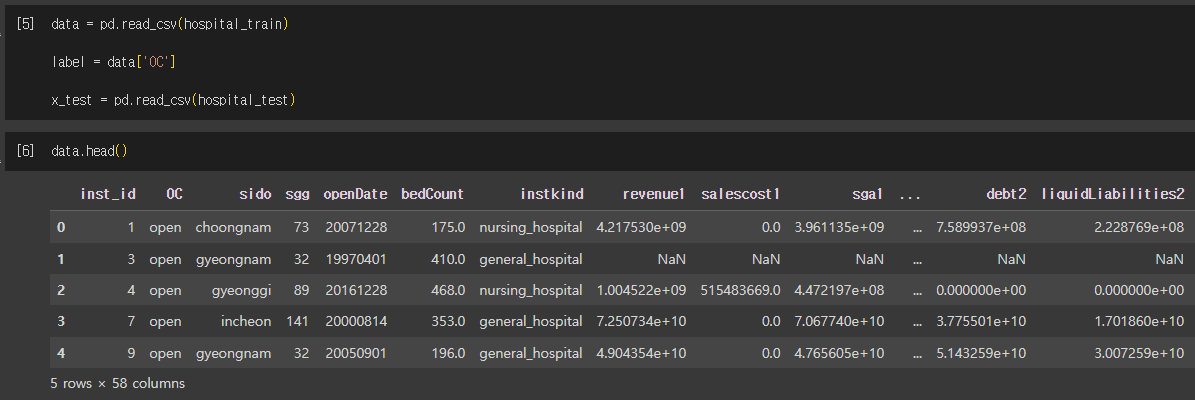
test 데이터를 확인해보니 employee1, employee2컬럼이 범주형 데이터로 되어있있다.
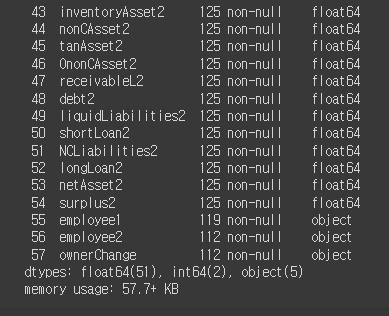
-> 실수형이어야 하는데 확인을 해보니 123,123 처럼 3자리수마다 콤마가 찍혀있어서 object로 표현되어있다.
따라서 이 부분을 astype() 함수로 자료형을 변경해줘야한다.
x_test['employee1'] = x_test['employee1'].astype(np.float64)
x_test['employee2'] = x_test['employee2'].astype(np.float64)
을 해주면 에러가 뜬다.(콤마 때문)
해결하기
# 발생한 에러처리
x_test['employee1'] = x_test['employee1'].map(lambda x: x.replace(',', '') if isinstance(x, str) else x)
x_test['employee2'] = x_test['employee2'].map(lambda x: x.replace(',', '') if isinstance(x, str) else x)

# 자료형 변경
x_test['employee1'] = x_test['employee1'].astype(np.float64)
x_test['employee2'] = x_test['employee2'].astype(np.float64)
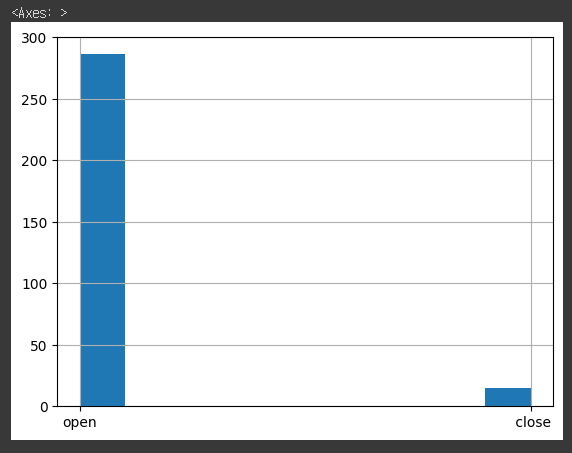
data['OC'].hist() 로 확인해보니 클래스가 불균형하다
openDate 컬럼은 병원이 개업한 년월일로 일단 실습에서 필요없어서 삭제.
data.drop(columns=['OC', 'inst_id', 'openDate'], inplace=True)

x_test.drop(columns=['OC', 'inst_id', 'openDate'], inplace=True)
수치형, 범주형 변수 나누기
# DF.info에서 Object type을 가진 컬럼은 모두 범주형 변수
cat_columns = data.select_dtypes(include='object').columns
num_columns = data.select_dtypes(exclude='object').columns
데이터 쪼개기 (train, valid)
- train_test_split 파라미터
- test_size (float): Valid(test)의 크기의 비율을 지정
- random_state (int): 데이터를 쪼갤 때 내부적으로 사용되는 난수 값 (해당 값을 지정하지 않으면 매번 달라집니다.)
- shuffle (bool): 데이터를 쪼갤 때 섞을지 유무
- stratify (array): Stratify란, 쪼개기 이전의 클래스 비율을 쪼개고 나서도 유지하기 위해 설정해야하는 값입니다. 클래스 라벨을 넣어주면 됩니다.
x_train, x_valid, y_train, y_valid = train_test_split(data, label,
                                                      test_size=0.3,
                                                      shuffle=True,
                                                      stratify=label)
# 쪼갠 데이터의 인덱스는 정리해주는것이 좋습니다. pd.concat 연산 시, 인덱스를 기준으로 연결하기 때문입니다.
# drop 인자를 True로 주지 않으면 이전 인덱스가 새로운 변수로 생성됩니다.
x_train = x_train.reset_index(drop=True)
x_valid = x_valid.reset_index(drop=True)데이터 전처리 실습
- x_train 데이터로 MICE(수치형 변수)처리와 최빈값(범주형 변수)을 이용해 x_train, x_valid 데이터의 결측값을 처리
결측치 처리
수치형 변수 MICE 처리
from sklearn.experimental import enable_iterative_imputer
from sklearn.impute import IterativeImputer

# fit은 train 데이터에만 해야한다!
# 우리는 train의 분포에 맞게 모델을 학습 시킨걸 기준으로 valid, test에 적용시켜야 하기 때문이다
# (예측할 때 이 값이 train의 어떤 데이터에 가깝다라고 예측시켜야함)
x_train[num_columns] = imputer.fit_transform(x_train[num_columns])
x_valid[num_columns] = imputer.transform(x_valid[num_columns])
x_test[num_columns]  = imputer.transform(x_test[num_columns])
# mode() 는 각 컬럼의 최빈값을 뽑아준다 (필요시 검색)
x_train_mode = x_train[cat_columns].mode()변주형 변수 최빈값 처리
for c in cat_columns:
    # x_train의 최빈 값으로 x_train, x_valid 범주형 변수 결측치 처리
    x_train.loc[pd.isna(x_train[c]), c] =  x_train_mode[c][0]
    x_valid.loc[pd.isna(x_valid[c]), c] =  x_train_mode[c][0]
    x_test.loc[pd.isna(x_test[c]), c]   =  x_train_mode[c][0]
확인
pd.isna(x_train).sum().sum(), pd.isna(x_valid).sum().sum(), pd.isna(x_test).sum().sum()
스케일링
x_train_mean = np.mean(x_train[num_columns], axis=0)
x_train_std  = np.std(x_train[num_columns], axis=0)

# Numpy 브로드캐스팅 기능을 활용해 x_train의 평균과 표준편차로 x_train, x_valid의 스케일링을 진행해줍니다.
x_train.loc[:, num_columns] = (x_train[num_columns] - x_train_mean) / (x_train_std + 1e-10)
x_valid.loc[:, num_columns] = (x_valid[num_columns] - x_train_mean) / (x_train_std + 1e-10)
x_test.loc[:, num_columns]  = (x_test[num_columns]  - x_train_mean) / (x_train_std + 1e-10)
확인
x_train[num_columns].describe()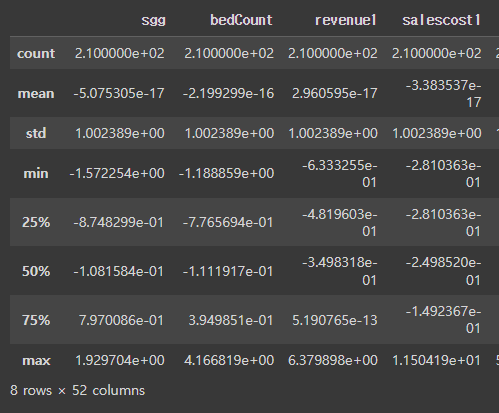
x_valid[num_columns].describe()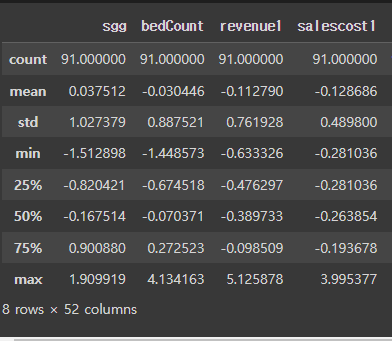
x_test[num_columns].describe()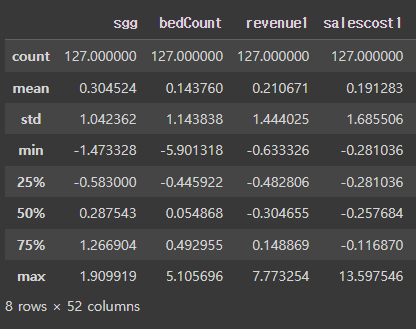
왜 x_valid와 x_test는 평균이 0, 표준편차가 1이 아닌가요?
-> x_train의 평균과 표준편차를 사용했기 때문에 x_valid의 평균과 표준편차가 0, 1이 아닐 수 있습니다.
범주형 변수 Onehot Encoding
변수 개수만큼의 차원으로 2개라면 (0,0), (0,1), 3개면 (0,0,0), (0,1,0), (0,0,1) 로 인코딩
from sklearn.preprocessing import OneHotEncoder
ohe = OneHotEncoder(sparse=False)

ohe.fit(x_train[cat_columns])
new_x_train_cat = ohe.transform(x_train[cat_columns])
new_x_valid_cat = ohe.transform(x_valid[cat_columns])
new_x_test_cat = ohe.transform(x_test[cat_columns])돌리면 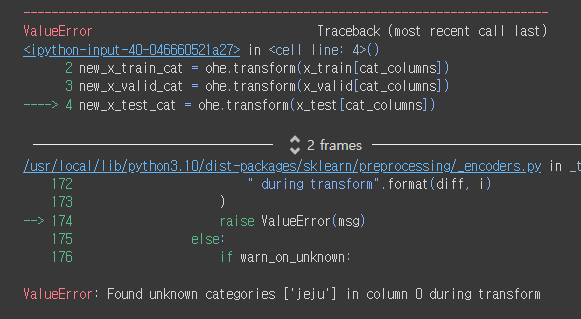
test 데이터에만 존재하는 범주형 변수가 존재해서 에러가 뜬다.
이럴 때는 train, valid, test를 하나로 합쳤다가 인코딩 후 다시 쪼개야한다.
-> 인코딩 자체는 data leakage 아님
x_all = pd.concat([x_train[cat_columns], x_valid[cat_columns], x_test[cat_columns]], axis=0)

# 전체에 대해 fiting
ohe.fit(x_all)

# 입력된 범주형 컬럼의 범주 값을 순서대로 담고 있습니다.
ohe_columns = ohe.get_feature_names_out()
# get_feature_names_out() : ndarray 형태로 반환
new_x_train_cat = pd.DataFrame(ohe.transform(x_train[cat_columns]), columns=ohe_columns)
new_x_valid_cat = pd.DataFrame(ohe.transform(x_valid[cat_columns]), columns=ohe_columns)
new_x_test_cat = pd.DataFrame(ohe.transform(x_test[cat_columns]), columns=ohe_columns).shape으로 각각 데이터를 확인해 볼 수 있다.
인덱스 초기화
# 동일하게 데이터를 쪼갤 시 인덱스를 초기화합니다.
new_x_train_cat.reset_index(drop=True, inplace=True)
new_x_valid_cat.reset_index(drop=True, inplace=True)
new_x_test_cat.reset_index(drop=True,  inplace=True)
전처리된 수치형 변수 + Onehot Encoding된 변수 합친 새로운 DataFrame생성
# Onehot Encoding 변수 추가
x_train = pd.concat([x_train[num_columns], new_x_train_cat], axis=1)
x_valid = pd.concat([x_valid[num_columns], new_x_valid_cat], axis=1)
x_test  = pd.concat([x_test[num_columns],  new_x_test_cat],  axis=1)
라벨 변수 Label Encoding
변수 개수만큼 0,1,2 순으로 라벨링 해주는 인코딩방법
from sklearn.preprocessing import LabelEncoder
le = LabelEncoder()
le.fit(y_train)
y_train = le.transform(y_train)
y_valid = le.transform(y_valid)