테라폼을 통한 폴더 격리화
격리화 구조
/online-survey-platform
├── /backend
│ ├── /lambda-functions
│ │ ├── /create-survey
│ │ │ ├── index.js
│ │ │ ├── handler.js
│ │ │ ├── package.json
│ │ ├── /submit-response
│ │ │ ├── index.js
│ │ │ ├── handler.js
│ │ │ ├── package.json
│ │ ├── /manage-survey
│ │ ├── index.js
│ │ ├── handler.js
│ │ ├── package.json
│ ├── /api-gateway
│ │ ├── /endpoints
│ │ │ ├── surveys.yml
│ │ │ ├── responses.yml
│ │ ├── /authorizers
│ │ ├── cognito-authorizer.js
│ ├── /dynamodb
│ ├── /tables
│ │ ├── surveys.json
│ │ ├── responses.json
│ ├── /scripts
│ ├── initialize-tables.js
├── /frontend
│ ├── /public
│ │ ├── index.html
│ │ ├── styles.css
│ ├── /src
│ ├── /components
│ │ ├── SurveyForm.js
│ │ ├── SurveyResults.js
│ ├── /services
│ ├── api.js
│ ├── package.json
│ ├── webpack.config.js
├── /infrastructure
│ ├── /terraform
│ │ ├── /modules
│ │ │ ├── vpc
│ │ │ │ ├── main.tf
│ │ │ │ ├── variables.tf
│ │ │ │ ├── outputs.tf
│ │ │ ├── lambda
│ │ │ ├── main.tf
│ │ │ ├── variables.tf
│ │ │ ├── outputs.tf
│ │ ├── /environments
│ │ ├── /development
│ │ │ ├── main.tf
│ │ │ ├── variables.tf
│ │ ├── /staging
│ │ │ ├── main.tf
│ │ │ ├── variables.tf
│ │ ├── /production
│ │ ├── main.tf
│ │ ├── variables.tf
│ ├── /ansible
│ ├── /playbooks
│ │ ├── deploy-lambda.yml
│ │ ├── configure-apigateway.yml
│ ├── /roles
│ ├── /lambda
│ │ ├── tasks/main.yml
│ │ ├── handlers/main.yml
│ ├── /apigateway
│ │ ├── tasks/main.yml
│ │ ├── handlers/main.yml
│ ├── /dynamodb
│ ├── tasks/main.yml
│ ├── handlers/main.yml
└── README.md -
격리화된 각 폴더의 역할 설명
-
최상위 폴더: online-survey-platform
이 폴더는 전체 프로젝트의 루트 폴더입니다. -
/backend
이 폴더는 백엔드 관련 코드와 설정 파일들을 포함하고 있습니다.-
/lambda-functions: AWS Lambda 함수들을 관리하는 폴더입니다.
-
/create-survey: 설문 조사를 생성하는 Lambda 함수와 관련된 코드.
- index.js: Lambda 함수의 진입점 파일.
- handler.js: Lambda 함수의 핸들러 코드.
- package.json: Node.js 패키지 관리 파일.
-
/submit-response: 설문 응답을 제출하는 Lambda 함수와 관련된 코드.
- index.js: Lambda 함수의 진입점 파일.
- handler.js: Lambda 함수의 핸들러 코드.
- package.json: Node.js 패키지 관리 파일.
-
/manage-survey: 설문 조사를 관리하는 Lambda 함수와 관련된 코드.
- index.js: Lambda 함수의 진입점 파일.
- handler.js: Lambda 함수의 핸들러 코드.
- package.json: Node.js 패키지 관리 파일.
-
/api-gateway: AWS API Gateway와 관련된 설정 파일을 관리하는 폴더입니다.
-
/endpoints: API 엔드포인트 설정 파일들.
- surveys.yml: 설문 조사 관련 엔드포인트 설정.
- responses.yml: 응답 관련 엔드포인트 설정.
-
/authorizers: API Gateway의 인증 관련 코드.
- cognito-authorizer.js: Cognito를 사용한 인증 로직.
-
/dynamodb: AWS DynamoDB와 관련된 설정과 스크립트를 관리하는 폴더입니다.
-
/tables: DynamoDB 테이블 설정 파일들.
- surveys.json: 설문 조사 테이블 설정.
- responses.json: 응답 테이블 설정.
-
/scripts: DynamoDB 초기화 스크립트.
- initialize-tables.js: DynamoDB 테이블 초기화를 위한 스크립트.
-
-
/frontend
이 폴더는 프론트엔드 관련 코드와 설정 파일들을 포함하고 있습니다.-
/public: 공개된 정적 파일들.
- index.html: 메인 HTML 파일.
- styles.css: CSS 스타일 시트.
-
/src: 프론트엔드 애플리케이션 소스 코드.
-
/components: React 컴포넌트 파일들.
- SurveyForm.js: 설문 조사 폼 컴포넌트.
- SurveyResults.js: 설문 조사 결과 컴포넌트.
-
/services: API 호출 관련 파일들.
- api.js: API 호출 로직.
- package.json: Node.js 패키지 관리 파일.
- webpack.config.js: Webpack 설정 파일.
-
infrastructure/ansible
Ansible을 사용한 인프라 자동화 및 구성 관리 파일들을 포함합니다.
-
playbooks
Ansible 플레이북 파일들이 저장되는 폴더입니다. 플레이북은 여러 호스트에 걸쳐서 자동화 작업을 수행하는 Ansible의 스크립트입니다.-
configure-apigateway.yml
- API Gateway를 설정하기 위한 플레이북 파일입니다. API Gateway의 구성을 자동화하는 데 사용됩니다.
-
deploy-lambda.yml
- Lambda 함수를 배포하기 위한 플레이북 파일입니다. Lambda 함수를 자동으로 배포하고 설정하는 작업을 수행합니다.
-
-
roles
Ansible 롤이 저장되는 폴더입니다. 롤은 관련된 태스크들을 그룹화하여 재사용 가능한 자동화 작업을 정의합니다.-
apigateway
- API Gateway와 관련된 설정 및 작업을 정의하는 롤입니다.
-
dynamodb
- DynamoDB와 관련된 설정 및 작업을 정의하는 롤입니다.
-
lambda
- Lambda 함수와 관련된 설정 및 작업을 정의하는 롤입니다.
-
-
/terraform: Terraform을 사용한 인프라 관리 파일.
-
/modules: 모듈화된 Terraform 코드.
-
/vpc: VPC 관련 Terraform 코드.
- main.tf: VPC 리소스 정의.
- variables.tf: 변수 정의.
- outputs.tf: 출력 값 정의.
-
/lambda: Lambda 관련 Terraform 코드.
- main.tf: Lambda 리소스 정의.
- variables.tf: 변수 정의.
- outputs.tf: 출력 값 정의.
-
/environments: 환경별 설정 파일.
-
/development: 개발 환경 설정.
- main.tf: 개발 환경 리소스 정의.
- variables.tf: 변수 정의.
-
/staging: 스테이징 환경 설정.
- main.tf: 스테이징 환경 리소스 정의.
- variables.tf: 변수 정의.
-
/production: 프로덕션 환경 설정.
- main.tf: 프로덕션 환경 리소스 정의.
- variables.tf: 변수 정의.
-
/ansible: Ansible을 사용한 서버 설정 파일.
-
/playbooks: Ansible 플레이북 파일들.
- deploy-lambda.yml: Lambda 배포 플레이북.
- configure-apigateway.yml: API Gateway 설정 플레이북.
-
/roles: Ansible 역할별 파일들.
-
/lambda: Lambda 역할 설정 파일.
- tasks/main.yml: Lambda 설정 작업.
- handlers/main.yml: Lambda 핸들러 설정.
-
/apigateway: API Gateway 역할 설정 파일.
- tasks/main.yml: API Gateway 설정 작업.
- handlers/main.yml: API Gateway 핸들러 설정.
-
/dynamodb: DynamoDB 역할 설정 파일.
- tasks/main.yml: DynamoDB 설정 작업.
- handlers/main.yml: DynamoDB 핸들러 설정.
-
README.md
프로젝트에 대한 전반적인 설명과 각 폴더 및 파일의 역할을 기술한 문서입니다. 이 문서를 통해 프로젝트 구조를 이해하고, 각 파일이 어떤 역할을 하는지 알 수 있습니다.
이와 같은 폴더 구조를 통해 프로젝트를 체계적으로 관리하고, 각 컴포넌트를 명확하게 구분하여 개발할 수 있습니다.
폴더 생성
cmd 창을 이용해서 생성한 후에, ftp를 이용해서 리눅스에도 같은 폴더 생성
폴더 생성 후 VPC 생성 테스트
- 디렉토리 이동:
- C:\Users\USER\online-survey-platform\infrastructure\terraform\modules\vpc로 이동
- main.tf 파일 수정:
- VPC를 생성하는 내용 입력
- 테스트 진행:
- terraform init,
terraform plan,
terraform apply
명령어 실행
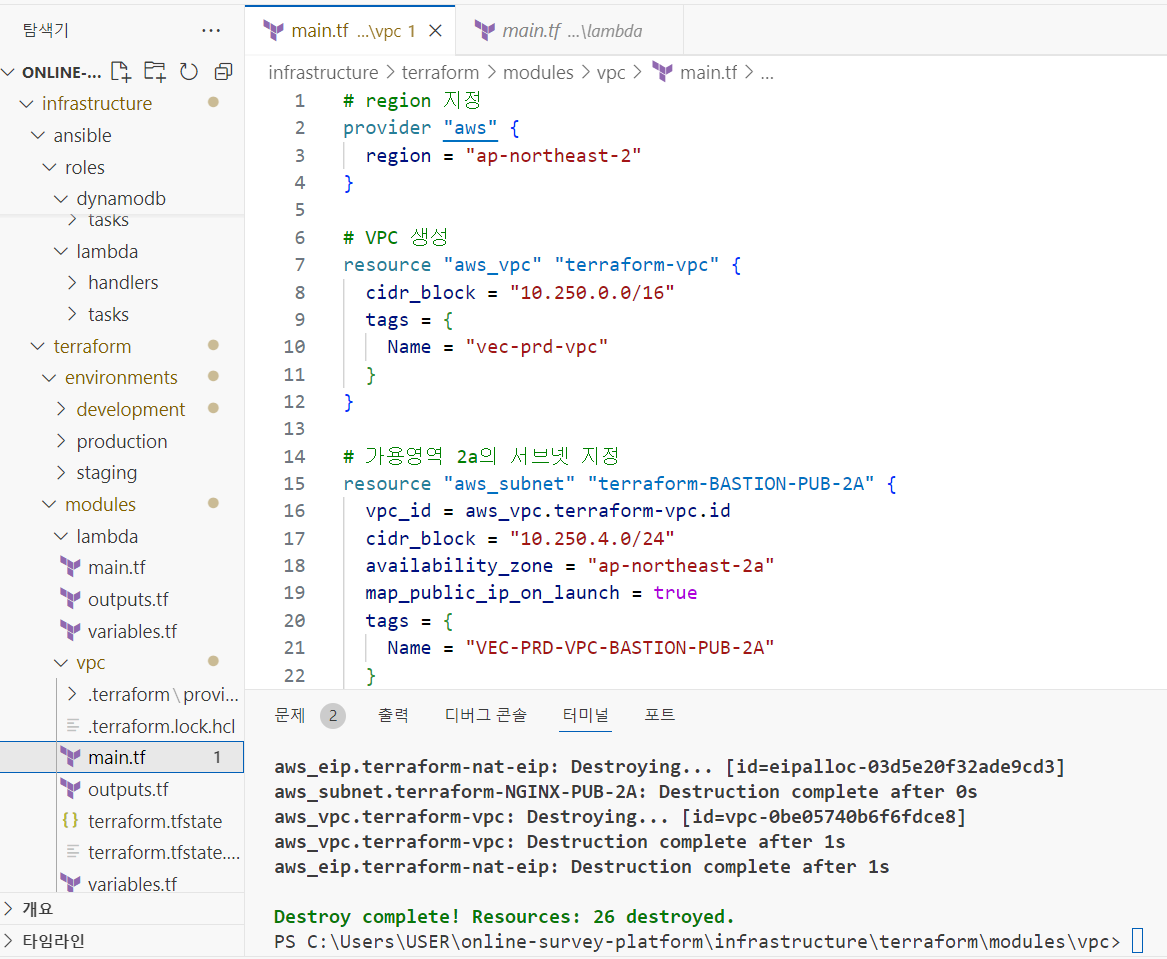
create-survey terraform 수행
terraform에서
-
S3 <-> APIgateway <-> Lambda <-> DynamoDB
-
S3를 통해 html(create survey 및 다른 html 등등) 에서 요청받은 이벤트를 APIgateway를 통해 배포받은 Lambda 함수로 처리하여 dynamoDB에 저장하는 내용을 수행
main.tf 작성
provider "aws" {
  region = "ap-northeast-2"
}

# DynamoDB 테이블 생성
resource "aws_dynamodb_table" "survey_table" {
  name           = "dynamodb-html"
  billing_mode   = "PAY_PER_REQUEST"
  hash_key       = "SurveyId"

  attribute {
    name = "SurveyId"
    type = "S"
  }

  tags = {
    Name        = "dynamodb-html"
    Environment = "Production"
  }
}

# Lambda 함수에 필요한 IAM 역할 생성
resource "aws_iam_role" "lambda_dynamodb_role" {
  name = "lambda-dynamodb-role"

  assume_role_policy = jsonencode({
    Version = "2012-10-17"
    Statement = [
      {
        Action = "sts:AssumeRole"
        Effect = "Allow"
        Principal = {
          Service = "lambda.amazonaws.com"
        }
      }
    ]
  })
}

resource "aws_iam_policy_attachment" "dynamodb_policy_attachment" {
  name       = "lambda-dynamodb-policy-attachment"
  roles      = [aws_iam_role.lambda_dynamodb_role.name]
  policy_arn = "arn:aws:iam::aws:policy/AmazonDynamoDBFullAccess"
}

# API Gateway 로그를 위한 IAM 역할 생성
resource "aws_iam_role" "apigateway_cloudwatch_role" {
  name = "apigateway-cloudwatch-role"

  assume_role_policy = jsonencode({
    Version = "2012-10-17"
    Statement = [
      {
        Effect = "Allow"
        Principal = {
          Service = "apigateway.amazonaws.com"
        }
        Action = "sts:AssumeRole"
      }
    ]
  })
}

resource "aws_iam_policy_attachment" "apigateway_cloudwatch_policy_attachment" {
  name       = "apigateway-cloudwatch-policy-attachment"
  roles      = [aws_iam_role.apigateway_cloudwatch_role.name]
  policy_arn = "arn:aws:iam::aws:policy/service-role/AmazonAPIGatewayPushToCloudWatchLogs"
}

resource "aws_api_gateway_account" "account_settings" {
  cloudwatch_role_arn = aws_iam_role.apigateway_cloudwatch_role.arn
}

# Lambda 함수 생성
resource "aws_lambda_function" "lambda_html" {
  s3_bucket        = "my-unique-bucket-phj-12345"
  s3_key           = "ImportJson.zip"
  function_name    = "lambda-html"
  role             = aws_iam_role.lambda_dynamodb_role.arn
  handler          = "lambda_function.lambda_handler"
  runtime          = "python3.12"

  environment {
    variables = {
      DYNAMODB_TABLE = "dynamodb-html"
    }
  }
}

# Lambda 함수에 대한 API Gateway의 호출 권한 설정
resource "aws_lambda_permission" "api_gateway" {
  statement_id  = "AllowAPIGatewayInvoke"
  action        = "lambda:InvokeFunction"
  function_name = aws_lambda_function.lambda_html.function_name
  principal     = "apigateway.amazonaws.com"
  source_arn    = "arn:aws:execute-api:${var.region}:${data.aws_caller_identity.current.account_id}:${aws_api_gateway_rest_api.rest_api.id}/*"
}

# API Gateway 설정
resource "aws_api_gateway_rest_api" "rest_api" {
  name        = "REST-html"
  description = "REST API for handling survey submissions"
}

resource "aws_api_gateway_resource" "survey_resource" {
  rest_api_id = aws_api_gateway_rest_api.rest_api.id
  parent_id   = aws_api_gateway_rest_api.rest_api.root_resource_id
  path_part   = "survey"
}

# POST 메서드 설정 및 Lambda 통합
resource "aws_api_gateway_method" "post_method" {
  rest_api_id   = aws_api_gateway_rest_api.rest_api.id
  resource_id   = aws_api_gateway_resource.survey_resource.id
  http_method   = "POST"
  authorization = "NONE"
}

resource "aws_api_gateway_integration" "lambda_integration" {
  depends_on = [
    aws_api_gateway_method.post_method,
    aws_lambda_function.lambda_html,
    aws_lambda_permission.api_gateway
  ]
  rest_api_id             = aws_api_gateway_rest_api.rest_api.id
  resource_id             = aws_api_gateway_resource.survey_resource.id
  http_method             = aws_api_gateway_method.post_method.http_method
  integration_http_method = "POST"
  type                    = "AWS_PROXY"
  uri                     = aws_lambda_function.lambda_html.invoke_arn
}

resource "aws_api_gateway_method_response" "method_response" {
  depends_on = [
    aws_api_gateway_method.post_method
  ]
  rest_api_id = aws_api_gateway_rest_api.rest_api.id
  resource_id = aws_api_gateway_resource.survey_resource.id
  http_method = aws_api_gateway_method.post_method.http_method
  status_code = "200"
}

resource "aws_api_gateway_integration_response" "integration_response" {
  depends_on = [
    aws_api_gateway_integration.lambda_integration
  ]
  rest_api_id = aws_api_gateway_rest_api.rest_api.id
  resource_id = aws_api_gateway_resource.survey_resource.id
  http_method = aws_api_gateway_method.post_method.http_method
  status_code = aws_api_gateway_method_response.method_response.status_code
}

# CORS 설정을 위한 OPTIONS 메서드
resource "aws_api_gateway_method" "options_method" {
  rest_api_id   = aws_api_gateway_rest_api.rest_api.id
  resource_id   = aws_api_gateway_resource.survey_resource.id
  http_method   = "OPTIONS"
  authorization = "NONE"
}

resource "aws_api_gateway_integration" "options_integration" {
  depends_on = [
    aws_api_gateway_method.options_method
  ]
  rest_api_id             = aws_api_gateway_rest_api.rest_api.id
  resource_id             = aws_api_gateway_resource.survey_resource.id
  http_method             = aws_api_gateway_method.options_method.http_method
  type                    = "MOCK"
  integration_http_method = "POST"
  request_templates = {
    "application/json" = "{\"statusCode\": 200}"
  }
}

resource "aws_api_gateway_method_response" "options_method_response_200" {
  depends_on = [
    aws_api_gateway_method.options_method
  ]
  rest_api_id     = aws_api_gateway_rest_api.rest_api.id
  resource_id     = aws_api_gateway_resource.survey_resource.id
  http_method     = aws_api_gateway_method.options_method.http_method
  status_code     = "200"

  response_parameters = {
    "method.response.header.Access-Control-Allow-Headers" = true
    "method.response.header.Access-Control-Allow-Methods" = true
    "method.response.header.Access-Control-Allow-Origin"  = true
  }
}

resource "aws_api_gateway_integration_response" "options_integration_response_200" {
  depends_on = [
    aws_api_gateway_integration.options_integration
  ]
  rest_api_id     = aws_api_gateway_rest_api.rest_api.id
  resource_id     = aws_api_gateway_resource.survey_resource.id
  http_method     = aws_api_gateway_method.options_method.http_method
  status_code     = aws_api_gateway_method_response.options_method_response_200.status_code

  response_parameters = {
    "method.response.header.Access-Control-Allow-Headers" = "'Content-Type,X-Amz-Date,Authorization,X-Api-Key,X-Amz-Security-Token'"
    "method.response.header.Access-Control-Allow-Methods" = "'GET,POST,OPTIONS'"
    "method.response.header.Access-Control-Allow-Origin"  = "'*'"
  }
}

# API Gateway 배포
resource "aws_api_gateway_deployment" "api_deployment" {
  depends_on = [
    aws_api_gateway_integration.lambda_integration,
    aws_api_gateway_integration_response.integration_response,
    aws_api_gateway_integration.options_integration,
    aws_api_gateway_integration_response.options_integration_response_200,
    aws_api_gateway_method_response.method_response,
    aws_api_gateway_method_response.options_method_response_200
  ]
  rest_api_id = aws_api_gateway_rest_api.rest_api.id
  stage_name  = "test"
}

resource "aws_api_gateway_method_settings" "method_settings" {
  rest_api_id = aws_api_gateway_rest_api.rest_api.id
  stage_name  = aws_api_gateway_deployment.api_deployment.stage_name

  method_path = "*/*"
  settings {
    metrics_enabled     = true
    logging_level       = "INFO"
    data_trace_enabled  = true
  }
}

output "api_endpoint" {
  value = aws_api_gateway_deployment.api_deployment.invoke_url
}
variables.tf 작성
variable "region" {
  description = "The AWS region to deploy resources"
  type        = string
  default     = "ap-northeast-2"
}
data.tf 작성
data "aws_caller_identity" "current" {}lambda 함수 zip 생성
- 준비 사항
-
Lambda 함수 코드 준비:
- Lambda 함수 코드 파일(lambda_function.py)과 필요한 모든 의존성 패키지들을 포함한 디렉토리(lambda_code)를 준비합니다.
-
의존성 패키지 설치:
-
로컬 환경에서 Lambda 함수를 실행할 때 필요한 모든 패키지를 확인하고, 해당 패키지들을 로컬 환경에 설치합니다.
-
예를 들어, boto3와 botocore는 AWS SDK를 사용할 때 필수적인 패키지입니다.
-
pip install boto3 botocore -t ./lambda_code
-
- Lambda 함수 코드와 의존성 패키지 압축
-
디렉토리 구조 확인:
-
Lambda 함수 코드와 의존성 패키지가 포함된 디렉토리 구조를 확인합니다
-
여기서 <other_dependency_directories_or_files>는 필요에 따라 추가적인 디렉토리나 파일들이 포함될 수 있습니다.
-
lambda_code/
├── lambda_function.py
├── boto3/
├── botocore/
├── <other_dependency_directories_or_files>- zip 파일 생성:
-
lambda_code 디렉토리에 있는 모든 파일과 하위 디렉토리를 포함하여 lambda_function.zip 파일을 생성합니다.
-
cd lambda_code
zip -r lambda_function.zip . -
zip -r 명령어는 -r 옵션을 사용하여 디렉토리를 재귀적으로 압축하며, .은 현재 디렉토리의 모든 파일과 하위 디렉토리를 포함한다는 의미입니다.
-
위 명령어를 실행하면 lambda_function.zip 파일이 lambda_code 디렉토리에 생성됩니다. 이 zip 파일은 Lambda 함수로 업로드할 준비가 된 상태입니다.
-