terraform 격리화를 통해 create-survey 시스템 구축
- 파일 구조
C:\USERS\USER\ONLINE-SURVEY-PLATFORM
└─infrastructure
└─terraform
├─modules
│ ├─apigateway
│ │ ├─main.tf
│ │ └─variables.tf
│ ├─dynamodb
│ │ ├─main.tf
│ │ └─variables.tf
│ ├─iam
│ │ ├─main.tf
│ │ └─variables.tf
│ ├─lambda
│ │ ├─main.tf
│ │ └─variables.tf
│ └─s3
│ ├─main.tf
│ └─variables.tf
├─main.tf
├─variables.tf
└─data.tf
apigateway 테라폼 파일 구성
- main.tf
resource "aws_api_gateway_rest_api" "rest_api" {
  name        = var.name
  description = var.description
}

resource "aws_api_gateway_resource" "survey_resource" {
  rest_api_id = aws_api_gateway_rest_api.rest_api.id
  parent_id   = aws_api_gateway_rest_api.rest_api.root_resource_id
  path_part   = "survey"
}

resource "aws_api_gateway_method" "post_method" {
  rest_api_id   = aws_api_gateway_rest_api.rest_api.id
  resource_id   = aws_api_gateway_resource.survey_resource.id
  http_method   = "POST"
  authorization = "NONE"
}

resource "aws_api_gateway_integration" "lambda_integration" {
  depends_on = [
    aws_api_gateway_method.post_method,
  ]
  rest_api_id             = aws_api_gateway_rest_api.rest_api.id
  resource_id             = aws_api_gateway_resource.survey_resource.id
  http_method             = aws_api_gateway_method.post_method.http_method
  integration_http_method = "POST"
  type                    = "AWS_PROXY"
  uri                     = var.lambda_invoke_arn
}

resource "aws_api_gateway_method_response" "method_response" {
  depends_on = [
    aws_api_gateway_method.post_method
  ]
  rest_api_id = aws_api_gateway_rest_api.rest_api.id
  resource_id = aws_api_gateway_resource.survey_resource.id
  http_method = aws_api_gateway_method.post_method.http_method
  status_code = "200"
}

resource "aws_api_gateway_integration_response" "integration_response" {
  depends_on = [
    aws_api_gateway_integration.lambda_integration
  ]
  rest_api_id = aws_api_gateway_rest_api.rest_api.id
  resource_id = aws_api_gateway_resource.survey_resource.id
  http_method = aws_api_gateway_method.post_method.http_method
  status_code = aws_api_gateway_method_response.method_response.status_code
}

resource "aws_api_gateway_method" "options_method" {
  rest_api_id   = aws_api_gateway_rest_api.rest_api.id
  resource_id   = aws_api_gateway_resource.survey_resource.id
  http_method   = "OPTIONS"
  authorization = "NONE"
}

resource "aws_api_gateway_integration" "options_integration" {
  depends_on = [
    aws_api_gateway_method.options_method
  ]
  rest_api_id             = aws_api_gateway_rest_api.rest_api.id
  resource_id             = aws_api_gateway_resource.survey_resource.id
  http_method             = aws_api_gateway_method.options_method.http_method
  type                    = "MOCK"
  integration_http_method = "POST"
  request_templates = {
    "application/json" = "{\"statusCode\": 200}"
  }
}

resource "aws_api_gateway_method_response" "options_method_response_200" {
  depends_on = [
    aws_api_gateway_method.options_method
  ]
  rest_api_id     = aws_api_gateway_rest_api.rest_api.id
  resource_id     = aws_api_gateway_resource.survey_resource.id
  http_method     = aws_api_gateway_method.options_method.http_method
  status_code     = "200"

  response_parameters = {
    "method.response.header.Access-Control-Allow-Headers" = true
    "method.response.header.Access-Control-Allow-Methods" = true
    "method.response.header.Access-Control-Allow-Origin"  = true
  }
}

resource "aws_api_gateway_integration_response" "options_integration_response_200" {
  depends_on = [
    aws_api_gateway_integration.options_integration
  ]
  rest_api_id     = aws_api_gateway_rest_api.rest_api.id
  resource_id     = aws_api_gateway_resource.survey_resource.id
  http_method     = aws_api_gateway_method.options_method.http_method
  status_code     = aws_api_gateway_method_response.options_method_response_200.status_code

  response_parameters = {
    "method.response.header.Access-Control-Allow-Headers" = "'Content-Type,X-Amz-Date,Authorization,X-Api-Key,X-Amz-Security-Token'"
    "method.response.header.Access-Control-Allow-Methods" = "'GET,POST,OPTIONS'"
    "method.response.header.Access-Control-Allow-Origin"  = "'*'"
  }
}

resource "aws_api_gateway_deployment" "api_deployment" {
  depends_on = [
    aws_api_gateway_integration.lambda_integration,
    aws_api_gateway_integration_response.integration_response,
    aws_api_gateway_integration.options_integration,
    aws_api_gateway_integration_response.options_integration_response_200,
    aws_api_gateway_method_response.method_response,
    aws_api_gateway_method_response.options_method_response_200
  ]
  rest_api_id = aws_api_gateway_rest_api.rest_api.id
  stage_name  = var.stage_name
}

resource "aws_api_gateway_method_settings" "method_settings" {
  rest_api_id = aws_api_gateway_rest_api.rest_api.id
  stage_name  = aws_api_gateway_deployment.api_deployment.stage_name

  method_path = "*/*"
  settings {
    metrics_enabled     = true
    logging_level       = "INFO"
    data_trace_enabled  = true
  }
}

output "api_endpoint" {
  value = aws_api_gateway_deployment.api_deployment.invoke_url
}
- variable.tf
variable "name" {
  description = "The name of the API Gateway"
  type        = string
}

variable "description" {
  description = "The description of the API Gateway"
  type        = string
}

variable "lambda_invoke_arn" {
  description = "The invoke ARN of the Lambda function"
  type        = string
}

variable "stage_name" {
  description = "The stage name for the API deployment"
  type        = string
}
dynamodb 테라폼 파일 구성
- main.tf
resource "aws_dynamodb_table" "survey_table" {
  name           = var.name
  billing_mode   = "PAY_PER_REQUEST"
  hash_key       = "SurveyId"

  attribute {
    name = "SurveyId"
    type = "S"
  }

  tags = {
    Name        = var.name
    Environment = var.environment
  }
}

output "table_name" {
  value = aws_dynamodb_table.survey_table.name
}
- variable.tf
variable "name" {
  description = "The name of the DynamoDB table"
  type        = string
}

variable "environment" {
  description = "The environment of the DynamoDB table"
  type        = string
}
iam 테라폼 파일 구성
- main.tf
resource "aws_iam_role" "lambda_dynamodb_role" {
  name = var.lambda_role_name

  assume_role_policy = jsonencode({
    Version = "2012-10-17"
    Statement = [
      {
        Action = "sts:AssumeRole"
        Effect = "Allow"
        Principal = {
          Service = "lambda.amazonaws.com"
        }
      }
    ]
  })
}

resource "aws_iam_policy_attachment" "dynamodb_policy_attachment" {
  name       = "lambda-dynamodb-policy-attachment"
  roles      = [aws_iam_role.lambda_dynamodb_role.name]
  policy_arn = "arn:aws:iam::aws:policy/AmazonDynamoDBFullAccess"
}

resource "aws_iam_role" "apigateway_cloudwatch_role" {
  name = var.api_gateway_role_name

  assume_role_policy = jsonencode({
    Version = "2012-10-17"
    Statement = [
      {
        Effect = "Allow"
        Principal = {
          Service = "apigateway.amazonaws.com"
        }
        Action = "sts:AssumeRole"
      }
    ]
  })
}

resource "aws_iam_policy_attachment" "apigateway_cloudwatch_policy_attachment" {
  name       = "apigateway-cloudwatch-policy-attachment"
  roles      = [aws_iam_role.apigateway_cloudwatch_role.name]
  policy_arn = "arn:aws:iam::aws:policy/service-role/AmazonAPIGatewayPushToCloudWatchLogs"
}

output "lambda_dynamodb_role_arn" {
  value = aws_iam_role.lambda_dynamodb_role.arn
}
- variable.tf
variable "lambda_role_name" {
  description = "The name of the IAM role for Lambda"
  type        = string
}

variable "api_gateway_role_name" {
  description = "The name of the IAM role for API Gateway"
  type        = string
}
lambda 테라폼 파일 구성
- main.tf
resource "aws_lambda_function" "lambda_html" {
  s3_bucket        = var.s3_bucket
  s3_key           = var.s3_key
  function_name    = var.function_name
  role             = var.role_arn
  handler          = var.handler
  runtime          = var.runtime

  environment {
    variables = {
      DYNAMODB_TABLE = var.dynamodb_table
    }
  }
}

resource "aws_lambda_permission" "api_gateway" {
  statement_id  = "AllowAPIGatewayInvoke"
  action        = "lambda:InvokeFunction"
  function_name = aws_lambda_function.lambda_html.function_name
  principal     = "apigateway.amazonaws.com"
  source_arn    = var.source_arn
}

output "lambda_function_arn" {
  value = aws_lambda_function.lambda_html.arn
}

output "lambda_invoke_arn" {
  value = aws_lambda_function.lambda_html.invoke_arn
}
- variable.tf
variable "s3_bucket" {
  description = "The S3 bucket containing the Lambda function code"
  type        = string
}

variable "s3_key" {
  description = "The S3 key for the Lambda function code"
  type        = string
}

variable "function_name" {
  description = "The name of the Lambda function"
  type        = string
}

variable "role_arn" {
  description = "The ARN of the IAM role for the Lambda function"
  type        = string
}

variable "handler" {
  description = "The handler for the Lambda function"
  type        = string
}

variable "runtime" {
  description = "The runtime for the Lambda function"
  type        = string
}

variable "dynamodb_table" {
  description = "The DynamoDB table name"
  type        = string
}

variable "source_arn" {
  description = "The source ARN for the API Gateway"
  type        = string
}
s3 테라폼 파일 구성
- main.tf
resource "aws_s3_bucket" "lambda_bucket" {
  bucket = var.bucket_name
}

resource "aws_s3_bucket_object" "lambda_zip" {
  bucket = aws_s3_bucket.lambda_bucket.bucket
  key    = var.object_key
  source = var.source_path
}

output "bucket_name" {
  value = aws_s3_bucket.lambda_bucket.bucket
}

output "object_key" {
  value = aws_s3_bucket_object.lambda_zip.key
}
- variable.tf
variable "bucket_name" {
  description = "The name of the S3 bucket"
  type        = string
}

variable "object_key" {
  description = "The key of the object in the S3 bucket"
  type        = string
}

variable "source_path" {
  description = "The local path to the object to upload"
  type        = string
}
root 모듈 테라폼 파일 구성
- main.tf
provider "aws" {
  region = var.region
}

module "dynamodb" {
  source      = "./modules/dynamodb"
  name        = "dynamodb-html"
  environment = "Production"
}

module "iam" {
  source             = "./modules/iam"
  lambda_role_name   = "lambda-dynamodb-role"
  api_gateway_role_name = "apigateway-cloudwatch-role"
}

module "lambda" {
  source        = "./modules/lambda"
  s3_bucket     = var.s3_bucket_name
  s3_key        = var.s3_object_key
  function_name = "lambda-html"
  role_arn      = module.iam.lambda_dynamodb_role_arn
  handler       = "lambda_function.lambda_handler"
  runtime       = "python3.12"
  dynamodb_table = module.dynamodb.table_name
  source_arn    = "arn:aws:execute-api:${var.region}:${data.aws_caller_identity.current.account_id}:*"
}

module "apigateway" {
  source             = "./modules/apigateway"
  name               = "REST-html"
  description        = "REST API for handling survey submissions"
  lambda_invoke_arn  = module.lambda.lambda_invoke_arn
  stage_name         = "test"

  depends_on = [module.lambda]
}

output "api_endpoint" {
  value = module.apigateway.api_endpoint
}
- variable.tf
variable "region" {
  description = "The AWS region to deploy resources"
  type        = string
  default     = "ap-northeast-2"
}

variable "s3_bucket_name" {
  description = "The name of the existing S3 bucket"
  type        = string
  default     = "my-unique-bucket-phj-12345"
}

variable "s3_object_key" {
  description = "The key of the object in the S3 bucket"
  type        = string
  default     = "ImportJson.zip"
}
- data.tf
data "aws_caller_identity" "current" {}
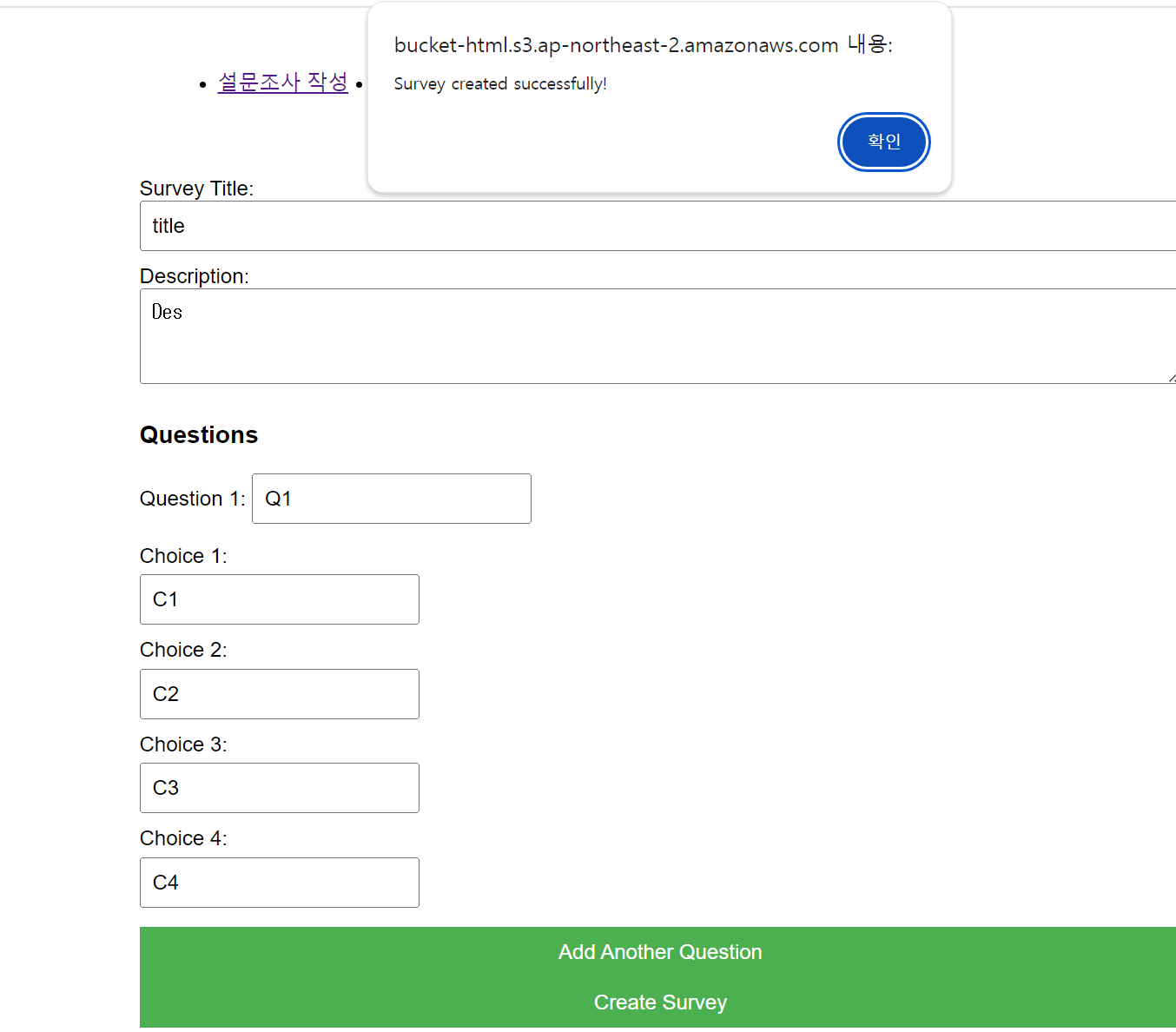
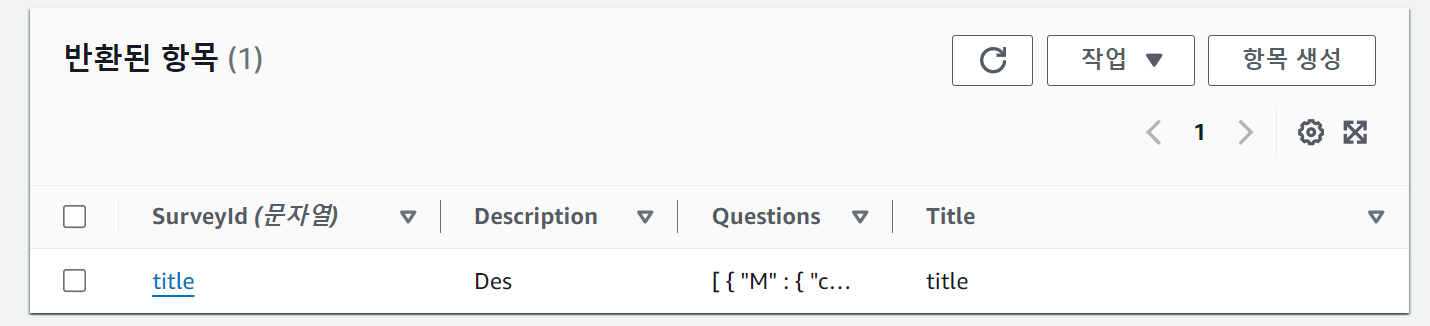
이후에 S3 정적 웹 사이트 호스팅을 통해 item을 입력했을 때 db에 저장되는 것 확인
이후에 dynamodb 권한이랑, 이름 수정 작업 필요