✨ 개발 환경
-
Unity:
6000.0.45f1 -
Google Play Games Services (GPGS):
2.0.0- 주의: GPGS
1.0.0은 더 이상 지원되지 않음
- 주의: GPGS
-
Backnd SDK:
5.18
필요 패키지
필요 조건
- Google Developer 계정 필요
패키지 정보
- GPGS는 로그인, 업적, 리더보드, 클라우드 저장 등을 지원하는 플랫폼
- Backnd는 게임 서버 기능을 쉽게 구현할 수 있도록 도와주는 BaaS 플랫폼
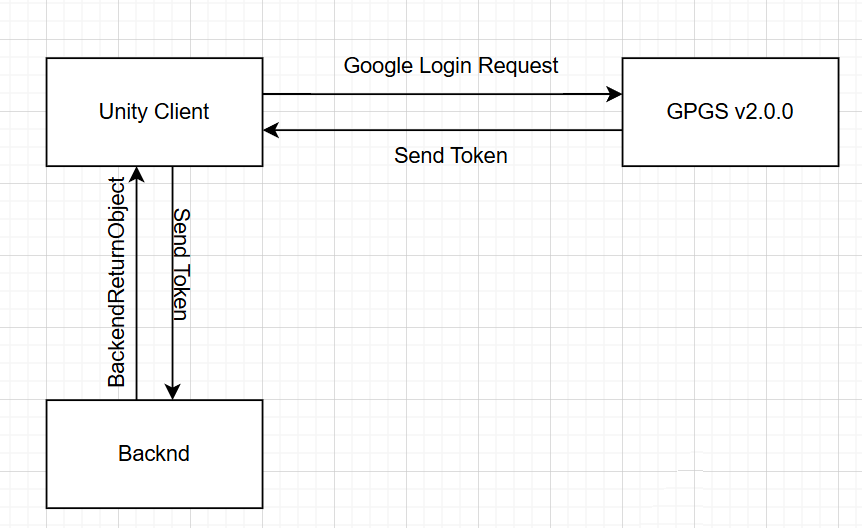
프로젝트 플로우
- Unity Client → GPGS API로 Google Token 획득
- 획득한 Token을 Backnd 서버에 전달
- Backnd는 해당 Token으로 로그인/회원가입 처리를 진행
프로젝트 설정
1. Unity 프로젝트 설정
Build Profile
File→Build Profiles진입- iOS Build Profile을 추가하지 않으면 GPGS 설치 시 에러 발생할 수 있음 (지원은 하지 않지만 필요)
Player Settings
Edit→Project Settings→Player
- API Level → 31 이상 설정 (Google Play 요구사항)
- IL2CPP 사용
- .NET Framework → Backnd API에 호환성 증가
Keystore 설정
- Java 필요
Edit→Player→Publishing Settings
keytool -keystore path-to-debug-or-production-keystore -list -vSHA1값 확보 필요 (GPGS 등록 시 사용)
2. Google Cloud Console 설정
1. OAuth 동의 화면
- Google Cloud Console →
APIs & Services→OAuth consent screen
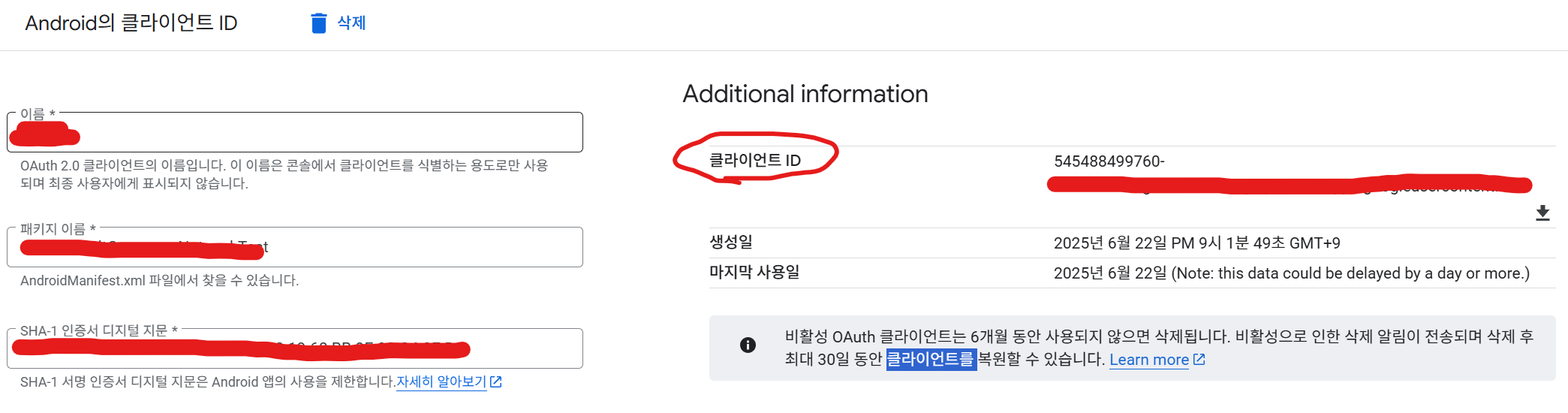
2. OAuth 클라이언트 ID 생성 (Android)
-
Create Credentials→OAuth client ID -
Application type: Android
-
입력:
- 패키지 이름
- SHA1 키
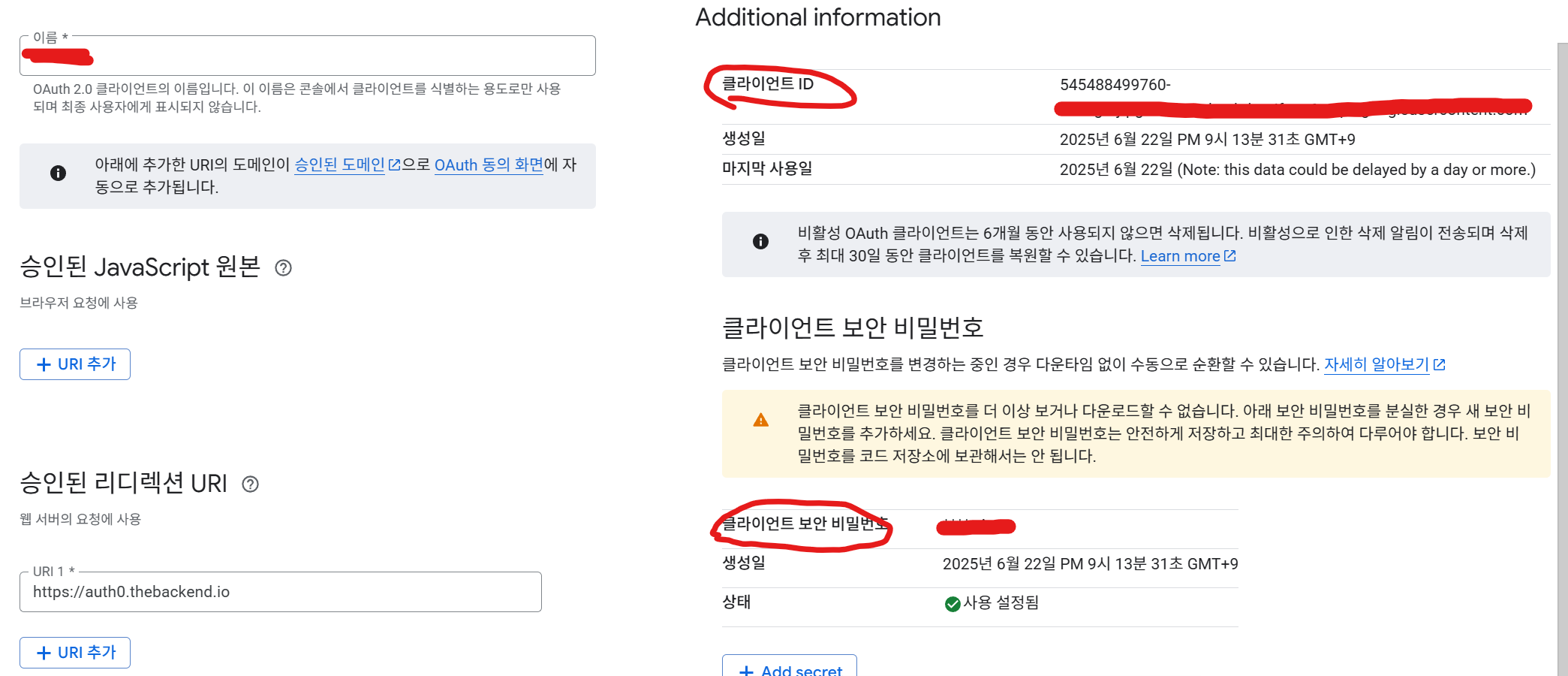
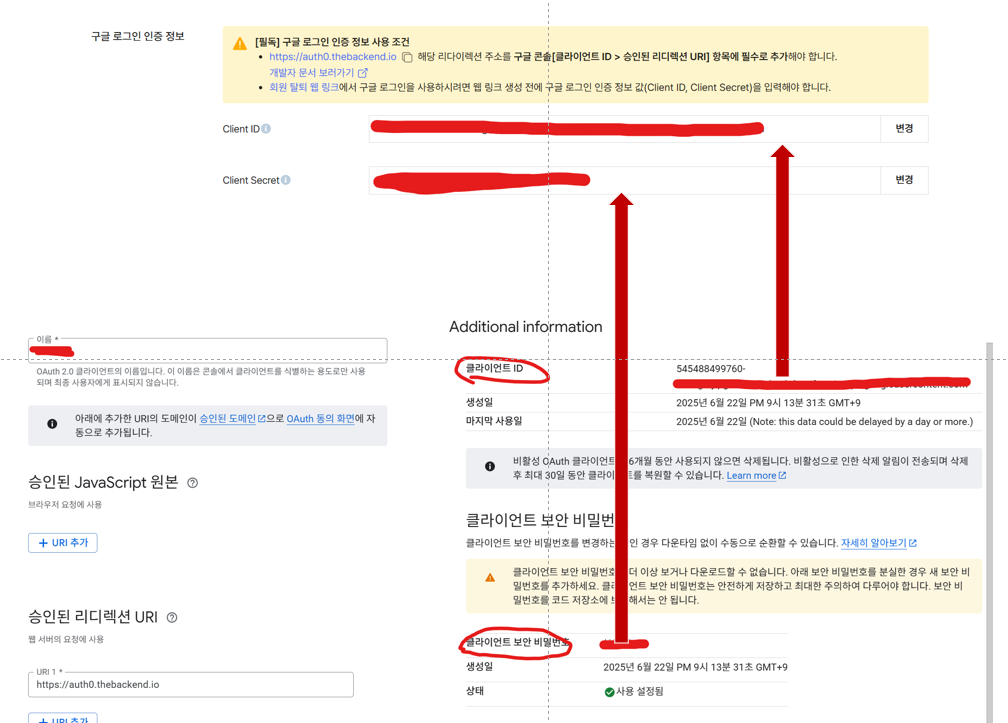
3. OAuth 클라이언트 ID 생성 (웹 애플리케이션)
Create Credentials→OAuth client ID- Application type: Web application
- URL 추가:
https://auth0.thebackend.io
스크린샷
- 전체 클라이언트:

- Android 클라이언트:
- Web 클라이언트:
3. Google Play Console 설정
-
관리자 계정으로 로그인
-
홈 → 앱 등록
-
내부 테스트 → 앱 번들 추가 → 테스터 이메일 등록
-
사용자 늘리기 → Play 게임즈 서비스 → 설정 및 관리
- OAuth 등록된 Android 인증키 연동됨
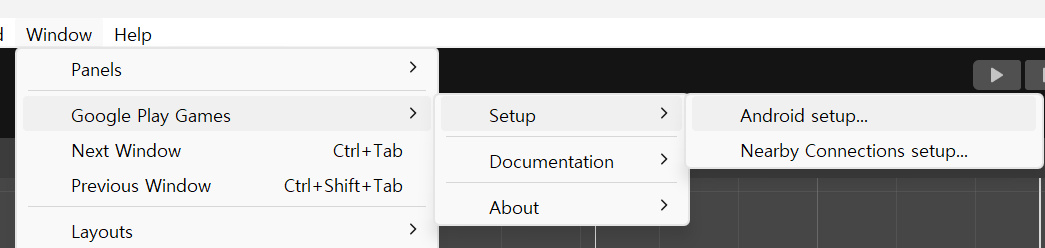
4. GPGS 설정
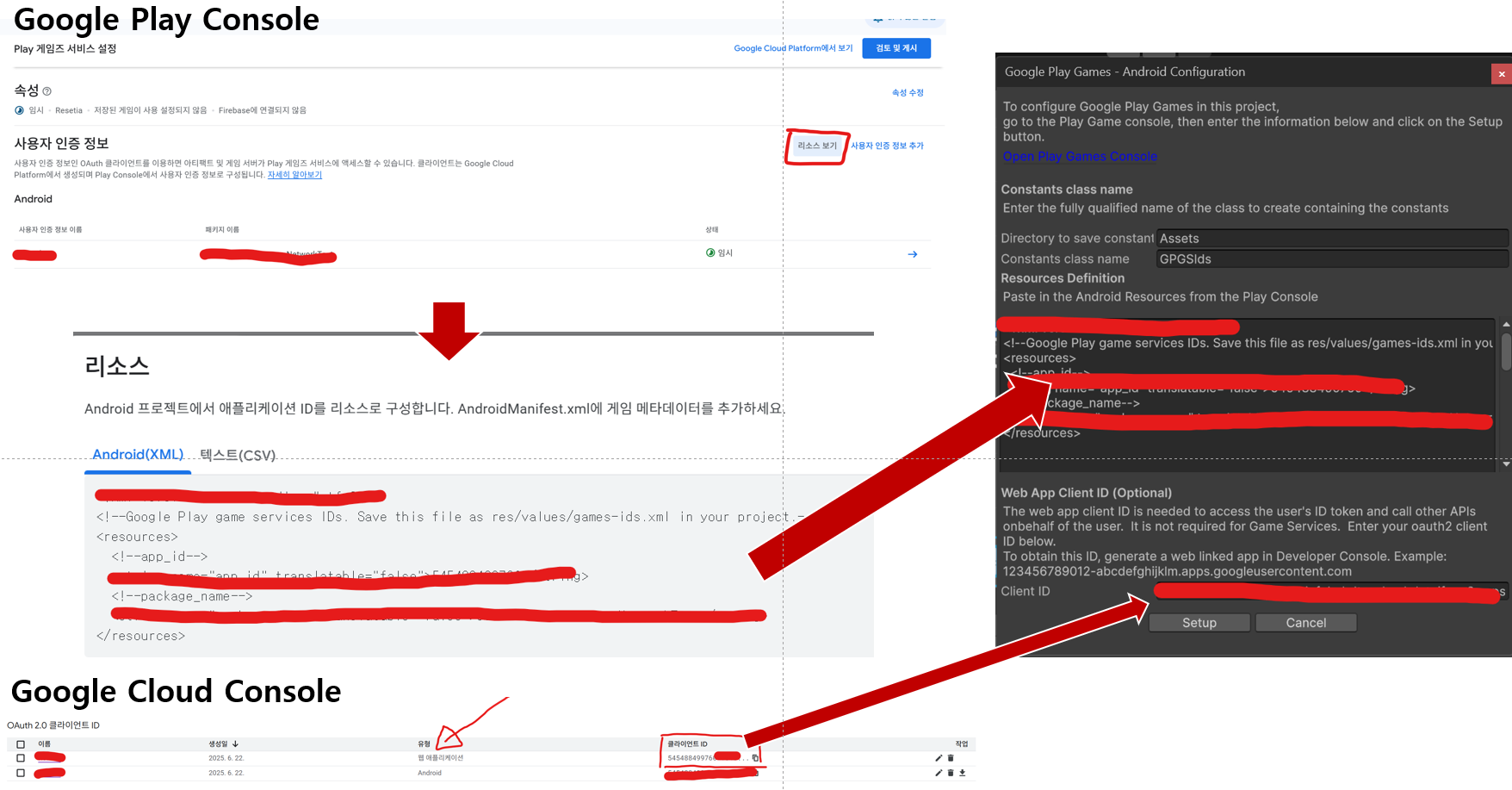
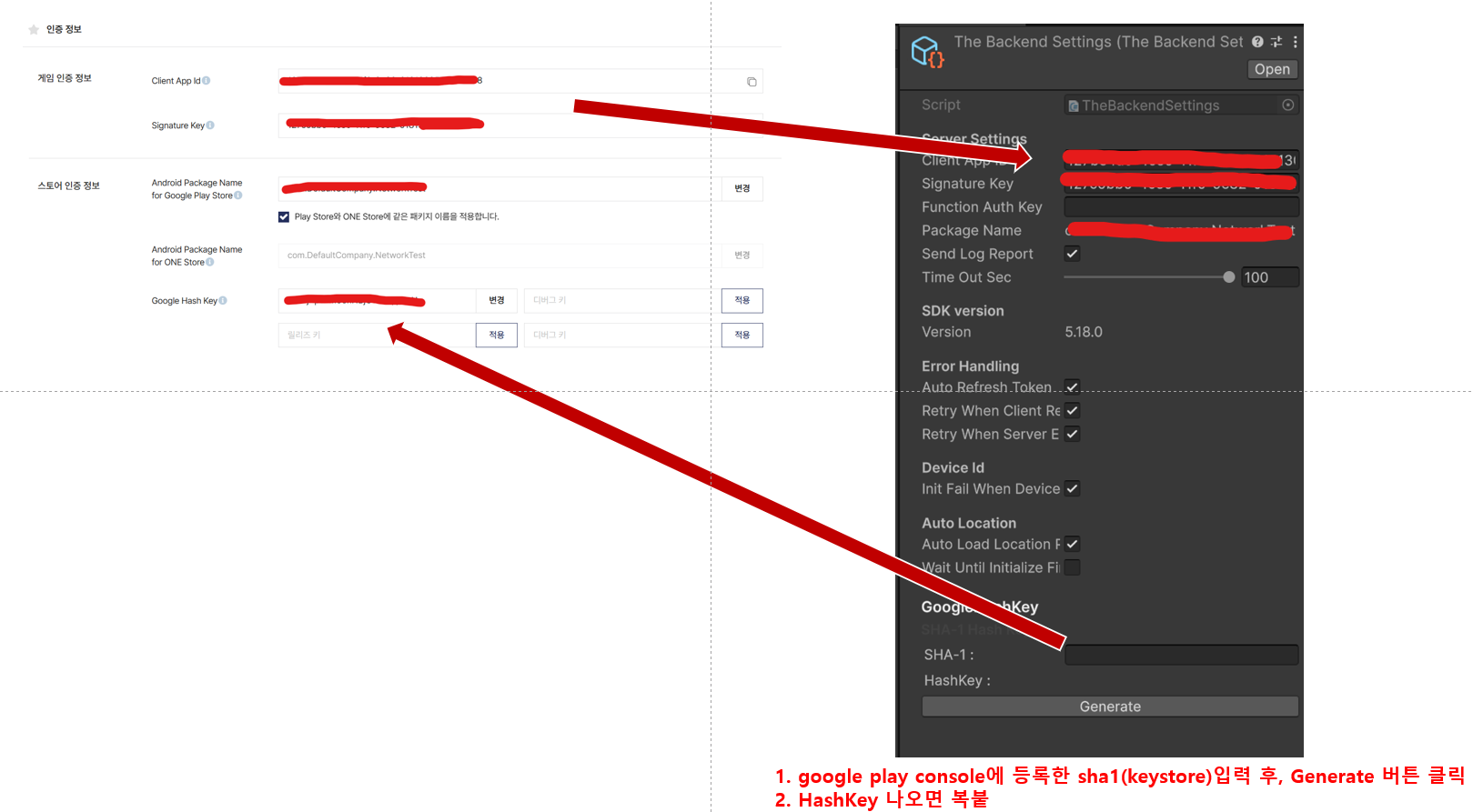
5. Backnd 설정
-
Unity → The Backend → Edit Settings
-
Backnd 콘솔 → 프로젝트 → 인증 정보 복사
-
Unity에 붙여넣기
-
-
버그 업데이트
Google Hash Key는 릴리즈와 디버그가 있는데, Google Play Console에서 디버그와 릴리즈 키를 확인할 수 있음
각종 테스트 aab 파일을 올리면, 키가 변하는데 서버에도 잘 적용해줘야 함
뒤끝 서버의 경우 빠르게 적용이 되는 것 같은데, Google Play Console은 적용하는데 시간이 좀 걸림
실행했는데, 위의 구글 플레이 마크가 뜨지 않는다면 연동이 안됐을 가능성이 높고, 설정을 크게 변경하지 않았다면 시간이 지나면 해결되는 경우가 대부분 (하지만 다른 경우도 존재하므로, 계속 추가하도록 함)
테스트 코드
using BackEnd;
using GooglePlayGames;
using GooglePlayGames.BasicApi;
using TMPro;
using UnityEngine;

public class LoginSystem : MonoBehaviour
{
    [SerializeField] private TMP_Text text;
    int c = 0;
    private void Awake()
    {
        var bro = Backend.Initialize();

        if(bro.IsSuccess())
        {
            text.text += "Init Complete!";
        }
        else
        {
            text.text += "Init Fail";
        }
    }

    private void Start()
    {
        PlayGamesPlatform.Instance.Authenticate(ProcessAuthentication);
    }

    internal void ProcessAuthentication(SignInStatus status)
    {
        if (status == SignInStatus.Success)
        {
            // Continue with Play Games Services
            text.text += "\nLogin Success";
            GetAccessCode();
        }
        else
        {
            // Disable your integration with Play Games Services or show a login button
            // to ask users to sign-in. Clicking it should call
            if (c++ == 1)
                return;
            PlayGamesPlatform.Instance.ManuallyAuthenticate(ProcessAuthentication);
            text.text += $"\nLogin Fail: {status}";
        }
    }

    private void GetAccessCode()
    {
        PlayGamesPlatform.Instance.RequestServerSideAccess(
          /* forceRefreshToken= */ false,
          code => {
              //Debug.Log("구글 인증 코드 : " + code);
              text.text += $"\n\"구글 인증 코드 : \" + code";
              Backend.BMember.GetGPGS2AccessToken(code, googleCallback =>
              {
                  text.text += $"\nGetGPGS2AccessToken 함수 호출 결과  + {googleCallback}";
                  string accessToken = "";

                  if (googleCallback.IsSuccess())
                  {
                      accessToken = googleCallback.GetReturnValuetoJSON()["access_token"].ToString();
                  }

                  Backend.BMember.AuthorizeFederation(accessToken, FederationType.GPGS2, callback =>
                  {
                      Debug.Log("뒤끝 로그인 성공했습니다. " + callback);
                      text.text += $"\n뒤끝 로그인 성공했습니다. + {callback}";
                  });
              });
          });
    }

}
마무리
계속 추가할 예정..
인디 게임 개발로 먹고 살기
네 계속 수정하시고 피드백 받으세요