구조 및 컨셉
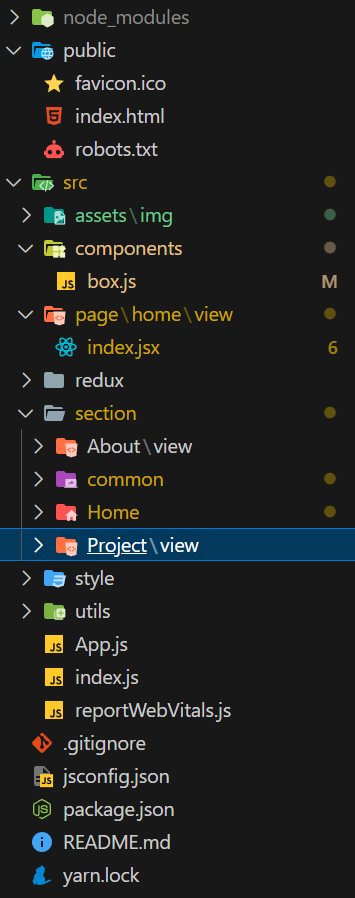
- 랜딩페이지 처럼 스크롤을 통해 섹션을 이동하는 페이지로 만들고자한다(router안쓸듯)
- 컨셉은 글리치 아날로그 tv?? 같은 느낌으로 만들어볼까한다..
진행사항
- 텍스트 글리치 컴포넌트 제작을 완료했다.
- 페이지 스크롤 상태를 관리할 리듀서생성 및 스타일드컴포넌트를 통해 props를 전달받아 스크롤 효과를 낼 컴포넌트를 생성했다.
문제발생지점1
const { createSlice } = require("@reduxjs/toolkit");

const initialState = {
  currentPage: 0,
  maxPage: 10
};

const viewer = createSlice({
  name: "viewer",
  initialState,
  reducers: {
    change(state, action) {
      let { payload } = action;
      const { currentPage, maxPage } = state;

      if (payload.currentPage) {
        state.currentPage = payload.currentPage;
      }
      if (payload.maxPage) {
        state.maxPage = payload.maxPage;
      }

      return state;
    }
  }
});

export const viewerReducer = viewer.reducer;
export const viewerActions = viewer.actions;
액션함수 내부에서 state의 객체 내부값을 쉽게 얻고싶어서 구조분해 할당을 사용하였다.
그러나 구조분해 할당시 새로운 변수에 객체의 값이(깊은복사, 원래 참조시 메모리주소가 저장되어야함) 저장되어 액션함수에서 아무리 구조분해 할당한 값을 변경해도 원본 state 내부의 객체의 값이 변경되지 않았다.
구조분해 할당을 무지성으로 사용하지않아야겠다.
*redux toolkit 사용시 리듀서는 void를 반환해야한다 (return하면안된다)
문제발생지점2 (미해결)
export default function GlitchText({ text }) {
  const savedCallback = useRef(null);
  const [clipPath, setClipPath] = useState({
    afterTop: 0,
    beforeTop: 0,
    afterBottom: 0,
    beforeBottom: 0,
    skew: 0
  });

  const callback = () => {
    setClipPath({
      afterTop: Math.random() * 100,
      beforeTop: Math.random() * 100,
      afterBottom: Math.random() * 100,
      beforeBottom: Math.random() * 100,
      skew: Math.random() * 20 - 10
    });
  };

  useEffect(() => {
    savedCallback.current = callback;
  }, []);

  useEffect(() => {
    const tick = () => {
      savedCallback.current();
    };
    const timer = setInterval(tick, 100);

    return () => clearInterval(timer);
  });

  return (
    <div>
      <Title $clipPath={clipPath}>
        {text}
        <TitleAfter $clipPath={clipPath}> {text}</TitleAfter>
        <TitleBefore $clipPath={clipPath}> {text}</TitleBefore>
      </Title>
    </div>
  );
해당형식으로 스타일드컴포넌트로 만든 jsx요소에 props를 전달해서 clip-path를 계속 변경시켜서 글리치를 만들었는데 너무 많은 클레스르 만들고있다고 경고가 발생했다.
const Title = styled.div.attrs(({ $clipPath }) => ({
  style: {
    transform: `skew(${$clipPath.skew}deg)`
  }
}))`
  text-shadow: 3px -2px black;

  color: white;
  position: relative;
  font-size: 3rem;
  font-weight: bold;
`;

const TitleBefore = styled.div.attrs(({ $clipPath }) => ({
  style: {
    clipPath: `polygon(0 ${$clipPath.beforeTop}%,100% ${$clipPath.beforeTop}%,100% ${$clipPath.beforeBottom}%,0 ${$clipPath.beforeBottom}%)`,
    transform: `skew(${$clipPath.skew}deg)`
  }
}))`
  background-color: transparent;
  position: absolute;
  top: 0;
  left: -2px;
  text-shadow: 3px -2px ${({ theme }) => theme.color.accent_alt};
`;

const TitleAfter = styled.div.attrs(({ $clipPath }) => ({
  style: {
    clipPath: `polygon(0 ${$clipPath.afterTop}%,100% ${$clipPath.afterTop}%,100% ${$clipPath.afterBottom}%,0 ${$clipPath.afterBottom}%)`,
    transform: `skew(${$clipPath.skew}deg)`
  }
}))`
  background-color: transparent;

  position: absolute;
  top: 0;
  left: 2px;
  text-shadow: 3px -2px ${({ theme }) => theme.color.accent};
`;
attrs로 넣어줘서 해당 오류는 해결하긴했는데 영 마음에 안든다..
해야할일
- 배경에도 글리치 혹은 노이즈 효과를 줄 수 있도록 하기
- 나머지 섹션 채워넣기..
- 글로벌 스타일 및 테마 작성하기