DAY 12-1 | Flutter 데모 앱 만들기: 화면 개선하기
리스트 화면 개선하기
WorkoutListPage Challenge
Column과Row를 통해 구현했던 것을ListView와ListTile로 리팩토링 해보자.
기존의 workout_list_page.dart 파일을 legacy_workout_list_page.dart 로 복사해 놓고 수정했다.
먼저, Row[Image, Text, Text] 구조를 ListTile[leading, title, trailing] 구조로 변경하였다. 그리고 Column[Row, Row, ...] 구조를 ListView[ListTile, ListTile, ...] 구조로 변경하였다.
lib/workout_list_page.dartimport 'package:flutter/material.dart'; class WorkoutListPage extends StatelessWidget { WorkoutListPage({super.key}); final List<Map<String, dynamic>> workoutList = [ {'name': '스쿼트', 'image': 'squat.png', 'minutes': 30}, {'name': '마운틴 클라이머', 'image': 'mountain_climber.png', 'minutes': 20}, {'name': '푸시업', 'image': 'push_up.png', 'minutes': 15}, {'name': '윗몸 일으키기', 'image': 'sit_up.png', 'minutes': 15}, {'name': '사이드 런지', 'image': 'side_lunge.png', 'minutes': 20}, {'name': '덩키 킥', 'image': 'donkey_kick.png', 'minutes': 30}, {'name': '사이드 플랭크', 'image': 'side_plank.png', 'minutes': 20}, {'name': '리버스 플랭크', 'image': 'reverse_plank.png', 'minutes': 15}, {'name': '힙 브릿지', 'image': 'hip_bridge.png', 'minutes': 25}, {'name': '어깨 스트레칭', 'image': 'shoulder_stretch.png', 'minutes': 15}, {'name': '햄스트링', 'image': 'hamstring_stretch.png', 'minutes': 10}, ]; List<ListTile> getWorkoutList() { List<ListTile> workoutTiles = []; for (var i = 0; i < workoutList.length; i++) { String name = workoutList[i]['name']; String image = workoutList[i]['image']; int minutes = workoutList[i]['minutes']; workoutTiles.add( ListTile( contentPadding: EdgeInsets.symmetric(vertical: 20, horizontal: 10), leading: Container( width: 100, height: 100, decoration: BoxDecoration( image: DecorationImage(image: AssetImage('assets/$image')), shape: BoxShape.circle, ), ), title: Text( '${i + 1}. $name', style: TextStyle(fontSize: 20, fontWeight: FontWeight.bold), ), trailing: Text( '$minutes분', style: TextStyle(fontSize: 20, color: Colors.blueAccent), ), ), ); } return workoutTiles; } Widget build(BuildContext context) { return Scaffold( appBar: AppBar(title: Center(child: Text('Workout List'))), body: Padding( padding: EdgeInsets.all(12), child: ListView( children: [ ListTile( contentPadding: EdgeInsets.only(left: 40, right: 10), title: Text( '운동', style: TextStyle(fontSize: 16, color: Colors.grey), ), trailing: Text( '세트 당 소요시간', style: TextStyle(fontSize: 16, color: Colors.grey), ), ), ...getWorkoutList(), ], ), ), ); } }
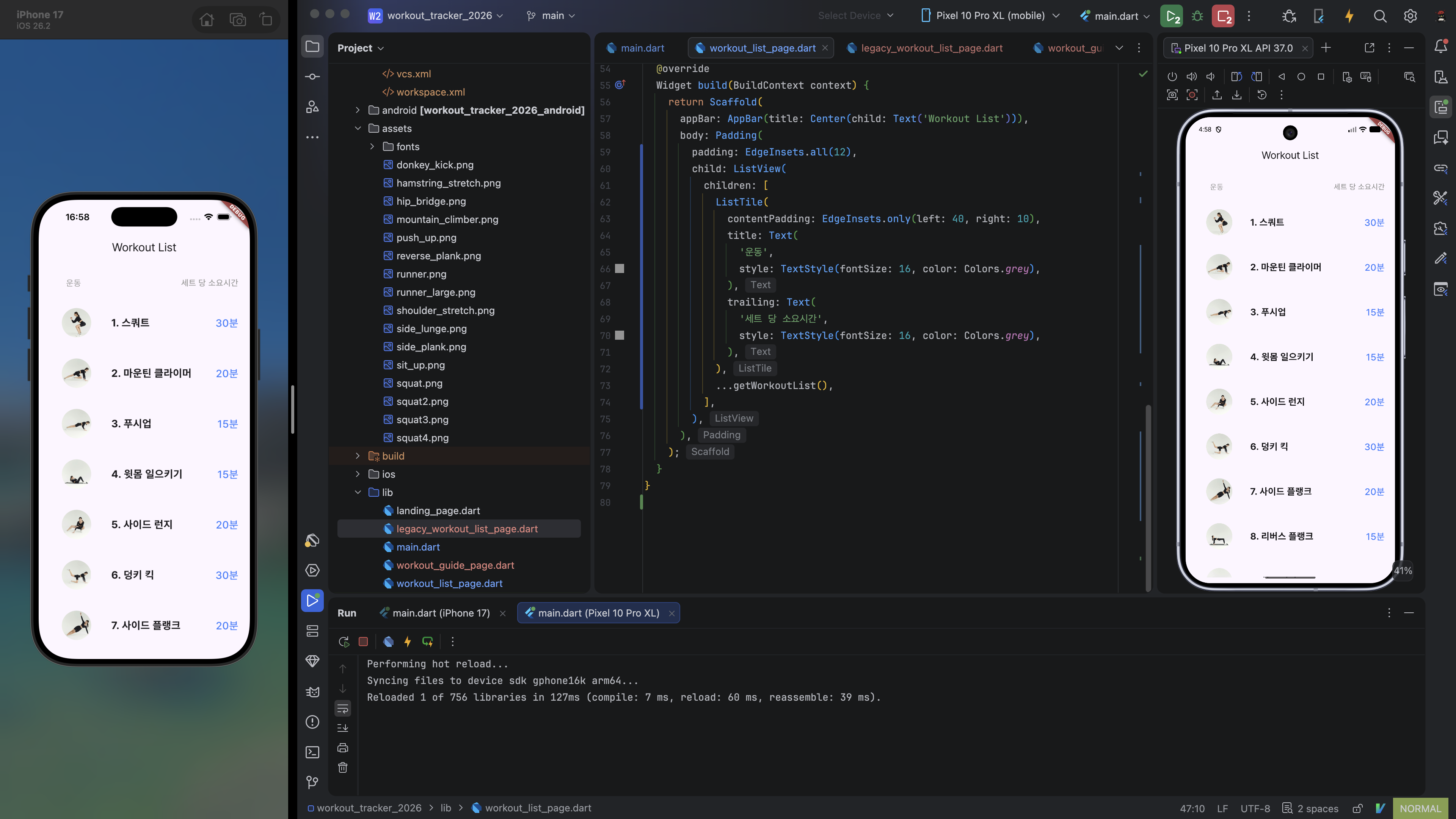
ListView widget은 기본적으로 scrollable하다. children이 ListView 의 범위를 넘어서면 overflow 되지 않고 scroll이 생긴다. 필요에 따라 ListTile widget의 onTap property에 적절한 callback function을 전달하여 각 항목을 선택 시 어떤 기능을 하도록 작성할 수 있다. 가령 각 항목을 선택하면 해당 운동에 대한 상세 페이지(WorkoutGuidePage)를 띄운다거나.
상세 페이지 개선하기
WorkoutGuidePage Challenge
상세 페이지 화면을 좀 더 꾸며 보자.
이것도 마찬가지로 기존의 workout_guide_page.dart 파일을 legacy_workout_guide_page.dart 로 복사해 놓고 수정했다.
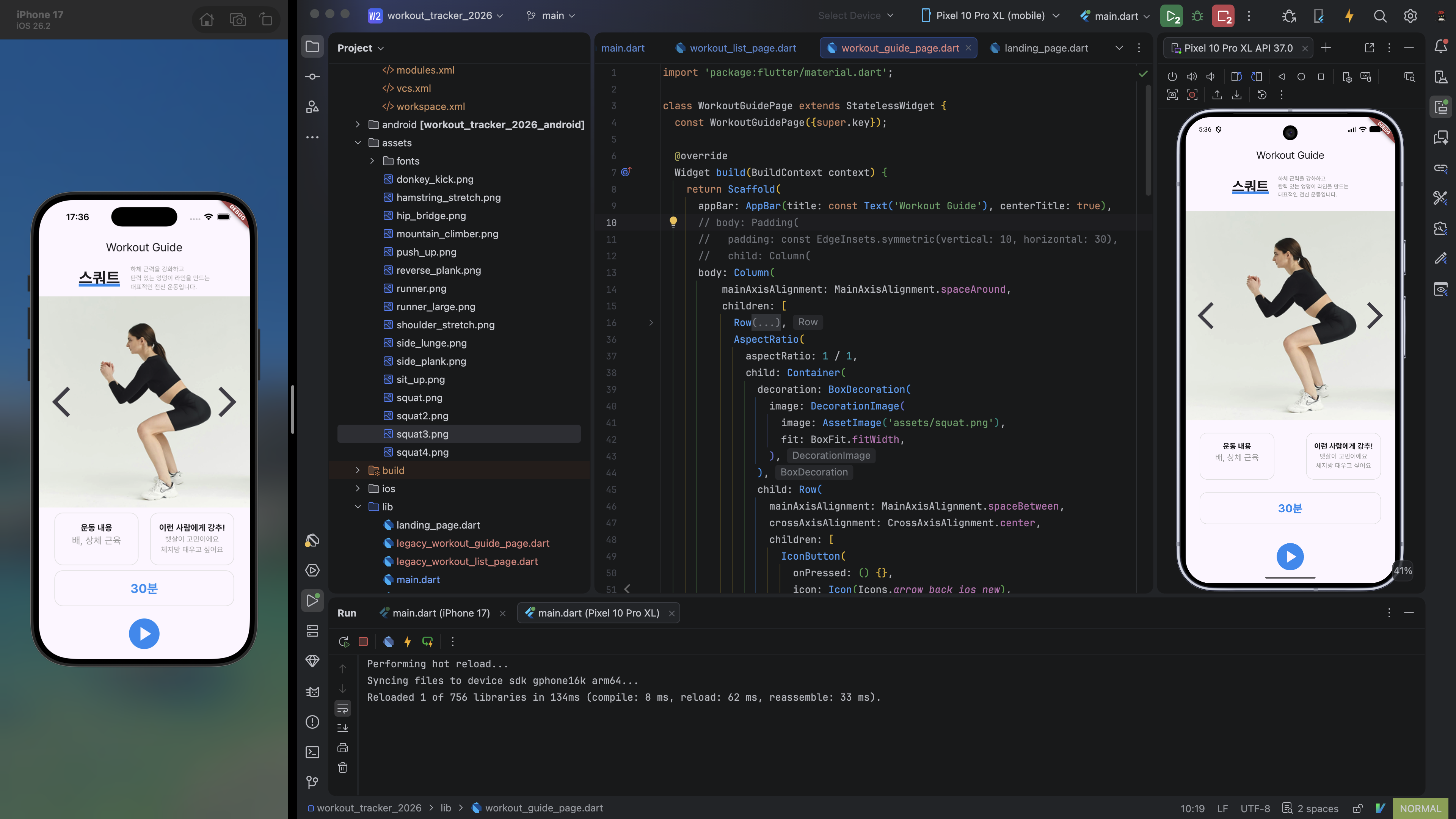
기존 화면은 이미지가 너무 작게 들어가 있으니 키우도록 하겠다. 기존에 Row[Icon, Image, Icon] 으로 구현되어 있던 것을 Container[Row[Icon, Icon]] 구조로 변경하고, Container widget의 decoration property를 사용하여 이미지를 깔도록 하겠다.
Container widget의 decoration 으로 이미지를 깔면 height가 Row 기준으로 shrink 하여 이미지가 잘려 나온다. 이 때, Container 에 임의의 height를 지정할 수도 있지만, 그렇게 하드코딩하지 않고 방법을 찾아 보았다.
이미지 비율이 정해져 있는 경우에는 AspectRatio widget으로 감싸는 방법이 있다고 한다. 네트워크 이미지를 사용하거나 같은 코드베이스를 여러 비율의 이미지를 띄울 때 사용하는 등 비율을 알 수 없는 경우에는 코드가 더 복잡해지기에, 여기서는 정방형 이미지를 기준으로 작성해 보았다. Stack widget을 사용하는 방법도 있지만 Container widget의 배경 이미지를 까는 방식으로 요구사항이 적혀 있으니 Stack widget은 배제하겠다.
이미지는 좌우 여백 없이 화면 가득 채우므로 Column 전체를 감싼 Padding widget을 제거하고, 하단 Container 들을 담은 Row 를 Padding 으로 감쌌다.
lib/workout_guide_page.dart// 앞 부분 생략 AspectRatio( aspectRatio: 1 / 1, child: Container( decoration: BoxDecoration( image: DecorationImage( image: AssetImage('assets/squat.png'), fit: BoxFit.fitWidth, ), ), child: Row( mainAxisAlignment: MainAxisAlignment.spaceBetween, crossAxisAlignment: CrossAxisAlignment.center, children: [ IconButton( onPressed: () {}, icon: Icon(Icons.arrow_back_ios_new), iconSize: 70, ), IconButton( onPressed: () {}, icon: Icon(Icons.arrow_forward_ios), iconSize: 70, ), ], ), ), ), // 뒷 부분 생략