Redis(Remote Dictionary Storage)
액세스 토큰, 리프레쉬 토큰, 반복된 데이터 요청을 빠르게 응답하는데
캐싱을 사용한다.
이번에는 spring application에서 RestController에
같은 입려값의 반복적이 요청이 들어왔을 때 캐싱이 잘 이루어지는지 테스트해보자.
build.gradle 의존성 추가
spring boot 3.3.1 기준
spring에서 redis를 사용하기위한 의존성을 추가했다.
dependencies {
	...

	// Spring Data Redis
	implementation 'org.springframework.boot:spring-boot-starter-data-redis:2.5.4'

	...
}
application.properties
redis.host와 port를 설정하고
특히 아래 설정을 추가해서 spring에서 캐싱이 이루어지도록 한다.
# Cache 설정
spring.cache.type=redis
-> redis Database에 캐싱하도록 설정한다.
# Redis 설정
spring.data.redis.host=${REDIS_URL}
spring.data.redis.port=6379
REDIS_URL=localhost

# Cache 설정
spring.cache.type=redis
../Config/RedisConfig.java
Redis를 사용하기위한 기본적인 설정을 해보자.
package com.myweapon.rtc_chatting.Config;

import org.springframework.beans.factory.annotation.Value;
import org.springframework.cache.CacheManager;
import org.springframework.context.annotation.Bean;
import org.springframework.context.annotation.Configuration;
import org.springframework.data.redis.cache.RedisCacheConfiguration;
import org.springframework.data.redis.cache.RedisCacheManager;
import org.springframework.data.redis.connection.RedisConnectionFactory;
import org.springframework.data.redis.connection.lettuce.LettuceConnectionFactory;
import org.springframework.data.redis.core.RedisTemplate;
import org.springframework.data.redis.serializer.GenericJackson2JsonRedisSerializer;
import org.springframework.data.redis.serializer.RedisSerializationContext;
import org.springframework.data.redis.serializer.StringRedisSerializer;

import java.time.Duration;

@Configuration
public class RedisConfig {
    @Value("${spring.data.redis.host}")
    private String host;
    @Value("${spring.data.redis.port}")

    private int port;

    @Bean
    public RedisConnectionFactory redisConnectionFactory() {
        return new LettuceConnectionFactory(host, port);
    }

    @Bean
    public RedisTemplate<String, Object> redisTemplate() {
        RedisTemplate<String, Object> redisTemplate = new RedisTemplate<>();
        redisTemplate.setConnectionFactory(redisConnectionFactory());

        // 일반적인 key:value의 경우 시리얼라이저
        redisTemplate.setKeySerializer(new StringRedisSerializer());
        redisTemplate.setValueSerializer(new StringRedisSerializer());

        // Hash를 사용할 경우 시리얼라이저
        redisTemplate.setHashKeySerializer(new StringRedisSerializer());
        redisTemplate.setHashValueSerializer(new StringRedisSerializer());

        // 모든 경우
        redisTemplate.setDefaultSerializer(new StringRedisSerializer());

        return redisTemplate;
    }

    @Bean
    public CacheManager customCacheManager() {
        RedisCacheManager.RedisCacheManagerBuilder builder = RedisCacheManager.RedisCacheManagerBuilder
                .fromConnectionFactory(redisConnectionFactory());
        RedisCacheConfiguration configuration = RedisCacheConfiguration.defaultCacheConfig()
                .serializeValuesWith(RedisSerializationContext.
                        SerializationPair.fromSerializer(new GenericJackson2JsonRedisSerializer()))
                .prefixCacheNameWith("test:") // key prefix 로 test: 를 사용
                .entryTtl(Duration.ofMinutes(30));
        builder.cacheDefaults(configuration);
        return builder.build();
    }
}
../Entity/RefreshToken.java
package com.myweapon.rtc_chatting.Entity;

import lombok.AccessLevel;
import lombok.AllArgsConstructor;
import lombok.Builder;
import lombok.Getter;
import lombok.NoArgsConstructor;
import org.springframework.data.annotation.Id;
import org.springframework.data.redis.core.RedisHash;
import org.springframework.data.redis.core.TimeToLive;
import org.springframework.data.redis.core.index.Indexed;

@Getter
@NoArgsConstructor(access = AccessLevel.PROTECTED)
@AllArgsConstructor(access = AccessLevel.PRIVATE)
@Builder
@RedisHash(value = "refresh_token")
public class RefreshToken {
    @Id
    private String authId;

    @Indexed
    private String token;
    private String role;
    @TimeToLive
    private long ttl;

    public RefreshToken update(String token, long ttl) {
        this.token = token;
        this.ttl = ttl;
        return this;
    }
}- @Id : 키 값이 되며, 후술할 @RedisHash - value 에 prefix에 덧붙여져 위 예제의 경우 refresh_token:{id} 형태로 형성된다.
- @RedisHash : value 속성을 통해 설정한 값을 키 값 prefix로 사용한다. timeToLive 속성을 사용할 수도 있다.
- @Indexed : 해당 값으로 검색을 할 시에 추가한다.
- @TimeToLive : 만료시간을 설정한다.(초 단위)
../Repository/RefreshTokenRepository.java
CrudRepository를 상속받아 구현했다.
package com.myweapon.rtc_chatting.Repository;

import java.util.Optional;
import com.myweapon.rtc_chatting.Entity.RefreshToken;
import org.springframework.data.repository.CrudRepository;

public interface RefreshTokenRepository extends CrudRepository<RefreshToken, String> {
    Optional<RefreshToken> findByToken(String token);

    Optional<RefreshToken> findByAuthId(String authId);
}
../Service/RedisUtil.java
package com.myweapon.rtc_chatting.Service;

import java.util.concurrent.TimeUnit;
import lombok.RequiredArgsConstructor;
import org.springframework.data.redis.core.RedisTemplate;
import org.springframework.stereotype.Service;

@Service
@RequiredArgsConstructor
public class RedisUtil {
    private final RedisTemplate<String, Object> redisTemplate;

    public void putData(String key, String value, long expiredTime) {
        redisTemplate.opsForValue().set(key, value, expiredTime, TimeUnit.MICROSECONDS);
    }

    public String getData(String key) {
        return (String) redisTemplate.opsForValue().get(key);
    }

    public void deleteData(String key) {
        redisTemplate.delete(key);
    }
}
../DTO/CacheTestDTO.java
package com.myweapon.rtc_chatting.DTO;

import com.fasterxml.jackson.annotation.JsonCreator;
import lombok.AllArgsConstructor;
import lombok.Data;
import lombok.NoArgsConstructor;

@Data
@NoArgsConstructor
@AllArgsConstructor
public class CacheTestDTO {
    private String id;
    private String content;
}
../Service/CacheTestService.java
package com.myweapon.rtc_chatting.Service;

import com.myweapon.rtc_chatting.DTO.CacheTestDTO;
import lombok.extern.slf4j.Slf4j;
import org.springframework.stereotype.Service;

@Service
@Slf4j
public class CacheTestService {
    public CacheTestDTO getResult(String id) {
        log.info("Cache miss, fetching result for id: {}", id);
        return new CacheTestDTO(id, id + " content");
    }
}
../Controller/CacheTestController.java
package com.myweapon.rtc_chatting.Controller;

import com.myweapon.rtc_chatting.DTO.CacheTestDTO;
import com.myweapon.rtc_chatting.Service.CacheTestService;
import lombok.RequiredArgsConstructor;
import org.springframework.cache.annotation.Cacheable;
import org.springframework.web.bind.annotation.GetMapping;
import org.springframework.web.bind.annotation.RequestParam;
import org.springframework.web.bind.annotation.RestController;

@RestController
@RequiredArgsConstructor
public class CacheTestController {
    private final CacheTestService cacheTestService;

    @Cacheable(value = "CacheTestDTO", key = "#id", cacheManager = "customCacheManager", unless = "#id==''", condition = "#id.length > 2")
    @GetMapping("/result")
    public CacheTestDTO result(@RequestParam String id){
        return cacheTestService.getResult(id);
    }
}@Cacheable어노테이션을 사용해서 같은 요청이 들어오는 경우 캐싱을 할 수 있도록한다.
이때 설정값을 다양하게 줄 수 있는데
-
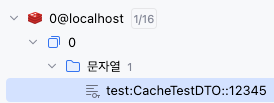
value: 캐시된 데이터의 이름을 의미한다.
value = "CacheTestDTO"이므로 "CacheTestDTO"캐시에 결과가 저장된다.
-
key: 캐시 항목의 키를 결정하는 데 사용되는 SpEL (Spring Expression Language) 표현식이다.
key = "#id"이므로public CacheTestDTO getResult(String id)
메소드의 인자인 "id"가 키로 사용된다. -
cacheManager: 캐시 매니저의 Bean 이름이다.캐시 매니저는 캐시의 생성과 관리를 담당하며
cacheManager = "customCacheManager"
여기서는 "customCacheManager"라는 이름의 캐시 매니저가 사용되었음을 의미한다. -
unless: 이는 결과를 캐시에 저장하지 않을 조건을 지정하는 SpEL 표현식입니다.
unless = "#id==''"이므로
"id"가 빈 문자열일 경우 결과가 캐시에 저장되지 않도록 한다. -
condition: 메소드가 캐시될 조건을 지정하는 SpEL 표현식입니다.
condition = "#id.length > 2"이므로
"id"의 길이가 2보다 클 경우에만 메소드가 캐시됩니다.
http://localhost:8080/result?id=12345이면 id의 길이는 5가 되서 캐싱이 이루어진다.
Application에 @EnableCaching
SpringBootApplication에 @EnableCaching을 추가해서 애플리케이션이 캐싱을 할 수 있도록 한다.
import org.springframework.boot.SpringApplication;
import org.springframework.boot.autoconfigure.SpringBootApplication;
import org.springframework.cache.annotation.EnableCaching;

@SpringBootApplication
@EnableCaching
public class RtcChattingApplication {

	public static void main(String[] args) {
		SpringApplication.run(RtcChattingApplication.class, args);
	}

}
정리
Spring Application이 캐싱이 되기 위해서는 3가지 조건이 필요하다.
1. Application.java - @EnableCaching 추가
2. application.properties - spring.cache.type=redis 추가
3. CacheTestController.java - @Cacheable(...) 추가
Redis 캐싱 테스트
이제 애플리케이션을 실행하고 본격적으로 테스트를 해보자.
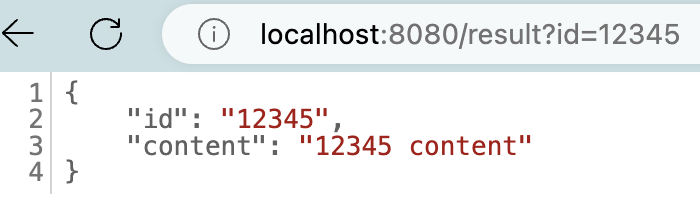
http://localhost:8080/result?id=12345를 처음에 누르면

이런 식으로 Cache miss 로그가 출력되며 캐싱된 데이터가 없다는 로그가 나온다.
하지만 2번째로 같은 http://localhost:8080/result?id=12345으로 접속해 요청하면
캐시된 데이터를 반환해준다.
트러블슈팅
처음에는 "http://localhost:8080/result?id=12345"를 요청하면 괜찮았는데
2번째로 요청하니
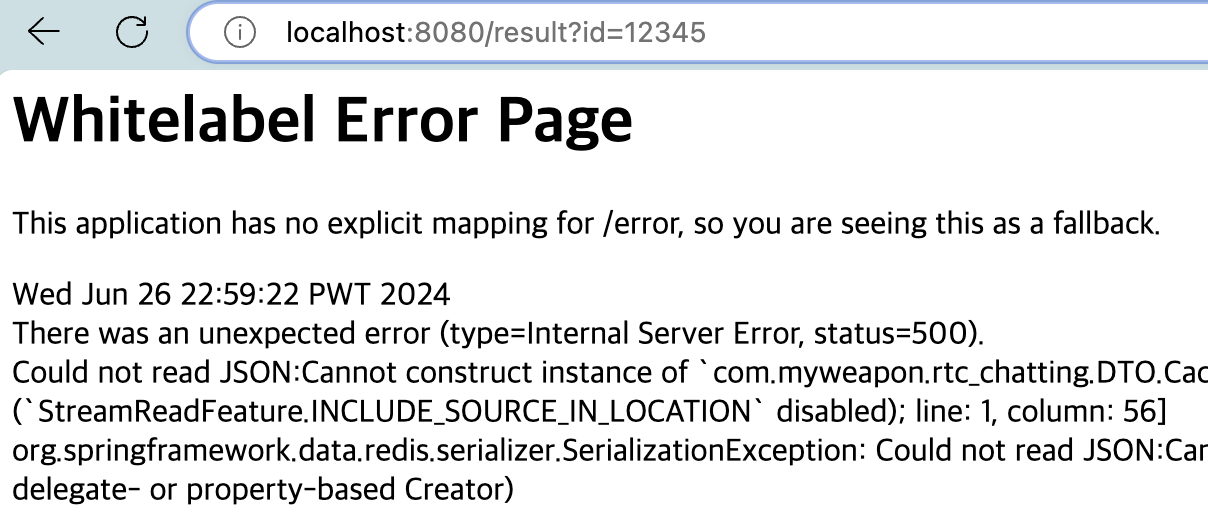
이런 식으로 에러가 발생했었다.
에러메시지를 자세히 읽어보니 CacheTestDTO에서 문제가 발생했었다.
Could not read JSON:Cannot construct instance of `com.myweapon.rtc_chatting.DTO.CacheTestDTO` (no Creators, like default constructor, exist): cannot deserialize from Object value (no delegate- or property-based Creator) at [Source: REDACTED (`StreamReadFeature.INCLUDE_SOURCE_IN_LOCATION` disabled); line: 1, column: 56]원인
발생한 에러는 com.myweapon.rtc_chatting.DTO.CacheTestDTO 클래스의 인스턴스를 생성할 수 없다를 의미한다. Jackson 라이브러리가 JSON을 CacheTestDTO 객체로 변환하는 과정에서 발생한 문제이다.
CacheTestDTO 클래스에 @NoArgsConstructor 어노테이션을 추가해서
Lombok 라이브러리가 기본 생성자를 자동으로 추가하도록 하거나,
@JsonCreator 어노테이션을 추가해서 CacheTestDTO 생성자를 구현해서
JSON형태로 CacheTestDTO 객체를 생성할 수 있도록 한다.
해결방법 1 - ../DTO/CacheTestDTO.java
-> @NoArgsConstructor를 추가한다.
package com.myweapon.rtc_chatting.DTO;

import lombok.AllArgsConstructor;
import lombok.Data;
import lombok.NoArgsConstructor;

@Data
@NoArgsConstructor
@AllArgsConstructor
public class CacheTestDTO {
    private String id;
    private String content;
}
해결방법 2 - ../DTO/CacheTestDTO.java
-> 생성자 + @JsonCreator를 추가하자
@Data
@AllArgsConstructor
public class CacheTestDTO {
    private String id;
    private String content;
    @JsonCreator
    CacheTestDTO() {
        this.id = "";
        this.content = "";
    }
}