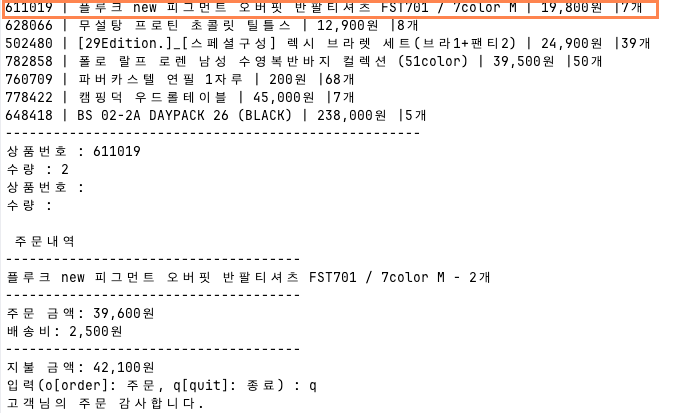
Nest.js로 BFF(Backend For Frontend)를 개발해왔는데 Nest.js로 주문 관리 프로그램을 개발해보기로 했다.
아직 프론트엔드를 별도로 만들지 않고 In-memory-repository를 생성해서 CSV 파일 데이터를 읽어온 후 터미널에서 입력받는 값에 따라 주문 관리 프로그램이 동작하도록 개발해보려고 한다.
- Nest.js 프로젝트 생성
폴더를 생성하고
nest new .입력하면
1. npm
2. yarn
3. pnpm(?기억이 잘 안 난다)
중에 선택하라고 뜨는데 yarn을 선택했다.
✔ Which package manager would you ❤️ to use? yarn별도로 DB를 생성하지 않고 In-memory-repository를 생성해보도록 하겠다.
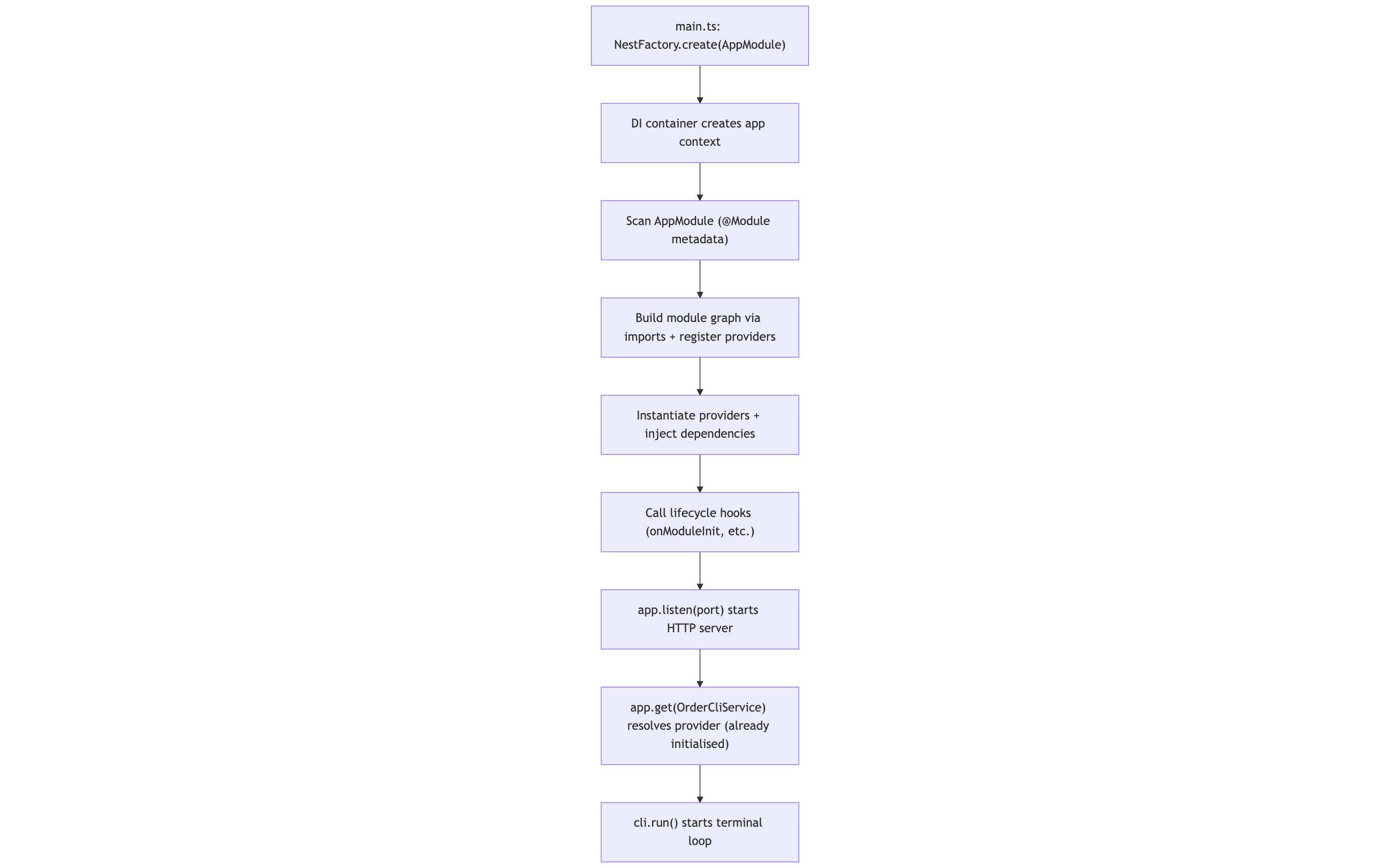
NestJS에서 node dist/main.js 실행 시
NestJS 내부에서 메모리 상에 하나의 ApplicationContext(=DI 컨테이너)가 생김
async function bootstrap() {
  const app = await NestFactory.create(AppModule);
  await app.listen(3000);
}
bootstrap();
NestFactory.create(AppModule) 이 호출되는 순간
-
Nest가 AppModule을 루트로 해서
-
그 안에 선언된 모든 @Module, providers, controllers 등을 스캔하고
-
DI 컨테이너(앱 컨텍스트)를 구성
DI(Dependency Injection)❓ DI는 클래스가 필요한 의존성을 스스로 생성하지 않고 외부에서 주입받는 설계 방식
목적은 다음과 같다:
-
객체 간 결합도 감소
-
테스트 용이성 향상
-
구현 교체 용이성
-
구조적이고 예측 가능한 초기화 과정 확보
-
NodeJS에서 DI 방식
별도의 DI 컨테이너가 없기 때문에 개발자가 직접 객체를 생성하고 주입const repo = new ProductRepository(); const service = new ProductService(repo); const controller = new ProductController(service); -
NestJS에서의 DI 방식
-
DI 컨테이너가 내장되어 있으며, 모듈 시스템과 데코레이터를 활용해 자동으로 의존성을 관리
-
싱글톤/요청 스코프 관리 가능
-
구현 교체(예: InMemoryRepo ↔ DBRepo)가 매우 쉬움
-
테스트 모듈(Test.createTestingModule) 제공 → Unit Test 환경에서 큰 장점
@Injectable()
	export class ProductService {
	constructor(private readonly repo: ProductRepository) {}
}
@Module({
	providers: [ProductRepository, ProductService],
})
export class ProductModule {}
구분 Node.js / Express NestJS DI 컨테이너 없음 내장 의존성 생성 개발자 직접 Nest가 자동 처리 모듈 구조 자유(혼란 가능) 모듈 기반 계층 구조 테스트 용이성 낮음 (Mock 주입 번거로움) 높음 (Test Module 제공) 구현 교체 어렵거나 번거로움 provider 바꾸면 끝 코드 일관성 팀 역량에 따라 편차 큼 프레임워크가 일관성 강제
-
// app.module.ts
@Module({
	imports: [ProductModule, OrderModule],
	providers: [OrderCliService],
})
export class AppModule implements OnModuleInit {
	constructor(private readonly productService: ProductService) {}

	async onModuleInit() {
		await this.productService.loadCSV();
	}
}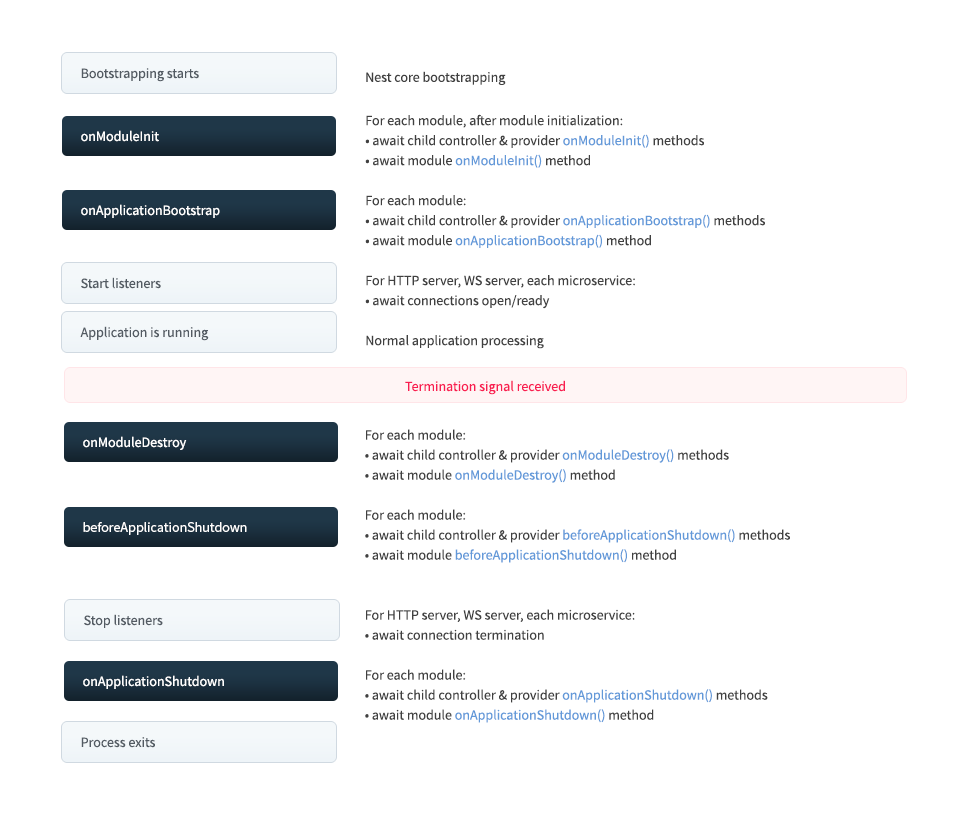
main.ts에 정의된 bootstrap() 실행후에 바로 실행되는 onModuleInit() 함수가 모듈이 초기화될 때 자동으로 실행
❓ 언제 사용할까?
- DB 연결 초기화
- WebSocket 연결
- 이벤트 리스너 설정
- 기본 데이터 로딩
- 기타 초기화 작업 수행
src/app.module.ts에서 AppModule이 ProductModule을 임포트하고, OnModuleInit 훅에서 ProductService.loadCSV()를 한 번 호출
이 호출로 애플리케이션 부팅 시점에만 CSV를 읽어 메모리에 올리기
// src/products/product.service.ts

	async loadCSV() {
		const filePath = path.join(
			process.cwd(), // node 명령어를 실행하는 루트(폴더)
			'src',
			'product-data',
			'products.csv',
		);

		const products = await this.readCsv(filePath);
		this.productRepo.loadData(products);
		this.logger.log(`Loaded ${products.length} products into memory`);
	}
	async readCsv(filePath: string): Promise<Array<ProductTypes>> {
		const rows: Array<ProductTypes> = [];
		return new Promise((resolve, reject) => {
			fs.createReadStream(filePath, { encoding: 'utf-8' })
				.pipe(
					parse({
                      //헤더(첫 행)를 읽고 컬럼명이 결정된 이후부터 각 row가 객체로
						columns: (header) =>
							header.map((h) => h.replace(/\uFEFF/g, '').trim()), //눈에 보이지 않는 특정 바이트를 넣은 UTF-8 BOM 형식이라서 상품번호 컬럼이 인식되지 않아서
						trim: true,
						skip_empty_lines: true,
					}),
				)
				.on('data', (data: ProductCsvRow) => {
					const productId = data['상품번호'];
					const productName = data['상품명'];
					let salePrice = data['판매가격'];
					salePrice = salePrice.replace(/[^\d.-]/g, '');
					const stockQuantity = data['재고수량'];

					rows.push({
						productId,
						productName,
						salePrice: Number(salePrice) ?? 0,
						stockQuantity: Number(stockQuantity) ?? 0,
					});
				})
				.on('end', () => {
					resolve(rows); // 스트림 파싱이 끝났으므로 Promise를 성공(fulfilled) 상태로 완료하고 rows를 반환
				})
				.on('error', (err) => reject(err));
		});
	}
parse() 함수로 CSV를 행(record) 단위로 파싱
=> columns: true 또는 columns: (header) => ... 를 쓰면, 첫 행을 헤더로 써서 각 행이 객체로 출력
//src/products/in-memory-product.repository.ts

private readonly products = new Map<string, ProductTypes>();


loadData(products: ProductTypes[]) {
		this.products.clear();

		products.forEach((product: ProductTypes) => {
			this.products.set(product.productId, { ...product });
		});

		this.logger.log(
			`Loaded ${this.products.size} into in-memory repository`,
		);
	}
products map에 담아주기
또한 터미널 창이 곧 UI 역할을 하기 때문에 서버를 실행하면 cli도 실행할 수 있게
//main.ts

async function bootstrap() {
	const app = await NestFactory.create(AppModule);
	await app.listen(process.env.PORT ?? 3030);
	console.log(
		`HTTP SERVER LISTENING ON http://localhost:${process.env.PORT}`,
	);

	const cli = app.get(OrderCliService);
	await cli.run();
}
bootstrap();
//src/cli/order-cli.service.ts

async run() {
		let hasOrdered = false; // 주문 없이 터미널 창을 빠져나갈 때랑 아닐 때 메시지를 구별하기 위한 flag
		while (true) {
			const cmd = (
				await this.ask('입력(o[order]: 주문, q[quit]: 종료) : ')
			)
				.trim()
				.toLowerCase();

			if (cmd === 'q' || cmd === 'quit') {
				if (hasOrdered) {
					console.log(`고객님의 주문 감사합니다.`);
				} else {
					console.log(`주문을 종료합니다.`);
				}
				this.rl.close();
				process.exit(0);
			}

			if (cmd === 'o' || cmd === 'order') {
				const ordered = await this.handleOrderFlow();
				if (ordered) {
					hasOrdered = true;
				}
			}
		}
	}


	private ask(question: string): Promise<string> {
		return new Promise((resolve) => {
			this.rl.question(question, (answer) => {
				resolve(answer);
			});
		});
	}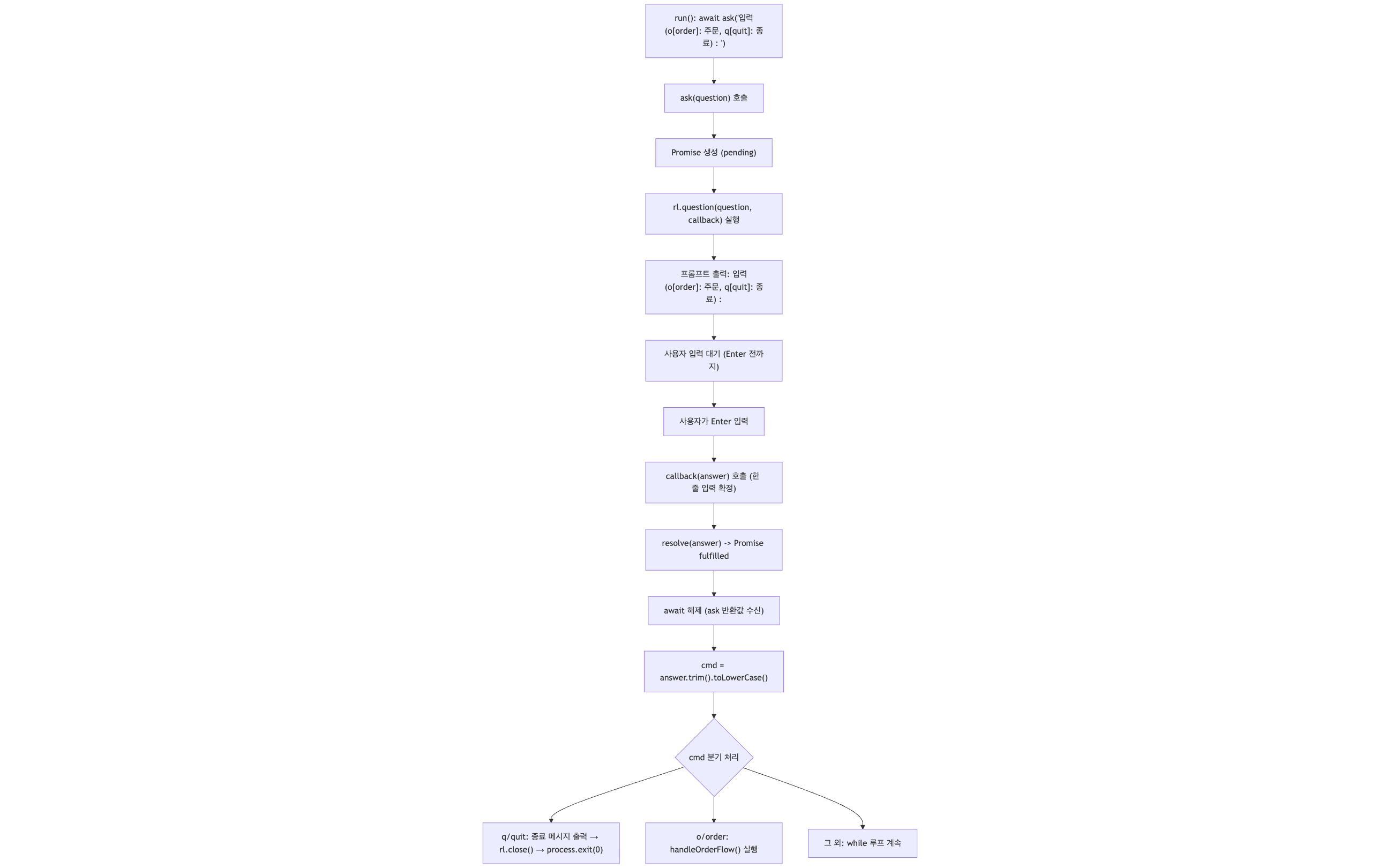
터미널 창으로 o나 order라는 단어가 입력되면
handleOrderFlow() 호출
// src/cli/order-cli.service.ts

	async handleOrderFlow(): Promise<boolean> {
		const items: { productId: string; quantity: number }[] = [];
		const products = await this.productRepository.findAll();
		const requested = new Map<string, number>();

        // 최초에 전체 상품 상품번호, 상품명, 가격, 재고 출력해주기
		printProducts(products);

		try {
			while (true) {
				// 1) 입력받은 상품 ID
				const productId = (await this.ask('상품번호 : ')).trim();

				// 2) 입력받은 수량
				const qtyStr = (await this.ask('수량 : ')).trim();
				const quantity = Number(qtyStr);

				const alreadyRequested = requested.get(productId) ?? 0;
				const requestedTotal = alreadyRequested + quantity;

				try {
					const validatedProduct =
						await this.orderInputValidator.validateLine(
							productId,
							quantity,
						);

					if ('end' in validatedProduct && validatedProduct.end) {
						break;
					}

					if (!validatedProduct.ok && 'message' in validatedProduct) {
						this.logger.log(validatedProduct.message);
						continue;
					}

					if (validatedProduct.ok) {
						items.push({
							productId: validatedProduct.value.productId,
							quantity: validatedProduct.value.quantity,
						});
						requested.set(productId, requestedTotal);
					}
					return true;
				} catch (err) {
					const msg =
						err instanceof Error
							? err.message
							: '입력 처리 중 오류가 발생했습니다.';
					this.logger.log(`${msg}\n`);
				}
			}

			if (!items.length) {
				console.log('주문 상품이 없습니다. \n');
				return false;
			}

			const summary = await this.orderService.createOrder(items);

			printSummary(summary);

			return true;
		} catch (e) {
			if (e instanceof SoldOutException) {
				this.logger.error(e.message, e.stack, e.name);
				return false;
			}

			const message =
				e instanceof Error ? e.message : '주문 처리 중 오류';
			this.logger.error(`주문 처리 중 오류가 발생했습니다. ${message}`);
			return false;
		}
	}

 // src/order/order.service.ts
@Injectable()
export class OrderInputValidator {
	constructor(
		@Inject('ProductRepository')
		private readonly productRepository: ProductRepository,
	) {}

	async validateLine(
		productId: string,
		qtyStr: string,
		alreadyRequested: number,
	): Promise<ValidateResult> {
		if (!productId && !qtyStr) {
			return { ok: false, end: true };
		}

		if (!productId || !qtyStr) {
			return {
				ok: false,
				message:
					'상품번호와 수량을 모두 입력하거나, 둘 다 space+enter 입력으로 주문을 종료해 주세요.',
			};
		}
		const quantity = Number(qtyStr);

		if (!Number.isInteger(quantity) || quantity <= 0) {
			return { ok: false, message: '수량은 1개 이상 입력해주세요.' };
		}

		const product = await this.productRepository.findById(productId);
		if (!product) {
			return { ok: false, message: '존재하지 않는 상품번호입니다.' };
		}

		const requestedTotal = alreadyRequested + quantity;
		if (requestedTotal > product.stockQuantity) {
			const available = Math.max(
				product.stockQuantity - alreadyRequested,
				0,
			);

			return {
				ok: false,
				message: `${productId}-${product.productName}의 재고가 부족합니다. 현재 재고는 ${product.stockQuantity}개이며, 이미 ${alreadyRequested}개를 요청하셨습니다. 추가로 주문 가능한 수량은 ${available}개입니다.`,
			};
		}

		return { ok: true, value: { productId, quantity, requestedTotal } };
	}
}
-
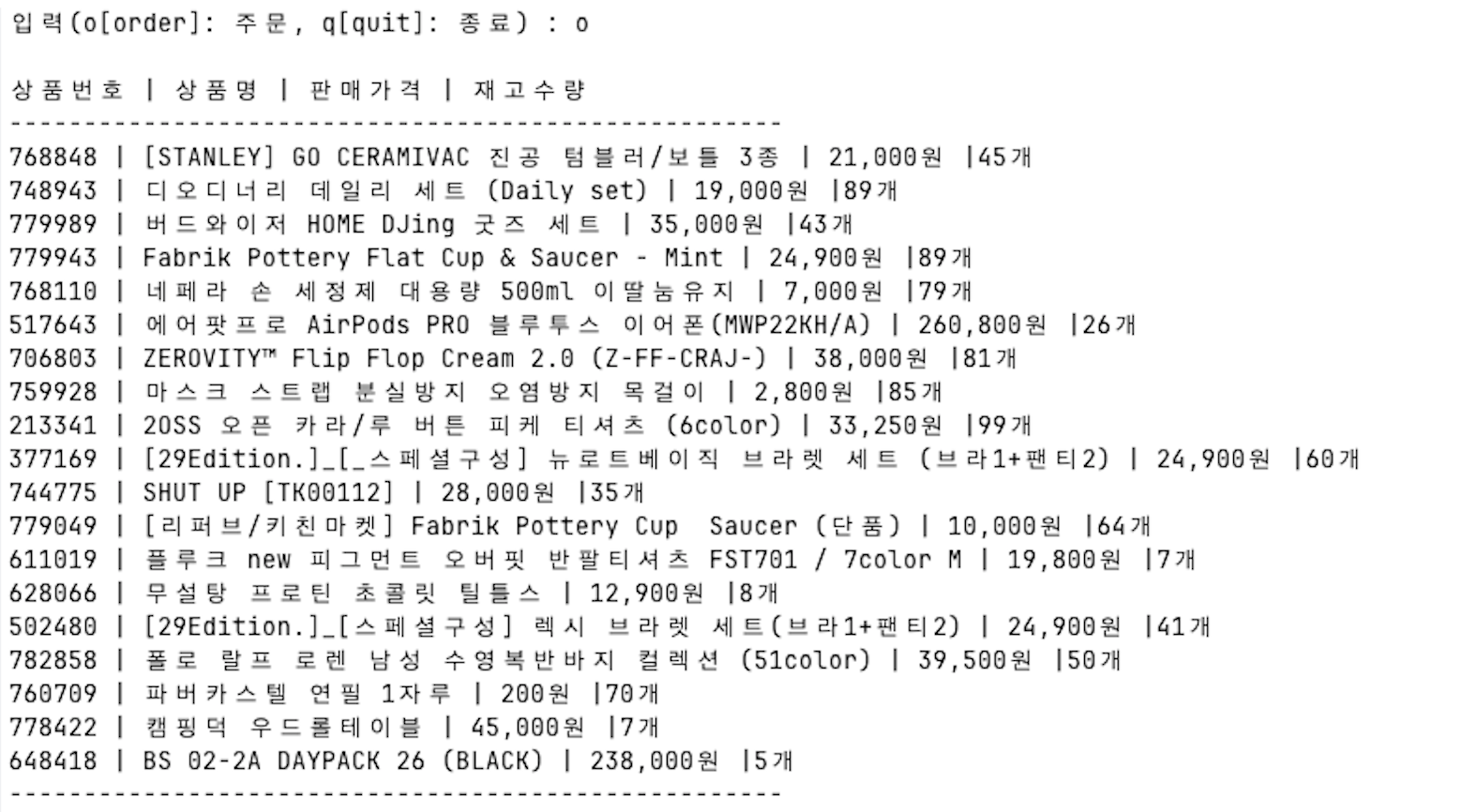
in-memory-repo에 저장된 상품정보를 모두 불러와 출력해준다
-
입력받은 상품 Id와 수량으로 유효성 체크를 한다
validateLine(productId, quantity)
- 동작방식
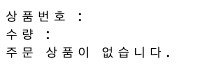
1. 상품 ID와 수량이 모두 입력되지 않으면
 2. 상품 ID를 입력했지만 수량이 1 미만일 때
 3. 존재하지 않는 상품번호를 입력했을 때
 4. 상품 ID와 수량 입력 후 해당 상품의 재고수량보다 희망하는 수량이 클 경우
 5. 유효성 통과 시 items 배열에 추가
// src/order/order.service.ts
@Injectable()
export class OrderService {
	constructor(
		@Inject('ProductRepository')
		private readonly productRepository: ProductRepository,
	) {}
	async createOrder(items: { productId: string; quantity: number }[]) {
		const summary: OrderSummary = {
			lines: [],
			orderAmount: 0,
			shippingFee: 0,
			paymentAmount: 0,
		};
		for (const item of items) {
			const product = await this.productRepository.findById(
				item.productId,
			);
			if (!product) {
				throw new ProductNotFoundException();
			}

			if (item.quantity > product.stockQuantity) {
				throw new SoldOutException(
					item.productId,
					item.quantity,
					product.stockQuantity,
				);
			}
			summary.orderAmount += item.quantity * product.salePrice;
			summary.lines.push({
				productId: item.productId,
				productName: product.productName,
				quantity: item.quantity,
			});

			await this.productRepository.decreaseStock(
				item.productId,
				item.quantity,
			);
		}

		// 주문 금액이 5만원 이하면 배송비 2,500원 더해주기
		if (summary.orderAmount < 50000) {
			summary.shippingFee += 2500;
		}

		summary.paymentAmount += summary.orderAmount + summary.shippingFee;

		return summary;
	}
}