SQL basic 5강
※ 4강은 단순 join에 관한 이야기라서 넘어갔다.
5, 6강은 예제를 풀었다.
테이블
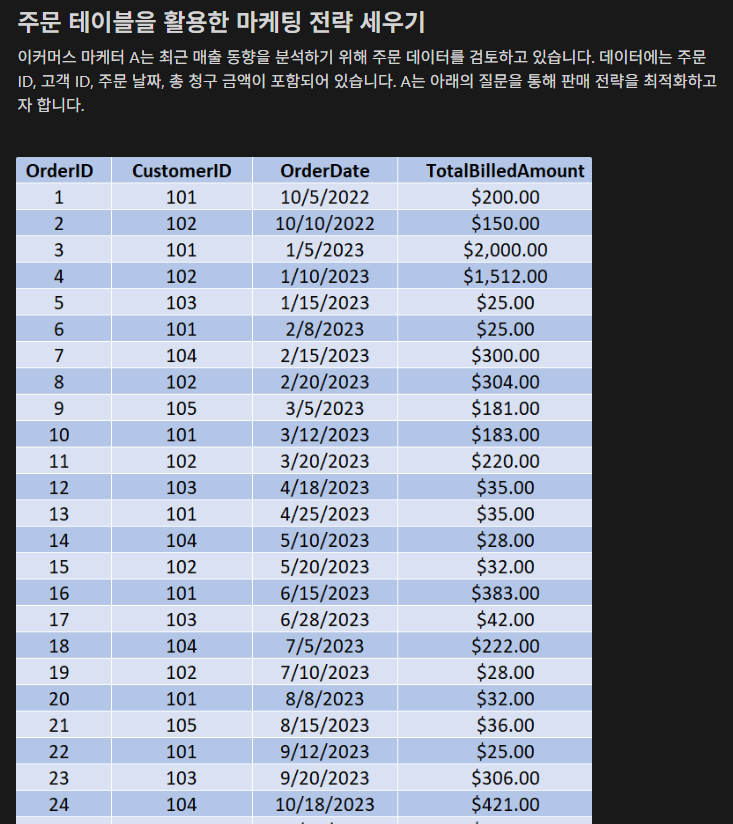
ORDERS 테이블
OrderID : 주문 아이디
CustomerID: 고객 아이디
OrderDate: 주문 일자
TotalBilledAmount: 일일 주문 금액
1번 문제
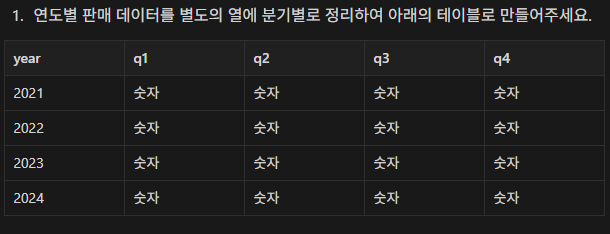
# 연도별 판매 데이터를 별도의 열에 분기별로 정리하여 아래의 테이블로 만들어주세요.
SELECT year(OrderDate) as `year`,
sum(case when quarter(OrderDate)=1 then TotalBilledAmount else 0 end) as q1,
sum(case when quarter(OrderDate)=2 then TotalBilledAmount else 0 end) as q2,
sum(case when quarter(OrderDate)=3 then TotalBilledAmount else 0 end) as q3,
sum(case when quarter(OrderDate)=4 then TotalBilledAmount else 0 end) as q4
FROM Orders GROUP BY year ORDER BY year;
설명 : ``를 사용하면 함수와 같은 컬럼명을 설정할 수 있다.
quarter(OrderDate)가 1일 때 1분기라는 것이다.
1일 경우 TotalBilledAmount를 반환하는 것이기 때문에 이건 1분기 판매 금액 합계로 q1으로 정의했다.
그렇게 4분기까지 정리하고 GROUP BY와 ORDER BY를 연도로 해주면 끝.
2번 문제
# 2023년 월별로 고객이 주문한 건수는 얼마나 되나요?

SELECT month(OrderDate), count(OrderID) FROM Orders WHERE year(OrderDate) = 2023 GROUP BY 1;
3번 문제
# 현재 기준으로 지난 분기에 주문하지 않은 고객들의 아이디 리스트를 만들어주세요.

SELECT CustomerID FROM Orders WHERE date_diff(current_date(),OrderDate,'Q') = 1;
4번 문제
# 현재 기준으로 지난 2년간 월별로 주문한 평균 금액을 계산해주세요.

SELECT year(OrderDate),month(OrderDate),avg(TotalBilledAmount)
FROM Orders WHERE date_diff(current_date(), OrderDate, 'Y') <= 2 GROUP BY 1,2;
5번 문제
# 100달러 이상의 상품을 한 번 이상 주문한 고객들의 아이디 리스트를 만들어주세요.

SELECT CustomerID, count(OrderID)
FROM Orders WHERE TotalBilledAmount >= 100 GROUP BY 1 HAVING count(OrderID) > 1;
SQL basic 6강
1번 문제
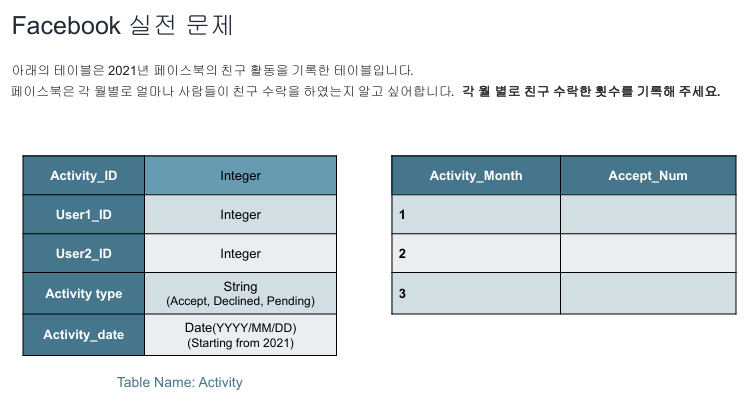
SELECT month(Activity_date) `month`, count(Activity_type = 'Accept') cnt FROM Activity
GROUP BY Activity_ID, month ORDER BY cnt;

SELECT month(Activity_date) `month`,
SUM(case when Activity_type = 'Accept' then 1 else 0 end) cnt
FROM Activity
GROUP BY 1;
나는 위에 코드 정답은 아래 코드.
2번 문제
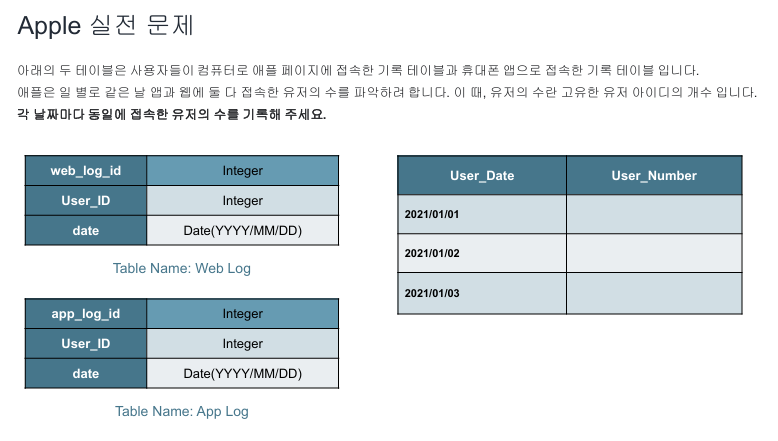
SELECT a.date User_Date, count(*) User_Number
FROM Web_Log a JOIN App_Log b ON a.User_id = b.User_id AND a.date = b.date
GROUP BY 1;

SELECT a.date User_Date, count(distinct a.User_id) User_Number
FROM Web_Log a JOIN App_Log b ON a.User_id = b.User_id AND a.date = b.date
GROUP BY 1;
distinct를 해주자.
3번 문제
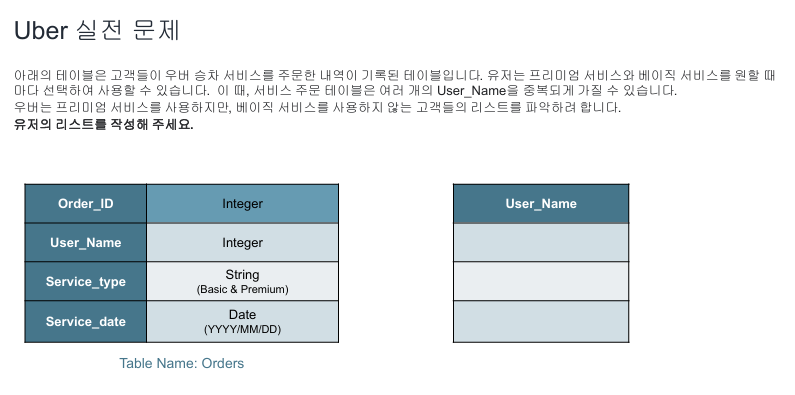
SELECT distinct User_Name
FROM Orders
WHERE Service_type = 'Premium';
쉬웠다.

안녕하세요 오정수입니다