Context
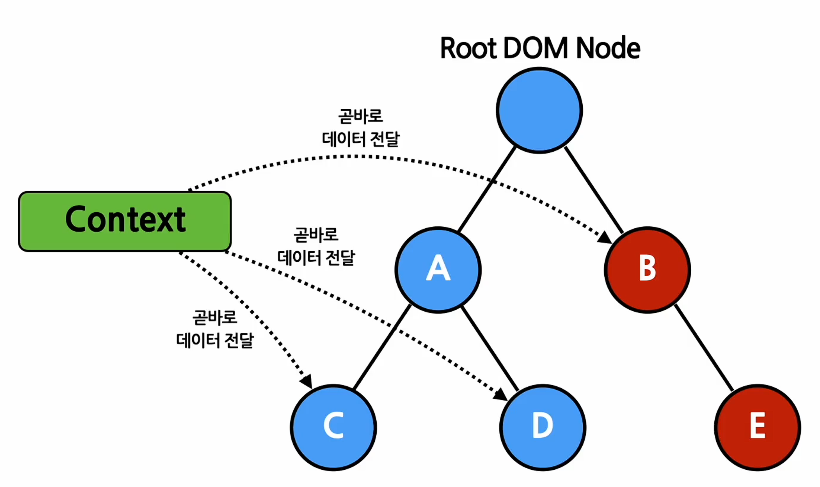
위계질서에 상관 없이 리액트 컴포넌트들 사이에서 데이터 전달을 가능하게 함
(이전까지는 '상위->하위' 밖에 안 됐지만, Context를 쓰면 위계에 상관 없이 데이터 전달이 가능하다)
언제 사용하는가?
주로 이런 데이터(또는 정보)를 관리할 때 쓴다.
- 로그인 여부
- 회원 정보
- UI 테마
- 웹사이트의 언어
- etc
기존의 props를 이용한 방식
function App(props) {
  return <Toolbar theme="dark" />;
}

// ThemedButton에 theme을 전달하기 위하여
// props.theme이 반드시 있어야 한다.
function Toolbar(props) {
  return (
    <div>
      <ThemedButton theme={props.theme} />
    </div>
  );
}

function ThemedButton(props) {
  return <Button theme={props.theme} />;
}
Context를 활용한 방식
// 'light'로 초깃값을 설정
const ThemeContext = React.createContext('light');

// ThemeContext를 제공할 컴포넌트
// 해당 컴포넌트 밑의 컴포넌트들은 ThemeContext에 접근할 수 있다.
function App(props) {
  return (
    <ThemeContext.Provider value="dart">
      <Toolbar />
    </ThemeContext.Provider>
  );
}

function Toolbar(props) {
  return (
    <div>
      <ThemedButton />
    </div>
  );
}

// 자신의 위에 있는 Provider 중에서 가장 가까운 Provider를 찾아서
// 만약 Provider가 있다면, 그 값을 사용하고
// 없다면 초깃값을 활용한다.
function ThemedButton(props) {
  return (
    <ThemeContext.Consumer>
      {value => <Button theme={value} />;}
    </ThemeContext.Consumer>
  );
}
주의
'Context를 사용할 경우, 코드의 재사용성이 떨어질 수 있다. 따라서, 다른 레벨의 많은 컴포넌트에서 데이터를 사용할 게 아니라면 기존의 방식대로 하는 것이 더 효율적이다.
사용법
React.createContext()
Context를 생성하는 함수. 만약 기본값이 undefined면 기본값이 없는 셈으로 취급한다.
const MyContext = React.createContext(/*기본값*/);Context.Provider
하위 컴포넌트들이 Context에 접근할 수 있게 해주는 리액트 컴포넌트. 만약 value의 값이 바뀌면 재렌더링 된다.
<MyContext.Provider value={/*새로운 값*/}>
  ...
</MyContext.Provider>
Class.contextType
Provider 밑의 Class Component에서 Context에 접근하는 함수. (잘 안 쓰니 그냥 있다고만 알자)
Context.Consumer
Provider를 통해 Context를 사용하는 리액트 컴포넌트
<MyContext.Consumer>
  {value => /*컨택스트 값에 따라서 컴포넌트들을 랜더링*/}
</MyContext.Provider>
몇 가지 규칙/주의사항
- 여러 개의 Consumer는 하나의 Provider에 접근할 수 있고, 또한 여러 개의 Provider는 중첩될 수 있다.
- Provider 밑의 모든 Consumer는 Provider의 value가 바뀔 때마다 재렌더링된다. 이때, 값이 변경되었는지 판단하는 방식은 JS의 Object.is와 같다.
만약 다음과 같이 Provider를 사용한다면, 상위 컴포넌트가 재렌더링될 때마다 value의 object가 새로 생성되기 때문에 하위 컴포넌트도 불필요하게 재렌더링된다.
function App(props) {
  return (
    <ThemeContext.Provider value={{ something: 'something' }}>
      <Toolbar />
    </ThemeContext.Provider>
  );
}
이를 막기 위해 value를 state를 사용하여 불필요한 재렌더링을 막는다.
function App(props) {
  const [value, setValue] = useState({ something: 'something' });

  return (
    <ThemeContext.Provider value={value}>
      <Toolbar />
    </ThemeContext.Provider>
  );
}
function as a child
// children prop를 직접 선언
<Profile children={name => <p>이름: {name}</p>} />

// Profile 컴포넌트를 감싸서 children을 만드는 방식
<Profile>{name => <p>이름: {name}</p>}</Profile>
Context.displayName
개발자들이 디버깅할 때, Context를 구분하기 쉽도록 이름을 설정할 수 있다.
// 이렇게 설정하면, MyContext의 Provider와 Consumer는
// "HelloWorld"라는 이름으로 대체된다.
const MyContext = React.createContext(/* some value */);
MyContext.displayName = 'HelloWorld';
여러 개의 Context 사용하기
const ThemeContext = React.createContext('light');
const UserContext = React.createContext({
  name: 'Guest'
});

function App(props) {
  return (
    <ThemeContext.Provider value={props.theme}>
      <UserContext.Provider value={props.signedInUser}
      	<Layout />
      </UserContext.Provider>
    </ThemeContext.Provider>
  );
}

function Layout(props) {
  return (
    <div>
      <Sidebar />
      <Content />
    </div>
  );
}

function Content(props) {
  return (
    <ThemeContext.Consumer>
      {theme => (
        <UserContext.Consumer>
          {user => (
            <ProfilePage user={user} theme={theme} />
          )}
        </UserContext.Consumer>
      )}
    </ThemeContext.Consumer>
  );
}
useContext
매번 Context.Provider & Context.Consumer를 쓰는 것은 생각보다 귀찮다. 이럴 때 useContext Hook을 사용하여 Function Component에서 Context를 쉽게 사용할 수 있다.
function MyComponent(props) {
  // 인자값으로 탐색할 Context 객체를 전달하면하면,
  // 해당 Context의 Provider 중에서 가장 가까운 상위 Providr가 리턴된다.
  // Providr가 재렌더링되면, useContext를 가진 컴포넌트도 재렌더링된다.
  const value = useContext(MyContext);

  return (
    ...
  );
}
Referance