40.1. 이벤트 드리븐 프로그래밍
- 이벤트 핸들러 (event handler) : 이벤트가 발생했을 때 호출될 함수
- 이벤트 핸들러 등록 : 이벤트가 발생했을 때 브라우저에게 이벤트 핸들러(함수) 호출 위임
- 이벤트 드리븐 프로그래밍 (event-driven programming) : 사용자와 애플리케이션이 상호작용하며 이벤트 중심으로 제어하는 프로그래밍 방식
40.2. 이벤트 타입
40.2.1. 마우스 이벤트
click: 클릭했을 때dbclick: 더블 클릭했을 때mousedown: 버튼 눌렀을 때mouseup: 누르고 있던 버튼을 놓았을 때mousemove: 커서를 움직였을 때mouseenter: HTML 요소 안으로 이동했을 때 (버블링 되지 않음)mouseover: HTML 요소 안으로 이동했을 떄 (버블링 됨)mouseleave: HTMl 요소 밖으로 이동했을 때 (버블링 되지 않음)mouseout: HTML 요소 밖으로 이동했을 때 (버블링 됨)
40.2.2. 키보드 이벤트
keydown: 모든 키를 눌렀을 때- control, option, shift, tab, delete, enter, 방향 키, 문자, 숫자, 특수 문자 키
- 문자, 숫자, 특수 문자, enter 키는 연속적으로 발생하지만 이외에는 한 번만 발생
keyup: 누르고 있던 키를 놓았을 때 한 번만 발생keydown과 동일함
keypress: 문자 키를 눌렀을 때 연속적으로 발생- 폐지(deprecated)되었으므로 권장하지 않음
40.2.3. 포커스 이벤트
focus: HTML 요소가 포커스를 받았을 때 (버블링되지 않음)blur: HTML 요소가 포커스를 잃었을 때 (버블링 됨)focusin: HTML 요소가 포커스를 받았을 때 (버블링되지 않음)focusout: HTML 요소가 포커스를 잃었을 때 (버블링 됨)focusin/focusout를 이벤트 핸들러 프로퍼티 방식으로 등록 시 정상 동작하지 않는 경우 있음addEventListener메서드 방식으로 등록해야 함
40.2.4. 폼 이벤트
submit- form 요소 내
input,select입력 필드에서 엔터 키를 눌렀을 때 - form 요소 내
submit버튼을 클릭했을 때
- form 요소 내
reset: form 요소 내의reset버튼을 클릭했을 때- 최근에는 사용 안 함
40.2.5. 값 변경 이벤트
input: input 요소 값이 입력되었을 때change: input 요소 값이 변경되었을 때readystatechange: HTML 문서의 로드와 파싱 상태를 나타내는document.readyState프로퍼티 값이 변경될 때document.readyState: loading, interactive, complete
40.2.6. DOM 이벤트
DOMContentLoaded: HTML 문서의 로드와 파싱이 완료되어 DOM 생성이 완료되었을 때
40.2.7. 뷰 이벤트
resize: 브라우저 윈도우 크기를 리사이즈할 때 연속적으로 발생- 오직
window객체에서만 발생함
- 오직
scroll: 웹페이지 또는 HTML 요소를 스크롤할 때 연속적으로 발생
40.2.8. 리소스 이벤트
load:DOMContentLoaded이벤트 발생 이후, 모든 리소스 로딩이 완료되었을 때unload: 리소스가 언로드될 때 (주로 새로운 웹페이지를 요청한 경우)abort: 리소스 로딩이 중단되었을 때error: 리소스 로딩을 실패했을 때
40.3. 이벤트 핸들러 등록
40.3.1. 이벤트 핸들러 어트리뷰트 방식
- 이벤트 핸들러 어트리뷰트 이름 : on 접두사 + 이벤트 타입 (ex.
onclick) - 이벤트 핸들러 어트리뷰트 값으로 함수 호출문 등을 할당하여 이벤트 핸들러 등록
- 실제로는 어트리뷰트 값으로 할당한 문자열은 암묵적으로 생성된 이벤트 핸들러의 함수 몸체
- 인수를 전달하기 위해 위와 같이 동작함
- 함수 참조: 함수 자체를 가리키는 변수, 함수를 변수에 할당하거나 함수를 매개변수로 전달하거나 다른 함수에서 호출 가능
- 함수 호출문: 함수를 실행하는 명령문, 함수 이름 뒤에 괄호 ()를 붙여 호출하며 함수의 실행 결과를 반환함
<button onClick="sayHi('Lee')">Click!</button>

// 이벤트 핸들러 어트리뷰트 이름과 동일한 이름으로 암묵적으로 생성되는 이벤트 핸들러의 함수 몸체
function onClick(event) {
  sayHi('Lee');
}- 모던 자바스크립트에서는 이벤트 핸들러 어트리뷰트 방식을 사용함
- CBD(Component Based Development) 방식의 Angular / React / Svelte / Vue.js 프레임워크 / 라이브러리에서 사용
40.3.2. 이벤트 핸들러 프로퍼티 방식
- 이벤트 핸들러 프로퍼티 이름 : on 접두사 + 이벤트 타입
- 이벤트 핸들러 프로퍼티에 함수를 바인딩하면 이벤트 핸들러 등록
- 이벤트 타깃 : 이벤트를 발생시킬 객체 (
$button) - 이벤트 타입 : 이벤트 종류 (
onclick) - 이벤트 핸들러 : 등록할 이벤트 핸들러 함수 (
function)
$button.onclick = function () { console.log('button click'); }; - 이벤트 타깃 : 이벤트를 발생시킬 객체 (
- 이벤트 핸들러는 대부분 이벤트를 발생시킬 이벤트 타깃에 바인딩
- 전파될 이벤트를 캐치할 DOM 노드 객체에 바인딩도 가능
- 이벤트 핸들러 프로퍼티는 하나의 이벤트 핸들러만 바인딩 가능
40.3.3. addEventListener 메서드 방식
- 이벤트 핸들러 어트리뷰트와 프로퍼티 방식은 DOM Level 0부터 제공되는 방식
- DOM Level 2에서 도입된
EventTarget.prototype.addEventListener메서드EventTarget.addEventListener('eventType', functionName[, useCapture])- 이벤트 타입에는 on 접두사를 붙이지 않음
- 마지막 매개변수에는 이벤트를 캐치할 이벤트 전파 단계(캡처링 또는 버블링) 지정
$button.addEventListener('click', function () { console.log('button click'); }); - 하나 이상의 이벤트 핸들러 등록 가능
- 등록된 순서대로 호출됨
- 동일한 이벤트 핸들러를 중복 등록하면 하나의 핸들러만 등록됨
40.4. 이벤트 핸들러 제거
EventTarget.prototype.removeEventListeneraddEventListener로 등록한 이벤트 핸들러 제거addEventListener에 전달한 인수와 일치하지 않으면 핸들러가 제거되지 않음- 무명 함수를 이벤트 핸들러로 등록한 경우 제거할 수 없음
- 이벤트 핸들러의 참조가 변수나 자료구조에 저장하고 있어야 함
- 함수 자신을 가리키는
argument.callee을 사용하여 제거할 수 있음 -> 권장하지 않음
- 이벤트 핸들러 프로퍼티 방식으로 등록한 이벤트 핸들러는 제거할 수 없음
- 이벤트 핸들러 프로퍼티에 null을 할당하여 제거
- ex.
$button.onclick = null;
40.5. 이벤트 객체
- 이벤트가 발생하면 이벤트와 관련된 다양한 정보를 담고 있는 이벤트 객체가 동적으로 생성됨
- 이벤트 핸들러의 첫 번째 인수로 전달됨
- 이벤트 핸들러 어트리뷰트 방식은 암묵적으로 생성된 이벤트 핸들러의 함수 몸체에서 매개변수 이름도 동일하게 명명하기 때문에 첫 번째 매개변수 이름을 반드시 '
event'로 지정해야 함
- 이벤트 핸들러 어트리뷰트 방식은 암묵적으로 생성된 이벤트 핸들러의 함수 몸체에서 매개변수 이름도 동일하게 명명하기 때문에 첫 번째 매개변수 이름을 반드시 '
40.5.1. 이벤트 객체의 상속 구조
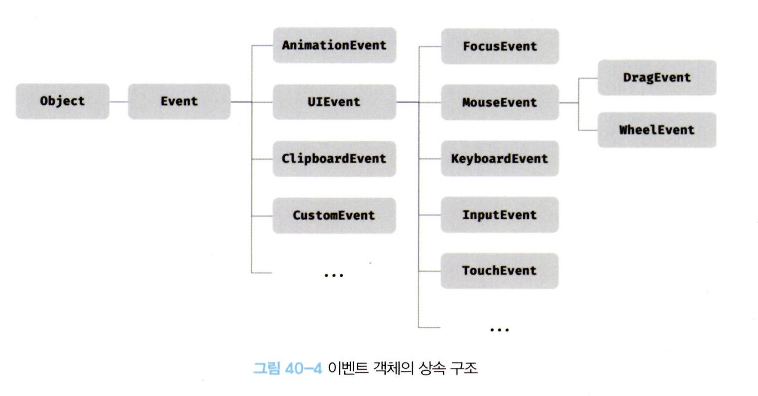
- 이벤트 객체도 생성자 함수에 의해 생성
- 사용자 행위에 의해 생성되거나 자바스크립트 코드에 의해 인위적으로 생성되기도 함
- 프로토타입으로 구성된 프로토타입 체인의 일원이 됨
40.5.2. 이벤트 객체의 공통 프로퍼티
- Event 인터페이스 (
Event.protytpe) : 모든 이벤트 객체가 상속받는 공통 프로퍼티 - 공통 프로퍼티
type(string) : 이벤트 타입target(DOM node) : 이벤트를 발생시킨 DOM 요소currentTarget(DOM node) : 이벤트 핸들러가 바인딩된 DOM 요소eventPhase(number) : 이벤트 전파 단계- 0: 이벤트 없음
- 1: 캡처링 단계
- 2: 타깃 단계
- 3: 버블링 단계
bubbles(boolean) : 이벤트 버블링 전파 여부- 버블링 불가 : focus, blur, load, unload, abort, error, mouseenter, mouseleave
cancelable(boolean) : preventDefault 사용 가능 여부- 사용 불가 : focus, blur, load, unload, abort, error, dbclick, mouseenter, mouseleave
defaultPrevented(boolean) : preventDefault 사용 여부isTrusted(boolean) : 사용자 행위에 의해 발생한 이벤트 여부timeStamp(number) : 이벤트 발생 시각
- 일반적으로 이벤트 객체의
target프로퍼티와currentTarget프로퍼티는 동일한 DOM 요소를 가리킴- 이벤트 위임을 통해 다른 DOM 요소를 가리킬 수 있음
40.5.3. 마우스 정보 취득
- 마우스 이벤트 객체(
MouseEvent)의 고유 프로퍼티- 마우스 포인터 좌표 정보 프로퍼티 :
screenX/screenY,clientX/clientY,pageX/pageY,offsetX/offsetY- clientX/clientY : 뷰포트(viewport), 웹페이지 가시 영역 기준 마우스 포인터 좌표
- 버튼 정보 프로퍼티 :
altKey,ctrlKey,shiftKey,button
- 마우스 포인터 좌표 정보 프로퍼티 :
40.5.4. 키보드 정보 취득
- 키보드 이벤트 객체(
KeyboardEvent)의 고유 프로퍼티altKey,ctrlKey,shiftKey,metaKey,key,keyCode등
keyup: 한글 입력 후 엔터 키 누르면 이벤트 핸들러가 두 번 호출되는 현상 발생keydown이벤트 사용 권장
40.6. 이벤트 전파
- 이벤트 전파 (event propagation) : DOM 요소 노드에서 발생한 이벤트는 이벤트 타깃을 중심으로 DOM 트리를 통해 전파
- 이벤트 전파 3단계
- 캡처링 단계 : 이벤트가 상위 요소에서 하위 요소 방향으로 전파
- 타깃 단계 : 이벤트가 타깃에 도달
- 버블링 단계 : 이벤트가 하위 요소에서 상위 요소 방향으로 전파
- 이벤드 핸들러 어트리뷰트/프로퍼티 방식은 2. 타깃 단계와 3. 버블링 단계만 캐치 가능
addEventListener방식은 3단계 모두 캐치 가능 -> 3번째 인수true
- 이벤트는 이벤트 타깃뿐만 아니라 상위 DOM 요소에서도 캐치 가능
- DOM 트리를 통해 전파되는 이벤트는 이벤트 패스에 위치한 모든 DOM 요소에서 캐치
- 이벤트 패스 : 이벤트가 통과하는 DOM 트리 상의 경로 (
Event.prototype.composedPath로 확인 가능)
- 대부분의 이벤트는 캡처링과 버블링을 통해 전파됨
- 버블링 되지 않는 이벤트 (
focus/blur/load/unload/abort/error/mouseenter/mouseleave) -> 캡처링에서 캐치 - 대체 가능 이벤트 사용 권장
- 버블링 되지 않는 이벤트 (
40.7. 이벤트 위임
- 여러 개의 하위 요소에 이벤트 핸들러를 등록하는 대신 하나의 상위 요소에만 등록 가능
- 실제로 이벤트를 발생시킨 이벤트 타깃과 다를 수 있음 주의
Element.prototype.matches메서드로 특정 노드인지 확인 가능- 이벤트 객체의
target과currentTarget프로퍼티가 다를 수 있음
40.8. DOM 요소의 기본 동작 조작
40.8.1. DOM 요소의 기본 동작 중단
- DOM 요소마다 기본 동작을 가짐
a>href링크로 이동,checkbox/radio> 체크 및 해제 등
preventDefault: 기본 동작 중단
40.8.2. 이벤트 전파 방지
stopPropagation: 이벤트 전파 중지- 상위 요소에서 전파된 이벤트를 중단시키고 개별적으로 이벤트를 처리할 수 있음
40.9. 이벤트 핸들러 내부의 this
40.9.1. 이벤트 핸들러 어트리뷰트 방식
- 이벤트 핸들러 어트리뷰트의
this는 전역 객체window- 암묵적으로 생성되는 이벤트 핸들러의 문이므로 일반 함수로 호출되어
this는 전역 객체를 가리킴
- 암묵적으로 생성되는 이벤트 핸들러의 문이므로 일반 함수로 호출되어
- 이벤트 핸들러의 인수로 전달한
this는 이벤트를 바인딩한 DOM 요소를 가리킴
<button onclick="handleClick(this)"> Click </button>
<script>
  function handleClick(button) {
    console.log(button); // button 요소
    console.log(this); // window
  }
</script>
40.9.2. 이벤트 핸들러 프로퍼티 방식과 addEventListener 메서드 방식
- 이벤트 핸들러 프로퍼티 방식과
addEventListener방식의this는 이벤트를 바인딩한 DOM 요소- 이벤트 핸들러 내부의
this=== 이벤트 객체의currentTarget프로퍼티
- 이벤트 핸들러 내부의
- 메서드 내부의
this가 생성할 인스턴스를 가리키려면bind메서드 사용
- 화살표 함수 사용: 화살표 함수 내부의
this는 상위 스코프의this이므로
- 화살표 함수 사용: 화살표 함수 내부의
constructor() {
  this.$button = document.querySelector('.btn');
  this.count = 0;

  // increase 메서드 내부의 this에 생성할 인스턴스를 바인딩함
  this.$button.onclick = this.increase.bind(this);
}
increase() {
  this.$button.textContent = ++this.count;
}
// 또는 .bind 없이 화살표 함수 가능
increase = () => this.$button.textContent = ++this.count;
40.10. 이벤트 핸들러 인수 전달
- 이벤트 핸들러 어트리뷰트 방식은 함수 호출문으로 인수 전달 가능
- 이벤트 핸들러 프로퍼티 방식과
addEventListener방식은 함수 자체 등록해야 함- 이벤트 핸들러 내부에서 함수를 호출하면서 인수 전달
- 또는 이벤트 핸들러를 반환하는 함수를 호출하면서 인수 전달
// 1. 함수를 호출하면서 인수 전달
// 인수가 없는 경우 $input.onblur = checkTextLength;
$input.onblur = () => checkTextLength(10);

// 2. 이벤트 핸들러를 반환하는 함수를 호출하면서 인수 전달
const checkTextLength = min => e =>
  $msg.textContent
    = $input.value.length < min ? `${min}자 이상 입력해주세요` : '';

$input.onblur = checkTextLength(10)
40.11. 커스텀 이벤트
40.11.1. 커스텀 이벤트 생성
- 커스텀 이벤트 : 개발자 의도로 생성된 이벤트
- 이벤트 타입은 기존 이벤트 타입을 사용하거나 임의의 문자열도 지정 가능
- 일반적으로
CustomEvent이벤트 생성자 함수 사용 - ex.
const customEvent = new CustomEvent('example');
- 일반적으로
- 커스텀 이벤트 객체는 버블링 되지 않으며, preventDefault 메서드 사용 불가
bubbles, cancelable = false기본 설정- 인수로 이벤트 객체를 전달하여 설정 변경 가능
- 이벤트 객체 고유의 프로퍼티 값도 지정 가능
- 커스텀 이벤트는 항상
isTrusted = false- 사용자 행위에 의해 발생한 이벤트 객체는 항상
isTrusted = true
- 사용자 행위에 의해 발생한 이벤트 객체는 항상
40.11.2. 커스텀 이벤트 디스패치
- 디스패치 (dispatch) : 이벤트를 발생시키는 행위
dispatchEvent: 이벤트 객체를 인수로 전달하면서 호출하면 커스텀 이벤트가 발생함
- 커스텀 이벤트 객체는 반드시
addEventListener방식으로 등록해야 함- 'on + 이벤트 타입' 요소 노드가 없으므로 어트리뷰트 / 프로퍼티 방식 사용 불가
- 'on + 이벤트 타입' 요소 노드가 없으므로 어트리뷰트 / 프로퍼티 방식 사용 불가
[출처] 모던 자바스크립트, Deep Dive

괴발개발라이프