서론
- 인앱결제.. 진짜.. 몇주째 잡고있었는데... 야근도하고.. 주말을 다 녹이면서 결국 해냈습니다..
- 아직 안드로이드 공식문서는 보지도 못했다는 것이.. 거짓말.. 할 수 있겠지 ha..
설엔 고향 갑시다 인간적으로..! 에잇~
- 아무래도 이게 사업자 등록하고 인앱결제 계약 동의, 세금 관련 문서 동의 등의 과정을 거쳐야 하기 때문에 다들 기업 자료라 참고 자료가 다소 적은 듯 합니다.
/verifyReceiptdeprecated 되었는데도.. 아직 그 예시도 돌아다니고..- 심지어는 실제로 JSW로 인코딩하고.. 직접 API 쏘는 분도 있는데 그건 진짜 리스펙..
- 저는 편리하게 App Store Server 라이브러리를 사용하였습니다.
- 민감 정보는 제외하고 공개된 라이브러리 GitHub와 WWDC 설명 영상을 토대로 설명하겠습니다.
- WWDC 요약이 대부분일듯
- 진짜.. 영상 3번 이상 본거같은데 처음 볼때도 뭔 말인지..
- WWDC 요약이 대부분일듯
- 테스팅을 하기 위해서 영수증이 필요했는데, 이건 도저히 방법이 안나서 그냥 GPT 유료버전 사고 2일만에 앱을 만들었습니다.. 하지만 계정과 앱 정보가 남아있어서 이건 제외 한번 시켜보고 하단에 가능하면 깃허브 남겨두겠습니다.
- GPT에게
인앱결제 영수증 생성 테스트를 하기 위해서 맥미니에서 더미 앱을 만드는 방법과(상품 조회, 결제하기 버튼 만 구현) 내가 할일은 애플 상품 Id 와 서버 주소만 입력할 수 있도록 만들어줘 - 라 한 결과 이것저것 따라하며, 배포도하고 아주 하루만에 GPT o1 한도를 끝냈었네요 ㅋㅋ 가능하다면 남겨보겠습니다..
- GPT에게
인앱결제 간단 정리
상품 구성
| 유형 | 설명 |
|---|---|
| 소모품 | 한번 사용하면 고갈되어 다시 구입 |
| 비소모품 | 한번 구입 후 사용 시 만료되거나 수량 감소하지 않는 제품 |
| 자동 갱신 구독 | 사용자가 정해진 기간 동안 동적 컨텐츠 구매할 수 있도록 하는 제품, 사용자 취소하지 않는 한 자동 갱신 |
| 비자동 갱신 구독 | 사용자가 제한된 기간 동안 컨텐츠 액세스 |
- 하나의 앱당 최대 10,000개의 구입 제품 생성 가능
- 이걸 그래서 우회하는 방안(?) 으로 앱 내에서 사용할 캐시, 금액권으로 사용하는 듯..!
구현 순서
순서
- 유료 앱 계약 동의
- 앱 내 구입 디자인
- App Store Connect에서 앱 내 구입 설정
- 앱 내 구입을 생성하고 제품 이름 등과 같은 메타데이터 추가
- 앱 내 구입 키를 생성하고 세금 카테고리 설정
- Storekit 구현
- 앱 내 구입 테스트
- Apple은 Sandbox 라는 테스트 환경 제공, 추가 비용 없이 앱 내 구입 테스트
- TestFlight, Xcode를 사용하여 앱 및 앱 내 구입 추가적 테스트
- App Store Service 알림 사용
- App Store 서버 알림은 거래 상태, 앱 내 구입과 관련된 주요 이벤트의 업데이트 실시간 가깝게 제공
- 환불, 구독 상태 변경, 가족 고유 액세스
- 허용하기 위해서는 App Store Connect에서 프로덕션 및 sandbox 서버 환경의 Url을 입력해야 함
- App Store 서버 알림은 거래 상태, 앱 내 구입과 관련된 주요 이벤트의 업데이트 실시간 가깝게 제공
- 심사를 위해 앱 내 구입 제출
- App Store에 앱 내 구입 게시 전 이를 심사를 위해 제출해야 함
- 최초 앱 내 구입 시 신규 버전의 앱 제출해야 함.
- 제출 전 필수 정보가 누락되지 않았는지 확인
- 앱 내 구입 진행 상태를 모니터링하여 앱 내 구입을 사용할 수 있는지 또는 주의가 필요한지 여부 파악
App Store Server API
- App Store 서버 API를 사용해 내 서버에서 App Store 서버로 요청을 할 수 있다.
- 거래에 대한 정보 얻기
- 구독 갱신 날짜 연장과 같이 해당 거래와 관련된 정보를 제출할 수도 있다.
App Store Server API End Point
| Transaction Information | Refunds and Customer Satisfaction | App Store Server Notifications |
|---|---|---|
| Get Transaction History | Send Consumption Information | Get Notification History |
| Get Transaction Info | Get Refund History | Request a Test Notification |
| Get All Subscription Statuses | Extend a Subscription Renewal Date | Get Test Notification Status |
| Look Up Order ID | Extend Subscription Renewal Dates for All Active Subscribers | |
| Get Status of Subscription Renewal Date Extensions |
- 이러한 API를 통해 테스트 알림을 트리거하고 알림 내역을 확인할 수 잇습니다.
- 총 12개의 App Store 서버 API 엔드포인트는 2023년에 지원이 중단된 Verify Receipt 엔트포인트를 대체하고 그 이상의 기능을 제공합니다.
Transaction Information
- App Store 서버 API의 엔드포인트 중 4개를 사용하면 고객의 거래 내역을 가져오는 등 거래에 대한 정보를 얻을 수 있습니다.
Refunds and Customer Satisfaction
- 추가적으로 5개의 엔드포인트는 환불 및 고객 만족에 관한 것으로 환불 결정 과정에 참여하기 위한 소비 정보를 전송할 수 있습니다.
App Store Server Notifications
- 마지막 3개의 엔드포인트는 App Store 서버 알림을 위한 것
- 테스트 알림을 트리거하고 알림 내역 확인할 수 있음
App Store Server API
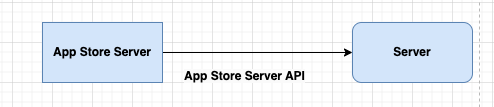
- App Store 서버 알림을 사용하면 App Store가 서버를 호출합니다.
- App Store 서버 알림으로 App Store는 내 서버에 거래 업데이트를 사전에 알릴 수 있습니다.
- App Store는 구독 라이프사이클의 업그레이드 또는 갱신과 같은 이벤트를 서버에 알릴 수 있습니다.
- 알림은 환불이 발생한 시기를 알려주는 등 환불 라이프 사이클에도 적용됩니다.
App Store Server Library
-
App Store Server API와 App Store 서버 알림 사용을 위한 기반
-
App Store 서버와의 통합을 간소화하도록 만들어짐
-
App Store 서버 API용 클라이언트를 제공하여 엔드포인트 사용을 쉽게 시작할 수 있습니다.
-
서명된 데이터 검증 기능 내장
- 기기, App Store 서버 API, App Store 서버 알림의 데이터를 검증하고 디코딩 할 수 있습니다.
-
지원이 중단된 영수증에서 거래 정보를 추출하여 지원이 중단된
verifyReceiptOriginal StoreKit클라이언트 프레임워크에서 전환할 수 있는 경로를 제공합니다. -
프로모션 특가 서명을 간단하게 생성할 수도 있습니다.
-
프로덕션에 바로 사용할 수 있는 1.0 버전을 Java, Python, Node.js, Swift 4개의 언어로 선보였습니다.
-
App Store 서버 API를 이러한 언어에서 사용할 때 App Store Server Library를 사용하는 것을 권장
-
시작하려면 각 언어에 해당하는 패키지 관리자를 통해 라이브러리를 다운로드 합니다.
-
라이브러리의 또 다른 장점은 오픈소스 라는 점
- 피드백 제출, PR 가능
- App Store Server Library 사용과 설정은
WWDC23 세션 App Store Server Library 알아보기참고
-
이 글의 후반부에서 저는 이 라이브러리를 사용한 코드를 첨부하겠습니다.
소모품 구입 & 환불의 예시
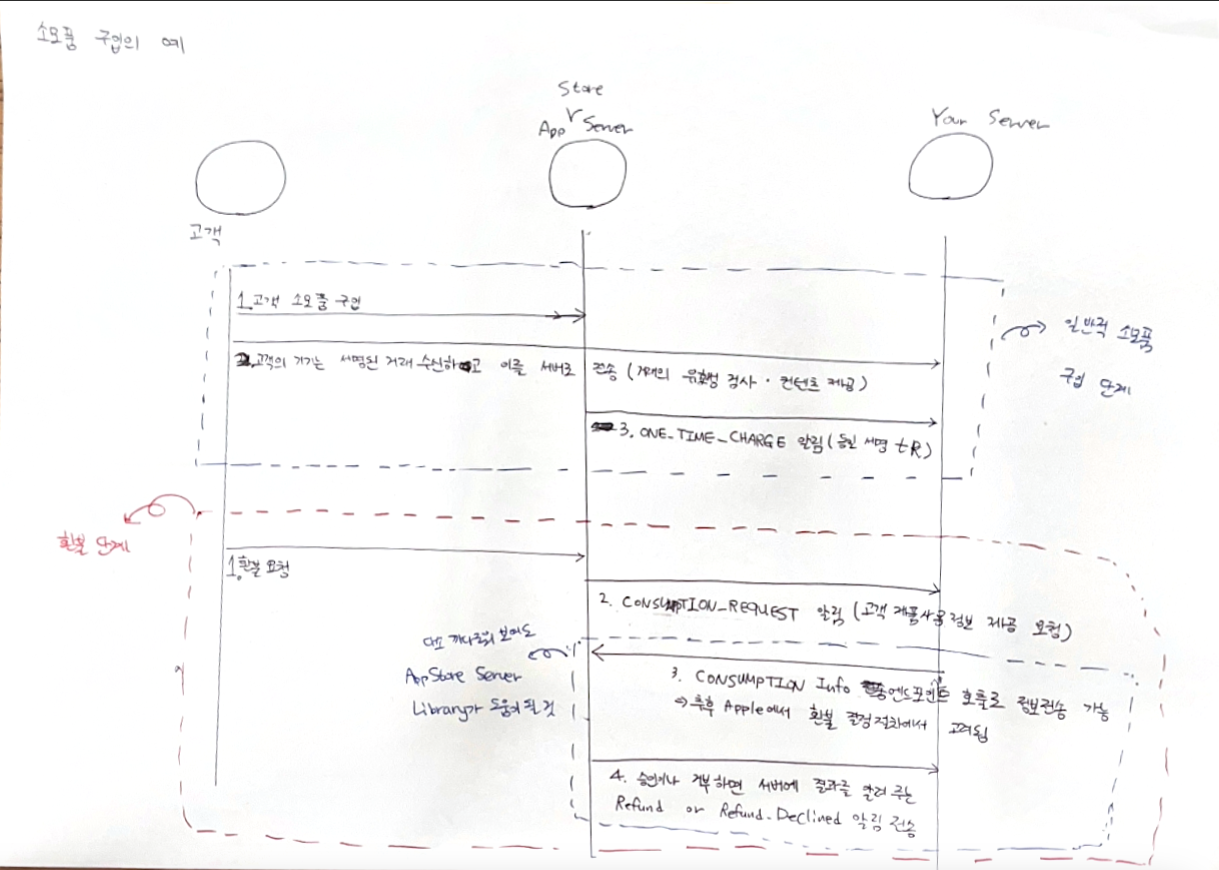
소모품 구입
- (고객 -> App Store Server) 고객 소모품 구입
- (기기 -> Server) 고객 기기는 서명된 거래 수신하고 서버로 전송(거래의 유효성 검사 및 컨텐츠 제공 목적)
- ONE_TIME_CHANGE 알림
- (저는 이 ONE_TIME_CHANGE 알림보다는 APP에서 오는 영수증을 활용하였습니다. 혹시 저 알림에 대해 좀 찾아보고 구현하는 방식도 있긴 할 것 같습니다.)
소모품 구입 방식 변경(/verifyReceipt 엔드포인트 호출 -> ReceiptUtility 이용)
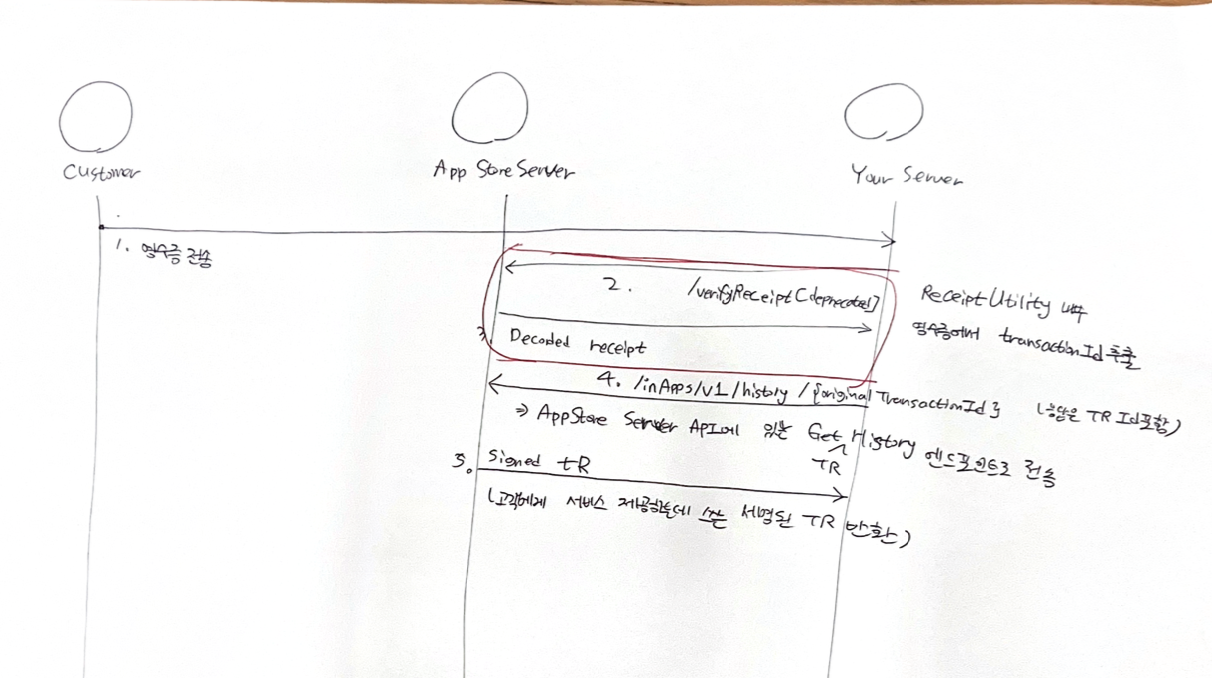
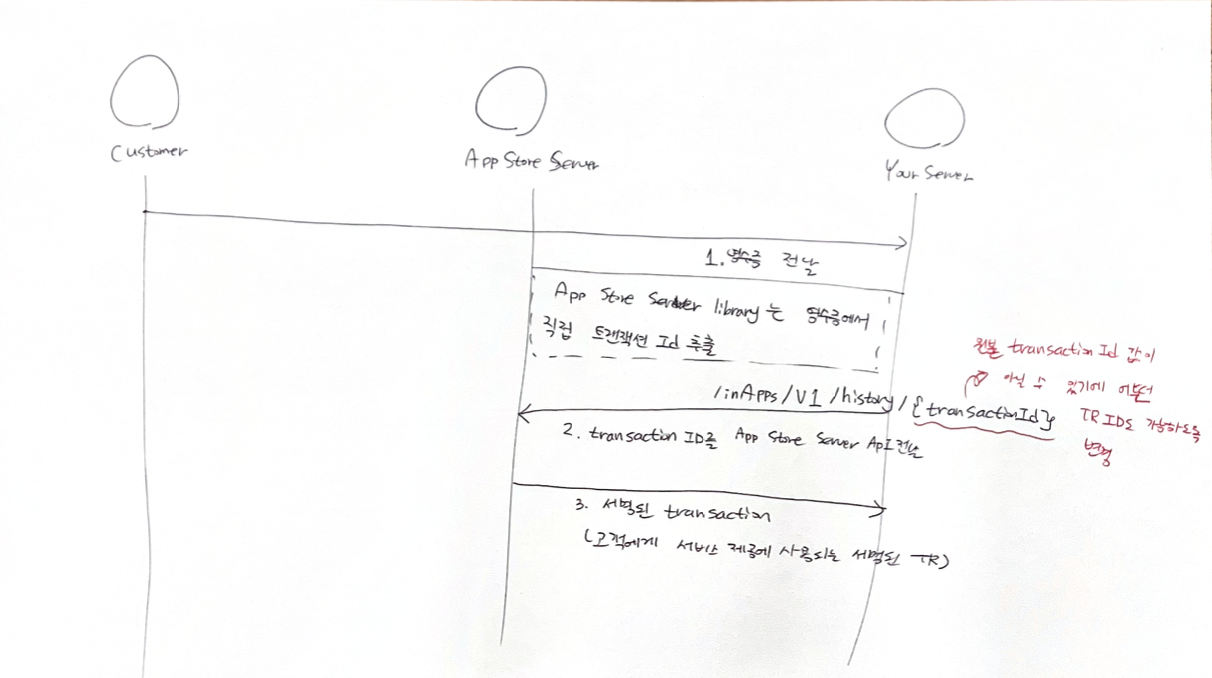
- (App -> Server) 고객 결제 영수증 제출
- (Server -> App Store Server) 영수증을 통해 transactionId 추출 요청
- (App Store Server -> Server) 디코딩한 transactionId 반환
- (Server -> App Store Server) transactionId에 대한 history 요청
- (App Store Server -> Server) 서명된 Transaction(거래 정보) 반환
/verifyReceipt가 deprecated 되고 ReceiptUtility 를 통해 transactionId를 추출하도록 아래와 같이 변경됨.
환불
- (고객 -> App Store Server) 고객 환불 요청
- (App Store Server -> Server)
CONSUMPTION_REQUEST알림 전송- (Server -> App Store Server)
Consumption Info알림 전송
- 고객 제품 사용 정보 요청 알림 수신
- 제품 사용 여부 / 환불 승인(불가) 사유 제출할 수 있음
- 이는 최종 결정에 참고됨(무조건 Server의 의견이 안받아 들일 수 있는듯)
- (App Store Server -> Server) 승인이나 거부하면 서버에 결과 알려주는 알림 전송
Refund결과일 경우 DB에서 처리Refund Declined결과일 경우 DB에서 처리하지 않음- (저는 이 ONE_TIME_CHANGE 알림보다는 APP에서 오는 영수증을 활용하였습니다. 혹시 저 알림에 대해 좀 찾아보고 구현하는 방식도 있긴 할 것 같습니다.)
- 복잡해 보여도 3, 4번의 경우 App Store Server Library를 활용할 수 있음
서버를 통한 컨텐츠 전송 워크플로
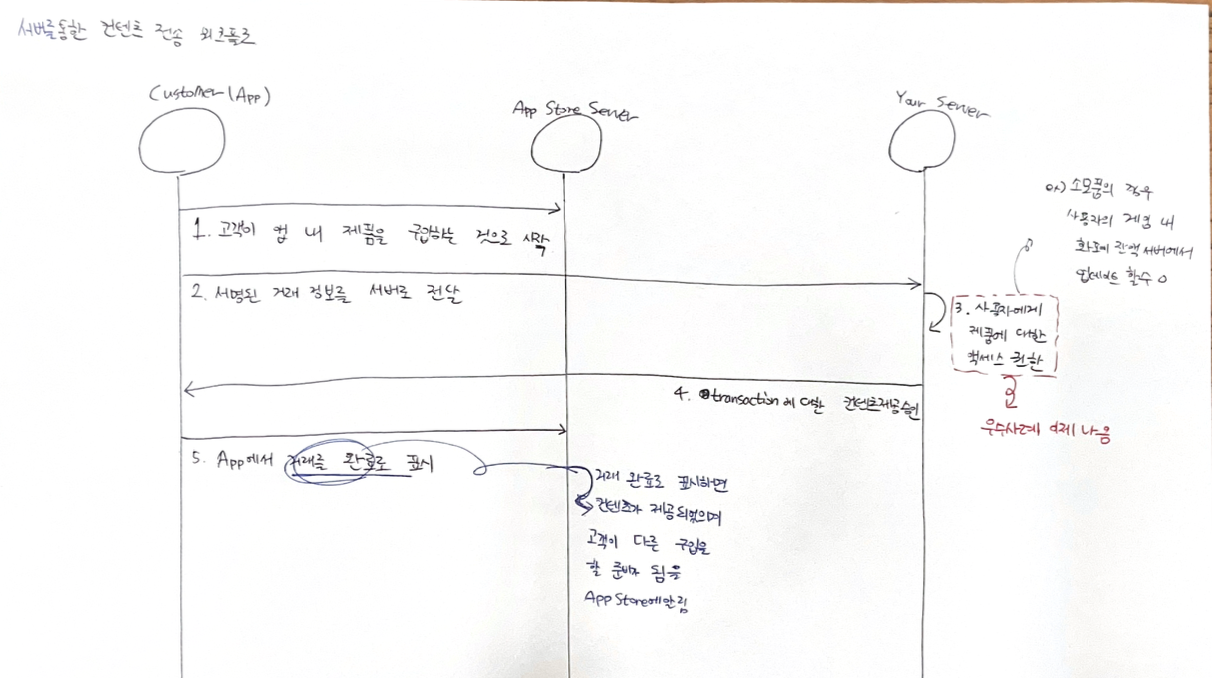
- 멀고 멀게 왔지만 결국 Server가 해야할 것이 무엇이냐? 하면
- 2번 영수증 받는 API / 3번 검증 / 4번 이 된다!
- 마지막 5번은 구글은 안보내주면 3일안에 환불된다는 글을 본거같은데 Apple은 아닌거 같기도 하고(혹시 아시는분 있으시다면.. 결국 그래서 성공 여부를 앱에 보내긴 하는데 저긴 앱 개발자와 추후 협의..)
인앱상품 구매 처리하기
- App Store Server Library Java 이용
- 이 중 Read me에 나와있는 Receipt Usage 참고
@Service
@Slf4j
public class AppleService {

    // 번들은 앱마다 고유
    public static final String bundleId = "example";

    // 이슈어, 키는 사용자별(apple developer) 고유
    public static final String issuerId = "example";
    public static final String keyId = "example";

    // 환경 설정
    public static final Environment environment = Environment.SANDBOX; // 실제 배포 시 PRODUCTION

    // 앱의 Apple Id
    public static final Long appAppleId = 123123213213213213213213213213123213123123123213exanL;

    // 온라인 검증 여부 - 방금 수신한건 true, 몇달 몇년 전꺼라면 인증서 만료로 false 여야함
    // 항상 최근꺼를 받으니 true
    public static final boolean onLineChecks = true;

    // 영수증에서 productId 추출기
    public static final ReceiptUtility receiptUtil = new ReceiptUtility();

    // 공통 객체 (인스턴스 변수)
    private AppStoreServerAPIClient appStoreServerAPIClient;
    private SignedDataVerifier signedDataVerifier;

    @PostConstruct
    public void init() {
        try {
            // 비공개 키 로드 - 2026년 1월 21일 만료
            String encodedKey = loadPrivateKey("example.p8");

            // App Store Server API 클라이언트 초기화
            this.appStoreServerAPIClient = new AppStoreServerAPIClient(encodedKey, keyId, issuerId, bundleId, environment);

            // Apple PKI에서 인증서 다운(Root CA), 인증서 만료기간 있어서 확인 하고 만료 전 변경 필요
            Set<InputStream> rootCAs = Set.of(
                    // 18:10:09 Apr 30, 2039
                    getResourceAsStream("AppleRootCA-G2.cer"),
                    // 18:19:06 Apr 30, 2039
                    getResourceAsStream("AppleRootCA-G3.cer"),
                    // 00:18:14 Feb 10, 2025
                    getResourceAsStream("AppleComputerRootCertificate.cer"),
                    // 21:40:36 Feb 9, 2035
                    getResourceAsStream("AppleIncRootCertificate.cer")
            );

            // SignedDataVerifier 초기화
            this.signedDataVerifier = new SignedDataVerifier(rootCAs, bundleId, appAppleId, environment, onLineChecks);

            log.info("ApplePurchaseService 초기화 완료");

        } catch (FileNotFoundException e) {
            log.error("비공개키, Root CA 중 하나 이상의 파일이 누락되었습니다.");
        } catch (IOException e) {
            log.error("비공개키, Root CA 파일을 로드하고 ApplePurchaseService를 초기화 하던 중 오류가 발생했습니다.");
        }
    }

     // App Store Server API를 호출하는 외부 네트워크 통신이라 실패할 수 있으므로 3번까지 재시도
    @Retryable(
            value = {APIException.class, IOException.class, VerificationException.class},
            maxAttempts = 3,
            backoff = @Backoff(delay = 1000)
    )
    public JWSTransactionDecodedPayload decodedPayloadByAppleReceiptForNotSubscription(String receipt) throws APIException, IOException, VerificationException {

        // 1. 영수증에서 TransactionId 추출
        String transactionId = receiptUtil.extractTransactionIdFromAppReceipt(receipt);

        // 2. 단일 거래 정보 추출(영수증에서 transationId 추출 & 해당 거래건에서 productionId 추출)
        TransactionInfoResponse transactionInfo = appStoreServerAPIClient.getTransactionInfo(transactionId);

        // 3. 거래정보에서 signedTransaction 정보를 얻어서 이거를 다시 디코딩해야 정보 확인 가능
        String signedTransactionInfo = transactionInfo.getSignedTransactionInfo();

        // 4. SignedDataVerifier를 사용하여 디코딩한 거래 정보 객체 반환
        return signedDataVerifier.verifyAndDecodeTransaction(signedTransactionInfo);
    }

        // 클래스패스에 있는 비공개 키 파일을 읽어 Base64 인코딩 문자열로 반환.
    private String loadPrivateKey(String resourcePath) throws IOException {
        ClassLoader classLoader = ApplePurchaseService.class.getClassLoader();
        try (var inputStream = classLoader.getResourceAsStream(resourcePath)) {
            if (inputStream == null) {
                throw new IOException("비공개 키 파일을 찾을 수 없습니다: " + resourcePath);
            }
            byte[] keyBytes = inputStream.readAllBytes();
            return new String(keyBytes);
        }
    }


    private InputStream getResourceAsStream(String path) throws IOException {
        InputStream is = ApplePurchaseService.class.getClassLoader().getResourceAsStream(path);
        if (is == null) {
            throw new IOException("인증서를 찾을 수 없습니다: " + path);
        }
        return is;
    }
}
잠깐 위 코드에서 인증서, 번들, 이것저것 뭔데...?
- 정답은 WWDC 2023 영상에서 찾을 수 있습니다.(Github readme에도 있어요~!)
App Store Server API 사용에 필요한 정보 얻기 - 인증서의 경우 유효기간 확인
- App Store Connect → Users and Access
- Keys → In-App Purchase
- Issure ID (발급자 Id)
- 새 프라이빗 키 생성
- 이름 짓고 생성
- 키를 만들면 2가지 정보 생성
- 키 Id, 프라이빗키 다운로드 옵션
- 다운로드는 한번만 가능
- 키 Id, 프라이빗키 다운로드 옵션
- Apple public Key 인프라스트럭처 사이트로 전환해서
Apple Root Certificates- 루트 인증서를 다운 받으세요
- github - App Store Server Library Java - readme
Obtaining an In-App Purchase key from App Store Connect부분 참고
인증서 유효기간 확인하기
- 인증서 유효기간을 주석으로 남겨두고, 만료 전에 새버전 있는지 확인하고 꼭 갱신해야 한다.
개귀찮..
- 만료기간 보는 법
다시 코드로 돌아와서
- 아까 위에서 언급한
transactionId를ReceiptUtility로 추출한다.
- 아까 위에서 언급한
- 단일 거래 정보 추출
- 거래정보에서 signedTransaction 정보를 얻어서 이거를 다시 디코딩해야 정보 확인 가능
- SignedDataVerifier를 사용하여 디코딩한 거래 정보 객체 반환
추출한 정보 예시(테스트 상품)
JWSTransactionDecodedPayload{
  originalTransactionId='12312321312321',
  // 이거 저장
  transactionId='123123132312',

  webOrderLineItemId='null',
  bundleId='example',
  // 이거 상품 정보에 있어야 함 -> DB에서 어떤 상품을 산건지 찾기
  productId='example',
  subscriptionGroupIdentifier='null',
  // 구매일자 이거 활용하기 -> 밀리초 단위 Instant 객체 -> LocalDateTime
  purchaseDate=1737776773000,
  originalPurchaseDate=1737776773000,
  expiresDate=null,
  quantity=1,
  type='Consumable',
  appAccountToken=null,
  inAppOwnershipType='PURCHASED',
  signedDate=1737789629012,
  revocationReason=null,
  revocationDate=null,
  isUpgraded=null,
  offerType=null,
  offerIdentifier='null',
  environment='Sandbox',
  storefront='KOR',
  storefrontId='143466',
  transactionReason='PURCHASE',
  // 금액 - 저장할 필요 없음, 공식 문서에서 price 1000배 한거라 나옴
  price=1100000,
  currency='KRW',
  offerDiscountType='null',
  unknownFields=null
}
여기서 드는 의문 한가지
original Transaction Id는 뭐고 Transaction Id는 뭘까?
- 이는 맨 처음을 돌아가서 상품의 종류를 다시 보자
- 구독형 상품의 경우 사용자가 계속적으로 구매하며 지속 갱신한다.
- 즉 original Transaction Id는 최초 구독 거래건에 대한 transactionId를 뜻하고
- transaction Id는 이번 거래 건에 대한 transactionId이다.
- 그렇다면 소모품, 비갱신형 구독 상품은 항상 같아야 하는거 아닌가?
- 그렇다 소모품 결제를 몇번 해본 결과
originalTransactionId=transactionId이더라~~
- 그렇다 소모품 결제를 몇번 해본 결과
인앱상품 환불 처리하기
- 아직 정책 확인 전으로 구현을 하진 못했는데 위 그림에서 키워드를 다시 확인해보자
- 고객이 환불을 요청하면
Consumption_Request를 수신하고 Server의 의견을 담아서Consumption_Info응답- 환불할지 여부, 상품 사용 여부, 사유 제출 하면 최종 심사 과정에 참고
- Apple Store에서 승인 혹은 거절하면 다시 알림 온다.
- 승인 이라면 상품 회수 처리
- 거절 이라면 유지
WWDC 2024에서 알려준 내용
Consumption Request
// CONSUMPTION_REQUEST norification (docoded)
{
	"notificationType" : "CONSUMPTION_REQUEST",
	"data" : {
	// 새 필드 : 고객이 환불한 이유
	// 아래 예시는 의도치 않게 구입함
		"consumptionRequestReason" : "UNITENDED_PURCHASE",
		"status" : 1,
		"signedTransactionInfo" : {
			"type" : "Auto-Renewable Subscription",
			"appAccountToken" : "23a91ca7-...",
			"purchaseDate" 171800000000,
			"expiresDate" : 172000000000,
			... // Additional fields not shown
		},
		"signedRenewalInfo" : {
			"renewalDate" : 1720630800000,
			"autoRenewStatus" : 1,
			... // Additional data truncated
	}
}- 고객 환불 요청 사유 등 확인 가능
CONSUMPTION_INFO
// Consumption request workflow
SignedDataVerifier verifier = new SignedDataVerifier(...);
AppStoreServerAPIClient apiClient = new AppStoreServerAPIClient(...);

String signedNotification = "ey...";
var notification = verifier.verifyAndDecodeNotification(signedNotification);
if(notification.getNotificationType() == NotificationTypeV2.CONSUMPTION_REQUEST) {
  String signedTransactionInfo = notification.getData().getSingedTransactionInfo();
  var transaction = verifier.verifyAndDecodeTransaction(signedTransactionInfo);
  // -------- 알림 디코딩 & 거래 정보 가져오는 코드 위 부분은 동일 ---------
  // ConsumptionRequestReason 포함됨
  ConsumptionRequestReason reason = notification.getData().getConsumptionRequestReason();

  // 환불 수락 또는 거부에 대한 선호 사항 표현하려는 경우 자체 로직에 따라 해당 사항 결정 가능 예 : determineRefundPreference
  // 소비 요청 이유와 거래 고려할 수 있음
  var refundPreference = determineRefundPreference(reason, transaction);
  ConsumptionRequest consumptionRequest = new ConsumptionRequest()
																				  .sampleContentProvided(true)
																					...
																	// ConsumptionRequest 객체에서 refundPreference 설정
																					.refundPreference(refundPreference);
	// 이전과 마찬가지로 App Store 서버로 전송
	apiClient.sendConsumptionData(transaction.getTransactionId(), consumptionRequest);
}
구현하기
Apple 개발자 사이트에서 Notification 알림 활성화하기
-
앱 -> 일반 -> App Store 서버 알림
- 로컬에서 테스트 하기 위해서는 도메인이 필요한데
ngrok를 사용하면 편리하다.
- 이 방식은 설명하지 않겠습니다. 찾아보시면 바로 알 수 있어요~!
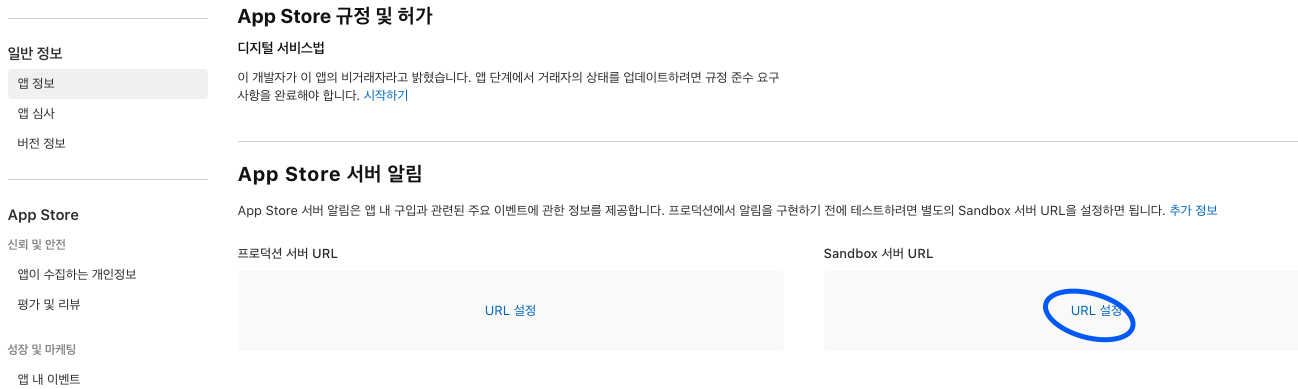
- 로컬에서 테스트 하기 위해서는 도메인이 필요한데
-
Notification 날라올 때 형식
- 아래와 같이 POST로 Body에 담겨서 옵니다.
- 해당 Notification을 받는 Controller 메서드와 엔드포인트 만들어두시고, Security 사용한다면 보안 인증 없이 permitAll() 해두시면 될 것 같습니다~!
{
  "signedPayload" : "asdkasdkjas,,..."
}- Notification 처리 예시는 아래와 같이 signedPayload만 추출해서 사용했습니다. 잘 모르시겠으면 readme나 WWDC 2024 영상을 한번 봐보시는 것 추천드립니다~!
알림 분기별로 처리하기
 public void handleSignedNotification(String signedNotification) throws Exception {
        ResponseBodyV2DecodedPayload payload = signedDataVerifier.verifyAndDecodeNotification(signedNotification);

        NotificationTypeV2 type = payload.getNotificationType();
        // Apple Server Notification의 경우 테스트 환경에서 ONE_TIME_CHARGE 알림만 활성화 되기에 테스트 용으로 한번 아래와 같이 바꿔서 비즈니스 로직 도는지 테스트
        type = NotificationTypeV2.REFUND;
        log.info("Apple NotificationType : {}", type);

        switch (type) {
            case CONSUMPTION_REQUEST:
                handleConsumptionRequest(payload);
                break;
            case REFUND:
                handleRefund(payload);
                break;
            case REFUND_DECLINED:
                handleRefundDeclined(payload);
                break;
            // 그 외 필요 알림들은 로그만 찍기
            default:
                log.info("Unhandled notification: {}", type);
        }
}- 결제 결과를 바로 영수증으로 처리하기 때문에 결제 시 발생하는
ONE_TIME_CHARGE무시 REFUND,REFUND_DECLINED의 경우 비즈니스 로직만 돌리면 되니 다루지 않고CONSUMPTION_REQUEST를 다루겠습니다.
CONSUMPTION_REQUEST 수신했을 때
  private void handleConsumptionRequest(ResponseBodyV2DecodedPayload notification) throws Exception {
        // 2) 알림 내 트랜잭션정보 (signedTransactionInfo) 추출
        String signedTransactionInfo = notification.getData().getSignedTransactionInfo();
        // 2-1) 검증 & 디코딩
        JWSTransactionDecodedPayload decodedTransaction = signedDataVerifier.verifyAndDecodeTransaction(signedTransactionInfo);
        String transactionId = decodedTransaction.getTransactionId();

        Sample sample = sampleService.findByAppleTransactionId(transactionId);
        Example example = exampleService.findByAppleTransactionId(transactionId);

        Boolean canRefund = false;

        if (sample != null) {
            canRefund = checkSampleStatusForApplePurchaseRefund(sample);
        } else if (itemPurchaseInfo != null) {
            canRefund = checkExampleStatusForApplePurchaseRefund(example);
        }

//        // 3. 환불 신청 이유 확인
//        // "APPSTORE_INITIATED", "FAMILY_SHARING", "REQUESTED_REFUND" 등등
//        ConsumptionRequestReason reason = notification.getData().getConsumptionRequestReason();
//        log.info("ConsumptionRequest reason: {}", reason);

        // 4. 환불 선호도
        RefundPreference refundPreference = determineRefundPreference(canRefund);

        // 5. ConsumptionRequest 객체 생성
        ConsumptionRequest request = new ConsumptionRequest()
                .accountTenure(AccountTenure.UNDECLARED) // 가입한지 얼마나 됐는지 제공 안함
                // .appAccountToken() - null일때 빈값으로 채워주는 JSON 설정 있어 패스
                .consumptionStatus(ConsumptionStatus.UNDECLARED) // 소비정보 제공 안함
                .customerConsented(true) // true : 고객이 소비정보 제공하기를 동의, false : 제공 동의안했으면 알림 자체 응답하지 않아야함
                // 상품 제공 여부 : 둘중 하나 null이 아니면 상품 일단 제공한 것, 그게 아니라면 다른 이유로 제공하지 못했음을 명시
                .deliveryStatus((example != null || sample != null) ? DeliveryStatus.DELIVERED_AND_WORKING_PROPERLY : DeliveryStatus.DID_NOT_DELIVER_FOR_OTHER_REASON )
                .lifetimeDollarsPurchased(LifetimeDollarsPurchased.UNDECLARED) // 여태 얼마나 결제 했냐? 제공 안함
                .lifetimeDollarsRefunded(LifetimeDollarsRefunded.UNDECLARED)  // 앱에서 받은 환불 총액? 제공 안함
                .platform(Platform.UNDECLARED) // Apple로 소비했는지 여부? 이거 PC인지 구분할 수 없기에 제공 안함
                .playTime(PlayTime.UNDECLARED) // 고객이 앱을 사용한 시간 ? 제공 안함
                .refundPreference(refundPreference)
                // 구매하기 전에 콘텐츠의 무료 샘플이나 평가판, 기능에 대한 정보를 제공했는지 여부 (학진테 정보 제공, 상품 미리보기 주니까 true)
                .sampleContentProvided(true)
                .userStatus(UserStatus.UNDECLARED); // 회원의 상태 ? 제공 안함

        // 6. App Store로 전송
        appStoreServerAPIClient.sendConsumptionData(transactionId, request);
}-
CONSUME_INFO의 필수값 모두 채워서 메서드 호출하면 API 호출됨
-
Chat GPT, Claud, 뤼튼 모두 뭐.. 필수값이 2개라더니만;; 저 링크 주면서 어딜봐서 2개냐고 따져도 무슨 예시가 있다고하고;; 진짜 그냥 다 넣어야 합니다 공식문서에 있는거!
-
12시간 안에 응답하면 된다고도 나와있어서 수신한
ResponseBodyV2DecodedPayload와 환불 신청 사유를 저장하고, 관리자가 12시간 안에 응답할 수 있도록 페이지를 구성해도 좋을 것 같긴한데.. 상당히 복잡할 것 같습니다.
요약 및 후기
- Github repo와 WWDC 사례에서는 history를 전체 조회해서 처리하는 방식을 설명했는데, 이건 네트워크 통신이 너무 늘어날 것 같아서 다른 방안을 찾았다.
- gpt 유료버전이 예시를 알려줬는데, 결국 상단에 위치한 API 중에
Get Transaction Info이걸 활용하는 거였음 ㅋㅋ- 뭔가 이거 없을까? 하는 것은 저 상단의 표를 보고 관련 문서 보면 좋을 것 같습니다.
- 저는 그냥 라이브러리 사용함..ㅎ
- 뭔가 이거 없을까? 하는 것은 저 상단의 표를 보고 관련 문서 보면 좋을 것 같습니다.
- @Retryable은 솔직히 네트워크 통신이다 보니까 실패하더라도 3번까진 시켜보고자 했습니다.
- 앱에서 영수증 오는데.. 실패하면 또 보내고.. 이것보단 한방에 몇번 재시도해서 제발 성공하자..! 란 마인드!
- 나름 리팩토링으로 메서드 호출때마다 객체를 생성하지 않도록 변경했는데, 이 방식이 코드도 깔끔해 지는 것 같아요.
- 환불의 경우
고객이 Apple에 정보 제공 동의했는지를 꼭 물어봐야 하므로 약관에 넣거나 등 방안을 모색해보시길 바랍니다! - 이거로 며칠을 쓴거지.. 야근도 하고 주말임에야 마무리 해버림.. 설날은 진짜 쉰다 내일부터..!
설 지나고도 환불 겨우 어찌저찌 해둬버린..인생아
- 구글 공식문서는 또 어떻게 보나 아으~!~! 구글 꿀팁 없나요 ㅠ
- 혹시 잘못된 내용이 있다면 알려주세요!!
도움 받은 자료들..