@Composable
fun BottomNavigation(navController: NavController) {
    val items = listOf(
        MainActivity.BottomNavItem.Home,
        MainActivity.BottomNavItem.Prediction,
        MainActivity.BottomNavItem.PillPredictionCamera,
        MainActivity.BottomNavItem.Saved,
        MainActivity.BottomNavItem.Settings,
    )

    val navBackStackEntry by navController.currentBackStackEntryAsState()
    val currentRoute = navBackStackEntry?.destination?.route

    Box(
        modifier = Modifier
            .fillMaxWidth()
            .height(80.dp),
        contentAlignment = Alignment.BottomCenter
    ) {
        Canvas(
            modifier = Modifier
                .fillMaxWidth()
                .height(80.dp)
        ) {
            val path = Path().apply {
                val width = size.width
                val height = size.height

                // Start point
                moveTo(0f, 0f)

                // Left flat section
                lineTo(width * 0.35f, 0f)

                // Upper curve for central button
                cubicTo(
                    width * 0.4f, 0f,
                    width * 0.45f, height * 0.3f,
                    width * 0.5f, height * 0.3f
                )
                cubicTo(
                    width * 0.55f, height * 0.3f,
                    width * 0.6f, 0f,
                    width * 0.65f, 0f
                )

                // Right flat section
                lineTo(width, 0f)

                // 바텀 경계선
                lineTo(width, height)
                lineTo(0f, height)

                close()
            }
            drawPath(
                path = path,
                color = Color.White
            )
        }

        Row(
            modifier = Modifier
                .fillMaxWidth()
                .navigationBarsPadding()
                .padding(horizontal = 8.dp),
            verticalAlignment = Alignment.CenterVertically,
            //간격의 시작 타이밍이 다름 - evenly는 맨앞부터 간격시작
            //between은 item부터
            horizontalArrangement = Arrangement.SpaceBetween
        ) {
            items.forEachIndexed { index, item ->
                if (index == 2) {
                    /*Column (
                        modifier = Modifier.navigationBarsPadding().padding(bottom = 5.dp),
                    ) {
                        Spacer(modifier = Modifier.weight(1f, true))
                        Text(
                            text = stringResource(id = R.string.bottom_center), // 버튼 아래 이름
                            style = MaterialTheme.typography.labelSmall,
                            color = Color.Black,
                        )
                    }*/
                    Column(
                        horizontalAlignment = Alignment.CenterHorizontally
                    ) {
                        FloatingActionButton(
                            onClick = {
                                navController.navigate(MainActivity.BottomNavItem.PillPredictionCamera.screenRoute) {
                                    popUpTo(navController.graph.startDestinationId) { inclusive = false }
                                    launchSingleTop = true // 중복 스택 방지
                                    restoreState = true
                                }
                            },
                            containerColor = blueColor5,
                            modifier = Modifier
                                .wrapContentSize()
                                .offset(y = (-10).dp),
                            shape = RoundedCornerShape(36.dp)
                        ) {
                            Icon(
                                painter = painterResource(id = R.drawable.baseline_camera_24),
                                contentDescription = "Center Button",
                                tint = Color.White
                            )
                        }
                        Text(
                            text = stringResource(id = R.string.bottom_center), // 버튼 아래 이름
                            style = MaterialTheme.typography.labelSmall,
                            color = Color.Black,
                            modifier = Modifier.padding(bottom = 10.dp)
                        )
                    }
                } else {
                    NavigationBarItem(
                        //그림자 파장효과 제거
                        interactionSource = NoRippleInteractionSource,
                        selected = currentRoute == item.screenRoute,
                        onClick = {
                            /*navController.navigate(item.screenRoute) {
                                popUpTo(navController.graph.startDestinationId) { saveState = true }
                                restoreState = true
                                launchSingleTop = true
                            }*/
                            navController.navigate(item.screenRoute) {
                                popUpTo(navController.graph.startDestinationId) {
                                    inclusive = true // 현재 스크린 제거
                                }
                                launchSingleTop = true
                                restoreState = true
                            }
                        },
                        icon = {
                            Icon(
                                painterResource(id = item.icon),
                                contentDescription = item.title.toString(),
                                modifier = Modifier.wrapContentSize()
                            )
                        },
                        label = {
                            Text(
                                text = LocalContext.current.getString(item.title),
                                style = MaterialTheme.typography.labelSmall
                            )
                        },
                        colors = NavigationBarItemDefaults.colors(
                            selectedIconColor = blueColor7,
                            selectedTextColor = blueColor5
                        )
                    )
                }
            }
        }

        // 가운데 버튼
        /*FloatingActionButton(
            onClick = {
                navController.navigate(MainActivity.BottomNavItem.PillPredictionCamera.screenRoute)
            },
            containerColor = blueColor5,
            modifier = Modifier
                .wrapContentSize()
                .align(Alignment.TopCenter)
                .offset(y = (-20).dp),
            shape = RoundedCornerShape(36.dp)
        ) {
            Icon(
                painter = painterResource(id = R.drawable.baseline_camera_24),
                contentDescription = "Center Button",
                tint = Color.White
            )
        }*/
    }
}
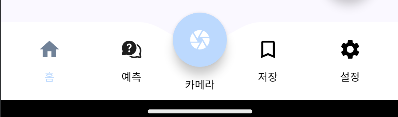
Canvas를 통해 바텀 네비게이션 메뉴의 container의 가운데 부분에 굴절을 만들고 그 안에 FloatingActionButton과 Text까지 함께 주어 완성하면 위와 같은 사진처럼 완성된다!

몰입의 즐거움