👾 몬스터 소환 로직 구현하기
이번에는 맵에 몬스터가 소환되는 로직을 구현해 봅시다.
앞서 이야기 한 것 처럼 오픈월드에서는 필요한 데이터만 메모리로 가져오고 나머지 데이터는 다시 디스크로 보내는 방식을 채용한다고 했습니다.
그리고 그 데이터를 선별하는 기준은 캐릭터의 주변 범위에 존재하는 지를 확인하는 것 입니다.
오픈월드 게임을 하다보면 몬스터가 캐릭터와 멀리 떨어져 있을 때는 소환되지 않습니다. 하지만 배경은 먼 장면까지 나타나야 하기 때문에 범위가 더 넓은 것입니다.
여기서 몬스터를 소환하는 방법도 스트리밍 기법을 사용하여 구현을 할 수 있다는 것을 알 수 있습니다. 대신 배경 Scene을 Load 할때보다 더 작은 범위를 가져야 한다는 것을 염두해 두고 구현해 보겠습니다.
🔧 설계
앞서 MapStreamingManager를 통해 캐릭터가 위치한 곳에 따라 Sector Scene들을 Load하는 방식을 배웠습니다.
여기에 이 Sector별로 Monster 소환을 관리하는 Object와 Script를 하나 작성해 보겠습니다.
즉, MainScene의
MonsterManager가 Sector의MonsterSpawner에게 필요할 때 몬스터를 소환할 것을 명령하는 방식입니다.
🗨️ 주요 요소
SectorMonsterSpawner.cs
private void OnEnable()
{
    isSpawning = false;
    MonsterManager.instance.AddMonsterSpawnerSC(sectorVec, this);
}

private void OnDisable()
{
    isSpawning = false;
    MonsterManager.instance.RemoveMonsterSpawnerSC(sectorVec);
}- 먼저 오브젝트가 활성화/비활성화 될 경우 해당 오브젝트의 참조를 MainScene의 MonsterManager에게 추가 및 삭제할 것을 요청하는 Callback을 작성합니다.
- 해당 오브젝트는 MapStreamingManager로 인해 Sector Scene이 Load 되었을 때 같이 활성화 됩니다.
왜 바로바로 몬스터를 소환할 것도 아닌데 미리 참조를 MonsterManager가 관리하도록 하는 것일까?
⇒ 주로 이러한 과정은 Unity의 Coroutin을 통해 비동기로 실행됩니다. 이 과정에서 몬스터가 소환되는 범위를 계산하고 참조를 추가하는 과정을 실시간으로 실행하다보면 수행시간이 길어져 게임 진행에 문제가 될 수 있습니다.
while (!monsterSpawners.ContainsKey(ranSector))
{
    yield return null;
}
이와 같은 반복문을 통해 프레임 단위로 작업을 대기했다가 수행하는 경우가 많습니다. 이러한 코드를 사용하여 유연하게 게임을 진행하는 것은 좋지만 너무 많아지면 비동기 작업에 있어 원하는 결과를 얻지 못하는 경우가 발생할 수 있습니다.
그렇기 때문에 비록 메모리를 좀 더 소모하더라고 미리 데이터를 처리해 두는 것이 좋다고 판단하여 Scene을 Load 했을 때 MonsterManager의 Dictionary를 갱신해두는 설계를 했습니다.
이건 개인 판단에 의한 것이니 정답은 없습니다!!
   public void OnPlayerEnter()
    {
        if (!isSpawning)
        {
            SpawnMonster();
            isSpawning = true;
        }
    }

    public void OnPlayerExit()
    {
        DespawnMonsterTotal();
}- 이 두 메서드는 Main Scene에 존재하는 MonsterManager가 플레이어의 위치에 따라 Spawner에게 알려주는 메서드들 입니다.
OnPlayerEnter()- Main Scene에서 플레이어가 설정한 범위에 들어왔을 때 호출하는 메서드
OnPlayerExit()- Main Scene에서 플레이어가 설정한 범위를 벗어났을 때 호출하는 메서드
- 중복 호출의 우려가 있으므로
isSpawning이라는 Flag를 만들어 방지 해줍시다.
👁️🗨️ Total Code
public class SectorMonsterSpawner : MonoBehaviour
{
    private ObjectPooling ObjectPooling;                                    // ObjectPooling을 구현한 SC
    private List<GameObject> spawnedMonsters = new List<GameObject>();      // 소환된 몬스터의 List

    private bool isSpawning;
    public Vector2Int sectorVec;              // 해당 Spawner가 위치한 Sector.

    void Start()
    {
        ObjectPooling = GetComponent<ObjectPooling>();
        isSpawning = false;
    }

    public void OnPlayerEnter()
    {
        if (!isSpawning)
        {
            SpawnMonster();
            isSpawning = true;
        }
    }

    public void OnPlayerExit()
    {
        if (isSpawning)
        {
            DespawnMonsterTotal();
            isSpawning = false;
        }
    }

    private void OnEnable()
    {
        isSpawning = false;
        MonsterManager.instance.AddMonsterSpawnerSC(sectorVec, this);
    }

    private void OnDisable()
    {
        isSpawning = false;
        MonsterManager.instance.RemoveMonsterSpawnerSC(sectorVec);
    }

    public void SpawnMonster()
    {
        Vector3 spawnPosition = gameObject.transform.position;
        GameObject monster = ObjectPooling.GetObject(spawnPosition, Quaternion.identity);
        if (monster != null)
        {
            spawnedMonsters.Add(monster);
        }
    }

    public void DespawnMonsterTotal()
    {
        foreach (GameObject monster in spawnedMonsters)
        {
            ObjectPooling.ReturnObject(monster);
        }
        spawnedMonsters.Clear();
    }
}
MonsterManager.cs
 public static MonsterManager instance { get; private set; }

 void Awake()
 {
     if (instance == null)
     {
         instance = this;
         DontDestroyOnLoad(gameObject);
     }
     else
     {
         Destroy(gameObject);
     }
}- 해당 오브젝트는 Main-Scene에서 Sector-Scene들의 몬스터 소환 기능을 총괄하는 중앙탑과 같은 역할을 수행하기 때문에
Singleton Object로 만들어 줍니다.
 public void AddMonsterSpawnerSC(Vector2Int sector, SectorMonsterSpawner spawner)
 {
     if(!monsterSpawners.ContainsKey(sector)) monsterSpawners.Add(sector, spawner);
 }

 public void RemoveMonsterSpawnerSC(Vector2Int sector)
 {
     if (monsterSpawners.ContainsKey(sector)) monsterSpawners.Remove(sector);
}- 해당 코드들은 Sector-Scene 들이 Load/UnLoad되었을 때, Callback으로 호출할 메서드입니다.
Dictionary<Vector2Int, SectorMonsterSpawner> monsterSpawners = new Dictionary<Vector2Int, SectorMonsterSpawner>();- 해당 Dictionary는 Sector 별로 몬스터를 소환하는 Object의 참조를 저장해두는 기능을 수행합니다.
- 이후 캐릭터가 위치한 곳에 따라 해당 Dictionary에서 적합한 Sector의 참조를 통해 몬스터 소환 기능을 수행합니다.
    IEnumerator NotifySpawner()
    {
        HashSet<Vector2Int> activeSpawners = new HashSet<Vector2Int>();
        Vector2Int currentSector = MapStreamingManager.Instance.currentSector;
        for (int x = -monsterSpawnCallRange; x <= monsterSpawnCallRange; x++)
        {
            for(int y = -monsterSpawnCallRange; y <= monsterSpawnCallRange; y++)
            {
                Vector2Int ranSector = currentSector + new Vector2Int(x, y);
                while (!monsterSpawners.ContainsKey(ranSector))
                {
                    yield return null;
                }
                activeSpawners.Add(ranSector);
            }
        }

        foreach (var sector in activeSpawners)
        {
            if (monsterSpawners.ContainsKey(sector))
            {
                monsterSpawners[sector].OnPlayerEnter();
                yield return null;
            }
        }

        HashSet<Vector2Int> unActiveSpawners = new HashSet<Vector2Int>();

        foreach(var sector in monsterSpawners)
        {
            if (Mathf.Abs(sector.Key.x - currentSector.x) > monsterSpawnCallRange || Mathf.Abs(sector.Key.y - currentSector.y) > monsterSpawnCallRange)
            {
                unActiveSpawners.Add(sector.Key);
            }
        }

        foreach (var sector in unActiveSpawners)
        {
            if (monsterSpawners.ContainsKey(sector))
            {
                monsterSpawners[sector].OnPlayerExit();
                yield return null;
            }
        }
}- 해당 NotifySpawner()는 MapStreamingManager로 부터 캐릭터가 위치한 Sector가 변경 되었을 때 호출하는 Coroutin 메서드 입니다. ⇒ Update를 통해 프레임 마다 호출하는 것보다 Sector의 변화에만 반응하도록 설정하여 불필요한 메서드 호출양을 줄입시다.
단점
-
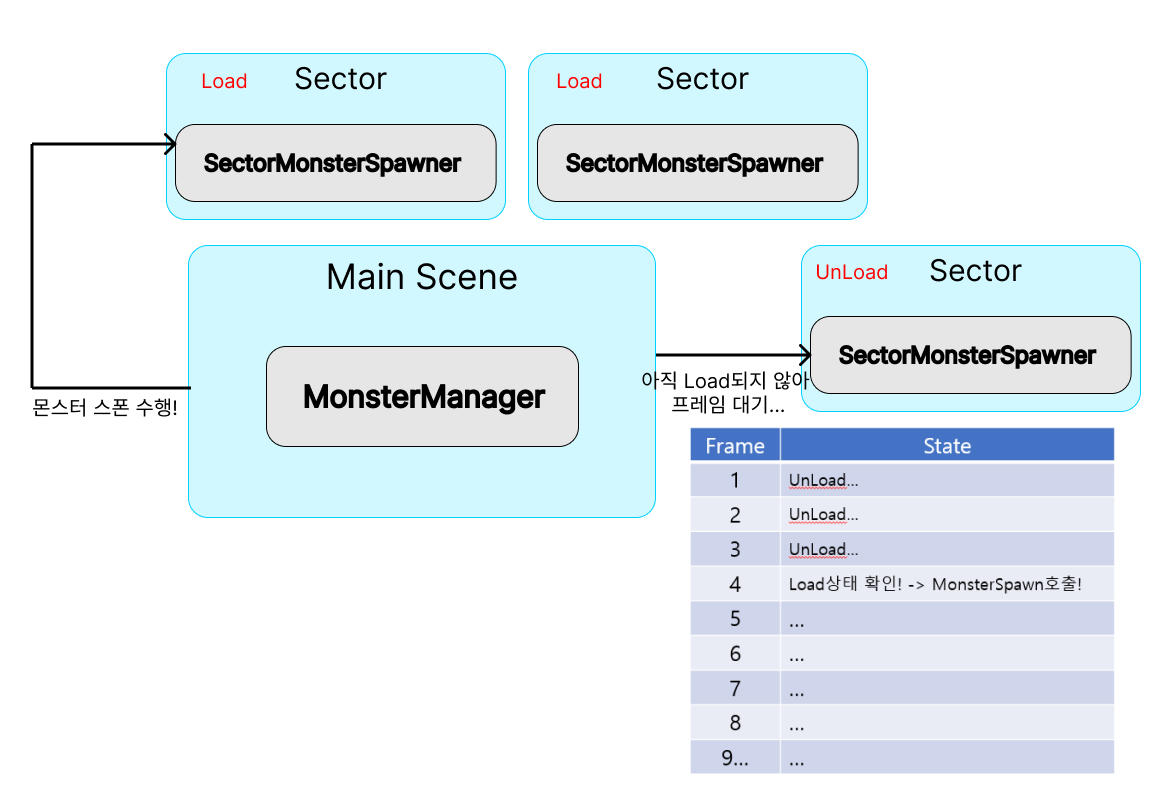
몬스터를 소환하기 위해서는 해당 Sector가 Load된 상태이어야 합니다.
즉, 몬스터를 소환하기 위해서는 Sector Scene이 Load될 때 까지 대기해야한다는 뜻입니다.
멀티 스레드 방식을 채용하고 있는 Unity의 특성 상 이 순서를 우리가 정할 수는 없습니다. 그러므로 몬스터를 소환하는 것을 Sector가 Load 될 때까지 대기하도록 해야합니다.
주로 프레임 단위 작업이므로
while (monsterSpawners.ContainsKey(sector))
{
      monsterSpawners[sector].OnPlayerEnter();
      yield return null;
}
와 같이 Load가 완료 될 때까지 작업할 프레임을 늦추는 것입니다!
-
보통 Update로 호출 되는 동안은 문제가 없지만, Start()를 통해 호출될 경우, NullException이 발생하게 됩니다.
-
이처럼 해당 Sector가 Load 완료 된 프레임에서 호출이 됩다.
-
👁️🗨️ Total Code
public class MonsterManager : MonoBehaviour
{
    public static MonsterManager instance { get; private set; }

    void Awake()
    {
        if (instance == null)
        {
            instance = this;
            DontDestroyOnLoad(gameObject);
        }
        else
        {
            Destroy(gameObject);
        }
    }

    public int monsterSpawnCallRange = 1;

    private void Start()
    {
        MonsterSpawnCall();
    }

    Dictionary<Vector2Int, SectorMonsterSpawner> monsterSpawners = new Dictionary<Vector2Int, SectorMonsterSpawner>();

    IEnumerator NotifySpawner()
    {
        HashSet<Vector2Int> activeSpawners = new HashSet<Vector2Int>();
        Vector2Int currentSector = MapStreamingManager.Instance.currentSector;
        for (int x = -monsterSpawnCallRange; x <= monsterSpawnCallRange; x++)
        {
            for(int y = -monsterSpawnCallRange; y <= monsterSpawnCallRange; y++)
            {
                Vector2Int ranSector = currentSector + new Vector2Int(x, y);
                while (!monsterSpawners.ContainsKey(ranSector))
                {
                    yield return null;
                }
                activeSpawners.Add(ranSector);
            }
        }

        foreach (var sector in activeSpawners)
        {
            if (monsterSpawners.ContainsKey(sector))
            {
                monsterSpawners[sector].OnPlayerEnter();
                yield return null;
            }
        }

        HashSet<Vector2Int> unActiveSpawners = new HashSet<Vector2Int>();

        foreach(var sector in monsterSpawners)
        {
            if (Mathf.Abs(sector.Key.x - currentSector.x) > monsterSpawnCallRange || Mathf.Abs(sector.Key.y - currentSector.y) > monsterSpawnCallRange)
            {
                unActiveSpawners.Add(sector.Key);
            }
        }

        foreach (var sector in unActiveSpawners)
        {
            if (monsterSpawners.ContainsKey(sector))
            {
                monsterSpawners[sector].OnPlayerExit();
                yield return null;
            }
        }
    }

      public void MonsterSpawnCall()
    {
        StartCoroutine(NotifySpawner());
    }

    public void AddMonsterSpawnerSC(Vector2Int sector, SectorMonsterSpawner spawner)
    {
        if(!monsterSpawners.ContainsKey(sector)) monsterSpawners.Add(sector, spawner);
    }

    public void RemoveMonsterSpawnerSC(Vector2Int sector)
    {
        if (monsterSpawners.ContainsKey(sector)) monsterSpawners.Remove(sector);
    }
}
MapStreamingManager.cs 수정
private void Update()
    {
        if(checkChangeSector()){
            LoadSectorFunc();
            UnloadSectorFunc();
            //monsterManager = Main Scene의 MonsterManager
            monsterManager.MonsterSpawnCall();
        }
    }
수행 화면
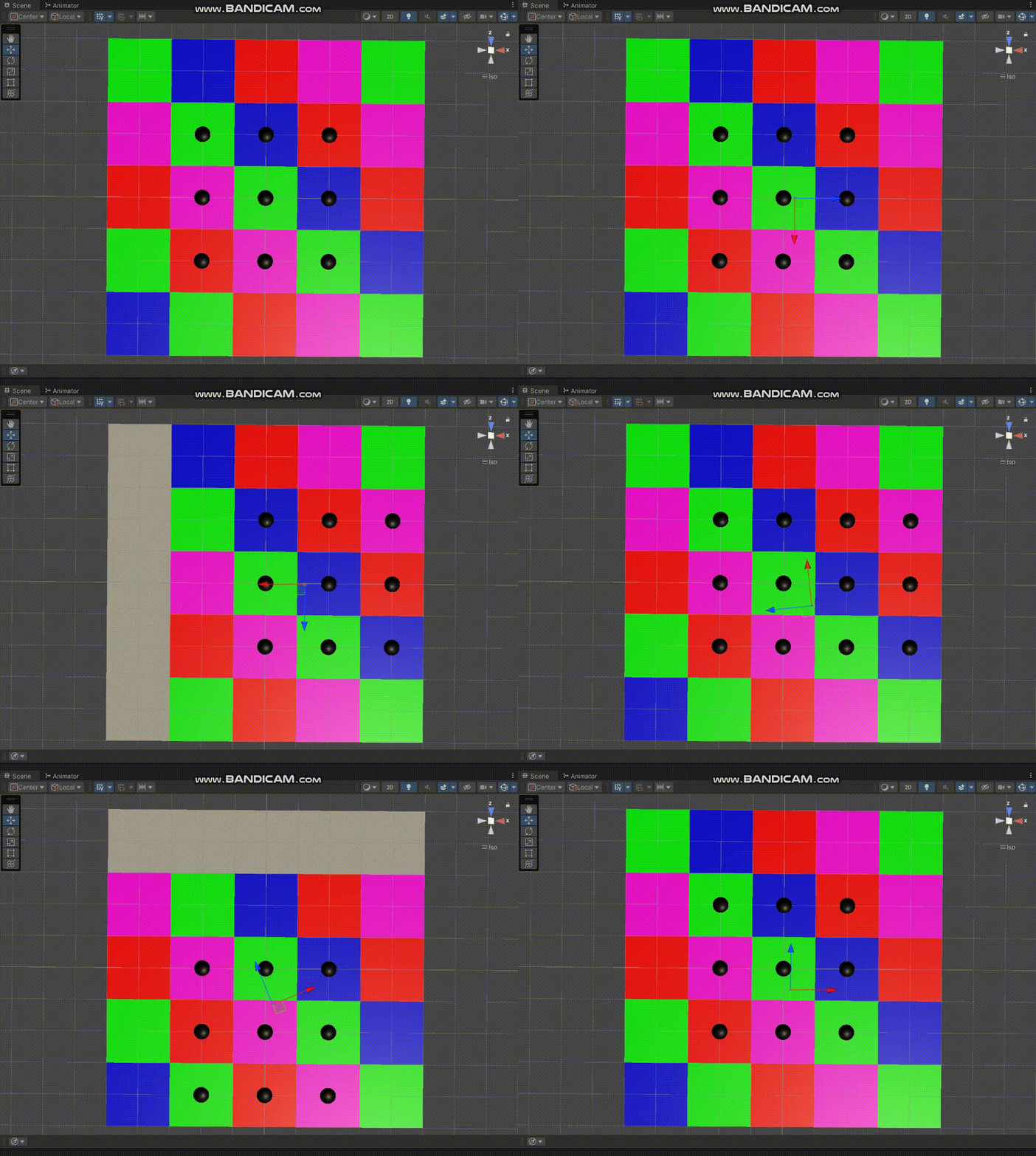
아래와 같이 검은 물체를 몬스터라고 합시다.
Scene은 +/-2의 범위로 Load되지만, 몬스터는 +/-1의 범위로 소환됩니다.!
다음에는 Sector 별로 다양한 몬스터가 소환되는 방식과 위에서 생략한 ObjectPooling을 통한 간단한 최적화 기법을 알아봅시다!
