
LCEL(LangChain Expression Language)이란?
랭체인의 여러 구성요소를 결합하여 하나의 체인을 만드는 방법
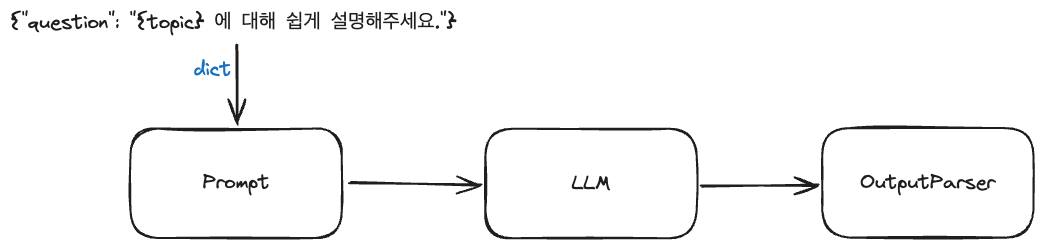
chain = prompt | model | output_parser위와 같이 프롬프트 + LLM 모델 + 파서를 결합하는 하나의 체인을 구성할 수 있음
❗️파이프( | )는 유닉스의 파이프 연산자처럼 하나의 구성 요소의 출력이 다음 구성 요소의 입력으로 전달하는 역할을 함
🧾 템플릿(Template)
##### 프롬프트 템플릿 #####
# 프롬프트를 형식화
# 템플릿 사용하면 좋은 점: 유효성 검사 가능, 템플릿을 디스크에 저장하고 load 할 수 있음

### PromptTemplate: string을 이용해서 template을 만듦 ###
# from_template: 프롬프트 템플릿 형식화
# format: 변수에 값 할당
# invoke: 프롬프트를 llm에 전달하여 값 반환

from langchain_openai import ChatOpenAI
from langchain.prompts import PromptTemplate, ChatPromptTemplate

chat = ChatOpenAI(temperature=0.1)

template = PromptTemplate.from_template(
    'What is the distance between {country_a} and {country_b}'
)

prompt = template.format(country_a='south korea',
                         country_b='japan')

print(chat.invoke(prompt))
AIMessage(content='The distance between South Korea and Japan is approximately 219 kilometers (136 miles) at the closest point, which is between the Korean peninsula and the Japanese island of Kyushu.', response_metadata={'token_usage': {'completion_tokens': 36, 'prompt_tokens': 17, 'total_tokens': 53, 'prompt_tokens_details': {'cached_tokens': 0}, 'completion_tokens_details': {'reasoning_tokens': 0}}, 'model_name': 'gpt-3.5-turbo', 'system_fingerprint': None, 'finish_reason': 'stop', 'logprobs': None}, id='run-9acdfdf0-ee24-42d6-8735-a37e59eb2930-0')### ChatPromptTemplate: message(리스트)를 이용해서 template을 만듦 ###
# from_messages: 프롬프트 템플릿 형식화. 각각 튜플 형태인 system, ai, human의 초기값을 리스트로 묶음
# format_messages: 변수 값 할당
# invoke: 프롬프트를 llm에 전달하여 값 반환
template = ChatPromptTemplate.from_messages([
('system',
'you are a geography export. and you only reply in {language}'), # SystemMessage: AI의 기본 설정값 지정
('ai',
'안녕? 내 이름은 {name}이야!'), # AIMessage: AI 답변을 가정
('human',
'What is the distance between {country_a} and {country_b}. also, what it your name?') # HumanMessage: 사용자 질문
])
prompt = template.format_messages(language='korean',
name='세종',
country_a='south korea',
country_b='japan')
chat.invoke(prompt)AIMessage(content='한국과 일본 사이의 거리는 약 220km입니다. 제 이름은 세종이에요.', response_metadata={'token_usage': {'completion_tokens': 33, 'prompt_tokens': 62, 'total_tokens': 95, 'prompt_tokens_details': {'cached_tokens': 0}, 'completion_tokens_details': {'reasoning_tokens': 0}}, 'model_name': 'gpt-3.5-turbo', 'system_fingerprint': None, 'finish_reason': 'stop', 'logprobs': None}, id='run-f49a0a3a-fa58-4422-9263-6e0dd17a280b-0')
🛠️ 파서(Parser)
# Output Parser: LLM의 응답을 변형할 때 사용
# langchain의 BaseOutputParser 클래스를 상속받아 나만의 Output Parser 클래스 생성

from langchain.schema import BaseOutputParser

class CommaOutputParser(BaseOutputParser):
    def parse(self, text):
        items = text.strip().split(',')
        return list(map(str.strip, items))


parser = CommaOutputParser()
print(parser.parse('안녕, 내이름은, pysun이야'))
['안녕', '내이름은', 'pysun이야']✨ LCEL 예시
##### langchain expression language 맛보기#####

# chain: 위 내용을 한번에 수행할 수 있음
# 모든 요소를 합쳐서 하나하나 result를 반환할 때까지 수행

### invoke를 수행 시 ###
# 1. 입력으로 딕셔너리를 받으며 값이 template에 전달 된 후 template 수행
# 2. template output(PromptValue)이 Chat model input(PromptValue)에 전달
# 3. Chat model의 output(ChatMessage)이 커스텀한 파서의 input으로 들어감
# 4. 파서까지 통과한 결과 출력

# 프롬프트 템플릿 생성
template = ChatPromptTemplate.from_messages(
    [
        (
            'system',
            'You are a list generating machine. Everything you are asked will be answered with a comma separated list of max {max_items} in lowercase. Do not reply with anything else.'
        ),
        (
            'human',
            '{question}')
    ]
)

# 모델 정의
chat = ChatOpenAI(temperature=0.1)

# 파서 정의
class CommaOutputParser(BaseOutputParser):
    def parse(self, text):
        items = text.strip().split(',')
        return list(map(str.strip, items))

parser = CommaOutputParser()

# 체인 생성
chain = template | chat | CommaOutputParser()

# 체인 실행
print(chain.invoke({
    'max_items':10,
    'question':'What are the pokemons?'
}))['bulbasaur',
'charmander',
'squirtle',
'pikachu',
'jigglypuff',
'eevee',
'snorlax',
'bulbasaur',
'charmander',
'squirtle']
배움의 흔적이 성장으로 이어지는 공간