
들어가며
회사 프로젝트를 진행하면서 GoogleMap과 비슷한 UI가 필요해졌습니다.
DraggableScrollableSheet 안에 ListView 스크롤과 drag handle로 시트 크기 조절이라는 두 가지 기능이 동시에 요구되었기 때문입니다.이 글에서는 제가 문제를 해결한 과정과, 이런 복잡한 요구사항을 빠르게 구현할 수 있는 grabber_sheet 패키지를 소개하려 합니다.
https://pub.dev/packages/grabber_sheet
요구사항 정의
구현해야 했던 UI는 다음과 같은 조건을 갖고 있었습니다:
- 사용자가 drag handle을 잡아 시트 높이를 조절할 수 있어야 하고
- 특정 위치에 도달하면 자동으로 고정되는 snap 동작이 필요하며
- 시트 하단에서는 ListView로 여러 항목을 스크롤할 수 있어야 했습니다.
즉, 하나의 시트에서 드래그 제스처와 리스트 스크롤이 자연스럽게 공존해야 하는 상황이었습니다. 아래는 요구사항 예시입니다.
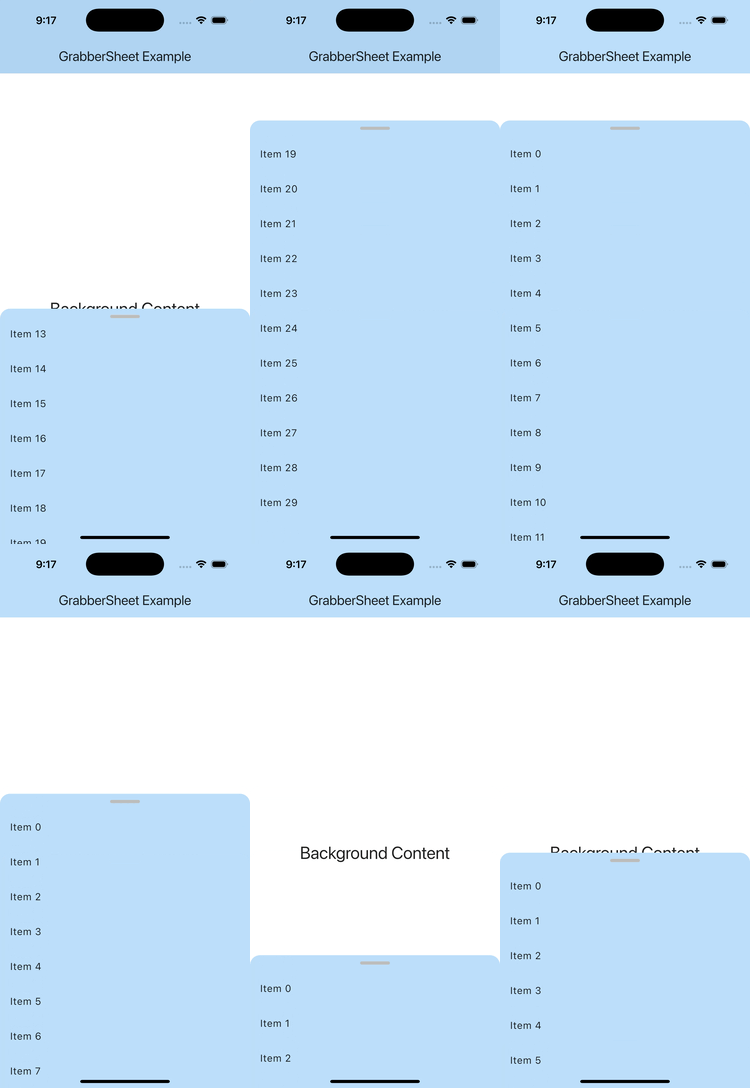
DraggableScrollableSheet의 공식문서에서는 데스크톱 앱에서 drag handle을 구현하는 예시를 함께 보여줍니다.
https://api.flutter.dev/flutter/widgets/DraggableScrollableSheet-class.html#widgets.DraggableScrollableSheet.1그러나, 이 예제에서는 데스크톱에서의 구현방법이며, drag handle이 동작하다가도 ListView를 통해 sheet의 크기를 제어하게 되면, ScrollController에게 Scroll 제어권이 넘어가버립니다. (그렇다고 GPT가 말하던데 아무튼)
그렇기에 이 방식으로는 어느정도 비슷하게는 만들 수 있어도 drag handle이 가능한 영역을 함께 구현하기에는 무리가 있습니다.
GestureDetector를 이용하자
GestureDetector와 DraggableScrollableController를 이용하여 현재의 스크롤 이동치 만큼 sheet의 사이즈를 조절한다면, drag handle영역의 sheet 사이즈 조절 기능을 구현할 수 있습니다.
late final DraggableScrollableController _controller;
late double _newSize = initSize; //임의의 시작 시트 크기
void initState() {
super.initState();
_controller = DraggableScrollableController();
}
void dispose() {
_controller.dispose();
super.dispose();
}
Widget build(BuildContext context) {
final theme = Theme.of(context);
final Color sheetColor =
widget.backgroundColor ?? theme.colorScheme.surface;
return LayoutBuilder(
builder: (BuildContext context, BoxConstraints constraints) {
return DraggableScrollableSheet(
controller: _controller,
...
// sheet에서 drag handle 기능 영역
GestureDetector(
onVerticalDragUpdate: (details) {
// 이동한 만큼 pixel 계산
final newPixel = _controller.pixels - details.delta.dy;
// pixel을 size로 변환
_newSize = _controller
.pixelsToSize(newPixel)
.clamp(0.0, 1.0);
// controller를 통해 새로운 시트 사이즈로 이동
_controller.jumpTo(_newSize);
},이로써, 아주 간단한 코드를 추가하여 drag handle기능 구현이 가능합니다.
문제는 이렇게 구현된 drag handle은 사용자 드래그가 멈춘 시점에서 sheet의 사이즈가 멈추어 부자연스러워집니다. 부드러운 UX를 위해 snap 액션을 추가해주겠습니다.
snap 액션은 가장 가까운 snap point로 이동시키는 액션입니다. DraggableScrollableSheet에서도 snap기능 활성화 여부를 property로 제공합니다.
onVerticalDragEnd: (details) {
	// 스크롤 속도
	final double velocity = details.primaryVelocity ?? 0.0;
    const double flingVelocity = 300.0;

	// snap 포인트 세트
    final Set<double> allSnapPoints = {
    	widget.minChildSize,
        widget.maxChildSize,
        ...?widget.snapSizes,
    };
    // 오름차순 정렬
    final List<double> sortedSnapPoints =
                          allSnapPoints.toList()..sort();

	double targetSize;

	if (velocity.abs() > flingVelocity) {
		// 속도가 빠른경우 맨끝 혹은 맨위까지 이동
    	targetSize = velocity < 0
        ? sortedSnapPoints.last
        : sortedSnapPoints.first;
    } else {
		// snap point 사이 중 더 가까운 point 계산
        targetSize = sortedSnapPoints.reduce(
        	(a, b) => (_newSize - a).abs() < (_newSize - b).abs()
            ? a
            : b,
        );
    }

	// 스크롤 이동
    _controller.animateTo(
    	targetSize,
        duration: const Duration(milliseconds: 300),
        curve: Curves.easeOut,
    );
},
이로써, snap 액션까지 부드럽게 이동하는 기능까지 DraggableScrollable에 추가해줬습니다.
마무리하며
생각보다 적은 코드로 구현할 수 있는 기능이지만, 프로젝트마다 이 로직을 매번 다시 작성하는 일은 꽤 번거롭습니다.
그래서 이러한 요구사항을 더 편하게 해결할 수 있도록 grabber_sheet
패키지를 직접 만들어 공개했습니다.부족한 부분이나 개선 아이디어가 있다면 언제든 편하게 알려주세요.
많은 관심 부탁드리며, 다양한 기능 기여도 환영합니다!