이론1. db를 생성하는 방법 2가지
- 자동 생성 →
dbca- 수동 생성 →
create database 스크립트로 생성
이론2. db생성시 구성하는 스토리지 종류 3가지
file system: dbca 와 create database 스크립트로 db 생성ASM: dbca 와 create database 스크립트로 db 생성raw device: create database 스크립트로만 db생성 할 수 있습니다.
실습1. dbca 로 19c database를 또 하나 새로 설치하는데 dw 용으로 생성하시오. db이름을 ora19dw 로 하시오
[oracle@ora19c ~]$ dbca
No protocol specified
Exception in thread "main" java.lang.NoClassDefFoundError: Could not initialize class sun.awt.X11.XToolkit
        at java.lang.Class.forName0(Native Method)
        at java.lang.Class.forName(Class.java:264)
        at java.awt.Toolkit$2.run(Toolkit.java:860)
        at java.awt.Toolkit$2.run(Toolkit.java:855)
        at java.security.AccessController.doPrivileged(Native Method)
        at java.awt.Toolkit.getDefaultToolkit(Toolkit.java:854)
        at com.jgoodies.looks.LookUtils.isLowResolution(LookUtils.java:484)
        at com.jgoodies.looks.LookUtils.<clinit>(LookUtils.java:249)
        at com.jgoodies.looks.plastic.PlasticLookAndFeel.<clinit>(PlasticLookAndFeel.java:135)
        at java.lang.Class.forName0(Native Method)
        at java.lang.Class.forName(Class.java:348)
        at javax.swing.SwingUtilities.loadSystemClass(SwingUtilities.java:1879)
        at javax.swing.UIManager.setLookAndFeel(UIManager.java:582)
        at oracle.install.commons.util.Application.startup(Application.java:976)
        at oracle.install.commons.flow.FlowApplication.startup(FlowApplication.java:181)
        at oracle.install.commons.flow.FlowApplication.startup(FlowApplication.java:198)
        at oracle.assistants.common.base.driver.AssistantApplication.startup(AssistantApplication.java:336)
        at oracle.assistants.dbca.driver.DBConfigurator.startup(DBConfigurator.java:378)
        at oracle.assistants.dbca.driver.DBConfigurator.main(DBConfigurator.java:513)
[oracle@ora19c ~]$
[oracle@ora19c ~]$
[oracle@ora19c ~]$ export DISPLAY=:10.0
[oracle@ora19c ~]$
[oracle@ora19c ~]$ dbca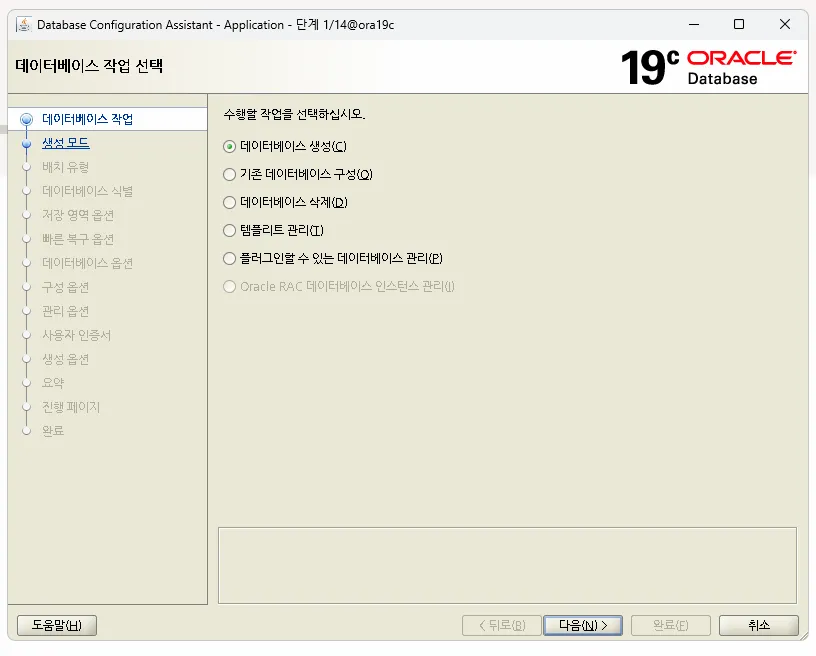
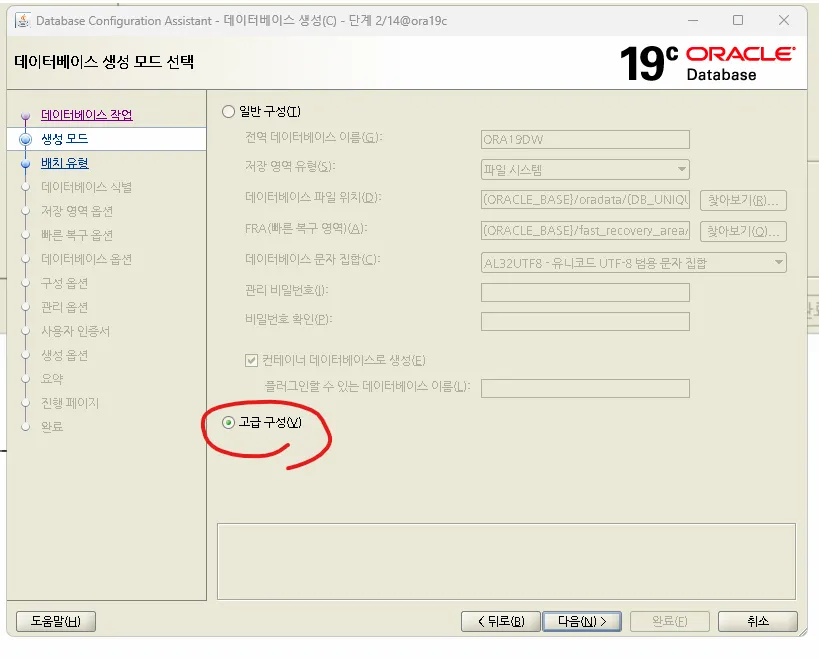
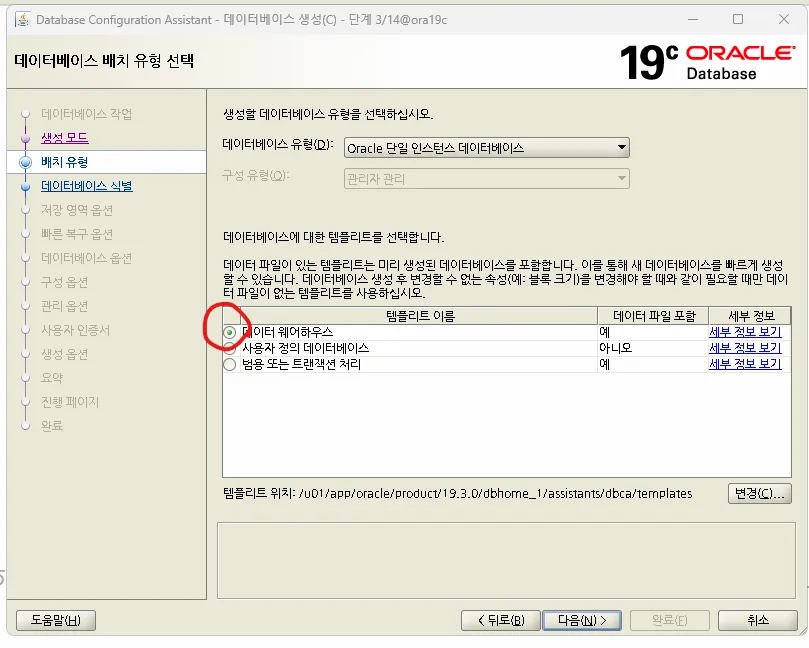
다음과 같이 디비이름과 인스턴스 이름을 지정합니다.
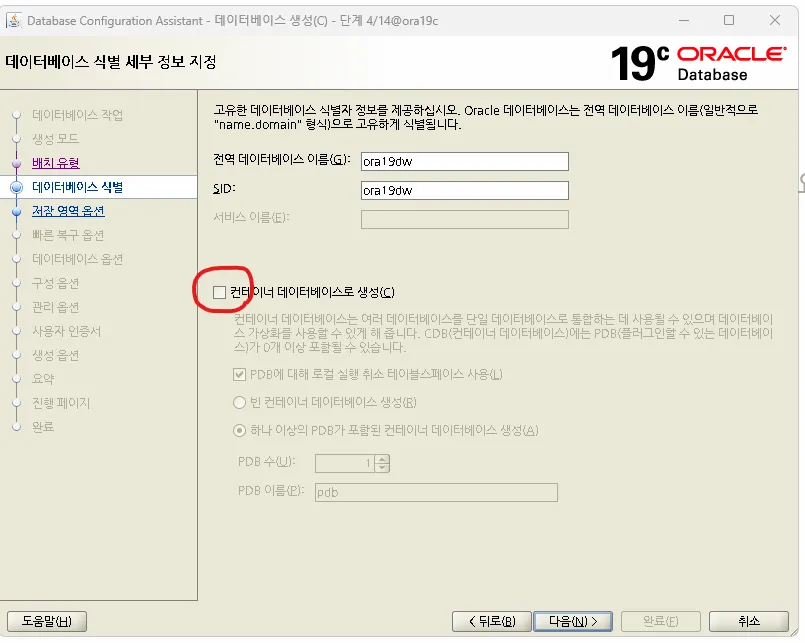
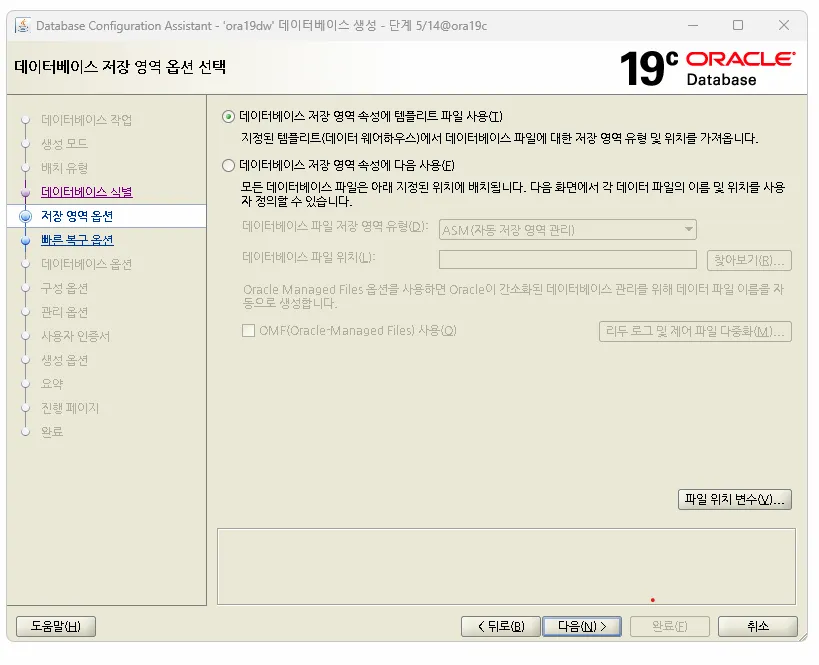
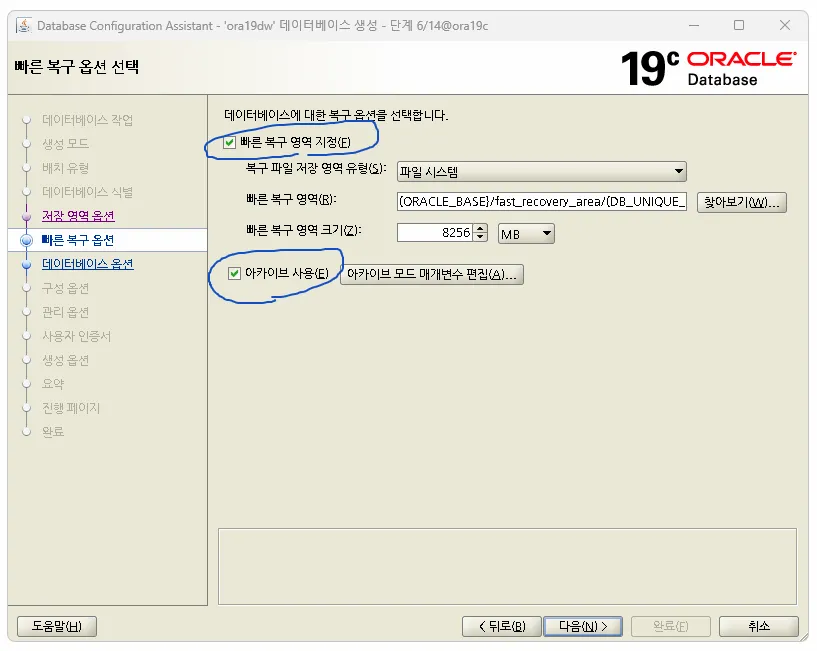
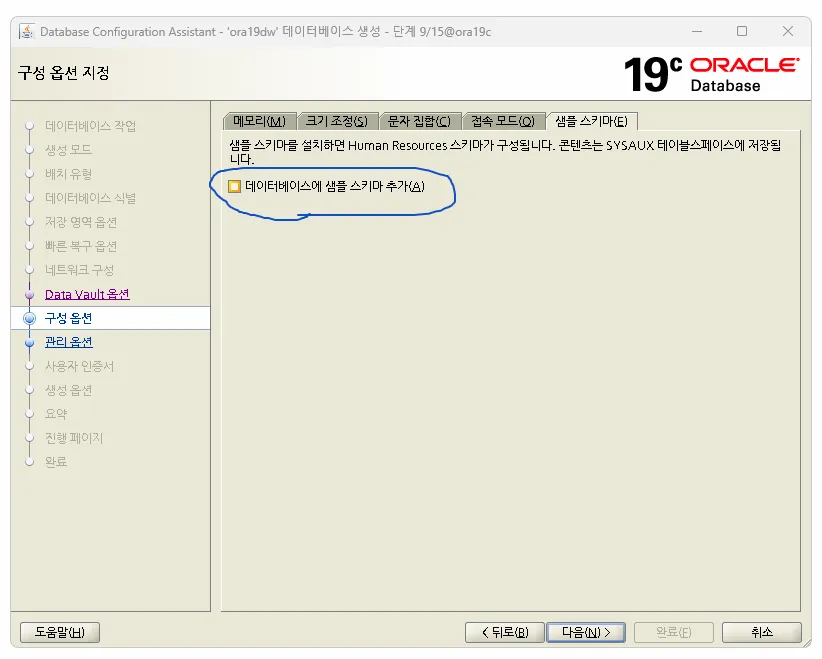
이번에는 데이터 이행 연습을 위해서 아래 샘플 스키마를 체크하지 X
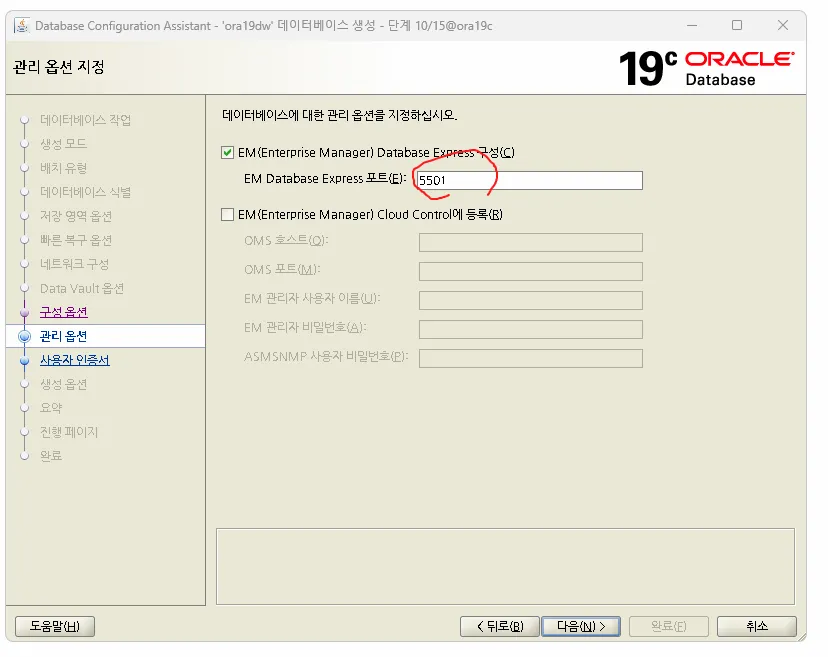
5501번 포트로 보임
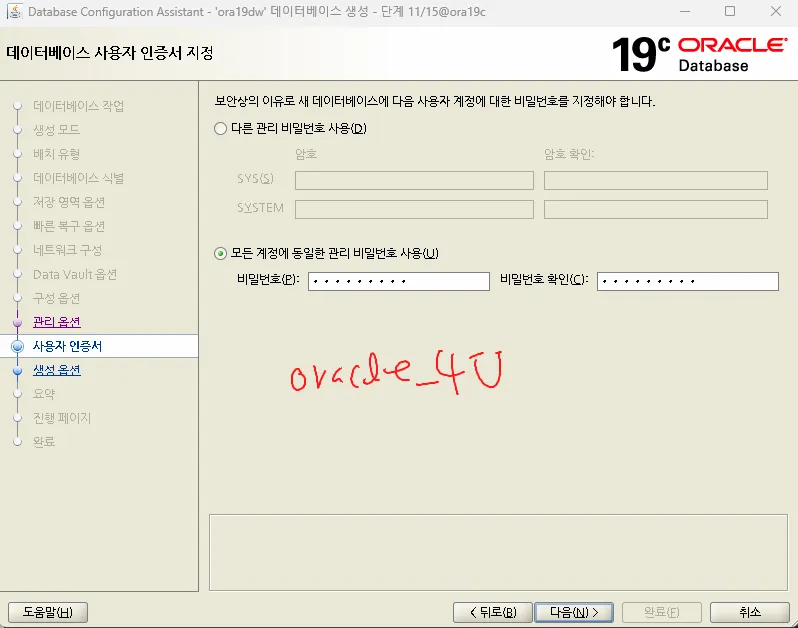
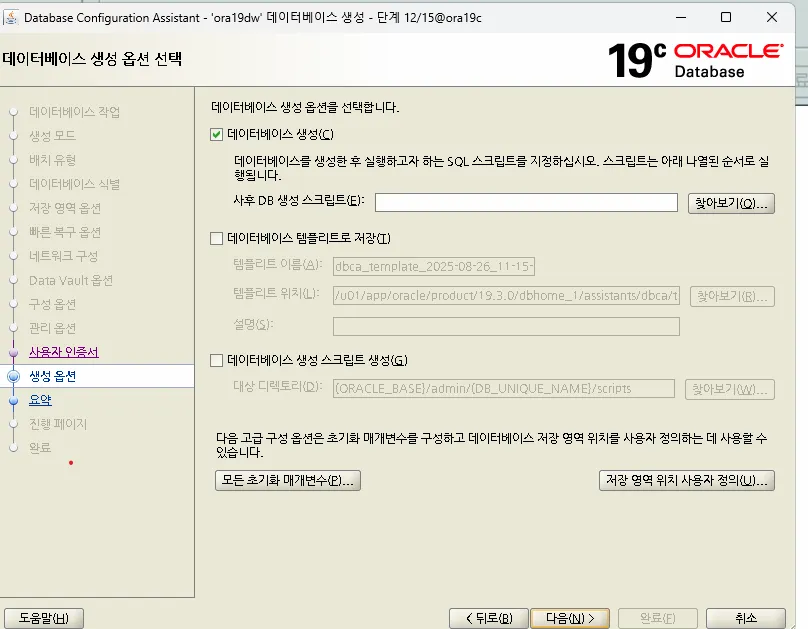
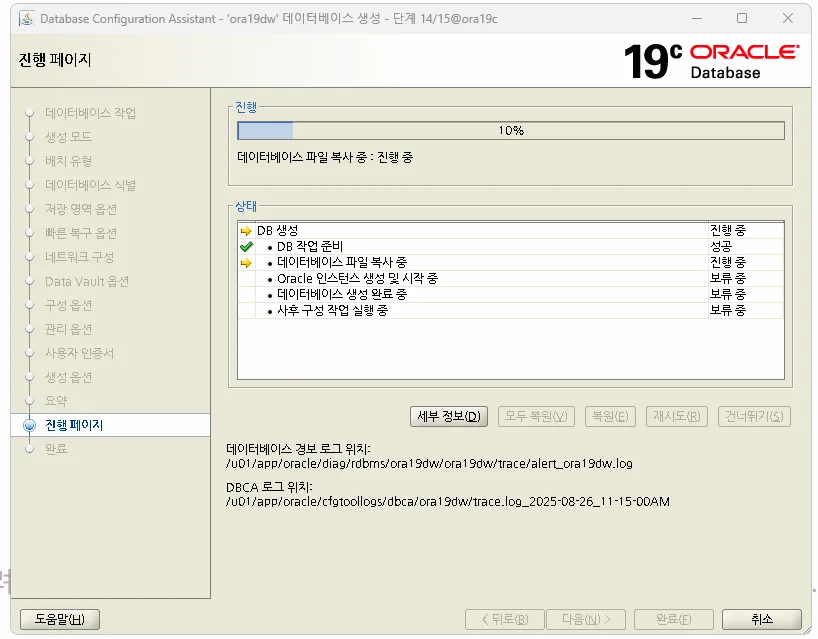
db 가 2개가 잘 있는지 확인하세요
[oracle@ora19c ~]$ ps -ef |grep pmon | grep -v grep
oracle    2060     1  0 09:42 ?        00:00:00 ora_pmon_ORA19
oracle   13039     1  0 11:38 ?        00:00:00 ora_pmon_ora19dw

[oracle@ora19c ~]$ sys

SQL*Plus: Release 19.0.0.0.0 - Production on 화 8월 26 11:45:59 2025
Version 19.3.0.0.0

Copyright (c) 1982, 2019, Oracle.  All rights reserved.


다음에 접속됨:
Oracle Database 19c Enterprise Edition Release 19.0.0.0.0 - Production
Version 19.3.0.0.0

SQL> @i

STATUS
------------
OPEN

SQL> select instance_name from v$instance;

INSTANCE_NAME
----------------
ORA19


[oracle@ora19c ~]$ . oraenv
ORACLE_SID = [ora19dw] ? ORA19
The Oracle base remains unchanged with value /u01/app/oracle
[oracle@ora19c ~]$
[oracle@ora19c ~]$ sys

SQL*Plus: Release 19.0.0.0.0 - Production on 화 8월 26 11:49:27 2025
Version 19.3.0.0.0

Copyright (c) 1982, 2019, Oracle.  All rights reserved.


다음에 접속됨:
Oracle Database 19c Enterprise Edition Release 19.0.0.0.0 - Production
Version 19.3.0.0.0

SQL> select instance_name from v$instance;

INSTANCE_NAME
----------------
ORA19

SQL> save iname.sql
file iname.sql(이)가 생성되었습니다
SQL>
SQL> exit;
Oracle Database 19c Enterprise Edition Release 19.0.0.0.0 - Production
Version 19.3.0.0.0에서 분리되었습니다.
[oracle@ora19c ~]$
[oracle@ora19c ~]$ . oraenv
ORACLE_SID = [ORA19] ? ora19dw
The Oracle base remains unchanged with value /u01/app/oracle
[oracle@ora19c ~]$ sys

SQL*Plus: Release 19.0.0.0.0 - Production on 화 8월 26 11:50:00 2025
Version 19.3.0.0.0

Copyright (c) 1982, 2019, Oracle.  All rights reserved.


다음에 접속됨:
Oracle Database 19c Enterprise Edition Release 19.0.0.0.0 - Production
Version 19.3.0.0.0

SQL> @iname

INSTANCE_NAME
----------------
ora19dw
문제1. sys의 alias 는 ora19 로 접속되게 만드시오
[oracle@ora19c ~]$ cat .bash_profile
# .bash_profile

# Get the aliases and functions
if [ -f ~/.bashrc ]; then
        . ~/.bashrc
fi

# User specific environment and startup programs

PATH=$PATH:$HOME/.local/bin:$HOME/bin
export ORACLE_BASE=/u01/app/oracle
export ORACLE_HOME=/u01/app/oracle/product/19.3.0/dbhome_1
export ORA_INVENTORY=/u01/app/oraInventory
export ORACLE_SID=ORA19
#export TNS_ADMIN=/u01/app/oracle/product/19.3.0/dbhome_1/network/admin
export PATH=$PATH:$HOME/bin:$ORACLE_HOME/bin
export LD_LIBRARY_PATH=$ORACLE_HOME/lib:/lib:/usr/lib
export CLASSPATH=$ORACLE_HOME/JRE:$ORACLE_HOME/jlib:$ORACLE_HOME/rdbms/jlib
export NLS_LANG=KOREAN_KOREA.AL32UTF8
export PATH
export DISPLAY=:0.0

alias sys='export ORACLE_SID=ORA19; sqlplus / as sysdba'
alias sysdw='export ORACLE_SID=ora19dw; sqlplus / as sysdba'
alias scott='sqlplus scott/tiger'
alias net='cd /u01/app/oracle/product/19.3.0/dbhome_1/network/admin/'

[oracle@ora19c ~]$ source .bash_profile
[oracle@ora19c ~]$
[oracle@ora19c ~]$ sysdw

SQL*Plus: Release 19.0.0.0.0 - Production on 화 8월 26 12:00:14 2025
Version 19.3.0.0.0

Copyright (c) 1982, 2019, Oracle.  All rights reserved.


다음에 접속됨:
Oracle Database 19c Enterprise Edition Release 19.0.0.0.0 - Production
Version 19.3.0.0.0

SQL> @iname

INSTANCE_NAME
----------------
ora19dw

[oracle@ora19c ~]$ sys

SQL*Plus: Release 19.0.0.0.0 - Production on 화 8월 26 12:00:27 2025
Version 19.3.0.0.0

Copyright (c) 1982, 2019, Oracle.  All rights reserved.


다음에 접속됨:
Oracle Database 19c Enterprise Edition Release 19.0.0.0.0 - Production
Version 19.3.0.0.0

SQL> @iname

INSTANCE_NAME
----------------
ORA19
문제2. ora19dw 데이터 베이스에 scott 유저를 생성하고 scott 유저로 접속해서 emp 테이블을 생성하시오
[oracle@ora19c ~]$ sysdw

SQL*Plus: Release 19.0.0.0.0 - Production on 화 8월 26 12:06:59 2025
Version 19.3.0.0.0

Copyright (c) 1982, 2019, Oracle.  All rights reserved.


다음에 접속됨:
Oracle Database 19c Enterprise Edition Release 19.0.0.0.0 - Production
Version 19.3.0.0.0

SQL> create user scott
  2  identified by tiger;

사용자가 생성되었습니다.

SQL> grant dba to scott;

권한이 부여되었습니다.

SQL> connect scott/tiger
연결되었습니다.
SQL> @demo

세션이 변경되었습니다.

drop table emp
           *
1행에 오류:
ORA-00942: 테이블 또는 뷰가 존재하지 않습니다


drop table dept
           *
1행에 오류:
ORA-00942: 테이블 또는 뷰가 존재하지 않습니다


테이블이 생성되었습니다.


1 개의 행이 만들어졌습니다.


1 개의 행이 만들어졌습니다.


1 개의 행이 만들어졌습니다.


1 개의 행이 만들어졌습니다.


테이블이 생성되었습니다.


1 개의 행이 만들어졌습니다.


1 개의 행이 만들어졌습니다.


1 개의 행이 만들어졌습니다.


1 개의 행이 만들어졌습니다.


1 개의 행이 만들어졌습니다.


1 개의 행이 만들어졌습니다.


1 개의 행이 만들어졌습니다.


1 개의 행이 만들어졌습니다.


1 개의 행이 만들어졌습니다.


1 개의 행이 만들어졌습니다.


1 개의 행이 만들어졌습니다.


1 개의 행이 만들어졌습니다.


1 개의 행이 만들어졌습니다.


1 개의 행이 만들어졌습니다.


커밋이 완료되었습니다.

SQL>
문제3. 오라클로 접속할 때 내가 접속한 db가 어느 db인지가 SQL 프롬프트 창에 나오게하시오
set sqlprompt "_user '@' _connect_identifier > “
[oracle@ora19c ~]$ cd $ORACLE_HOME
[oracle@ora19c dbhome_1]$
[oracle@ora19c dbhome_1]$ cd sqlplus
[oracle@ora19c sqlplus]$ cd admin
[oracle@ora19c admin]$ ls
glogin.sql  help  libsqlplus.def  plustrce.sql  pupbld.sql  pupdel.sql
[oracle@ora19c admin]$ pwd
/u01/app/oracle/product/19.3.0/dbhome_1/sqlplus/admin
[oracle@ora19c admin]$
[oracle@ora19c admin]$ vi glogin.sql
[oracle@ora19c admin]$
[oracle@ora19c admin]$ tail -5 glogin.sql
--   This script is automatically run
--

set sqlprompt "_user '@' _connect_identifier > "

[oracle@ora19c admin]$
[oracle@ora19c ~]$ sysdw

SQL*Plus: Release 19.0.0.0.0 - Production on 화 8월 26 13:47:32 2025
Version 19.3.0.0.0

Copyright (c) 1982, 2019, Oracle.  All rights reserved.


다음에 접속됨:
Oracle Database 19c Enterprise Edition Release 19.0.0.0.0 - Production
Version 19.3.0.0.0

SYS @ ora19dw > exit;

[oracle@ora19c admin]$ vi glogin.sql
[oracle@ora19c admin]$
[oracle@ora19c admin]$ tail -5 glogin.sql

set sqlprompt "_user '@' _connect_identifier > "
set time on

[oracle@ora19c admin]$ vi glogin.sql
[oracle@ora19c admin]$
[oracle@ora19c admin]$ tail -5 glogin.sql
set sqlprompt "_user '@' _connect_identifier > "
set time on
set timing on

[oracle@ora19c ~]$ sysdw

SQL*Plus: Release 19.0.0.0.0 - Production on 화 8월 26 13:51:56 2025
Version 19.3.0.0.0

Copyright (c) 1982, 2019, Oracle.  All rights reserved.


다음에 접속됨:
Oracle Database 19c Enterprise Edition Release 19.0.0.0.0 - Production
Version 19.3.0.0.0

13:51:56 SYS @ ora19dw > connect scott/tiger
연결되었습니다.
13:52:00 SCOTT @ ora19dw >
13:52:01 SCOTT @ ora19dw > select count(*)
13:52:06   2   from emp;

  COUNT(*)
----------
         0

경   과: 00:00:00.00
13:52:10 SCOTT @ ora19dw >
문제4. 다음과 같이 별칭을 만들어서 scott 유저로 접속하기 좋게 만드세요
scott 으로 접속하면 ORA19 로 scott으로 접속하게 하고,
scottdw 라고 하면 ora19dw 로 scott 으로 접속되게 하시오
[oracle@ora19c ~]$ vi .bash_profile
[oracle@ora19c ~]$ source .bash_profile
[oracle@ora19c ~]$
[oracle@ora19c ~]$ cat .bash_profile
# .bash_profile

# Get the aliases and functions
if [ -f ~/.bashrc ]; then
        . ~/.bashrc
fi

# User specific environment and startup programs

PATH=$PATH:$HOME/.local/bin:$HOME/bin

export ORACLE_BASE=/u01/app/oracle
export ORACLE_HOME=/u01/app/oracle/product/19.3.0/dbhome_1
export ORA_INVENTORY=/u01/app/oraInventory
export ORACLE_SID=ORA19
#export TNS_ADMIN=/u01/app/oracle/product/19.3.0/dbhome_1/network/admin
export PATH=$PATH:$HOME/bin:$ORACLE_HOME/bin
export LD_LIBRARY_PATH=$ORACLE_HOME/lib:/lib:/usr/lib
export CLASSPATH=$ORACLE_HOME/JRE:$ORACLE_HOME/jlib:$ORACLE_HOME/rdbms/jlib
export NLS_LANG=KOREAN_KOREA.AL32UTF8
export PATH
export DISPLAY=:0.0

alias sys='export ORACLE_SID=ORA19; sqlplus / as sysdba '
alias sysdw='export ORACLE_SID=ora19dw; sqlplus / as sysdba'
alias scott='export ORACLE_SID=ORA19; sqlplus scott/tiger'
alias scottdw='export ORACLE_SID=ora19dw; sqlplus scott/tiger'
alias net='cd /u01/app/oracle/product/19.3.0/dbhome_1/network/admin/'


[oracle@ora19c ~]$ scott

SQL*Plus: Release 19.0.0.0.0 - Production on 화 8월 26 13:59:34 2025
Version 19.3.0.0.0

Copyright (c) 1982, 2019, Oracle.  All rights reserved.

마지막 성공한 로그인 시간: 화 8월  26 2025 13:57:14 +09:00

다음에 접속됨:
Oracle Database 19c Enterprise Edition Release 19.0.0.0.0 - Production
Version 19.3.0.0.0

13:59:34 SCOTT @ ORA19 > exit;
Oracle Database 19c Enterprise Edition Release 19.0.0.0.0 - Production
Version 19.3.0.0.0에서 분리되었습니다.
[oracle@ora19c ~]$
[oracle@ora19c ~]$ scottdw

SQL*Plus: Release 19.0.0.0.0 - Production on 화 8월 26 13:59:41 2025
Version 19.3.0.0.0

Copyright (c) 1982, 2019, Oracle.  All rights reserved.

마지막 성공한 로그인 시간: 화 8월  26 2025 13:57:26 +09:00

다음에 접속됨:
Oracle Database 19c Enterprise Edition Release 19.0.0.0.0 - Production
Version 19.3.0.0.0

13:59:41 SCOTT @ ora19dw >
13:59:43 SCOTT @ ora19dw > exit;
Oracle Database 19c Enterprise Edition Release 19.0.0.0.0 - Production
Version 19.3.0.0.0에서 분리되었습니다.