[oracle@ora19c ~]$ ps -ef |grep pmon |grep -v grep
oracle    2088     1  0 15:44 ?        00:00:00 ora_pmon_ORA19
[oracle@ora19c ~]$
[oracle@ora19c ~]$ sys

SQL*Plus: Release 19.0.0.0.0 - Production on 화 8월 26 15:48:24 2025
Version 19.3.0.0.0

Copyright (c) 1982, 2019, Oracle.  All rights reserved.


다음에 접속됨:
Oracle Database 19c Enterprise Edition Release 19.0.0.0.0 - Production
Version 19.3.0.0.0

15:48:25 SYS @ ORA19 > @i

STATUS
------------
OPEN

경   과: 00:00:00.00
15:48:29 SYS @ ORA19 >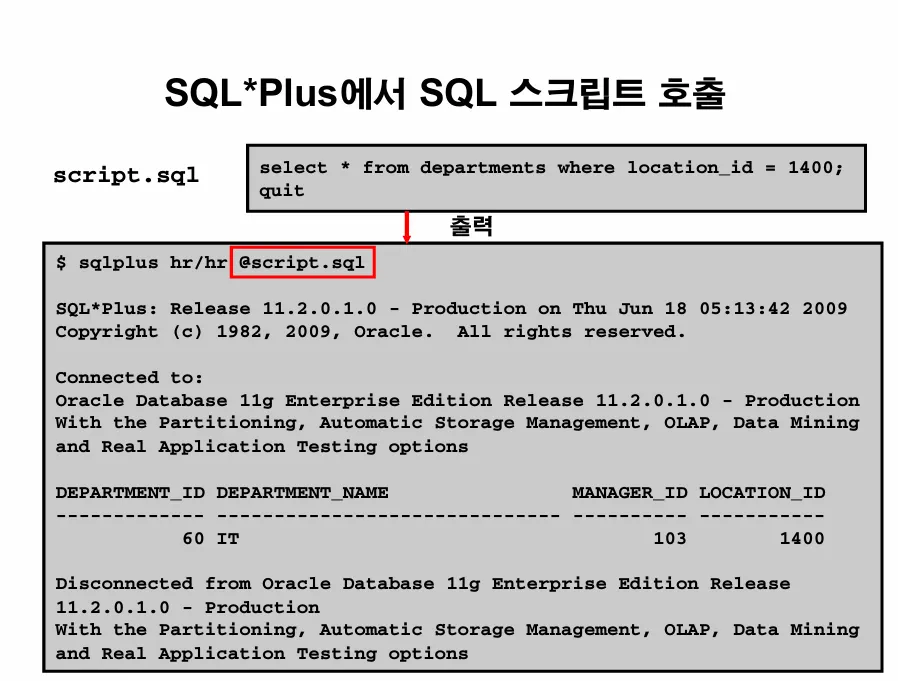
실습1. hr 계정의 락을 해제하고 hr 계정의 패스워드를 hr 로 변경하시오
잠금해제: alter user hr account unlock;
패스워드를 hr로 변경: alter user hr identified by hr;
15:48:30 SYS @ ORA19 > connect hr/hr
ERROR:
ORA-28000: 계정이 잠겼습니다.


경고: 이제는 ORACLE에 연결되어 있지 않습니다.
15:55:25  @  > connect sys/oracle_4U as sysdba
연결되었습니다.
15:55:35 SYS @ ORA19 >
15:55:35 SYS @ ORA19 >
15:55:36 SYS @ ORA19 > alter user hr account unlock;

사용자가 변경되었습니다.

경   과: 00:00:00.07
15:55:49 SYS @ ORA19 > alter user hr identified by hr;

사용자가 변경되었습니다.

경   과: 00:00:00.07

15:56:00 SYS @ ORA19 > connect hr/hr
연결되었습니다.
15:56:50 HR @ ORA19 >
15:56:51 HR @ ORA19 > select count(*) from employees;

  COUNT(*)
----------
       107

경   과: 00:00:00.06
15:56:57 HR @ ORA19 > exit;

[oracle@ora19c ~]$ vi script.sql
[oracle@ora19c ~]$
[oracle@ora19c ~]$ cat script.sql
select * from departments where location_id=1400;
quit

[oracle@ora19c ~]$
[oracle@ora19c ~]$ sqlplus hr/hr @script.sql

SQL*Plus: Release 19.0.0.0.0 - Production on 화 8월 26 16:00:00 2025
Version 19.3.0.0.0

Copyright (c) 1982, 2019, Oracle.  All rights reserved.

마지막 성공한 로그인 시간: 화 8월  26 2025 15:56:50 +09:00

다음에 접속됨:
Oracle Database 19c Enterprise Edition Release 19.0.0.0.0 - Production
Version 19.3.0.0.0


DEPARTMENT_ID DEPARTMENT_NAME                MANAGER_ID LOCATION_ID
------------- ------------------------------ ---------- -----------
           60 IT                                    103        1400

경   과: 00:00:00.05
Oracle Database 19c Enterprise Edition Release 19.0.0.0.0 - Production
Version 19.3.0.0.0에서 분리되었습니다.
[oracle@ora19c ~]$
desc v$mystat: 나의 정보를 볼 수 있음
실습2. (dba에게 유용한 스크립트) 아래의 스크립트를 수행하시오
select
        s.sid, s.serial#, p.spid
from
        v$session s, v$process p
where
        s.sid = (select sid from v$mystat where rownum = 1)
        and s.paddr = p.addr;


 [oracle@ora19c ~]$ sqlplus scott/tiger @mystat.sql

SQL*Plus: Release 19.0.0.0.0 - Production on 화 8월 26 16:05:27 2025
Version 19.3.0.0.0

Copyright (c) 1982, 2019, Oracle.  All rights reserved.

마지막 성공한 로그인 시간: 화 8월  26 2025 16:00:50 +09:00

다음에 접속됨:
Oracle Database 19c Enterprise Edition Release 19.0.0.0.0 - Production
Version 19.3.0.0.0


       SID    SERIAL# SPID
---------- ---------- ------------------------
       483      65148 5567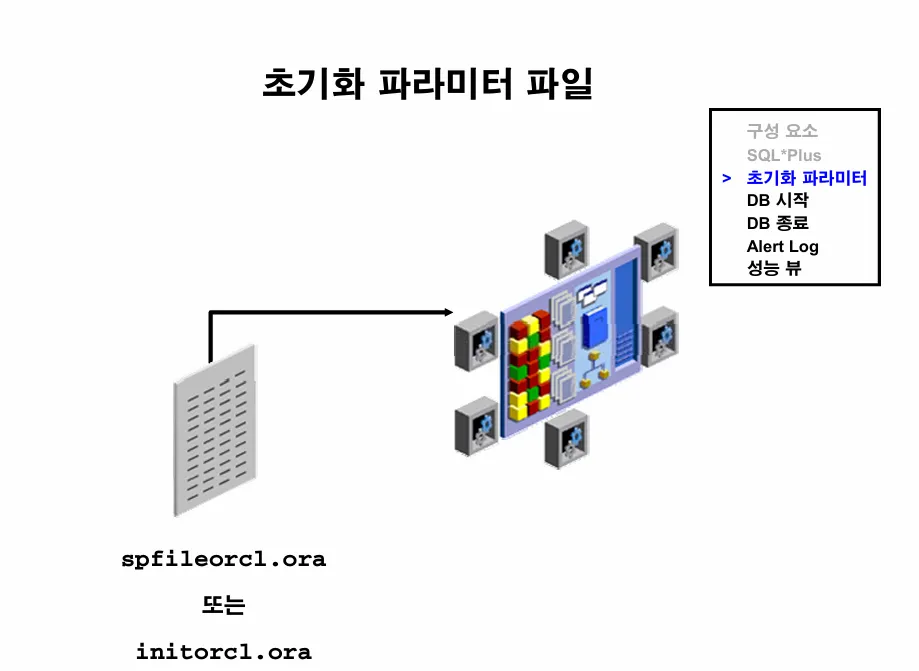
이론1. dba가 데이터베이스를 생성하고 반드시 변경해줘야하는 파라미터들이 몇가지 있습니다. 빅데이터 환경에서는 반드시 처음에 db를 생성하고 변경해줘야합니다.
- db_files : 데이터베이스에서 생성할 수 있는 file들의 총 갯수
16:08:47 SYS @ ORA19 > show parameter db_files

NAME                                 TYPE        VALUE
------------------------------------ ----------- ------------------------------
db_files integer 200[root@localhost ~]# grep -v ^# /etc/security/limits.d/oracle-database-preinstall-19c.conf
oracle soft nofile 1024 # 기본 최대 열린 파일수
oracle hard nofile 65536
oracle soft nproc 16384 # 기본 최대 프로세서 수
oracle hard nproc 16384실습1. db_files 파라미터를 1000개로 늘리시오
16:13:20 SYS @ ORA19 > alter system set db_files=1000 scope=both;
alter system set db_files=1000 scope=both
                 *
1행에 오류:
ORA-02095: 지정된 초기화 매개변수를 수정할 수 없습니다


경   과: 00:00:00.00
16:13:49 SYS @ ORA19 > alter system set db_files=1000 scope=spfile;

시스템이 변경되었습니다.

scope=spfile --> 파라미터 파일의 내용만 변경하겠다.
scope=memory --> 현재 인스턴스에만 반영하겠다.
scope=both  --> 파라미터 파일과 인스턴스 둘다 반영하겠다.

both 로 하는게 가장 좋은데 안되면 spfile 로 해야합니다.
spfile 로 하면 무조건 db를 내렸다 올려야 반영이 됩니다.

경   과: 00:00:00.01
16:14:09 SYS @ ORA19 > shutdown immediate

16:16:39 SYS @ ORA19 > startup
ORACLE 인스턴스가 시작되었습니다.

Total System Global Area 1979709008 bytes
Fixed Size                  8898128 bytes
Variable Size             536870912 bytes
Database Buffers         1409286144 bytes
Redo Buffers               24653824 bytes
데이터베이스가 마운트되었습니다.
데이터베이스가 열렸습니다.
16:16:55 SYS @ ORA19 >
16:16:56 SYS @ ORA19 > show parameter db_files

NAME                                 TYPE        VALUE
------------------------------------ ----------- ------------------------------
db_files                             integer     1000
문제1. db에 한번에 열 수 있는 process의 갯수를 2배로 늘리시오
16:16:22 SYS @ ORA19 > show parameter processes

NAME                                 TYPE        VALUE
------------------------------------ ----------- ------------------------------
aq_tm_processes                      integer     1
db_writer_processes                  integer     1
gcs_server_processes                 integer     0
global_txn_processes                 integer     1
job_queue_processes                  integer     80
log_archive_max_processes            integer     4
processes                            integer     600

16:17:07 SYS @ ORA19 > alter system set processes=1200 scope=both;
alter system set processes=1200 scope=both
                 *
1행에 오류:
ORA-02095: 지정된 초기화 매개변수를 수정할 수 없습니다


경   과: 00:00:00.01
16:18:49 SYS @ ORA19 > alter system set processes=1200 scope=spfile;

시스템이 변경되었습니다.

경   과: 00:00:00.03
16:19:10 SYS @ ORA19 >
16:19:12 SYS @ ORA19 > shutdown immediate
데이터베이스가 닫혔습니다.
데이터베이스가 마운트 해제되었습니다.
ORACLE 인스턴스가 종료되었습니다.
16:20:00 SYS @ ORA19 > startup
ORACLE 인스턴스가 시작되었습니다.

Total System Global Area 1979709008 bytes
Fixed Size                  8898128 bytes
Variable Size             520093696 bytes
Database Buffers         1426063360 bytes
Redo Buffers               24653824 bytes
데이터베이스가 마운트되었습니다.
데이터베이스가 열렸습니다.
16:20:14 SYS @ ORA19 >
16:20:22 SYS @ ORA19 > show parameter processes

NAME                                 TYPE        VALUE
------------------------------------ ----------- ------------------------------
aq_tm_processes                      integer     1
db_writer_processes                  integer     1
gcs_server_processes                 integer     0
global_txn_processes                 integer     1
job_queue_processes                  integer     80
log_archive_max_processes            integer     4
processes                            integer     1200
문제. ORA19 와 ora19dw 를 모두 다 shutdown 시키고나서 새로운 db를 dbca 로 생성하는데 orakbm1 으로 생성
16:23:32 SYS @ ora19dw > shutdown immediate
데이터베이스가 닫혔습니다.
데이터베이스가 마운트 해제되었습니다.
ORACLE 인스턴스가 종료되었습니다.

16:24:38 SYS @ ora19dw > exit;
Oracle Database 19c Enterprise Edition Release 19.0.0.0.0 - Production
Version 19.3.0.0.0에서 분리되었습니다.


[oracle@ora19c ~]$ sys

SQL*Plus: Release 19.0.0.0.0 - Production on 화 8월 26 16:25:29 2025
Version 19.3.0.0.0

Copyright (c) 1982, 2019, Oracle.  All rights reserved.


다음에 접속됨:
Oracle Database 19c Enterprise Edition Release 19.0.0.0.0 - Production
Version 19.3.0.0.0

16:25:29 SYS @ ORA19 > shutdown immediate
데이터베이스가 닫혔습니다.
데이터베이스가 마운트 해제되었습니다.
ORACLE 인스턴스가 종료되었습니다.[oracle@ora19c ~]$ ps -ef |grep pmon | grep -v grep
oracle 7863 1 0 16:55 ? 00:00:00 ora_pmon_orakbm1
oracle 8749 1 0 17:01 ? 00:00:00 ora_pmon_ORA19
[oracle@ora19c ~]$ sys
SQL*Plus: Release 19.0.0.0.0 - Production on 화 8월 26 17:04:49 2025
Version 19.3.0.0.0
Copyright (c) 1982, 2019, Oracle. All rights reserved.
다음에 접속됨:
Oracle Database 19c Enterprise Edition Release 19.0.0.0.0 - Production
Version 19.3.0.0.0
17:04:49 SYS @ ORA19 > @i
STATUS
------------
OPEN
경 과: 00:00:00.01
17:04:50 SYS @ ORA19 > select instance_name from v$instance;
INSTANCE_NAME
----------------
ORA19
경 과: 00:00:00.01
17:05:00 SYS @ ORA19 > exit;
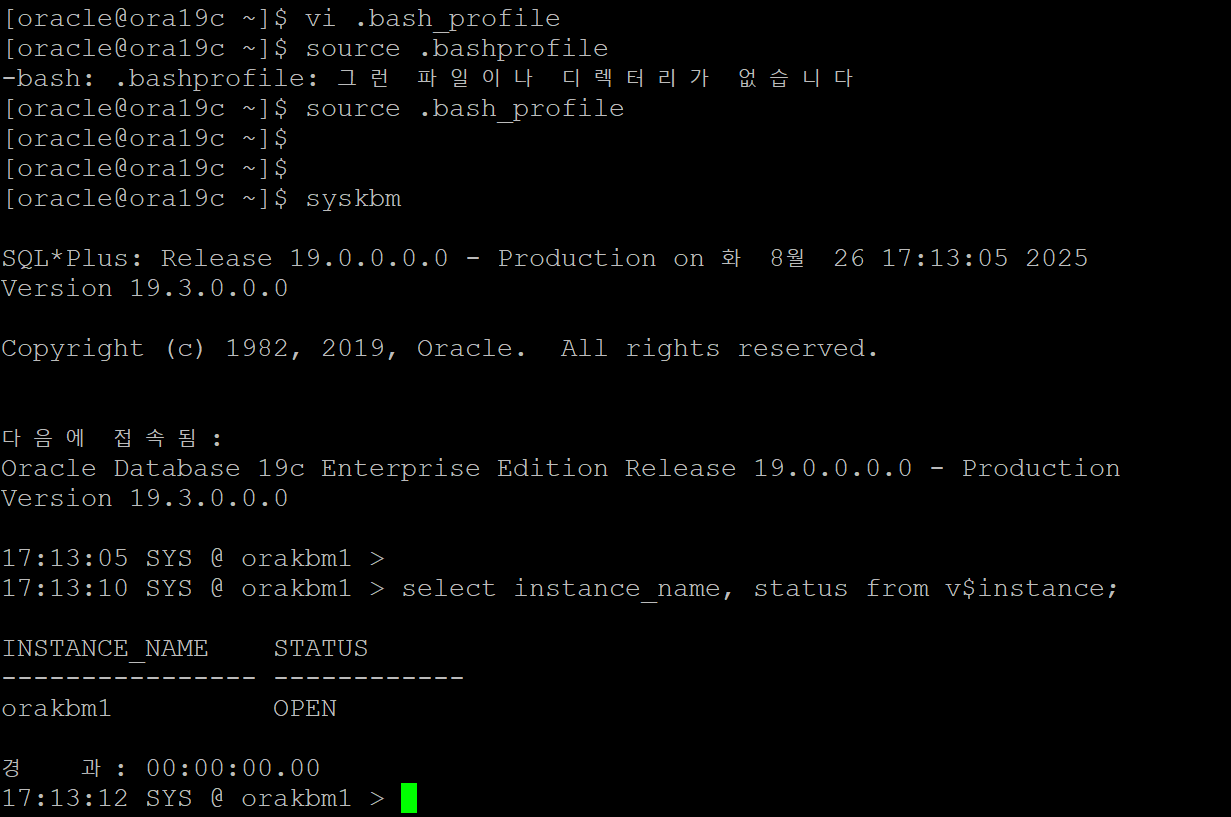
[oracle@ora19c ~]$ vi .bash_profile
[oracle@ora19c ~]$ source .bash_profile
[oracle@ora19c ~]$ cat .bash_profile
# .bash_profile
# Get the aliases and functions
if [ -f ~/.bashrc ]; then
. ~/.bashrc
fi
# User specific environment and startup programs
PATH=$PATH:$HOME/.local/bin:$HOME/bin
export ORACLE_BASE=/u01/app/oracle
export ORACLE_HOME=/u01/app/oracle/product/19.3.0/dbhome_1
export ORA_INVENTORY=/u01/app/oraInventory
export ORACLE_SID=ORA19
#export TNS_ADMIN=/u01/app/oracle/product/19.3.0/dbhome_1/network/admin
export PATH=$PATH:$HOME/bin:$ORACLE_HOME/bin
export LD_LIBRARY_PATH=$ORACLE_HOME/lib:/lib:/usr/lib
export CLASSPATH=$ORACLE_HOME/JRE:$ORACLE_HOME/jlib:$ORACLE_HOME/rdbms/jlib
export NLS_LANG=KOREAN_KOREA.AL32UTF8
export PATH
export DISPLAY=:0.0
alias sys='export ORACLE_SID=ORA19; sqlplus / as sysdba '
alias sysdw='export ORACLE_SID=ora19dw; sqlplus / as sysdba'
alias syskbm='export ORACLE_SID=orakbm1; sqlplus / as sysdba'
alias scott='export ORACLE_SID=ORA19; sqlplus scott/tiger'
alias scottdw='export ORACLE_SID=ora19dw; sqlplus scott/tiger'
alias net='cd /u01/app/oracle/product/19.3.0/dbhome_1/network/admin/'
[oracle@ora19c ~]$ syskbm
SQL*Plus: Release 19.0.0.0.0 - Production on 화 8월 26 17:07:25 2025
Version 19.3.0.0.0
Copyright (c) 1982, 2019, Oracle. All rights reserved.
다음에 접속됨:
Oracle Database 19c Enterprise Edition Release 19.0.0.0.0 - Production
Version 19.3.0.0.0
17:07:25 SYS @ orakbm1 > @iname
INSTANCE_NAME
----------------
orakbm1
경 과: 00:00:00.01
17:07:49 SYS @ orakbm1 > exit;[oracle@ora19c ~]$ syskbm
SQL*Plus: Release 19.0.0.0.0 - Production on 화 8월 26 17:13:05 2025
Version 19.3.0.0.0
Copyright (c) 1982, 2019, Oracle. All rights reserved.
다음에 접속됨:
Oracle Database 19c Enterprise Edition Release 19.0.0.0.0 - Production
Version 19.3.0.0.0
17:13:05 SYS @ orakbm1 >
17:13:10 SYS @ orakbm1 > select instance_name, status from v$instance;
INSTANCE_NAME STATUS
---------------- ------------
orakbm1 OPEN
경 과: 00:00:00.00