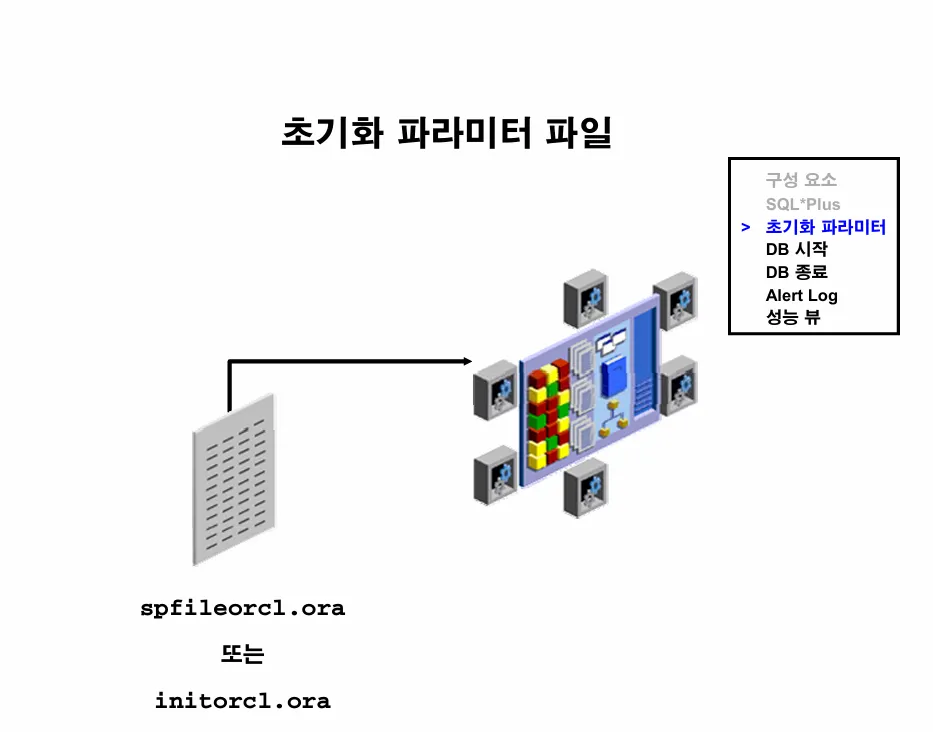
🔸 이론1. 파라미터 파일이란?
💡 인스턴스의 구조 정보를 담고있는 파일
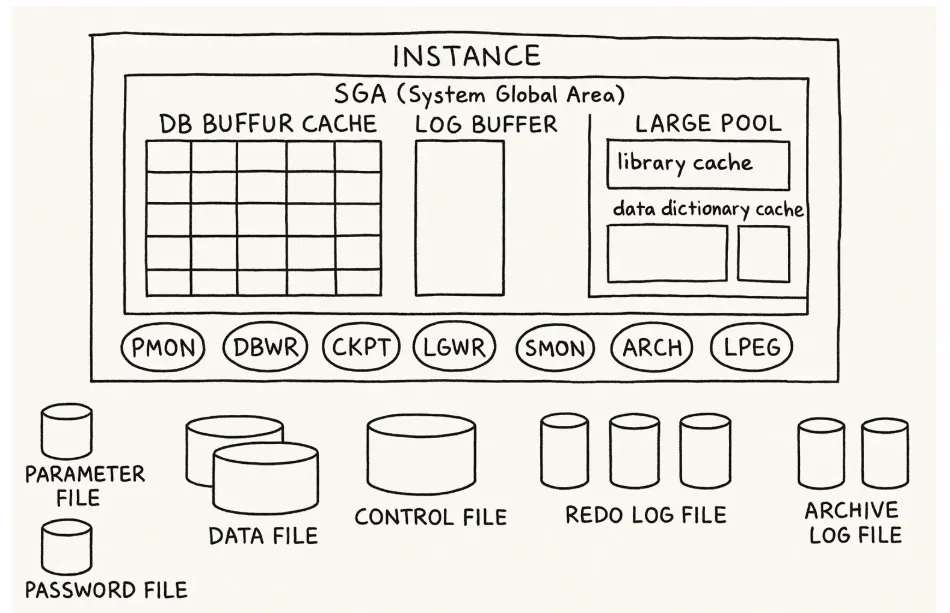
실습1. 오라클 인스턴스를 shutdown 하고 다시 startup 하시오
09:55:00 SYS @ ORA19 >
09:55:42 SYS @ ORA19 > shutdown immediate
데이터베이스가 닫혔습니다.
데이터베이스가 마운트 해제되었습니다.
ORACLE 인스턴스가 종료되었습니다.
09:57:28 SYS @ ORA19 >
09:57:31 SYS @ ORA19 > startup
ORACLE 인스턴스가 시작되었습니다.

Total System Global Area 1979709008 bytes
Fixed Size                  8898128 bytes
Variable Size             536870912 bytes
Database Buffers         1409286144 bytes
Redo Buffers               24653824 bytes
데이터베이스가 마운트되었습니다.
데이터베이스가 열렸습니다.
09:57:53 SYS @ ORA19 >
실습2. 파라미터 파일을 잠시 다른 곳으로 move 하고 다시 shutdown 했다가 올리시오
[oracle@ora19c dbs]$ cd $ORACLE_HOME/dbs
[oracle@ora19c dbs]$
[oracle@ora19c dbs]$ ls -l spfile*
-rw-r-----. 1 oracle oinstall 3584  8월 27 09:57 spfileORA19.ora
-rw-r-----. 1 oracle oinstall 3584  8월 26 16:23 spfileora19dw.ora
[oracle@ora19c dbs]$
[oracle@ora19c dbs]$ mkdir backup2
[oracle@ora19c dbs]$
[oracle@ora19c dbs]$ mv spfileORA19.ora ./backup2/
[oracle@ora19c dbs]$
[oracle@ora19c dbs]$ ls -l spfile*
-rw-r-----. 1 oracle oinstall 3584  8월 26 16:23 spfileora19dw.ora
[oracle@ora19c dbs]$

10:03:01 SYS @ ORA19 > shutdown abort
ORACLE 인스턴스가 종료되었습니다.
10:03:10 SYS @ ORA19 >
10:03:11 SYS @ ORA19 > startup
ORA-01078: failure in processing system parameters
LRM-00109: '/u01/app/oracle/product/19.3.0/dbhome_1/dbs/initORA19.ora' ������������ ��������� ��� ��� ������������
10:03:38 SYS @ ORA19 >
💡 파라미터 파일이 없기 때문에 shutdown 했을 때 startup이 되지 않음
실습3. 다시 원래 자리로 파라미터 파일을 돌려놓고 인스턴스를 올리시오
[oracle@ora19c dbs]$ cp $ORACLE_HOME/dbs/backup2/spfileORA19.ora .
[oracle@ora19c dbs]$
[oracle@ora19c dbs]$ ls -l spfile*
-rw-r-----. 1 oracle oinstall 3584  8월 27 10:06 spfileORA19.ora
-rw-r-----. 1 oracle oinstall 3584  8월 26 16:23 spfileora19dw.ora
[oracle@ora19c dbs]$
[oracle@ora19c dbs]$ cp $ORACLE_HOME/dbs/backup2/spfileORA19.ora .
[oracle@ora19c dbs]$
[oracle@ora19c dbs]$ ls -l spfile*
-rw-r-----. 1 oracle oinstall 3584  8월 27 10:06 spfileORA19.ora
-rw-r-----. 1 oracle oinstall 3584  8월 26 16:23 spfileora19dw.ora
[oracle@ora19c dbs]$
[oracle@ora19c dbs]$ sys

SQL*Plus: Release 19.0.0.0.0 - Production on 수 8월 27 10:07:17 2025
Version 19.3.0.0.0

Copyright (c) 1982, 2019, Oracle.  All rights reserved.

휴지 인스턴스에 접속되었습니다.

10:07:18 SYS @ ORA19 > startup
ORACLE 인스턴스가 시작되었습니다.

Total System Global Area 1979709008 bytes
Fixed Size                  8898128 bytes
Variable Size             536870912 bytes
Database Buffers         1409286144 bytes
Redo Buffers               24653824 bytes
데이터베이스가 마운트되었습니다.
데이터베이스가 열렸습니다.
10:07:31 SYS @ ORA19 >
🔸 이론2. 파라미터 파일의 종류 2가지
- spfile : 바이너리 파일
바이너리 파일로 되어있는 spfile 의 파라미터를 수정하려면 반드시 alter system 명령어로만 수정해야지 vi 편집기 명령어로 수정하면 안됨
ex.alter system set db_files=2000 scope=spfile;
- pfile : 텍스트 파일
vi 편집기 명령어로 직접 열고 수정할 수 있음
실습1. spfile 로 pfile 을 생성하시오
10:12:54 SYS @ ORA19 > create pfile from spfile;

파일이 생성되었습니다.

경   과: 00:00:00.00
10:13:01 SYS @ ORA19 >
실습2. 위와 같이 spfile과 pfile이 동시에 있는 상황이면 pfile 보다 spfile의 우선순위가 높아서 spfile로 인스턴스를 올립니다. 테스트하여 확인하시오.
10:16:17 SYS @ ORA19 > shutdown abort
ORACLE 인스턴스가 종료되었습니다.

10:16:28 SYS @ ORA19 >
10:16:29 SYS @ ORA19 >
10:16:29 SYS @ ORA19 > startup
ORACLE 인스턴스가 시작되었습니다.

Total System Global Area 1979709008 bytes
Fixed Size                  8898128 bytes
Variable Size             536870912 bytes
Database Buffers         1409286144 bytes
Redo Buffers               24653824 bytes
데이터베이스가 마운트되었습니다.
데이터베이스가 열렸습니다.
10:16:44 SYS @ ORA19 >
10:16:46 SYS @ ORA19 > show parameter spfile

NAME                                 TYPE        VALUE
------------------------------------ ----------- ------------------------------
spfile                               string      /u01/app/oracle/product/19.3.0
                                                 /dbhome_1/dbs/spfileORA19.ora
💡
show parameter spfile을 했을 때 value에 값이 보이면 spfile 로 인스턴스가 구성된 것임
실습3. 이번에는 spfileORA19.ora 를 지우고 다시 인스턴스를 내렸다 올리면, 인스턴스를 pfile로 읽어서 구성했는지 확인하시오
[oracle@ora19c dbs]$ pwd
/u01/app/oracle/product/19.3.0/dbhome_1/dbs
[oracle@ora19c dbs]$
[oracle@ora19c dbs]$ ls -l *.ora
-rw-r--r--. 1 oracle oinstall 3079  5월 14  2015 init.ora
-rw-r--r--. 1 oracle oinstall 1278  8월 27 10:13 initORA19.ora
-rw-r-----. 1 oracle oinstall 3584  8월 27 10:16 spfileORA19.ora
-rw-r-----. 1 oracle oinstall 3584  8월 26 16:23 spfileora19dw.ora
[oracle@ora19c dbs]$
[oracle@ora19c dbs]$ rm spfileORA19.ora
[oracle@ora19c dbs]$
[oracle@ora19c dbs]$
10:20:39 SYS @ ORA19 > shutdown abort
ORACLE 인스턴스가 종료되었습니다.
10:20:48 SYS @ ORA19 >
10:20:49 SYS @ ORA19 > startup
ORACLE 인스턴스가 시작되었습니다.

Total System Global Area 1979709008 bytes
Fixed Size                  8898128 bytes
Variable Size             536870912 bytes
Database Buffers         1409286144 bytes
Redo Buffers               24653824 bytes
데이터베이스가 마운트되었습니다.
데이터베이스가 열렸습니다.
10:21:02 SYS @ ORA19 >
10:21:07 SYS @ ORA19 > show parameter spfile

NAME                                 TYPE        VALUE
------------------------------------ ----------- ------------------------------
spfile                               string
💡 value에 값이 없음 --> pfile로 인스턴스가 구성된 것
실습4. pfile만 있기 때문에 앞으로 파라미터 파일의 내용을 변경하려면 직접 vi 편집기로 열어서 수정해야합니다. db_files라는 파라미터를 300으로 변경하고 인스턴스에 반영하시오
10:24:38 SYS @ ORA19 > show parameter db_files

NAME                                 TYPE        VALUE
------------------------------------ ----------- ------------------------------
db_files                             integer     1000
10:24:47 SYS @ ORA19 >
10:24:48 SYS @ ORA19 >

[oracle@ora19c dbs]$ vi initORA19.ora

10:24:49 SYS @ ORA19 > shutdown abort
ORACLE 인스턴스가 종료되었습니다.
10:25:00 SYS @ ORA19 >
10:25:02 SYS @ ORA19 > startup
ORACLE 인스턴스가 시작되었습니다.

Total System Global Area 1979709008 bytes
Fixed Size                  8898128 bytes
Variable Size             536870912 bytes
Database Buffers         1409286144 bytes
Redo Buffers               24653824 bytes
데이터베이스가 마운트되었습니다.
데이터베이스가 열렸습니다.
10:25:16 SYS @ ORA19 >
10:25:18 SYS @ ORA19 > show parameter db_files

NAME                                 TYPE        VALUE
------------------------------------ ----------- ------------------------------
db_files                             integer     3000
실습5. 프로세서의 갯수를 결정하는 파라미터인 processes 를 1500 으로 변경하고 현재 인스턴스에 반영하시오
- spfile : 바이너리 파일
바이너리 파일로 되어있는 spfile 의 파라미터를 수정하려면 반드시 alter system 명령어로만 수정해야지 vi 편집기 명령어로 수정하면 안됨
ex.alter system set db_files=2000 scope=spfile;
- pfile : 텍스트 파일
vi 편집기 명령어로 직접 열고 수정할 수 있음
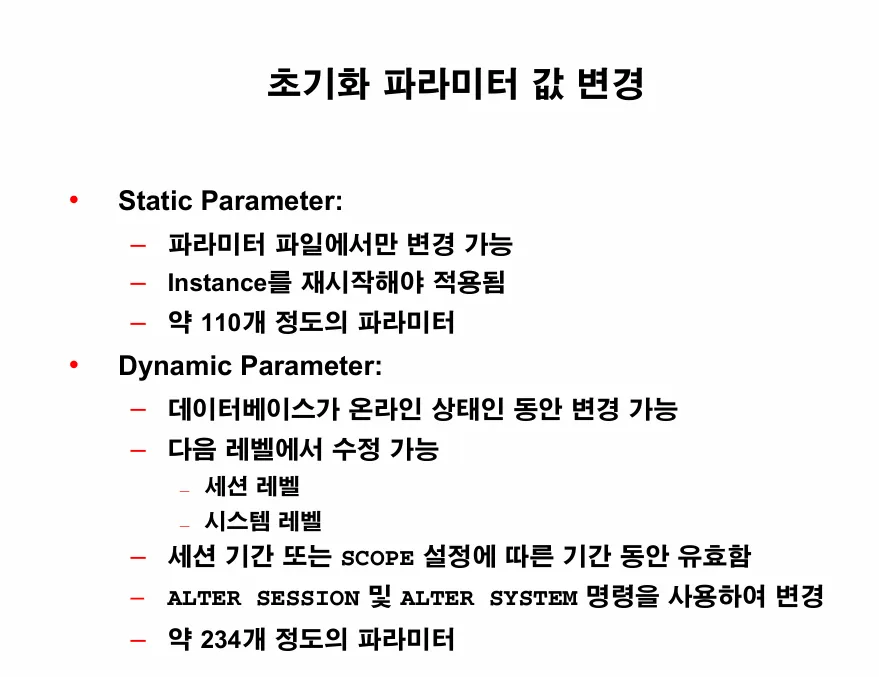
💡 파라미터 --> 정적 파라미터와 동적 파라미터가 있음
- 정적 파라미터
: db_files 같은 파라미터인데 인스턴스를 내렸다 올려야지만 인스턴스에 반영되는 파라미터
- 동적 파라미터
: 인스턴스 운영 중에 바로 변경할 수 있는 파라미터
alter system이나alter session명령어로 변경가능
실습1. 지금 현재 pfile 로 인스턴스 구성되어 있는 상황입니다. 이 상황에서 동적 파라미터를 변경해보시오
💡 db_file_multiblock_read_count
: db에서 한번에 메모리로 올릴 수 있는 블럭의 갯수
--> full table scan을 할 때 작동되는 파라미터
10:54:29 SYS @ ORA19 > show parameter db_file_multiblock_read_count

NAME                                 TYPE        VALUE
------------------------------------ ----------- ------------------------------
db_file_multiblock_read_count        integer     83
10:54:43 SYS @ ORA19 >
10:54:43 SYS @ ORA19 >
10:57:02 SYS @ ORA19 > alter session set db_file_multiblock_read_count=126;

세션이 변경되었습니다.

경   과: 00:00:00.00
10:57:18 SYS @ ORA19 > show parameter db_file_multiblock_read_count

NAME                                 TYPE        VALUE
------------------------------------ ----------- ------------------------------
db_file_multiblock_read_count        integer     126
10:57:28 SYS @ ORA19 >

10:57:53 SYS @ ORA19 > alter session set db_files=4000;
alter session set db_files=4000
                  *
1행에 오류:
ORA-02095: 지정된 초기화 매개변수를 수정할 수 없습니다


경   과: 00:00:00.02
10:58:09 SYS @ ORA19 > exit;
[oracle@ora19c dbs]$ sys

SQL*Plus: Release 19.0.0.0.0 - Production on 수 8월 27 10:58:54 2025
Version 19.3.0.0.0

Copyright (c) 1982, 2019, Oracle.  All rights reserved.


다음에 접속됨:
Oracle Database 19c Enterprise Edition Release 19.0.0.0.0 - Production
Version 19.3.0.0.0

10:58:54 SYS @ ORA19 > show parameter db_file_multi

NAME                                 TYPE        VALUE
------------------------------------ ----------- ------------------------------
db_file_multiblock_read_count        integer     83
💡 alter session 으로 동적 파라미터를 변경하면 현재 세션에서만 유지되고 세션이 끝나면 사라집니다. 그런데 alter system 명령어로 변경하면 인스턴스가 유지되는 동안에는 계속 변경된 상태로 유지됨
실습2. alter system 명령어로 db_file_multiblock_read_count를 126으로 변경하시오
10:59:44 SYS @ ORA19 > alter system set db_file_multiblock_read_count=126;

시스템이 변경되었습니다.

경   과: 00:00:00.01
11:02:01 SYS @ ORA19 > show parameter db_file_multiblock_read_count

NAME                                 TYPE        VALUE
------------------------------------ ----------- ------------------------------
db_file_multiblock_read_count        integer     126
11:02:10 SYS @ ORA19 > exit;
Oracle Database 19c Enterprise Edition Release 19.0.0.0.0 - Production
Version 19.3.0.0.0에서 분리되었습니다.
[oracle@ora19c dbs]$ sys

SQL*Plus: Release 19.0.0.0.0 - Production on 수 8월 27 11:04:03 2025
Version 19.3.0.0.0

Copyright (c) 1982, 2019, Oracle.  All rights reserved.


다음에 접속됨:
Oracle Database 19c Enterprise Edition Release 19.0.0.0.0 - Production
Version 19.3.0.0.0

11:04:03 SYS @ ORA19 > show parameter db_file_multiblock_read_count

NAME                                 TYPE        VALUE
------------------------------------ ----------- ------------------------------
db_file_multiblock_read_count        integer     126
exit; 하고 다시 sys 유저로 접속해도
변경된 상태 계속 유지됨
실습3. alter system set 명령어로 scope=memory 로 반영했기 때문에 db를 내렸다 올리면 사라집니다. 한번 db를 내렸다 올리세요
11:05:29 SYS @ ORA19 > shutdown abort
ORACLE 인스턴스가 종료되었습니다.
11:05:46 SYS @ ORA19 > startup
ORACLE 인스턴스가 시작되었습니다.

Total System Global Area 1979709008 bytes
Fixed Size                  8898128 bytes
Variable Size             520093696 bytes
Database Buffers         1426063360 bytes
Redo Buffers               24653824 bytes
데이터베이스가 마운트되었습니다.
데이터베이스가 열렸습니다.
11:06:05 SYS @ ORA19 > show parameter db_file_multi
NAME                                 TYPE        VALUE
------------------------------------ ----------- ------------------------------
db_file_multiblock_read_count        integer     84
실습4. 그래서 파라미터 파일을 변경할 때는 memory 와 파라미터 파일 둘다 변경해주는 것이 좋습니다. 이번에는 둘다 변경하세요.
11:07:36 SYS @ ORA19 > alter system set db_file_multiblock_read_count=126 scope=memory;

시스템이 변경되었습니다.

경   과: 00:00:00.00
11:08:00 SYS @ ORA19 > alter system set db_file_multiblock_read_count=126 scope=spfile;
alter system set db_file_multiblock_read_count=126 scope=spfile
*
1행에 오류:
ORA-32001: SPFILE에 쓰기가 요청되었지만 사용 중인 SPFILE이 없습니다.

[oracle@ora19c dbs]$ vi initORA19.ora
[oracle@ora19c dbs]$
[oracle@ora19c dbs]$ tail -5 initORA19.ora
*.remote_login_passwordfile='EXCLUSIVE'
*.sga_target=1874m
*.statistics_level='ALL'
*.undo_tablespace='UNDOTBS1'
*.db_file_multiblock_read_count=126
[oracle@ora19c dbs]$
[oracle@ora19c dbs]$ sys

SQL*Plus: Release 19.0.0.0.0 - Production on 수 8월 27 11:11:17 2025
Version 19.3.0.0.0

Copyright (c) 1982, 2019, Oracle.  All rights reserved.


다음에 접속됨:
Oracle Database 19c Enterprise Edition Release 19.0.0.0.0 - Production
Version 19.3.0.0.0

11:11:17 SYS @ ORA19 > startup force
ORACLE 인스턴스가 시작되었습니다.

Total System Global Area 1979709008 bytes
Fixed Size                  8898128 bytes
Variable Size             520093696 bytes
Database Buffers         1426063360 bytes
Redo Buffers               24653824 bytes
데이터베이스가 마운트되었습니다.
데이터베이스가 열렸습니다.
11:11:45 SYS @ ORA19 >
11:11:58 SYS @ ORA19 > show parameter db_file_multi

NAME                                 TYPE        VALUE
------------------------------------ ----------- ------------------------------
db_file_multiblock_read_count        integer     126
💡 startup force
: shutdown과 startup을 한번에 할 수 있음
실습5. 현재 pfile 을 가지고 spfile 을 생성하시오
11:13:05 SYS @ ORA19 > create spfile from pfile;

파일이 생성되었습니다.

경   과: 00:00:00.03
11:13:10 SYS @ ORA19 > create spfile from pfile='$ORACLE_HOME/dbs/initORA19.ora';

파일이 생성되었습니다.

경   과: 00:00:00.03
11:13:30 SYS @ ORA19 > !ls -l *.ora
-rw-r--r--. 1 oracle oinstall 3079  5월 14  2015 init.ora
-rw-r--r--. 1 oracle oinstall 1314  8월 27 11:10 initORA19.ora
-rw-r-----. 1 oracle oinstall 3584  8월 27 11:13 spfileORA19.ora
-rw-r-----. 1 oracle oinstall 3584  8월 26 16:23 spfileora19dw.ora
실습6. 현재 spfile 의 파라미터 중 db_file_multiblock_read_count를 64로 변경하는데 현재 memory 와 spfile 두 곳 모두 반영하시오
11:15:43 SYS @ ORA19 > alter system set db_file_multiblock_read_count=64 scope=both;
alter system set db_file_multiblock_read_count=64 scope=both
*
1행에 오류:
ORA-32001: SPFILE에 쓰기가 요청되었지만 사용 중인 SPFILE이 없습니다.

-- 현재 pfile 로 인스턴스가 올라왔으므로 변경이 안됩니다.

경   과: 00:00:00.00
11:16:06 SYS @ ORA19 > show parameter spfile

NAME                                 TYPE        VALUE
------------------------------------ ----------- ------------------------------
spfile                               string
11:16:19 SYS @ ORA19 >
11:17:16 SYS @ ORA19 > startup force
ORACLE 인스턴스가 시작되었습니다.

Total System Global Area 1979709008 bytes
Fixed Size                  8898128 bytes
Variable Size             536870912 bytes
Database Buffers         1409286144 bytes
Redo Buffers               24653824 bytes
데이터베이스가 마운트되었습니다.
데이터베이스가 열렸습니다.
11:17:34 SYS @ ORA19 >
11:17:48 SYS @ ORA19 >
11:17:48 SYS @ ORA19 > show parameter spfile

NAME                                 TYPE        VALUE
------------------------------------ ----------- ------------------------------
spfile                               string      /u01/app/oracle/product/19.3.0
                                                 /dbhome_1/dbs/spfileORA19.ora
11:17:54 SYS @ ORA19 >
11:18:11 SYS @ ORA19 > !ls -l *.ora
-rw-r--r--. 1 oracle oinstall 3079  5월 14  2015 init.ora
-rw-r--r--. 1 oracle oinstall 1314  8월 27 11:10 initORA19.ora
-rw-r-----. 1 oracle oinstall 3584  8월 27 11:17 spfileORA19.ora
-rw-r-----. 1 oracle oinstall 3584  8월 26 16:23 spfileora19dw.ora

11:18:17 SYS @ ORA19 >
11:18:47 SYS @ ORA19 > alter system set db_file_multiblock_read_count=64 scope=both;

시스템이 변경되었습니다.

경   과: 00:00:00.01
11:19:55 SYS @ ORA19 > show parameter db_file_multiblock_read_count

NAME                                 TYPE        VALUE
------------------------------------ ----------- ------------------------------
db_file_multiblock_read_count        integer     64
11:22:05 SYS @ ORA19 >
11:22:05 SYS @ ORA19 >
11:22:09 SYS @ ORA19 > exit;
Oracle Database 19c Enterprise Edition Release 19.0.0.0.0 - Production
Version 19.3.0.0.0에서 분리되었습니다.
[oracle@ora19c dbs]$
[oracle@ora19c dbs]$ cat spfileORA19.ora
C"▒▒"▒▒"HCC")ORA19.__data_transfer_cache_size=0
ORA19.__db_cache_size=1308622848
ORA19.__inmemory_ext_roarea=0
ORA19.__inmemory_ext_rwarea=0
ORA19.__java_pool_size=67108864
ORA19.__large_pool_size=33554432
ORA19.__oracle_base='/u01/app/oracle'#ORACLE_BASE set from environment
ORA19.__pga_aggregate_target=838860800
ORA19.__sga_target=1979711488
ORA19.__shared_io_pool_size=100663296
ORA19.__shared_pool_size=436207616
ORA19.__streams_pool_size=0
ORA19.__unified_pga_pool_size=0
*.audit_file_dest='/u0CC"?%1/app/oracle/admin/ORA19/adump'
*.audit_trail='db'
*.compatible='19.0.0'
*.control_files='/u01/app/oracle/oradata/ORA19/control01.ctl','/u01/app/oracle/fast_recovery_area/ORA19/control02.ctl'
*.db_block_size=8192
*.db_file_multiblock_read_count=64
*.db_files=3000
*.db_name='ORA19'
*.db_recovery_file_dest='/u01/app/oracle/fast_recovery_area'
*.db_recovery_file_dest_size=8256m
*.dbwr_io_slaves=3
*.diagnostic_dest='/u01/app/oracle'
*.dispatchers='(PROTOCOL=TCP) (SERVICE=ORA19XDB)'
*.fasCC"D       t_start_mttr_target=600
*.large_pool_size=16777216
*.local_listener='LISTENER_ORA19'
*.log_buffer=16777216
*.nls_language='KOREAN'
*.nls_territory='KOREA'
*.open_cursors=600
*.pga_aggregate_target=838860800
*.processes=1200
*.remote_login_passwordfile='EXCLUSIVE'
*.sga_target=1874m
*.statistics_level='ALL'
*.undo_tablespace='UNDOTBS1'
[oracle@ora19c dbs]$
alter system set db_file_multiblock_read_count=64 scope=memory; --현재 인스턴스에만 반영 alter system set db_file_multiblock_read_count=64 scope=spfile; --현재 spfile 에만 반영 alter system set db_file_multiblock_read_count=64 scope=both; -- 인스턴스와 spfile 둘 다 반영
실습7. 지금 현재 spfile과 pfile 이렇게 2개가 있는 상태에서 db_file_multiblock_read_count를 64로 변경한 거는 spfile 에만 반영되었고 pfile 에는 반영되지 않은 상태입니다. spfile 의 내용을 pfile에 반영하시오
11:23:12 SYS @ ORA19 > create pfile from spfile;문제1. open_cursors 파라미터를 현재 값에서 2배로 늘리는데 현재 인스턴스와 spfile과 pfile 에도 다 반영하시오
11:25:30 SYS @ ORA19 > show parameter open_cursors

NAME                                 TYPE        VALUE
------------------------------------ ----------- ------------------------------
open_cursors                         integer     600
11:26:47 SYS @ ORA19 >
11:26:54 SYS @ ORA19 > alter system set open_cursors=1200 scope=both;

시스템이 변경되었습니다.

경   과: 00:00:00.01
11:27:17 SYS @ ORA19 >
11:27:23 SYS @ ORA19 > show parameter spfile

NAME                                 TYPE        VALUE
------------------------------------ ----------- ------------------------------
spfile                               string      /u01/app/oracle/product/19.3.0
                                                 /dbhome_1/dbs/spfileORA19.ora
11:27:27 SYS @ ORA19 > startup force
ORACLE 인스턴스가 시작되었습니다.

Total System Global Area 1979709008 bytes
Fixed Size                  8898128 bytes
Variable Size             520093696 bytes
Database Buffers         1426063360 bytes
Redo Buffers               24653824 bytes
데이터베이스가 마운트되었습니다.
데이터베이스가 열렸습니다.
11:27:58 SYS @ ORA19 > show parameter spfile

NAME                                 TYPE        VALUE
------------------------------------ ----------- ------------------------------
spfile                               string      /u01/app/oracle/product/19.3.0
                                                 /dbhome_1/dbs/spfileORA19.ora