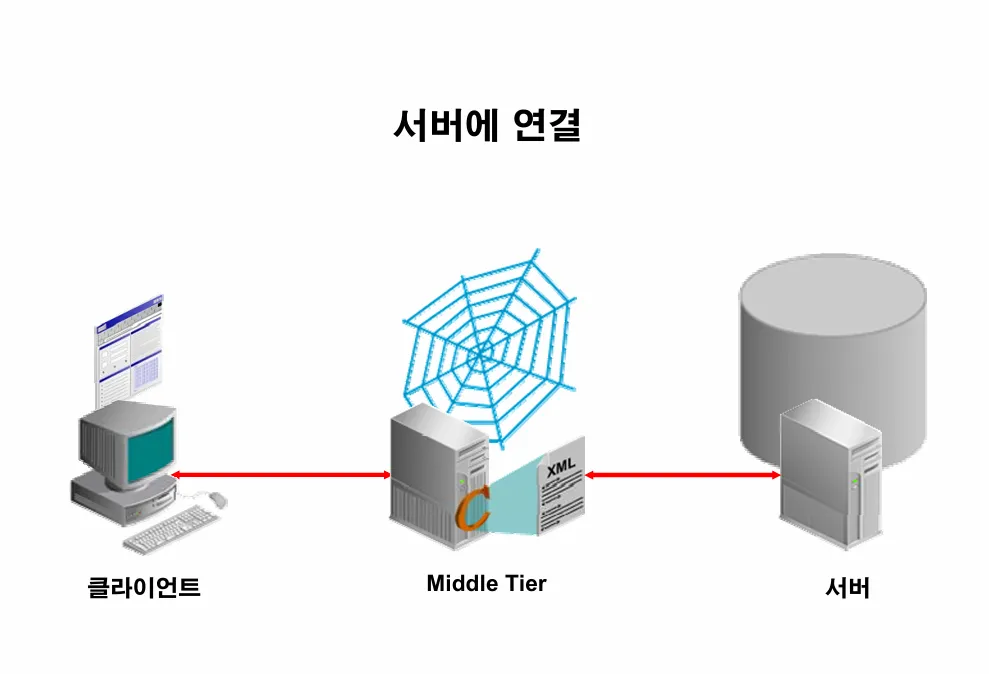
▩ 1. 오라클 데이터 베이스의 구조

   1. two  tier 환경

        클라이언트 ---------------------> 서버(db)

          노트북                       회사의 서버실의 서버

   2. tree tier 환경

       클라이언트 --------->  미들 티어 ------------> 서버(db)
                          (middle tier)
                                ↓
         클라이언트가 접속할 때 접속이 원할하게 진행되게 접속로드를
          분할하는 역할.    예:  턱시도, 티베로

   예: 수강신청, 열차 예매, SQLD 시험 신청
실습1. sql developer 로 리눅스 오라클 서버에 접속하기 위해서 리스너 상태를 확인하시오
📌 확인해야할 3가지 내용
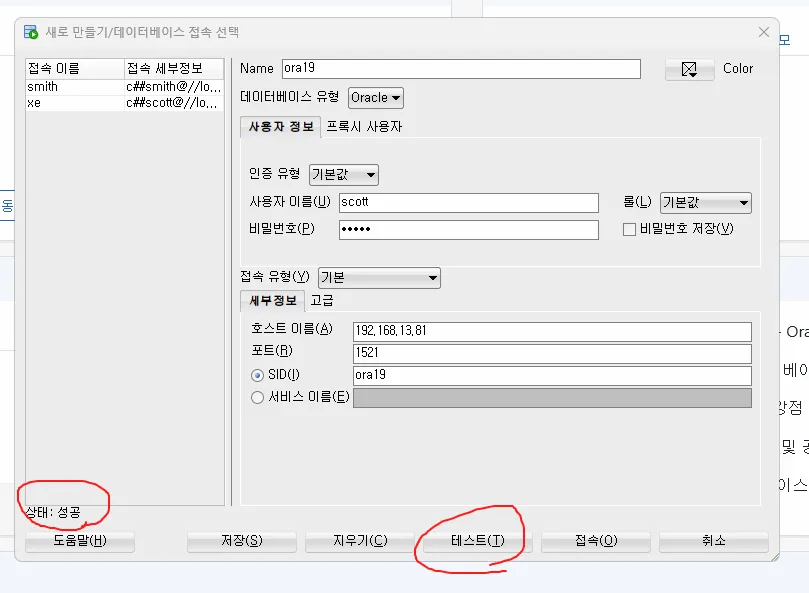
- host: 서버의 아이피 주소 또는 hosts 파일과 매핑된 네트워크 별칭
- 포트번호
- 서비스 이름: 데이터베이스 이름
[oracle@ora19c ~]$ lsnrctl status

LSNRCTL for Linux: Version 19.0.0.0.0 - Production on 18-AUG-2025 19:38:28

Copyright (c) 1991, 2019, Oracle.  All rights reserved.

Connecting to (DESCRIPTION=(ADDRESS=(PROTOCOL=TCP)(HOST=ora19c)(PORT=1521)))
STATUS of the LISTENER
------------------------
Alias                     LISTENER
Version                   TNSLSNR for Linux: Version 19.0.0.0.0 - Production
Start Date                18-AUG-2025 18:09:27
Uptime                    0 days 1 hr. 29 min. 1 sec
Trace Level               off
Security                  ON: Local OS Authentication
SNMP                      OFF
Listener Parameter File   /u01/app/oracle/product/19.3.0/dbhome_1/network/admin/listener.ora
Listener Log File         /u01/app/oracle/diag/tnslsnr/ora19c/listener/alert/log.xml
Listening Endpoints Summary...
  (DESCRIPTION=(ADDRESS=(PROTOCOL=tcp)(HOST=ora19c)(PORT=1521)))
  (DESCRIPTION=(ADDRESS=(PROTOCOL=ipc)(KEY=EXTPROC1521)))
  (DESCRIPTION=(ADDRESS=(PROTOCOL=tcps)(HOST=ora19c)(PORT=5500))(Security=(my_wallet_directory=/u01/app/oracle/admin/ORA19/xdb_wallet))(Presentation=HTTP)(Session=RAW))
Services Summary...
Service "ORA19" has 1 instance(s).
  Instance "ORA19", status READY, has 1 handler(s) for this service...
Service "ORA19XDB" has 1 instance(s).
  Instance "ORA19", status READY, has 1 handler(s) for this service...
The command completed successfully
[oracle@ora19c ~]$
실습2. 윈도우에서 ora19c 로 또는 192.168.13.69로 ping 이 나가는지 확인합니다.
C:\Users\Administrator>ping ora19c
Ping 요청에서 ora19c 호스트를 찾을 수 없습니다. 이름을 확인하고 다시 시도하십시오.

C:\Users\Administrator>ping 192.168.13.69

Ping 192.168.13.69 32바이트 데이터 사용:
192.168.13.69의 응답: 바이트=32 시간<1ms TTL=64
192.168.13.69의 응답: 바이트=32 시간<1ms TTL=64
192.168.13.69의 응답: 바이트=32 시간<1ms TTL=64
192.168.13.69의 응답: 바이트=32 시간<1ms TTL=64

192.168.13.69에 대한 Ping 통계:
    패킷: 보냄 = 4, 받음 = 4, 손실 = 0 (0% 손실),
왕복 시간(밀리초):
    최소 = 0ms, 최대 = 0ms, 평균 = 0ms
실습3. listener.ora 파일을 열어서 host를 아이피로 변경하고 리스너를 내렸다 올립니다.
[oracle@ora19c ~]$ vi /u01/app/oracle/product/19.3.0/dbhome_1/network/admin/listener.ora

[oracle@ora19c ~]$ cat /u01/app/oracle/product/19.3.0/dbhome_1/network/admin/listener.ora
# listener.ora Network Configuration File: /u01/app/oracle/product/19.3.0/dbhome_1/network/admin/listener.ora
# Generated by Oracle configuration tools.

LISTENER =
  (DESCRIPTION_LIST =
    (DESCRIPTION =
      (ADDRESS = (PROTOCOL = TCP)(HOST = 192.168.13.81)(PORT = 1521))
      (ADDRESS = (PROTOCOL = IPC)(KEY = EXTPROC1521))
    )
  )

[oracle@ora19c ~]$
[oracle@ora19c ~]$ lsnrctl stop

LSNRCTL for Linux: Version 19.0.0.0.0 - Production on 18-AUG-2025 19:47:07

Copyright (c) 1991, 2019, Oracle.  All rights reserved.

Connecting to (DESCRIPTION=(ADDRESS=(PROTOCOL=TCP)(HOST=192.168.13.81)(PORT=1521)))
The command completed successfully
[oracle@ora19c ~]$
[oracle@ora19c ~]$ lsnrctl start

LSNRCTL for Linux: Version 19.0.0.0.0 - Production on 18-AUG-2025 19:47:10

Copyright (c) 1991, 2019, Oracle.  All rights reserved.

Starting /u01/app/oracle/product/19.3.0/dbhome_1/bin/tnslsnr: please wait...

TNSLSNR for Linux: Version 19.0.0.0.0 - Production
System parameter file is /u01/app/oracle/product/19.3.0/dbhome_1/network/admin/listener.ora
Log messages written to /u01/app/oracle/diag/tnslsnr/ora19c/listener/alert/log.xml
Listening on: (DESCRIPTION=(ADDRESS=(PROTOCOL=tcp)(HOST=192.168.13.81)(PORT=1521)))
Listening on: (DESCRIPTION=(ADDRESS=(PROTOCOL=ipc)(KEY=EXTPROC1521)))

Connecting to (DESCRIPTION=(ADDRESS=(PROTOCOL=TCP)(HOST=192.168.13.81)(PORT=1521)))
STATUS of the LISTENER
------------------------
Alias                     LISTENER
Version                   TNSLSNR for Linux: Version 19.0.0.0.0 - Production
Start Date                18-AUG-2025 19:47:11
Uptime                    0 days 0 hr. 0 min. 0 sec
Trace Level               off
Security                  ON: Local OS Authentication
SNMP                      OFF
Listener Parameter File   /u01/app/oracle/product/19.3.0/dbhome_1/network/admin/listener.ora
Listener Log File         /u01/app/oracle/diag/tnslsnr/ora19c/listener/alert/log.xml
Listening Endpoints Summary...
  (DESCRIPTION=(ADDRESS=(PROTOCOL=tcp)(HOST=192.168.13.81)(PORT=1521)))
  (DESCRIPTION=(ADDRESS=(PROTOCOL=ipc)(KEY=EXTPROC1521)))
The listener supports no services
The command completed successfully
[oracle@ora19c ~]$
[oracle@ora19c ~]$ lsnrctl status

LSNRCTL for Linux: Version 19.0.0.0.0 - Production on 18-AUG-2025 19:47:45

Copyright (c) 1991, 2019, Oracle.  All rights reserved.

Connecting to (DESCRIPTION=(ADDRESS=(PROTOCOL=TCP)(HOST=192.168.13.81)(PORT=1521)))
STATUS of the LISTENER
------------------------
Alias                     LISTENER
Version                   TNSLSNR for Linux: Version 19.0.0.0.0 - Production
Start Date                18-AUG-2025 19:47:11
Uptime                    0 days 0 hr. 0 min. 34 sec
Trace Level               off
Security                  ON: Local OS Authentication
SNMP                      OFF
Listener Parameter File   /u01/app/oracle/product/19.3.0/dbhome_1/network/admin/listener.ora
Listener Log File         /u01/app/oracle/diag/tnslsnr/ora19c/listener/alert/log.xml
Listening Endpoints Summary...
  (DESCRIPTION=(ADDRESS=(PROTOCOL=tcp)(HOST=192.168.13.81)(PORT=1521)))
  (DESCRIPTION=(ADDRESS=(PROTOCOL=ipc)(KEY=EXTPROC1521)))
The listener supports no services
The command completed successfully

[oracle@ora19c ~]$ lsnrctl status

LSNRCTL for Linux: Version 19.0.0.0.0 - Production on 18-AUG-2025 20:01:07

Copyright (c) 1991, 2019, Oracle.  All rights reserved.

Connecting to (DESCRIPTION=(ADDRESS=(PROTOCOL=TCP)(HOST=192.168.13.81)(PORT=1521)))
STATUS of the LISTENER
------------------------
Alias                     LISTENER
Version                   TNSLSNR for Linux: Version 19.0.0.0.0 - Production
Start Date                18-AUG-2025 19:47:11
Uptime                    0 days 0 hr. 13 min. 56 sec
Trace Level               off
Security                  ON: Local OS Authentication
SNMP                      OFF
Listener Parameter File   /u01/app/oracle/product/19.3.0/dbhome_1/network/admin/listener.ora
Listener Log File         /u01/app/oracle/diag/tnslsnr/ora19c/listener/alert/log.xml
Listening Endpoints Summary...
  (DESCRIPTION=(ADDRESS=(PROTOCOL=tcp)(HOST=192.168.13.81)(PORT=1521)))
  (DESCRIPTION=(ADDRESS=(PROTOCOL=ipc)(KEY=EXTPROC1521)))
  (DESCRIPTION=(ADDRESS=(PROTOCOL=tcps)(HOST=ora19c)(PORT=5500))(Security=(my_wallet_directory=/u01/app/oracle/admin/ORA19/xdb_wallet))(Presentation=HTTP)(Session=RAW))
Services Summary...
Service "ORA19" has 1 instance(s).
  Instance "ORA19", status READY, has 1 handler(s) for this service...
Service "ORA19XDB" has 1 instance(s).
  Instance "ORA19", status READY, has 1 handler(s) for this service...
The command completed successfully
[oracle@ora19c ~]$
[oracle@ora19c ~]
💡 lsnrctl status 로 리스너의 상태를 확인했을 때 위와 같이 서비스가 보이면 클라이언트에서 sql developer 로 접속을 할 수 있는 상태인 것
실습4. root 유져로 접속해서 1521 포트에 대한 방화벽을 해제해줍니다.
[root@ora19c ~]# systemctl status firewalld

[root@ora19c ~]# netstat -tlnp | grep 1521
tcp        0      0 192.168.13.81:1521      0.0.0.0:*               LISTEN      17132/tnslsnr
[root@ora19c ~]# firewall-cmd --permanent --add-port=1521/tcp
success
[root@ora19c ~]# firewall-cmd --reload
success
[root@ora19c ~]# exit
실습5. 오라클의 sys 유져로 접속해서 scott 유져를 생성합니다.
[oracle@ora19c ~]$ whoami
oracle
[oracle@ora19c ~]$
[oracle@ora19c ~]$ sqlplus "/as sysdba"

SQL*Plus: Release 19.0.0.0.0 - Production on Mon Aug 18 20:05:43 2025
Version 19.3.0.0.0

Copyright (c) 1982, 2019, Oracle.  All rights reserved.


??? ???:
Oracle Database 19c Enterprise Edition Release 19.0.0.0.0 - Production
Version 19.3.0.0.0

SQL> create user scott identified by tiger;

SQL> grant dba to scott;
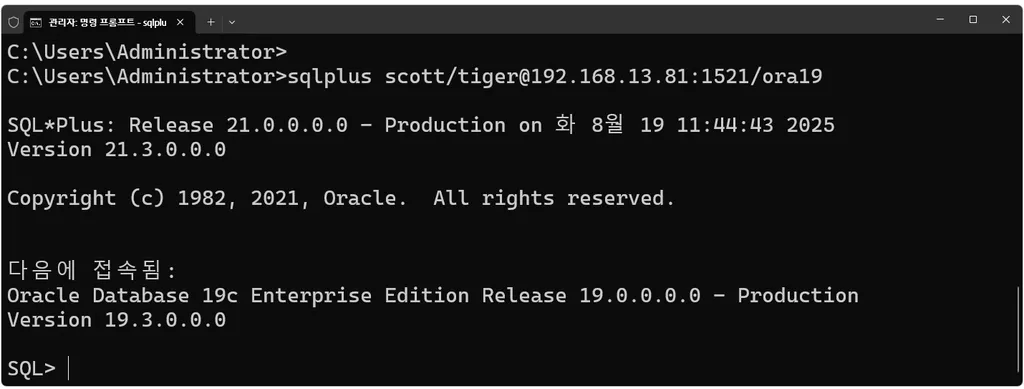
실습6. 윈도우에서 명령 프롬프트 창을 열고 아래와 같이 서버에 리스너 통해서 scott 으로 접속이 되는지 확인합니다.
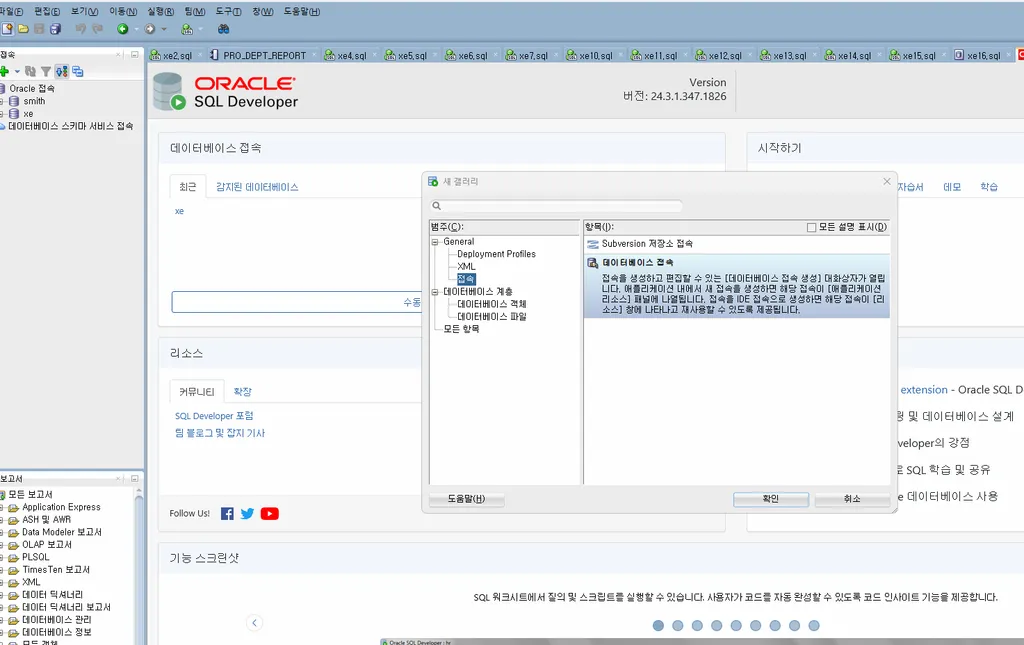
실습7. sql developer 로 scott 으로 접속합니다.
다음의 emp 테이블을 생성합니다.
alter session set nls_Date_format='RR/MM/DD';
drop table emp;
drop table dept;


CREATE TABLE DEPT
       (DEPTNO number(10),
        DNAME VARCHAR2(14),
        LOC VARCHAR2(13) );


INSERT INTO DEPT VALUES (10, 'ACCOUNTING', 'NEW YORK');
INSERT INTO DEPT VALUES (20, 'RESEARCH',   'DALLAS');
INSERT INTO DEPT VALUES (30, 'SALES',      'CHICAGO');
INSERT INTO DEPT VALUES (40, 'OPERATIONS', 'BOSTON');

CREATE TABLE EMP (
 EMPNO               NUMBER(4) NOT NULL,
 ENAME               VARCHAR2(10),
 JOB                 VARCHAR2(9),
 MGR                 NUMBER(4) ,
 HIREDATE            DATE,
 SAL                 NUMBER(7,2),
 COMM                NUMBER(7,2),
 DEPTNO              NUMBER(2) );


INSERT INTO EMP VALUES (7839,'KING','PRESIDENT',NULL,'81-11-17',5000,NULL,10);
INSERT INTO EMP VALUES (7698,'BLAKE','MANAGER',7839,'81-05-01',2850,NULL,30);
INSERT INTO EMP VALUES (7782,'CLARK','MANAGER',7839,'81-05-09',2450,NULL,10);
INSERT INTO EMP VALUES (7566,'JONES','MANAGER',7839,'81-04-01',2975,NULL,20);
INSERT INTO EMP VALUES (7654,'MARTIN','SALESMAN',7698,'81-09-10',1250,1400,30);
INSERT INTO EMP VALUES (7499,'ALLEN','SALESMAN',7698,'81-02-11',1600,300,30);
INSERT INTO EMP VALUES (7844,'TURNER','SALESMAN',7698,'81-08-21',1500,0,30);
INSERT INTO EMP VALUES (7900,'JAMES','CLERK',7698,'81-12-11',950,NULL,30);
INSERT INTO EMP VALUES (7521,'WARD','SALESMAN',7698,'81-02-23',1250,500,30);
INSERT INTO EMP VALUES (7902,'FORD','ANALYST',7566,'81-12-11',3000,NULL,20);
INSERT INTO EMP VALUES (7369,'SMITH','CLERK',7902,'80-12-09',800,NULL,20);
INSERT INTO EMP VALUES (7788,'SCOTT','ANALYST',7566,'82-12-22',3000,NULL,20);
INSERT INTO EMP VALUES (7876,'ADAMS','CLERK',7788,'83-01-15',1100,NULL,20);
INSERT INTO EMP VALUES (7934,'MILLER','CLERK',7782,'82-01-11',1300,NULL,10);


commit;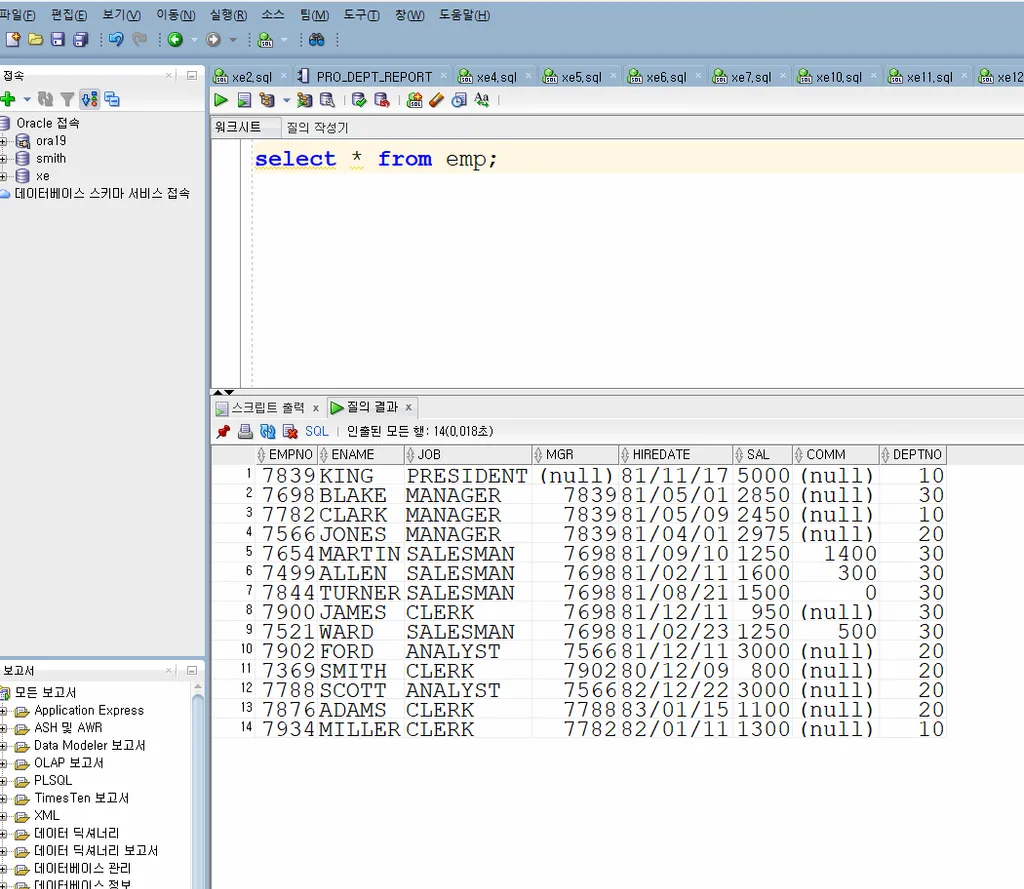
sys 유져로 sqldeveloper 로 접속하시오
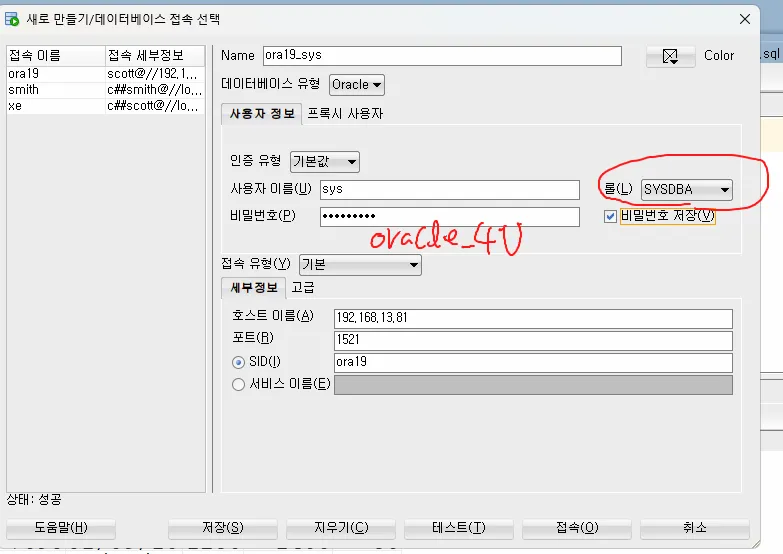
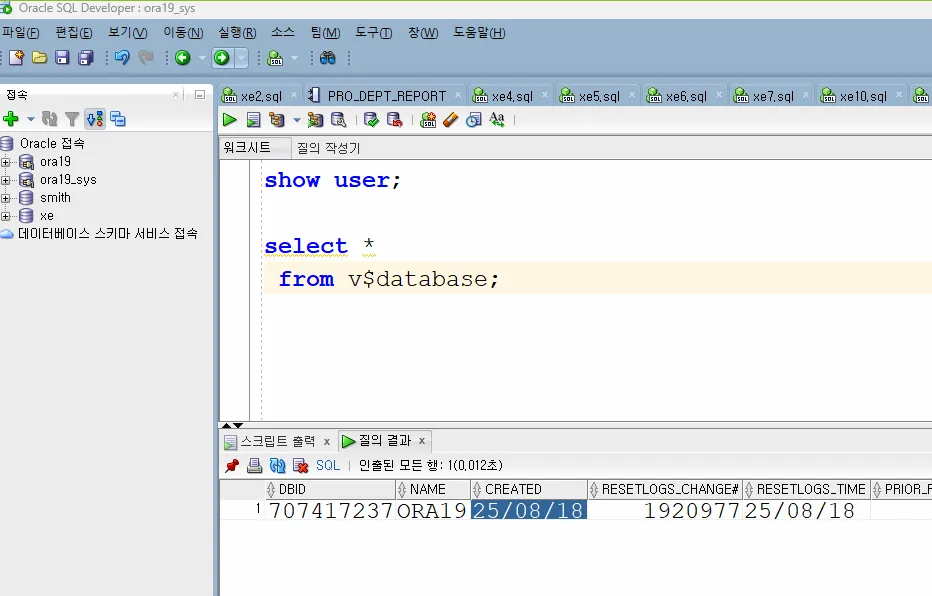
한글이 깨지지 않도록 설정합니다.
export NLS_LANG=KOREAN_KOREA.AL32UTF8
[oracle@ora19c ~]$ export NLS_LANG=KOREAN_KOREA.AL32UTF8
[oracle@ora19c ~]$
[oracle@ora19c ~]$ vi .bash_profile
[oracle@ora19c ~]$
[oracle@ora19c ~]$ source .bash_profile
[oracle@ora19c ~]$ cat .bash_profile
# .bash_profile

# Get the aliases and functions
if [ -f ~/.bashrc ]; then
        . ~/.bashrc
fi

# User specific environment and startup programs

PATH=$PATH:$HOME/.local/bin:$HOME/bin
export ORACLE_BASE=/u01/app/oracle
export ORACLE_HOME=/u01/app/oracle/product/19.3.0/dbhome_1
export ORA_INVENTORY=/u01/app/oraInventory
export ORACLE_SID=ORA19
#export TNS_ADMIN=/u01/app/oracle/product/19.3.0/dbhome_1/network/admin
export PATH=$PATH:$HOME/bin:$ORACLE_HOME/bin
export LD_LIBRARY_PATH=$ORACLE_HOME/lib:/lib:/usr/lib
export CLASSPATH=$ORACLE_HOME/JRE:$ORACLE_HOME/jlib:$ORACLE_HOME/rdbms/jlib
export NLS_LANG=KOREAN_KOREA.AL32UTF8
export PATH

[oracle@ora19c ~]$ sqlplus scott/tiger

SQL*Plus: Release 19.0.0.0.0 - Production on 월 8월 18 20:19:01 2025
Version 19.3.0.0.0

Copyright (c) 1982, 2019, Oracle.  All rights reserved.

마지막 성공한 로그인 시간: 월 8월  18 2025 20:11:55 +09:00

다음에 접속됨:
Oracle Database 19c Enterprise Edition Release 19.0.0.0.0 - Production
Version 19.3.0.0.0

SQL>