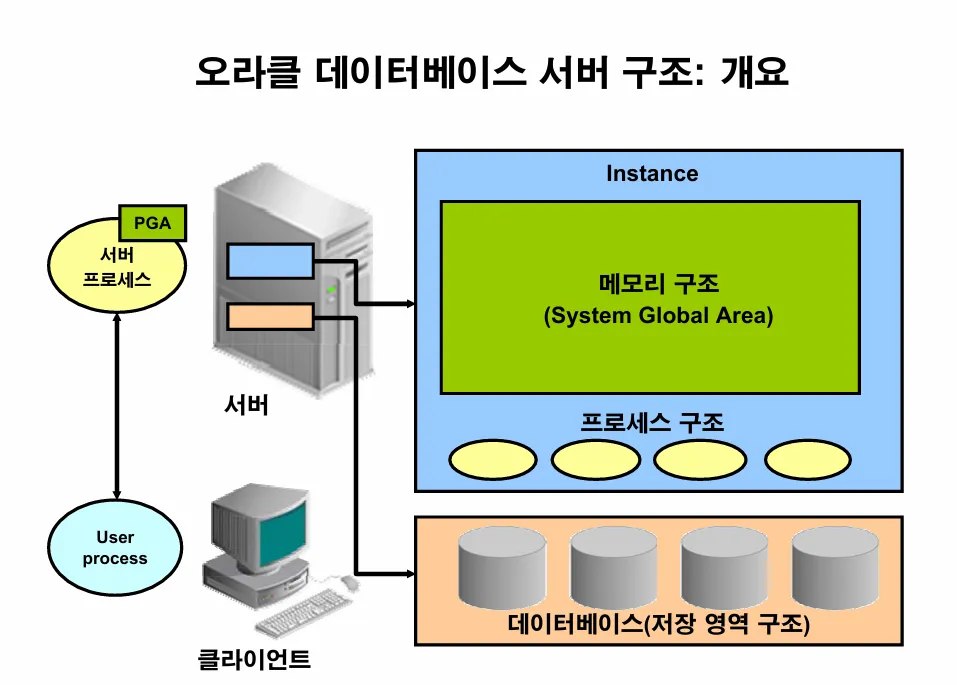
- 오라클 데이터베이스 시스템은 오라클 데이터베이스와 데이터베이스 Instance 로 구성됨
- 데이터베이스에는 물리적구조와 논리적구조로 구성
- instance는 메모리 구조 및 해당 Instance와 연관된 백그라운드 프로세스로 구성됨. Instance가 시작될 때마다 SGA(System Global Area)라는 공유 메모리 영역이 할당되고 백그라운드 프로세스가 시작됨
실습1. 오라클 데이터 베이스 이름을 조회하고 오라클 메모리인 인스턴스 이름을 조회하시오
SQL> select name, created
  2   from v$database;

NAME      CREATED
--------- --------
ORA19     25/08/18

SQL> select instance_name, status, version
  2   from v$instance;

INSTANCE_NAME    STATUS       VERSION
---------------- ------------ -----------------
ORA19            OPEN         19.0.0.0.0
실습2. 오라클 데이터 베이스가 물리적 구조로 구성되어 있다는 것을 확인하시오
SQL> select name from v$datafile;  -- data 가 들어있는 data file 의 위치를 확인

NAME
--------------------------------------------------------------------------------
/u01/app/oracle/oradata/ORA19/system01.dbf   <-- 시스템 운영에 필요한 데이터
/u01/app/oracle/oradata/ORA19/sysaux01.dbf   <-- 시스템 운영에 필요한 데이터
/u01/app/oracle/oradata/ORA19/undotbs01.dbf  <-- 시스템 운영에 필요한 데이터
/u01/app/oracle/oradata/ORA19/users01.dbf  <-- emp 테이블
문제1. 위의 위치로 가서 data file 을 ls 로 조회하시오
[oracle@ora19c ~]$ cd /u01/app/oracle/oradata
[oracle@ora19c oradata]$ ls
ORA19
[oracle@ora19c oradata]$ cd ORA19
[oracle@ora19c ORA19]$ ls
control01.ctl  redo02.log  sysaux01.dbf  temp01.dbf     users01.dbf
redo01.log     redo03.log  system01.dbf  undotbs01.dbf
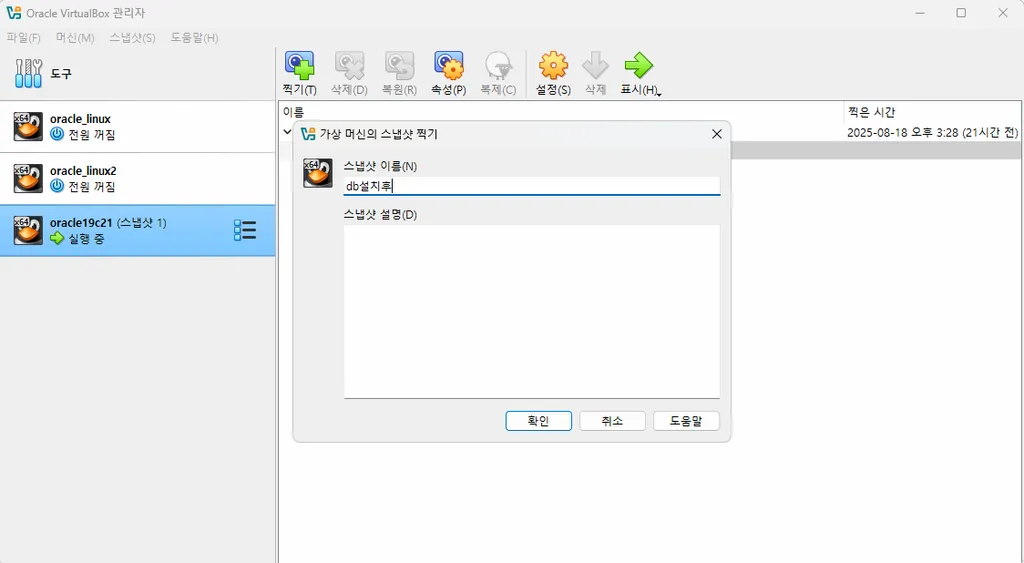
문제2. 지금 이 상태에서 스냅샷을 찍으세요
실습3. 오라클의 물리적인 파일들을 백업하시오
[oracle@ora19c ORA19]$ sqlplus "/as sysdba"

SQL*Plus: Release 19.0.0.0.0 - Production on 월 8월 18 22:32:49 2025
Version 19.3.0.0.0

Copyright (c) 1982, 2019, Oracle.  All rights reserved.


다음에 접속됨:
Oracle Database 19c Enterprise Edition Release 19.0.0.0.0 - Production
Version 19.3.0.0.0

SQL> shutdown immediate
데이터베이스가 닫혔습니다.
데이터베이스가 마운트 해제되었습니다.
ORACLE 인스턴스가 종료되었습니다.
SQL>
SQL>
SQL> exit;
Oracle Database 19c Enterprise Edition Release 19.0.0.0.0 - Production
Version 19.3.0.0.0에서 분리되었습니다.
[oracle@ora19c ORA19]$
[oracle@ora19c ORA19]$ ls
control01.ctl  redo02.log  sysaux01.dbf  temp01.dbf     users01.dbf
redo01.log     redo03.log  system01.dbf  undotbs01.dbf
[oracle@ora19c ORA19]$
[oracle@ora19c ORA19]$ ls -l | wc -l
10
[oracle@ora19c ORA19]$ mkdir backup
[oracle@ora19c ORA19]$
[oracle@ora19c ORA19]$ cp *.dbf ./backup/
[oracle@ora19c ORA19]$ cp *.log ./backup/
[oracle@ora19c ORA19]$ cp *.ctl ./backup/
[oracle@ora19c ORA19]$
실습4. 오라클 데이터베이스의 논리적 구조를 확인하시오
SQL> select tablespace_name, bytes/1024/1024
  2   from dba_data_files;

TABLESPACE_NAME                BYTES/1024/1024
------------------------------ ---------------
SYSTEM                                     910
SYSAUX                                     560
USERS                                        5
UNDOTBS1                                   340
실습5. 오라클 메모리인 인스턴스를 확인하시오
오라클 인스턴스는 SGA 영역과 백그라운드 프로세서로 구성되어있음
SQL> show sga

Total System Global Area 1979709008 bytes
Fixed Size                  8898128 bytes
Variable Size             452984832 bytes
Database Buffers         1509949440 bytes
Redo Buffers                7876608 bytes
SQL>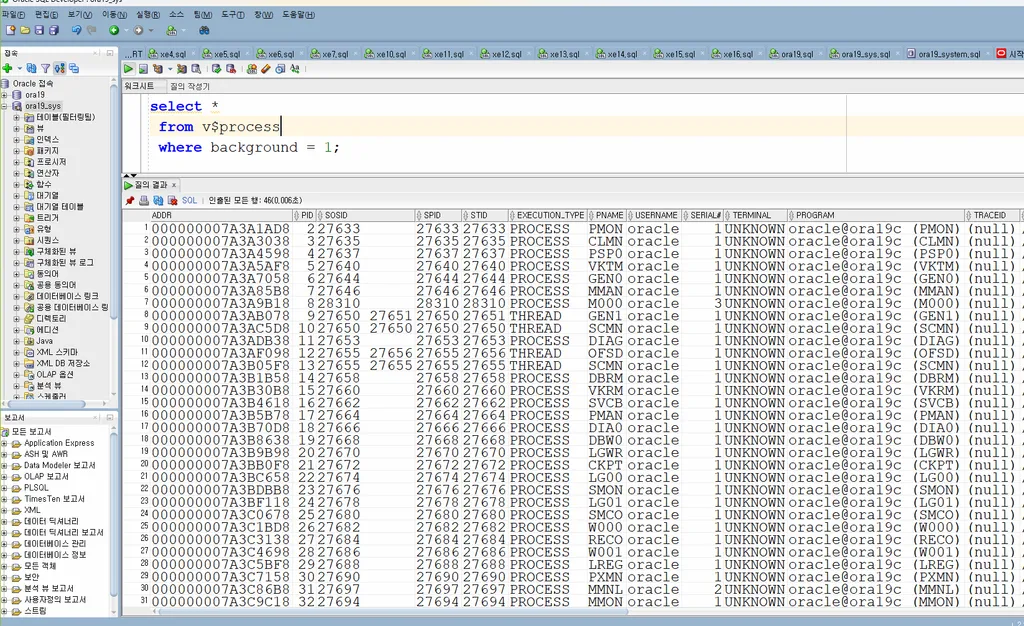
여러 개의 백그라운드 프로세서들이 열심히 일하고 있습니다.
SGA 영역은 여러 프로세서들이 공유해서 사용하는 메모리 영역
문제3. 21C의 오라클 백그라운드 프로세서가 몇개가 있는지 조회하시오
select count(*)
 from v$process
 where background = 1;
문제4. 오라클 백그라운드 프로세서를 kill 죽이면 오라클은 shutdown 됩니다. shutdown 되는지 확인하세요
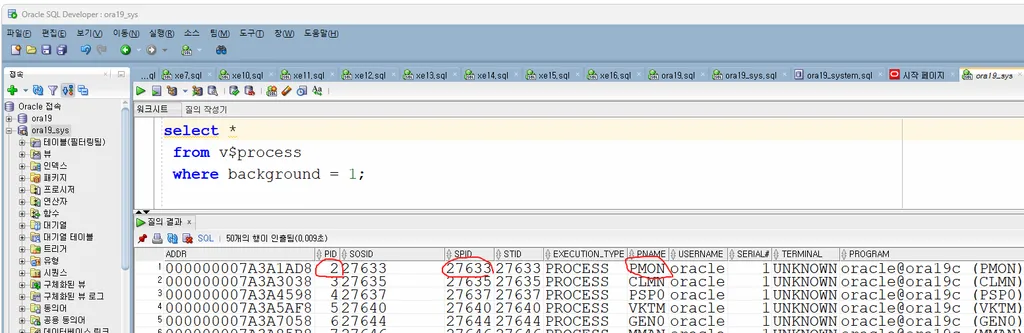
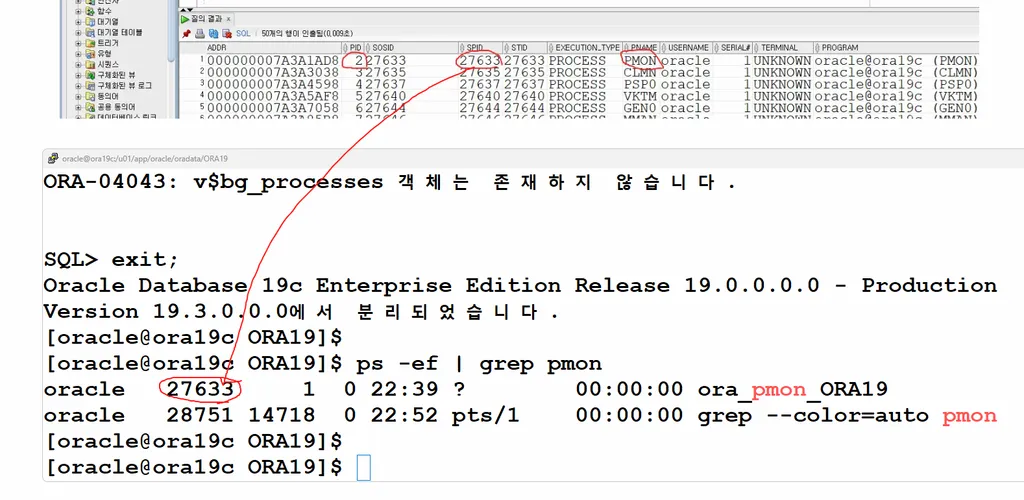
[oracle@ora19c ORA19]$ kill -9 27633
[oracle@ora19c ORA19]$
[oracle@ora19c ORA19]$ sqlplus scott/tiger

SQL*Plus: Release 19.0.0.0.0 - Production on 월 8월 18 22:54:40 2025
Version 19.3.0.0.0

Copyright (c) 1982, 2019, Oracle.  All rights reserved.

ERROR:
ORA-01034: ORACLE not available
ORA-27101: shared memory realm does not exist
Linux-x86_64 Error: 2: No such file or directory
Additional information: 4376
Additional information: 801739899
프로세스 ID: 0 세션
ID: 0 일련 번호: 0


사용자명 입력:

[oracle@ora19c ORA19]$ ps -ef |grep pmon
oracle   28964 14718  0 22:55 pts/1    00:00:00 grep --color=auto pmon
[oracle@ora19c ORA19]$
[oracle@ora19c ORA19]$ sqlplus "/as sysdba"

SQL*Plus: Release 19.0.0.0.0 - Production on 월 8월 18 22:55:26 2025
Version 19.3.0.0.0

Copyright (c) 1982, 2019, Oracle.  All rights reserved.

휴지 인스턴스에 접속되었습니다.

SQL> startup
ORACLE 인스턴스가 시작되었습니다.

Total System Global Area 1979709008 bytes
Fixed Size                  8898128 bytes
Variable Size             452984832 bytes
Database Buffers         1509949440 bytes
Redo Buffers                7876608 bytes
데이터베이스가 마운트되었습니다.
데이터베이스가 열렸습니다.
SQL>