3D SURVIVAL
지형 및 스카이 박스 준비 하기
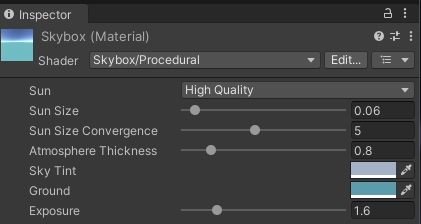
- Window - Rendering - Lighting → Skybox Material 에 설정
플레이어 준비
빈 오브젝트 생성한후 Player 변경하고, 하위 빈 오브젝트에 CameraContainer 생성한후에 Main Camera를 하위로 설정 하였다.

Player에 충돌 감지를 위해 Capsule Collider와 Rigidbody를 넣어주었다.
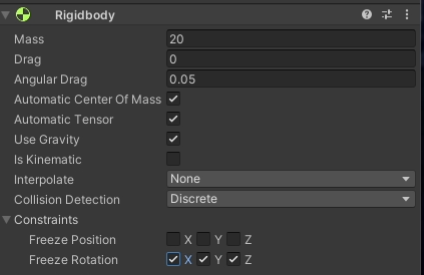
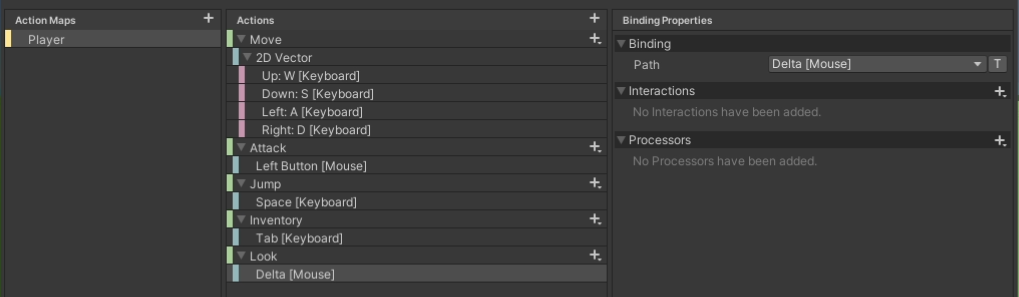
Player를 움직이기 위한 Input Action을 만들고
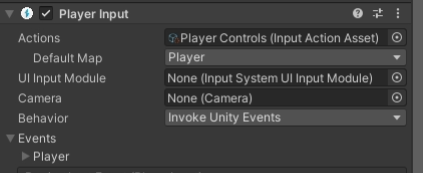
Player Input 을 추가했다.
Character Manager 스크립트
using UnityEngine;

public class CharacterManager : MonoBehaviour // CharacterManager라는 클래스 선언, MonoBehaviour를 상속하여 Unity에서 작동할 수 있게 합니다.
{
    // CharacterManager 클래스의 정적 인스턴스 변수 선언, 클래스 차원에서 하나만 존재합니다.
    private static CharacterManager _instance;

    // CharacterManager 클래스의 정적 인스턴스 프로퍼티 선언, 외부에서 접근할 수 있도록 합니다.
    public static CharacterManager Instance
    {
        get
        {
            // 만약 _instance가 아직 초기화되지 않았다면 새로운 GameObject를 생성하고 CharacterManager 컴포넌트를 추가합니다.
            if(_instance == null)
            {
                _instance = new GameObject("CharacterManager").AddComponent<CharacterManager>();
            }
            // 초기화된 _instance를 반환합니다.
            return _instance;
        }
    }

    // Player 타입의 프로퍼티 선언, 외부에서 접근할 수 있도록 합니다.
    public Player Player
    {
        // _player 필드를 반환합니다.
        get { return _player; }
        // _player 필드를 설정합니다.
        set { _player = value; }
    }
    // Player 타입의 인스턴스 변수 선언, Player 객체를 저장합니다.
    private Player _player;

    // MonoBehaviour의 Awake 메서드를 오버라이드하여 게임 오브젝트가 초기화될 때 호출됩니다.
    private void Awake()
    {
        // 만약 _instance가 아직 초기화되지 않았다면 이 인스턴스를 _instance로 설정합니다.
        if(_instance == null)
        {
            _instance = this;
            // 이 게임 오브젝트를 새로운 씬 로드 시 파괴되지 않도록 설정합니다.
            DontDestroyOnLoad(gameObject);
        }
        else
        {
            // 이미 _instance가 초기화되어 있는데 그것이 이 인스턴스가 아니라면 이 게임 오브젝트를 파괴합니다.
            if(_instance != this)
            {
                Destroy(gameObject);
            }
        }
    }
}
이 스크립트는 싱글톤 패턴을 구현하여 CharacterManager 클래스의 인스턴스가 게임 내에서 오직 하나만 존재하도록 보장합니다. 싱글톤 패턴은 전역 접근 지점을 제공하며 인스턴스가 한 번만 생성되도록 합니다. Awake 메서드에서는 인스턴스 중복 생성을 방지하고, 씬 로드 시에도 유지되도록 설정합니다. Player 프로퍼티는 게임의 주인공 캐릭터와 관련된 정보를 관리합니다.
Player 스크립트
using System;
using UnityEngine;

public class Player : MonoBehaviour // Player 클래스 선언, MonoBehaviour를 상속하여 Unity에서 작동할 수 있게 합니다.
{
    // PlayerController 타입의 퍼블릭 변수 선언, 이 변수는 플레이어의 제어를 담당합니다.
    public PlayerController controller;

    // MonoBehaviour의 Awake 메서드를 오버라이드하여 게임 오브젝트가 초기화될 때 호출됩니다.
    private void Awake()
    {
        // CharacterManager 싱글톤 인스턴스의 Player 프로퍼티에 이 인스턴스를 할당합니다.
        CharacterManager.Instance.Player = this;
        // 이 게임 오브젝트에서 PlayerController 컴포넌트를 가져와 controller 변수에 할당합니다.
        controller = GetComponent<PlayerController>();
    }
}
이 스크립트는 Player
클래스를 정의하며, 이 클래스는 MonoBehaviour를 상속받아 Unity에서 사용됩니다. Awake 메서드에서 CharacterManager 싱글톤 인스턴스의 Player 프로퍼티에 자신을 할당하여 CharacterManager가 이 Player 인스턴스를 참조할 수 있게 합니다. 또한 Awake 메서드에서 GetComponent PlayerController를 호출하여 이 게임 오브젝트에 붙어 있는 PlayerController 컴포넌트를 찾아 controller 변수에 할당합니다. PlayerController는 플레이어 캐릭터의 제어를 담당하는 컴포넌트입니다.
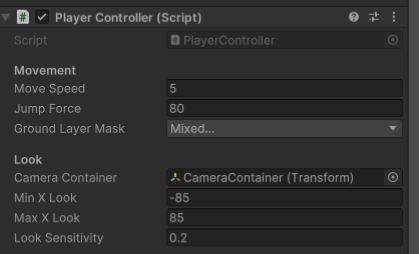
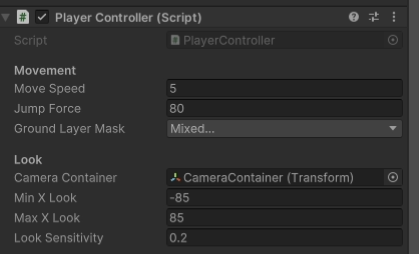
PlayerController 스크립트
using System;
using UnityEngine;
using UnityEngine.InputSystem;

public class PlayerController : MonoBehaviour // PlayerController 클래스 선언, MonoBehaviour를 상속하여 Unity에서 작동할 수 있게 합니다.
{
  // Movement 헤더 아래에 있는 변수들
  [Header("Movement")]
  public float moveSpeed; // 이동 속도
  private Vector2 curMovementInput; // 현재 이동 입력 값
  public float jumptForce; // 점프 힘
  public LayerMask groundLayerMask; // 땅 레이어 마스크

  // Look 헤더 아래에 있는 변수들
  [Header("Look")]
  public Transform cameraContainer; // 카메라 컨테이너
  public float minXLook; // 카메라 회전의 최소 X 값
  public float maxXLook; // 카메라 회전의 최대 X 값
  private float camCurXRot; // 현재 카메라의 X 회전 값
  public float lookSensitivity; // 마우스 감도

  private Vector2 mouseDelta; // 마우스 이동 값

  [HideInInspector]
  public bool canLook = true; // 카메라 이동 가능 여부

  private Rigidbody rigidbody; // Rigidbody 컴포넌트

  // MonoBehaviour의 Awake 메서드를 오버라이드하여 게임 오브젝트가 초기화될 때 호출됩니다.
  private void Awake()
  {
      // Rigidbody 컴포넌트를 가져옵니다.
      rigidbody = GetComponent<Rigidbody>();
  }

  // MonoBehaviour의 Start 메서드, 게임 시작 시 한 번 호출됩니다.
  void Start()
  {
      // 커서를 잠금 상태로 설정합니다.
      Cursor.lockState = CursorLockMode.Locked;
  }

  // MonoBehaviour의 FixedUpdate 메서드, 물리 연산과 관련된 업데이트를 처리합니다.
  private void FixedUpdate()
  {
      // Move 메서드를 호출하여 이동을 처리합니다.
      Move();
  }

  // MonoBehaviour의 LateUpdate 메서드, 모든 업데이트가 끝난 후 호출됩니다.
  private void LateUpdate()
  {
      // canLook이 true일 경우 CameraLook 메서드를 호출하여 카메라 이동을 처리합니다.
      if (canLook)
      {
          CameraLook();
      }
  }

  // 입력 시스템에서 Look 입력을 처리하는 메서드
  public void OnLookInput(InputAction.CallbackContext context)
  {
      // 마우스 이동 값을 context에서 읽어옵니다.
      mouseDelta = context.ReadValue<Vector2>();
  }

  // 입력 시스템에서 Move 입력을 처리하는 메서드
  public void OnMoveInput(InputAction.CallbackContext context)
  {
      // 입력이 수행 중일 때 이동 입력 값을 context에서 읽어옵니다.
      if(context.phase == InputActionPhase.Performed)
      {
          curMovementInput = context.ReadValue<Vector2>();
      }
      // 입력이 취소될 때 이동 입력 값을 0으로 초기화합니다.
      else if(context.phase == InputActionPhase.Canceled)
      {
          curMovementInput = Vector2.zero;
      }
  }

  // 입력 시스템에서 Jump 입력을 처리하는 메서드
  public void OnJumpInput(InputAction.CallbackContext context)
  {
      // 입력이 시작되었고, 땅에 있을 때 점프를 수행합니다.
      if(context.phase == InputActionPhase.Started && IsGrounded())
      {
          // Rigidbody에 위쪽 방향으로 힘을 가합니다.
          rigidbody.AddForce(Vector2.up * jumptForce, ForceMode.Impulse);
      }
  }

  // 이동을 처리하는 메서드
  private void Move()
  {
      // 이동 방향을 계산합니다.
      Vector3 dir = transform.forward * curMovementInput.y + transform.right * curMovementInput.x;
      dir *= moveSpeed; // 이동 속도를 적용합니다.
      dir.y = rigidbody.velocity.y; // y축 속도를 유지합니다.

      // Rigidbody의 속도를 설정합니다.
      rigidbody.velocity = dir;
  }

  // 카메라 이동을 처리하는 메서드
  void CameraLook()
  {
      // 마우스 이동 값을 기반으로 카메라 X축 회전을 업데이트합니다.
      camCurXRot += mouseDelta.y * lookSensitivity;
      // 카메라 X축 회전을 제한합니다.
      camCurXRot = Mathf.Clamp(camCurXRot, minXLook, maxXLook);
      // 카메라 컨테이너의 회전 값을 설정합니다.
      cameraContainer.localEulerAngles = new Vector3(-camCurXRot, 0, 0);

      // 플레이어의 Y축 회전을 업데이트합니다.
      transform.eulerAngles += new Vector3(0, mouseDelta.x * lookSensitivity, 0);
  }

  // 플레이어가 땅에 있는지 확인하는 메서드
  bool IsGrounded()
  {
      // 네 개의 레이를 사용하여 땅에 있는지 확인합니다.
      Ray[] rays = new Ray[4]
      {
          new Ray(transform.position + (transform.forward * 0.2f) + (transform.up * 0.01f), Vector3.down),
          new Ray(transform.position + (-transform.forward * 0.2f) + (transform.up * 0.01f), Vector3.down),
          new Ray(transform.position + (transform.right * 0.2f) + (transform.up * 0.01f), Vector3.down),
          new Ray(transform.position + (-transform.right * 0.2f) +(transform.up * 0.01f), Vector3.down)
      };

      // 각 레이에 대해 땅과 충돌하는지 확인합니다.
      for(int i = 0; i < rays.Length; i++)
      {
          if (Physics.Raycast(rays[i], 0.1f, groundLayerMask))
          {
              return true; // 땅에 있으면 true를 반환합니다.
          }
      }

      return false; // 땅에 있지 않으면 false를 반환합니다.
  }

  // 커서 잠금 상태를 전환하는 메서드
  public void ToggleCursor(bool toggle)
  {
      // 커서 상태를 변경합니다.
      Cursor.lockState = toggle ? CursorLockMode.None : CursorLockMode.Locked;
      // canLook 값을 반전시킵니다.
      canLook = !toggle;
  }
}
이 스크립트는 PlayerController 클래스를 정의하며, 플레이어 캐릭터의 이동, 점프, 카메라 회전을 처리합니다. 새로운 Unity 입력 시스템을 사용하여 플레이어의 입력을 관리합니다. Awake, Start, FixedUpdate, LateUpdate 메서드들을 통해 초기화와 반복적인 업데이트 작업을 처리합니다. OnLookInput, OnMoveInput, OnJumpInput 메서드들은 입력 시스템으로부터 호출되어 플레이어의 입력을 처리합니다. Move, CameraLook, IsGrounded, ToggleCursor 메서드들은 각각 플레이어의 이동, 카메라 회전, 땅에 있는지 확인, 커서 잠금 상태 전환을 수행합니다.
이전에는 점프를 누르게 되면 점프가 무한으로 나가게 되었는데,
이렇게 설정하게되면 Ray를 통해 땅에 있는지를 확인한후에 점프를 할수있도록 변경되었다.
