오늘은 적을 추가하는 작업과, 상점을 구현해볼것이다.
적 추가하기
일단 적을 추가하는데 앞에서 만들었던 Bat와 똑같이 만들어 주면된다
스크립트 추가
using System.Collections;
using UnityEngine;

public class EnemySp : MonoBehaviour
{
    [Header("Enemy")]
    public GameObject[] enemies; // 스폰될 적 게임 오브젝트 배열
    public GameObject enemySpawn; // 적이 스폰될 위치
    public bool isSpawn = true; // 적 스폰 여부를 제어하는 변수

    private Settings settings; // 게임 설정을 관리하는 Settings 인스턴스
    private UIcontroller controller; // UI 업데이트를 위한 UIcontroller 인스턴스

    // 게임 시작 시 초기 설정
    private void Start()
    {
        settings = GameManager.Instance.settings; // GameManager에서 Settings 인스턴스를 가져옴
        controller = FindObjectOfType<UIcontroller>(); // UIcontroller 인스턴스를 찾아 할당
    }

    // 매 프레임마다 호출되는 함수
    void Update()
    {
        EnemySpawn(); // 적을 스폰하는 함수 호출
    }

    // 적을 스폰하는 함수
    private void EnemySpawn()
    {
        if (isSpawn) // isSpawn이 true일 때만 적을 스폰
        {
            StartCoroutine(EnemySpawnTime()); // 코루틴을 통해 적 스폰을 지연
            isSpawn = false; // 적이 스폰 중인 동안 isSpawn을 false로 설정
        }
    }

    // 적 스폰을 지연시키는 코루틴 함수
    IEnumerator EnemySpawnTime()
    {
        yield return new WaitForSeconds(1f); // 1초 대기

        if (settings.enemyCount <= 0) // 남은 적의 수가 0 이하일 경우
        {
            settings.stage += 1; // 스테이지를 증가
            settings.enemyCount = 6; // 적의 수를 초기화
            settings.InitEnemyHP(); // 적의 체력을 초기화
            controller.UpdateStageCount(settings.stage); // UI에 스테이지 카운트를 업데이트
        }

        int ran = Random.Range(0, enemies.Length); // 랜덤으로 적을 선택
        Instantiate(enemies[ran], enemySpawn.transform.position, Quaternion.identity); // 적을 스폰
        settings.enemyCount -= 1; // 남은 적의 수를 감소
        controller.UpdateEnemyCount(settings.enemyCount); // UI에 남은 적의 수를 업데이트
    }
}
이렇게 스크립트를 추가하고나서,
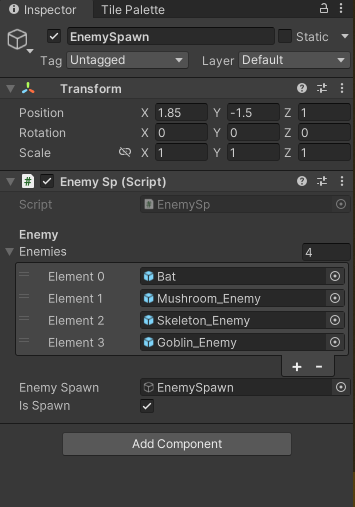
이렇게 배열에 적을 추가해주면 된다.
상점
일단 상점의 UI작업부터 하고

이렇게 왼쪽 버튼과 오른쪽 버튼을 만들어 두었고 가격은 동일하게 10원씩 정하였다.
스크립트
using System.Numerics; // BigInteger를 사용하기 위해 필요
using UnityEngine;
using UnityEngine.UI;
using TMPro;

public class ShopManager : MonoBehaviour
{
    public Button increaseAttackButton; // 공격력 증가 버튼
    public TextMeshProUGUI textGold; // 골드 표시 텍스트
    public Button randomGoldButton; // 랜덤 골드 버튼

    private Settings settings; // 게임 설정을 관리하는 Settings 인스턴스

    void Start()
    {
        settings = GameManager.Instance.settings; // GameManager에서 Settings 인스턴스를 가져옴

        // Increase Attack Button 초기화
        increaseAttackButton.onClick.AddListener(OnIncreaseAttackButtonClicked); // 공격력 증가 버튼 클릭 이벤트 설정

        // Random Gold Button 초기화
        randomGoldButton.onClick.AddListener(OnRandomGoldButtonClicked); // 랜덤 골드 버튼 클릭 이벤트 설정

        UpdateGold(); // 초기 골드 표시 업데이트
    }

    // 골드 텍스트를 업데이트하는 함수
    public void UpdateGold()
    {
        textGold.text = settings.SGold(); // Settings의 SGold() 메서드를 통해 포맷된 골드를 가져와 텍스트에 표시
    }

    // 공격력 증가 버튼 클릭 시 호출되는 함수
    private void OnIncreaseAttackButtonClicked()
    {
        BigInteger attackAmount = 100; // 증가할 공격력 양
        BigInteger goldCost = 10; // 공격력 증가에 필요한 골드 비용

        if (settings.DecreaseGold(goldCost)) // 골드가 충분한지 확인하고, 충분하면 감소
        {
            settings.IncreaseAttackDMG(attackAmount); // 공격력 증가
            UpdateGold(); // 골드 텍스트 업데이트
        }
        else
        {
            Debug.Log("Not enough gold."); // 골드가 부족할 때 디버그 메시지 출력
        }
    }

    // 랜덤 골드 버튼 클릭 시 호출되는 함수
    private void OnRandomGoldButtonClicked()
    {
        BigInteger goldCost = 10; // 랜덤 골드 획득에 필요한 골드 비용

        if (settings.DecreaseGold(goldCost)) // 골드가 충분한지 확인하고, 충분하면 감소
        {
            BigInteger randomGold = (BigInteger)Random.Range(0, 21); // 0에서 20 사이의 랜덤 골드 양 생성
            settings.IncreaseGold(randomGold); // 골드 증가
            UpdateGold(); // 골드 텍스트 업데이트
        }
        else
        {
            Debug.Log("Not enough gold."); // 골드가 부족할 때 디버그 메시지 출력
        }
    }
}
이렇게 스크립트를 작성하고 나서,
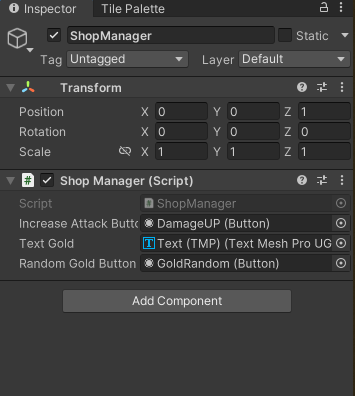
버튼을 맞게 할당 해주게 되면 완성이다.
완성화면
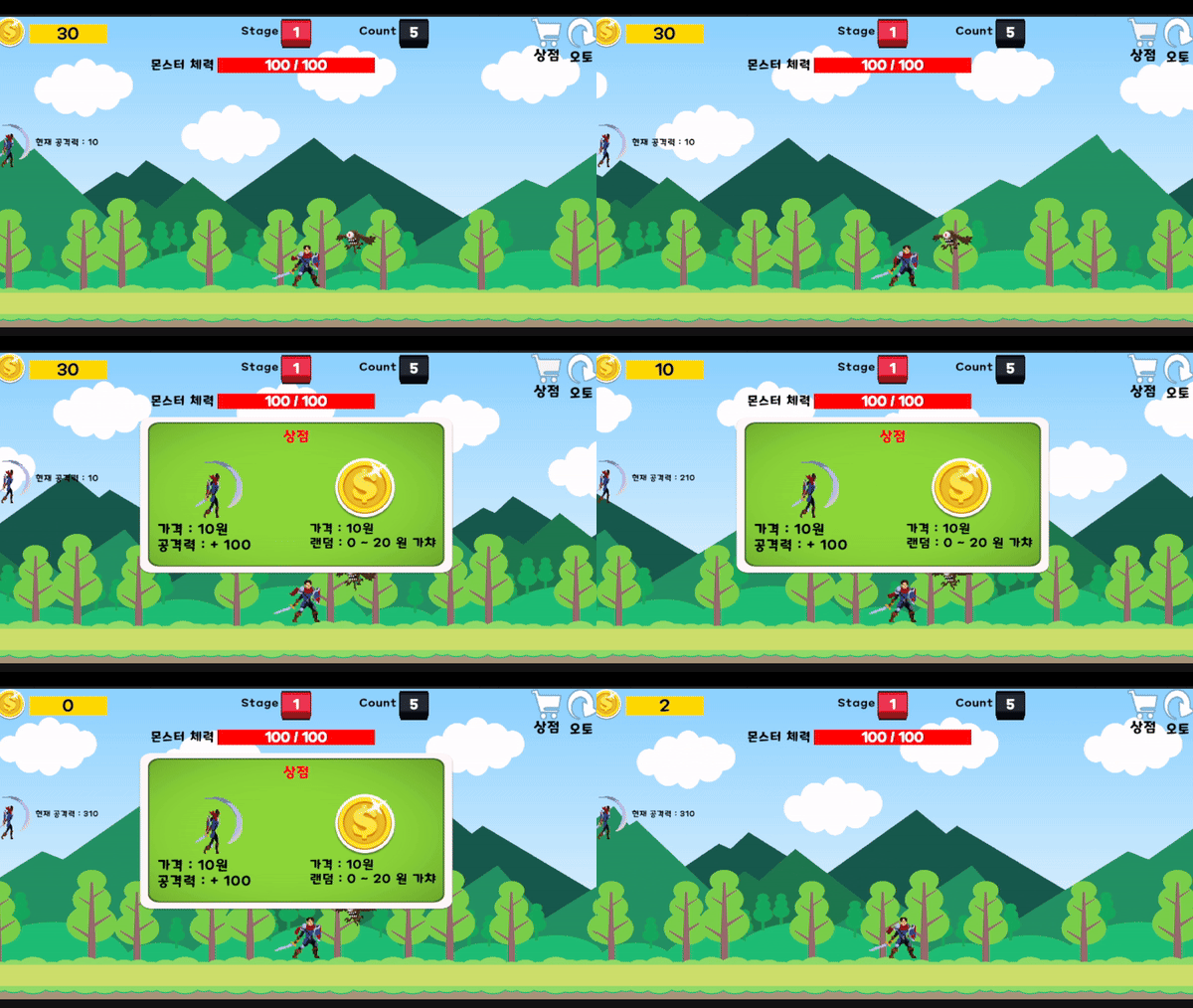
상점 공격력 증가
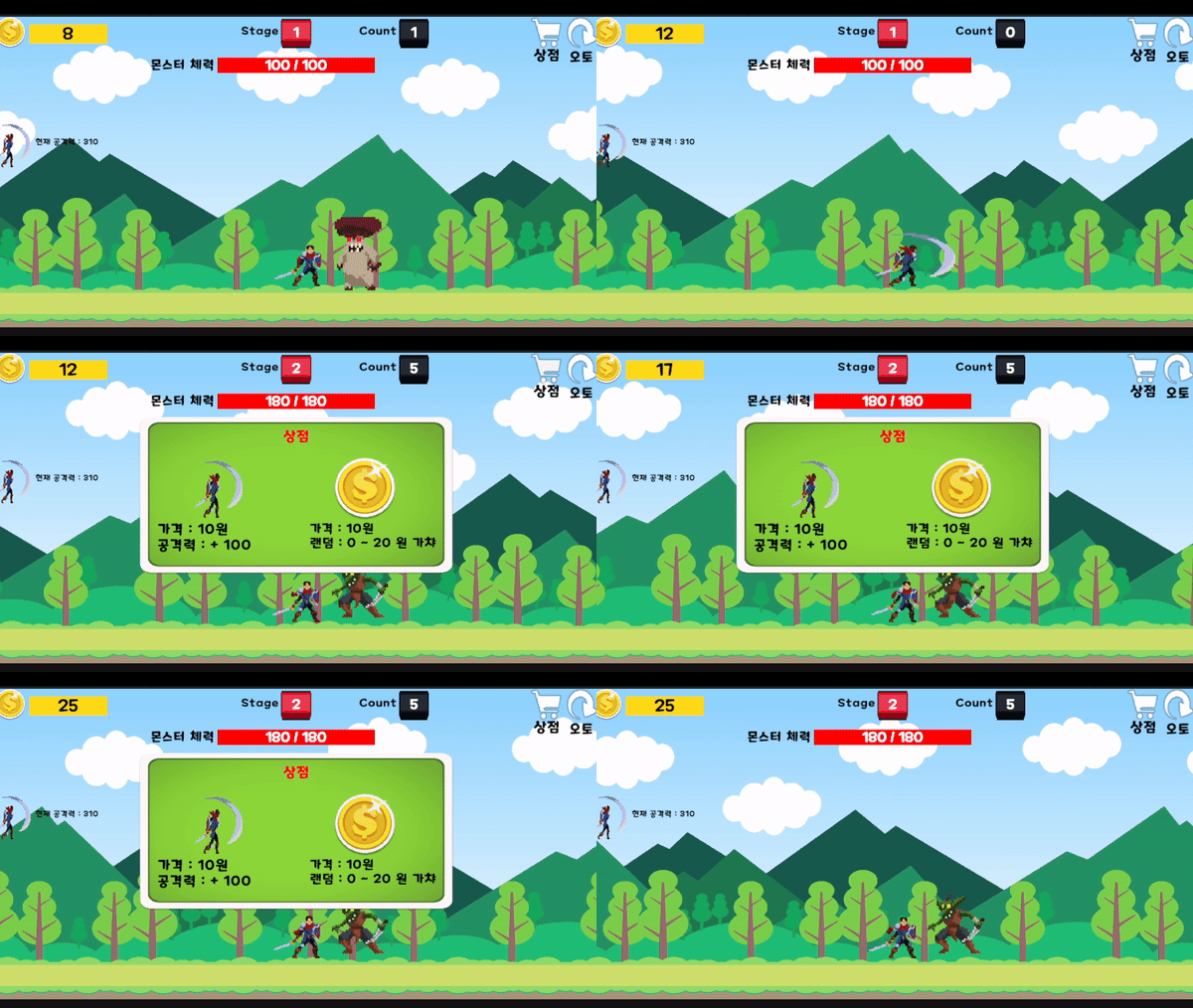
랜덤 골드 증가

게임개발자꿈나무