오늘은 도구를 이용해 나무를 없애보는 작업을 할것이다.
Axe
using UnityEngine;

public class Axe : MonoBehaviour, IInteractable
{
    private Transform originalParent;    // 원래의 부모 Transform을 저장하는 변수

    public float detectionRange = 2.0f;  // 충돌 검출 범위
    public LayerMask interactableLayer;  // 상호작용 가능한 레이어 마스크
    private Rigidbody rb;               // Rigidbody 컴포넌트 변수

    void Start()
    {
        rb = GetComponent<Rigidbody>(); // Rigidbody 컴포넌트 가져오기
        if (rb == null)
        {
            rb = gameObject.AddComponent<Rigidbody>(); // Rigidbody가 없으면 추가
        }
        rb.isKinematic = false; // 운동학적 상태 설정 (움직임 여부)
        rb.collisionDetectionMode = CollisionDetectionMode.Continuous; // 충돌 감지 모드 설정
    }

    void Update()
    {
        CheckForCollision(); // 충돌 검출 함수 호출
    }

    void CheckForCollision()
    {
        Collider[] hitColliders = Physics.OverlapSphere(transform.position, detectionRange, interactableLayer); // 주어진 위치에서 주어진 반경 내의 충돌체 검색
        foreach (Collider hitCollider in hitColliders)
        {
            if (hitCollider.CompareTag("wood")) // 충돌체가 "wood" 태그를 가지고 있는지 확인
            {
                Tree tree = hitCollider.GetComponent<Tree>(); // 충돌체에서 Tree 컴포넌트 가져오기
                if (tree != null)
                {
                    tree.Hit(); // Tree의 Hit 메서드 호출
                    Debug.Log("Hit the tree with an axe."); // 디버그 로그 출력
                }
            }
        }
    }

    public void Pickup(Transform holdPoint)
    {
        originalParent = transform.parent; // 현재 부모 Transform 저장
        transform.parent = holdPoint; // 새로운 부모 Transform으로 설정
        transform.localPosition = Vector3.zero; // 로컬 위치를 원점으로 설정
        transform.localRotation = Quaternion.identity; // 로컬 회전을 기본 값으로 설정
        rb.isKinematic = true; // 운동학적 상태를 Kinematic으로 설정 (움직임 없음)
    }

    public void Drop()
    {
        transform.parent = originalParent; // 원래의 부모 Transform으로 되돌리기
        rb.isKinematic = false; // 운동학적 상태를 비-Kinematic으로 설정 (움직임 가능)
    }

    public bool TryPlace()
    {
        // 특정한 도끼의 배치 로직 구현 (만약 필요하다면)
        return false; // 기본적으로 false 반환
    }

    void OnTriggerEnter(Collider other)
    {
        if (other.CompareTag("wood")) // 충돌체가 "wood" 태그를 가지고 있는지 확인
        {
            Tree tree = other.GetComponent<Tree>(); // 충돌체에서 Tree 컴포넌트 가져오기
            if (tree != null)
            {
                tree.Hit(); // Tree의 Hit 메서드 호출
                Debug.Log("Hit the tree with an axe."); // 디버그 로그 출력
            }
        }
    }
}
도끼 오브젝트를 만들어 이 스크립트를 넣는다
나무
using UnityEngine;

public class Tree : MonoBehaviour
{
    public int hitPoints = 3;           // 나무의 체력
    private int currentHitPoints;       // 현재 체력
    public Material hitMaterial;        // 충돌 시 표시할 재질
    private Renderer renderer;          // Renderer 컴포넌트
    private Material originalMaterial;  // 초기 재질

    void Start()
    {
        currentHitPoints = hitPoints;   // 현재 체력을 초기 체력으로 설정
        renderer = GetComponent<Renderer>();  // Renderer 컴포넌트 가져오기
        originalMaterial = renderer.material; // 초기 재질 저장

        // Rigidbody 컴포넌트 추가 및 설정
        Rigidbody rb = GetComponent<Rigidbody>();
        if (rb == null)
        {
            rb = gameObject.AddComponent<Rigidbody>(); // Rigidbody가 없으면 추가
            rb.isKinematic = true; // 물리적인 움직임이 필요하지 않으면 Kinematic 설정
        }
    }

    public void Hit()
    {
        currentHitPoints--; // 체력 감소
        renderer.material = hitMaterial; // 충돌 시 표시할 재질로 변경
        if (currentHitPoints <= 0)
        {
            Destroy(gameObject); // 체력이 0 이하이면 오브젝트 파괴
        }
    }
}
이 나무 스크립트도 나무 오브젝트에 넣고 태그를 wood로 설정해준다.
Hit() 메서드는 나무가 충돌을 받을 때마다 호출되어 체력을 감소시키고, 마지막 체력에 도달하면 나무를 파괴하는 기능을 수행한다.
이렇게 설정을 하게 되면
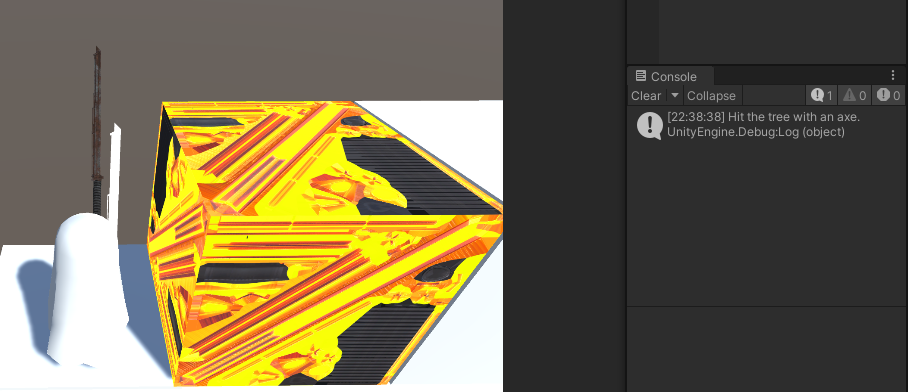
이렇게 부딪히게 되면 로그와 함께 큐브의 색이 바뀌게 된다.

게임개발자꿈나무