In the following posts (of parts 1 and 2), we'll take a deep dive inside Javascript's Promise.
Definition of Promise (mdn Web Docs)
A Promise is an object representing the eventual completion or failure of an asynchronous operation.
In the past, Javascript used callback functions for asynchronous executions(비동기 처리). However, this traditional way of handling asynchronous tasks led to something called a "callback hell". This led to the introduction of "Promises" in ES6.
Creating Promises
A Promise (object) can be created with the combination of the Promise constructor(생성자 함수) and the new operator(new 연산자). Refer to the code below:
const promise = new Promise()
The promise constructor receives an executor function(callback function) for its parameter(인수, 매개변수) to handle asynchronous tasks and this executor function receives resolve and reject functions as its parameter.
const promise = new Promise((resolve, reject) => {
  // execute asynchronous task
}
The callback(executor) function runs the asynchronous task. If the task succeeds, it calls the resolve function(which it got for its parameter) and if the task fails, it calls the reject function.
const promise = new Promise((resolve, reject) => {
  if(/* Success in asynchronous execution */) {
     resolve("Success!");
	} else { /* Failure in asynchronous execution */
     reject("Reason for failure");
	}
});
Promise's Status
The defualt state of a newly created Promise is "pending". After the asynchronous task is executed, it will either change to "fulfilled" or "rejected".
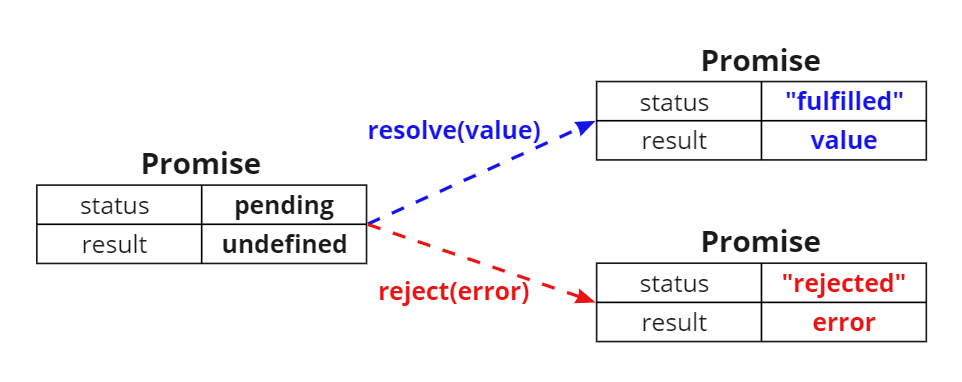
When the Promise is in a "fulfilled" or "rejected" state, we can also say that the Promise is in a "settled" state. It refers to a state where the asynchronous task has been executed. If a Promise's status goes into "settled", it cannot be changed to other states(such as "fulfilled" or "rejected").
Along with a "status", Promises also get a "result" (as shown in the image above). Let's try console logging the following Promise and see what we get.
const promise = new Promise(resolve => resolve(1));

console.log(promise);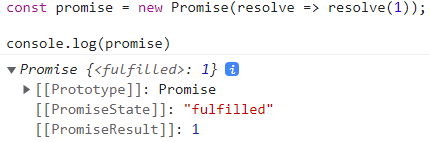
We can see the "status" and the "result" of the Promise. The same goes for "reject".
const promise = new Promise((_, reject) => reject(new Error("An error occurred")));

console.log(promise);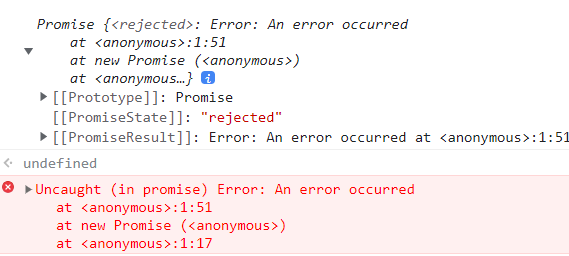
.then / .catch / .finally
If the status of a asynchronous task changes, we need to deal with its results. For example, if a Promise gets fulfilled, we need it to do A and if it gets rejected it needs to do B.
One important thing to remember is that if the status of an asynchronous task changes, callback functions set as parameters for .then / .catch / .finally will be called selectively. Then, the result of each callback functions(out of the three mentioned) will be returned.
Promise.prototype.then
The then() method gets two callback functions as its parameter.
- The first callback function gets called when the Promise sets to a "fulfilled" state. The callback function receives the result of the asynchronous operation as its parameter.
- The second callback function gets called when the Promise sets to a "rejected" state. The callback functions receives the error of the asynchronous operation as its parameter.
// fulfilled
const promise = new Promise(resolve => resolve("fulfilled"))
	.then(v => console.log(v), e => console.log(e)) // fulfilled

// rejected
const promise = new Promise((_, reject) => reject(new Error("rejected")))
	.then(v => console.log(v), e => console.log(e)) // Error: rejected
The then() method always returns a Promise. If the callback function of the then() method returns a Promise, it simply returns that Promise. However, if the callback function returns a value other than a Promise, the value is implicitly changed to "resolved" or "rejected", makes a Promise and returns it.
Promise.prototype.catch
The catch() method gets only one callback function as its parameter. The catch() method is only called when the Promise is in a "rejected" state.
// rejected
const promise = new Promise((_, reject) => reject(new Error("rejected")))
	.catch(e => console.log(e)); // Error: rejected
The catch() method works the same way as the then() method. So this means that the catch() method also and always returns a Promise.
Promise.prototype.finally
The finally() method gets only one callback function as its parameter. This method is called once regardless of the Promise being "fulfilled" or "rejected". Like then()/catch(), the finally() method always returns a Promise.
The finally() method is useful when a specific task needs to be executed regardless of the Promise's status(fulfilled or rejected)
const promise = new Promise(() => {})
	.finally(() => console.log("finally")); // finally
Let's continue this topic in part 2