PandasDataFrameOutputParser란
Python 프로그래밍 언어에서 널리 사용되는 데이터 구조로,
데이터 조작 및 분석을 위해 흔히 사용된다. 구조화된 데이터를 다루기 위한 포괄적인 도구세트를 제공하여,
데이터 정제, 변환 및 분석과 같은 작업에 다양하게 활용될 수 있다.
이 출력 파서는 사용자가 임의의 Pandas DataFrame을 지정하고 해당 DataFrame에서
데이터를 추출하여 형식화된 사전 형태로 데이터를 조회할 수 있는 LLM을 요청할 수 있게 해준다.
이 도구의 핵심 목적은 "자연어로 된 질문을 판다스 명령어로 자동 변환"하는 것이다.

기본 구조
import
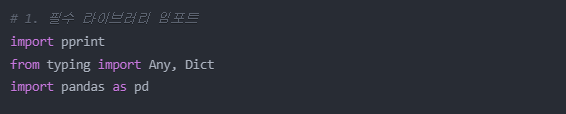
- import pprint
Python의 내장 모듈인 'pprint' (Pretty Print)를 임포트
복잡한 데이터 구조를 보기 좋게 출력해주는 기능 제공 - from typing import Any, Dict
Python의 타입 힌팅(Type Hinting)을 위한 도구들을 임포트
Dict: 딕셔너리 타입을 명시할 때 사용
Any: 어떤 타입이든 허용할 때 사용 - import pandas as pd
Pandas 라이브러리를 'pd'라는 별칭으로 임포트
함수 선언
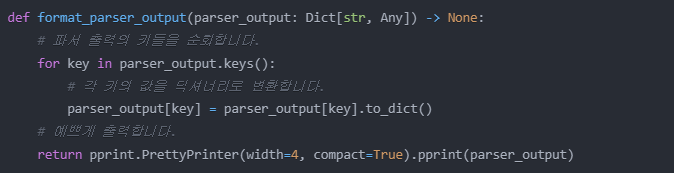

- parser_output: Pandas DataFrame들을 담고 있는 딕셔너리
- Dict[str, Any]: 키는 문자열, 값은 어떤 타입이든 가능함을 의미
- -> None: 이 함수는 아무것도 반환하지 않음(출력만 함)

- 딕셔너리의 모든 키를 순회
- 각 DataFrame을 딕셔너리 형태로 변환

- width = 4 : 출력시 들여쓰기 너비를 4로 설정
- compact = True : 가능한 한 줄에 많은 내용을 출력
데이터 로드
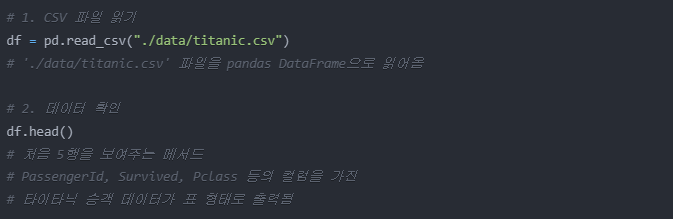
- pandas를 사용해서 CSV 파일을 데이터프레임으로 불러온다.
아까 pandas를 pd라는 별칭으로 임포트했기 때문에 pd.read_csv이라고 작성함 - 해당 데이터를 저장할 변수 df


- df = pd.read_csv()로 데이터를 읽어오면 DataFrame 형태
- 이 DataFrame으로 작업을 수행하면 결과가 Series나 DataFrame 형태
- format_parser_output는 이러한 pandas 객체들을 보기 좋은 딕셔너리 형태로 변환해서 출력
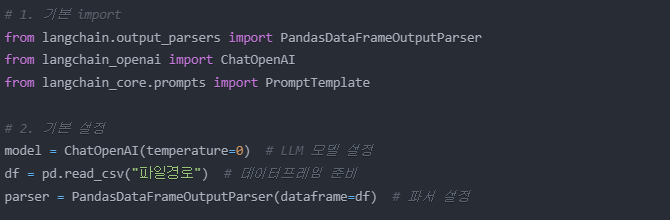
파서 및 지시사항 설정
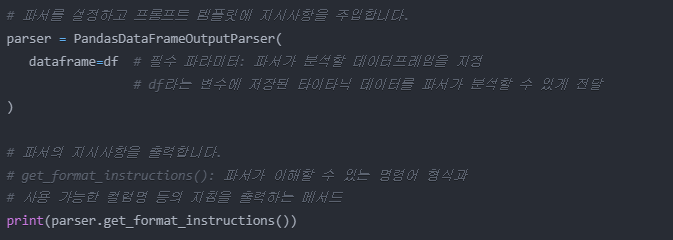
- pandas는 dataframe=df 파라미터가 필수적이다.
- 이 파서가 어떤 데이터프레임을 다룰지 지정하는 것이다.
The output should be formatted as a string as the operation, followed by a colon, followed by the column or row to be queried on, followed by optional array parameters.
1. The column names are limited to the possible columns below.
2. Arrays must either be a comma-separated list of numbers formatted as [1,3,5], or it must be in range of numbers formatted as [0..4].
3. Remember that arrays are optional and not necessarily required.
4. If the column is not in the possible columns or the operation is not a valid Pandas DataFrame operation, return why it is invalid as a sentence starting with either "Invalid column" or "Invalid operation".

As an example, for the formats:
1. String "column:num_legs" is a well-formatted instance which gets the column num_legs, where num_legs is a possible column.
2. String "row:1" is a well-formatted instance which gets row 1.
3. String "column:num_legs[1,2]" is a well-formatted instance which gets the column num_legs for rows 1 and 2, where num_legs is a possible column.
4. String "row:1[num_legs]" is a well-formatted instance which gets row 1, but for just column num_legs, where num_legs is a possible column.
5. String "mean:num_legs[1..3]" is a well-formatted instance which takes the mean of num_legs from rows 1 to 3, where num_legs is a possible column and mean is a valid Pandas DataFrame operation.
6. String "do_something:num_legs" is a badly-formatted instance, where do_something is not a valid Pandas DataFrame operation.
7. String "mean:invalid_col" is a badly-formatted instance, where invalid_col is not a possible column.

Here are the possible columns:

PassengerId, Survived, Pclass, Name, Sex, Age, SibSp, Parch, Ticket, Fare, Cabin, Embarked
그럼 이런식으로 출력이 되는데 이는 PandasDataFrameOutputParser가 이해할 수 있는 명령어 형식에 대한 설명이다.

외국인과 내국인 사이에 통역사가 위치하듯이

사용자와 판다스 사이에 PandasDataFrameOutputParser가 위치하는 것이다.
사용자 : 승객들의 평균 나이가 궁금하다
파서 : 이건 mean:Age 형식으로 변환해야지
판다스 : df['Age'].mean()을 실행
쉽게 말해서
1. 우리가 한국어로 얘기하면
2. PandasDataFrameOutputParser가 간단한 영어로 바꾸고
3. 그 영어를 프로그래밍 언어로 바꾸는 3단계 번역이다.
현재까지의 단계는 파서가 어떤 데이터를 다루고,
어떤 규칙으로 변환할지 준비하는 단계이다.
프롬프트 템플릿
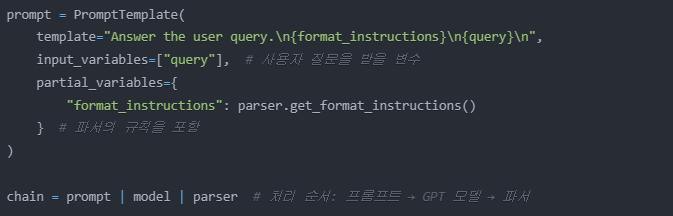
- "Answer the user query.\n": 기본 지시문
- {format_instructions}: 파서의 규칙이 들어갈 자리
- {query}: 나중에 작성할 사용자의 질문이 들어갈 자리
- \n: 각 요소를 구분하는 줄바꿈
여기서 {format_instructions}은 이 파서의 미리 정의된 규칙들을 가져오는 메서드이다.
규칙의 출처는
- LangChain 라이브러리 내부에 정의되어있고
PandasDataFrameOutputParser 클래스의 일부이다. - 우리가 수정할 수 없는 내장 규칙이다.
따라서 매번 바꿀 필요가 없는 고정된 규칙이라
partial_variables로 고정 변수를 미리 정의하는 것이다.
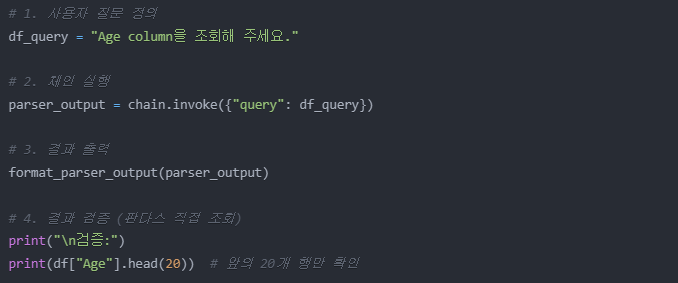
컬럼 조회 기능
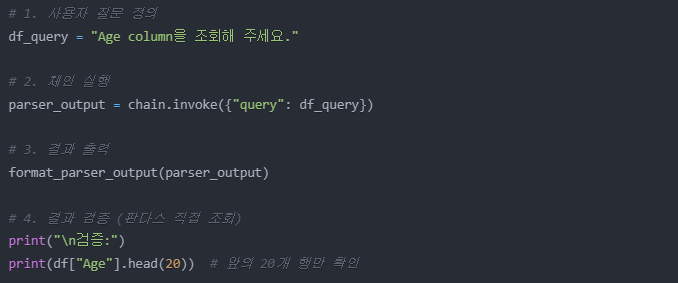
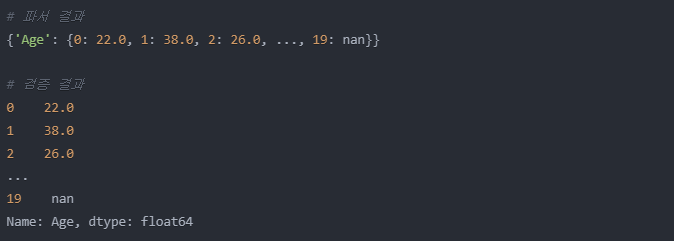
- 특정 컬럼의 전체 데이터를 보여줌
- 컬럼 조회 : (Age/나이)
0번 승객: 22세
1번 승객: 38세
2번 승객: 26세
...
첫번째 행 검색 기능
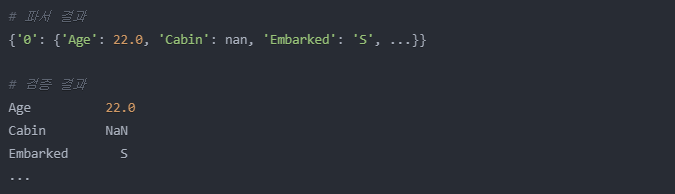
- 특정 행의 모든 컬럼 데이터를 보여줌
- 행 검색 (특정 승객의 모든 정보)
승객번호: 1
이름: Braund, Mr. Owen Harris
나이: 22세
성별: 남성
생존여부: 사망
좌석등급: 3등석
...등 한 승객의 모든 정보
특정 범위 평균 계산 기능
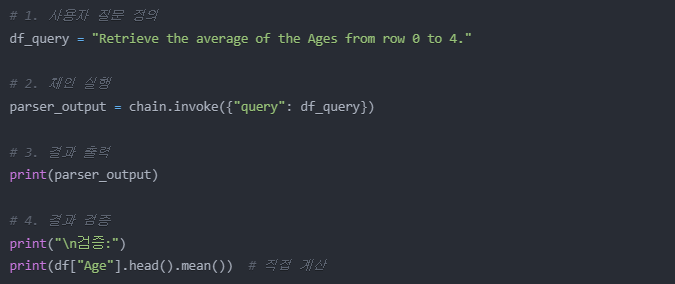

- 지정된 컬럼의 행 범위 평균을 계산
- 특정 범위의 행 평균 (0 ~ 4번 승객의 평균 나이)
(22 + 38 + 26 + 35 + 35) ÷ 5 = 31.2세
전체 평균 계산 기능
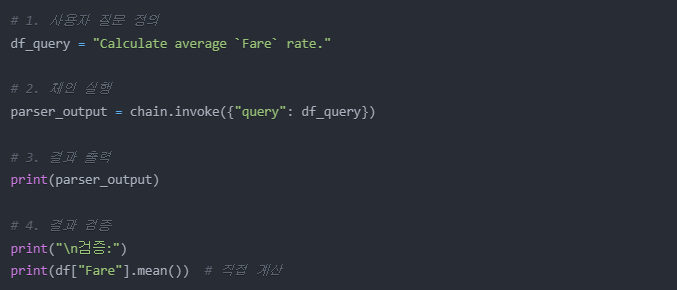

- 특정 컬럼의 전체 평균을 계산
- Fare(요금) 전체 평균
Fare는 승객들이 지불한 티켓 요금입니다
모든 승객들의 티켓 요금 평균 = 22.19937달러
예시:
승객1: 7.25달러
승객2: 71.28달러
승객3: 7.92달러
...
이런 모든 요금의 평균을 계산

성문이