💡 학습목표
   1. RestTemplate 사용 이유

   RestTemplate은 Spring Framework에서 제공하는 HTTP 통신을 간편하게 처리할 수 있는 클래스입니다.
   org.springframework.web.client.RestTemplate 패키지에 존재 합니다.

   RESTful 웹 서비스와의 통신을 위해 주로 사용되고 기본적으로 동기 방식으로 처리되며,
   비동기 방식으로 처리하고 싶을 경우 AsyncRestTemplate를 사용하면 됩니다.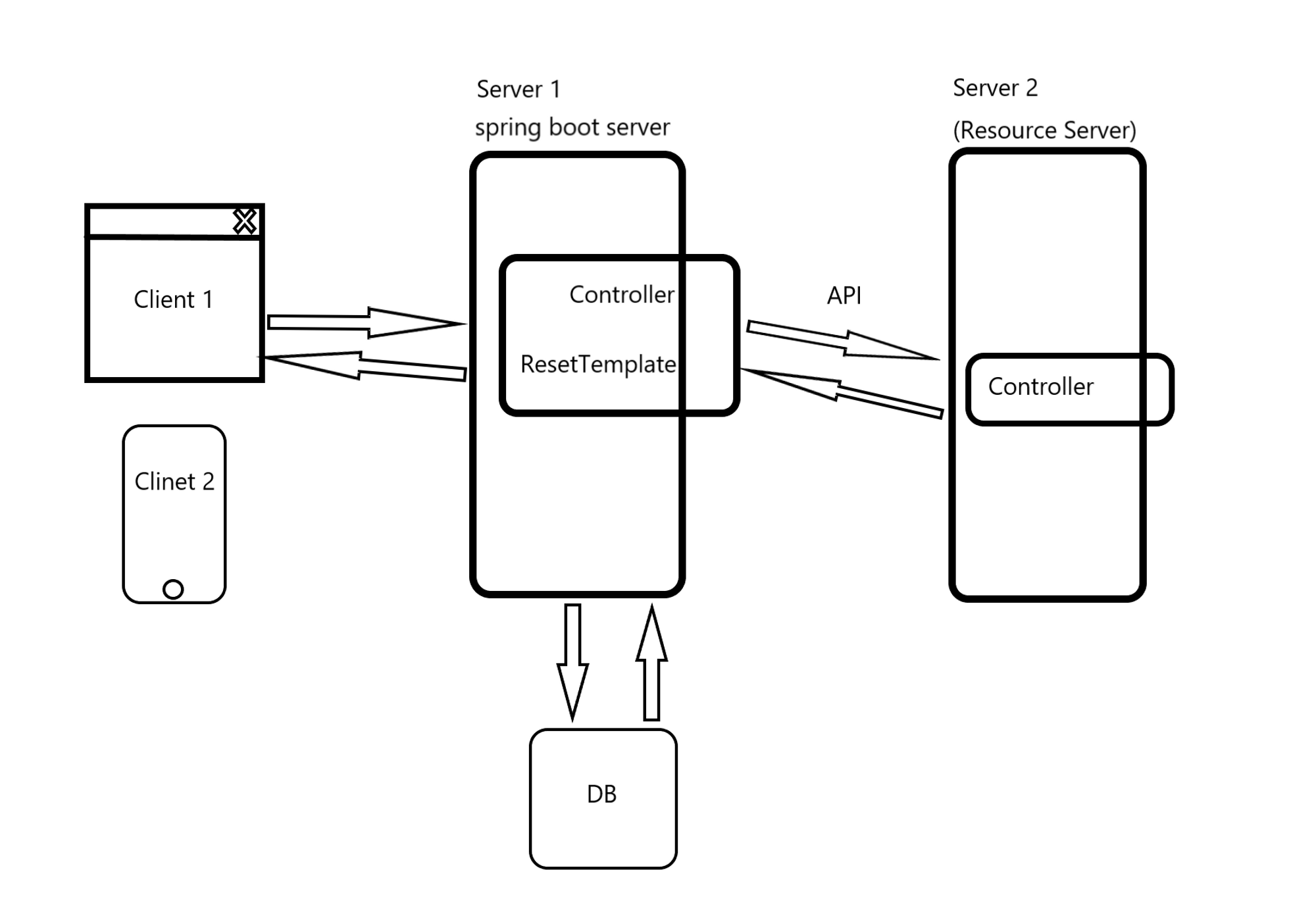
https://jsonplaceholder.typicode.com/todos시나리오 코드 1 단계
GET 방식으로 요청 처리 하기
package com.tencoding.demo3.controller;

import java.net.URI;

import org.springframework.http.HttpStatus;
import org.springframework.http.ResponseEntity;
import org.springframework.web.bind.annotation.GetMapping;
import org.springframework.web.bind.annotation.PathVariable;
import org.springframework.web.bind.annotation.RestController;
import org.springframework.web.client.RestTemplate;
import org.springframework.web.util.UriComponentsBuilder;

@RestController // IoC
public class HomeController {
	// 웹 브라우저 --> GET ()
	// 주소 설계 http://localhost:8080/todos/{id}


	@GetMapping("/todos/{id}")
	public ResponseEntity<?> restTemplate1(@PathVariable Integer id) {

		// 1. RestTemplate을 사용하려면 먼저 URI 객체를 만들어 줘야 한다.
		// URI uri = new URI("https://jsonplaceholder.typicode.com/todos);
		URI uri = UriComponentsBuilder
				.fromUriString("https://jsonplaceholder.typicode.com")
				.path("/todos")
				.path("/" + id)
				.encode()
				.build()
				.toUri();

		RestTemplate restTemplate = new RestTemplate();
		// uri 객체, 응답 받고자 하는 타입을 명시
		ResponseEntity<String> response = restTemplate.getForEntity(uri, String.class);
		System.out.println(response.getStatusCodeValue());
		System.out.println(response.getHeaders());
		System.out.println("----------------------");
		System.out.println(response.getBody());

		return ResponseEntity.status(HttpStatus.OK).body(response.getBody());
	}
}
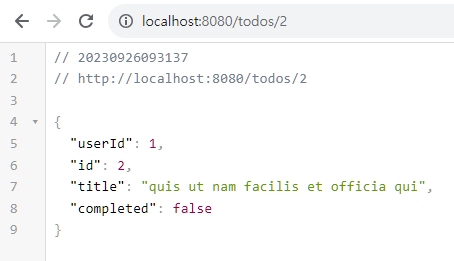
결과
| RestTemplate Method | HTTP Method | 설명 |
|---|---|---|
| getForEntity | GET | get 요청을 보내고 ResponseEntity로 응답을 받음 |
| getForObject | GET | get 요청을 보내고 java object로 매핑받아서 반환받음 |
| exchange | Any | 헤더 세팅해서 HTTP Method로 요청보내고 ResponseEntity로 반환받음 |
| put | PUT | PUT 형식으로 요청 |
| delete | DELETE | DELETE 형식으로 요청 |
| postForLocation | POST | post 요청을 보내고 java.net.URI 로 반환받음 |
| postForObject | POST | post 요청을 보내고 Object로 반환받음 |
| postForEntity | POST | POST 방식으로 요청하면 ResponseEntity를 반환해 준다. |
| optionsForAllow | OPTIONS | 해당 URI에서 지원하는 HTTP 메서드를 조회 |
| execute | Any | 요청과 응답에 대한 콜백 수정 |
시나리오 코드 2단계
GET 방식으로 요청 DTO 응답받기
package com.tencoding.demo3.dto;

import lombok.AllArgsConstructor;
import lombok.Builder;
import lombok.Data;
import lombok.NoArgsConstructor;

@Data
@Builder // 주의
@NoArgsConstructor // 기본생성자 만들어 줘야함
@AllArgsConstructor // 모든 매개 변수를 받을 수 있는 생성자 만들어 준다.
public class Todo {

	private Integer userId;
	private Integer id;
	private String title;
	private boolean completed;

}
package com.tencoding.demo3.controller;

import java.net.URI;

import org.springframework.http.HttpStatus;
import org.springframework.http.ResponseEntity;
import org.springframework.web.bind.annotation.GetMapping;
import org.springframework.web.bind.annotation.PathVariable;
import org.springframework.web.bind.annotation.RestController;
import org.springframework.web.client.RestTemplate;
import org.springframework.web.util.UriComponentsBuilder;

import com.tencoding.demo3.dto.Todo;

@RestController // IoC
public class HomeController {
	// 웹 브라우저 --> GET ()
	// 주소 설계 http://localhost:8080/todos/{id}


	@GetMapping("/todos/{id}")
	public ResponseEntity<?> restTemplate1(@PathVariable Integer id) {

		// 1. RestTemplate을 사용하려면 먼저 URI 객체를 만들어 줘야 한다.
		// URI uri = new URI("https://jsonplaceholder.typicode.com/todos);
		URI uri = UriComponentsBuilder
				.fromUriString("https://jsonplaceholder.typicode.com")
				.path("/todos")
				.path("/" + id)
				.encode()
				.build()
				.toUri();

		RestTemplate restTemplate = new RestTemplate();
		// uri 객체, 응답 받고자 하는 타입을 명시
		ResponseEntity<Todo> response = restTemplate.getForEntity(uri, Todo.class);
		System.out.println(response.getStatusCodeValue());
		System.out.println(response.getHeaders());
		System.out.println("----------------------");
		System.out.println(response.getBody());
		System.out.println("----------------------");
		// response.getBody() --> Todo Type
		System.out.println(response.getBody().getUserId());
		System.out.println(response.getBody().getId());
		System.out.println(response.getBody().getTitle());
		System.out.println(response.getBody().isCompleted());

		// 빌더 패턴 사용 방법 build() 메서드 반드시 호출
		// Todo todo = Todo.builder().id(1).title("반가워").build();

		return ResponseEntity.status(HttpStatus.OK).body(response.getBody());
	}
}
시나리오 코드 3단계
'Content-type': 'application/json; charset=UTF-8'POST 방식과 exchange 메서드 활용
package com.tencoding.demo3.controller;

import java.net.URI;

import org.springframework.http.HttpEntity;
import org.springframework.http.HttpHeaders;
import org.springframework.http.HttpMethod;
import org.springframework.http.HttpStatus;
import org.springframework.http.ResponseEntity;
import org.springframework.util.LinkedMultiValueMap;
import org.springframework.util.MultiValueMap;
import org.springframework.web.bind.annotation.GetMapping;
import org.springframework.web.bind.annotation.PathVariable;
import org.springframework.web.bind.annotation.RestController;
import org.springframework.web.client.RestTemplate;
import org.springframework.web.util.UriComponentsBuilder;

import com.tencoding.demo3.dto.Todo;

@RestController // IoC
public class HomeController {
	// 웹 브라우저 --> GET ()
	// 주소 설계 http://localhost:8080/todos/{id}


	@GetMapping("/todos/{id}")
	public ResponseEntity<?> restTemplate1(@PathVariable Integer id) {

		// 1. RestTemplate을 사용하려면 먼저 URI 객체를 만들어 줘야 한다.
		// URI uri = new URI("https://jsonplaceholder.typicode.com/todos);
		URI uri = UriComponentsBuilder
				.fromUriString("https://jsonplaceholder.typicode.com")
				.path("/todos")
				.path("/" + id)
				.encode()
				.build()
				.toUri();

		RestTemplate restTemplate = new RestTemplate();
		// uri 객체, 응답 받고자 하는 타입을 명시
		ResponseEntity<Todo> response = restTemplate.getForEntity(uri, Todo.class);
		System.out.println(response.getStatusCodeValue());
		System.out.println(response.getHeaders());
		System.out.println("----------------------");
		System.out.println(response.getBody());
		System.out.println("----------------------");
		// response.getBody() --> Todo Type
		System.out.println(response.getBody().getUserId());
		System.out.println(response.getBody().getId());
		System.out.println(response.getBody().getTitle());
		System.out.println(response.getBody().isCompleted());

		// 빌더 패턴 사용 방법 build() 메서드 반드시 호출
		// Todo todo = Todo.builder().id(1).title("반가워").build();

		return ResponseEntity.status(HttpStatus.OK).body(response.getBody());
	}

	@GetMapping("/exchange-test")
	public ResponseEntity<?> restTemplate2() {

		// 1. URI 객체 만들어 주기
		URI uri = UriComponentsBuilder
				.fromUriString("https://jsonplaceholder.typicode.com")
				.path("/posts")
				.encode()
				.build()
				.toUri();

		// 2. 객체 생성 - 메서드 호출
		RestTemplate restTemplate = new RestTemplate();
		// ! HTTP MESSAGE Header 생성하기

		// exchange 만드는 방법
		// 1. HttpHeaders 객체를 만들고 Header 메세지 구성
		// 2. body 데이터를 key=value 구조 만들고
		// 3. HttpEntity 객체 생성해서 결합

		// 1. Header 메세지 구성
		HttpHeaders headers = new HttpHeaders();
		// 'Content-type': 'application/json; charset=UTF-8'
		headers.add("Content-type", "application/json; charset=UTF-8");

		// 2. body 데이터를 key=value 구조 만들고
		MultiValueMap<String, String> params = new LinkedMultiValueMap<>();
		params.add("title", "블로그 포스트 1");
		params.add("body", "오늘의 점심");
		params.add("userId", "101");


		// 3. 헤더 바디 -> HttpEntity Object 결합
		HttpEntity<MultiValueMap<String, String>> reqEntity
		= new HttpEntity<>(params,headers);

		// HTTP 요청
		ResponseEntity<String> response
					= restTemplate.exchange(uri, HttpMethod.POST, reqEntity, String.class);

		System.out.println("response getHeaders 확인 : " + response.getHeaders());
		System.out.println("response getBody 확인 : " + response.getBody());


		return ResponseEntity.status(HttpStatus.CREATED)
				.body(response.getBody());
	}
}
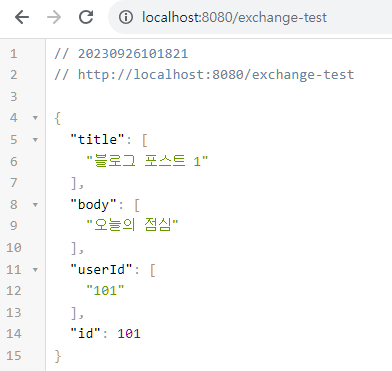
결과