싱글톤
싱글톤이란 디자인 패턴 중 하나로서 게임 상이나 메모리 상으로 단 하나만 존재하며
언제 어디서든 사용 가능한 오브젝트를 만들 때 사용되는 디자인 패턴입니다.
싱글톤의 특징 1. 👉 접근성
- 게임의 전범위에 걸쳐서 동작 해야하는 중요한 기능들을 싱글톤으로 만듭니다.
- 이렇게 싱글톤으로 만든 오브젝트는 클래스 어디서나 가져오는 작업을 편리하게 할 수 있습니다.
싱글톤의 특징 2. 👉 유일성
- 싱글톤으로 만든 오브젝트는 복제가 되든 새로 생성되어 여러개가 되든 기능별로 하나만 존재해야합니다.
- 싱글톤의 특성상 복수로 존재하게 되면 스크립트끼리 충돌하기 때문입니다.
싱글톤의 특징 3. 👉 존속성
- 유니티 상에서 씬이 전환이 되더라도 오브젝트가 유지되도록 해야합니다.
싱글톤의 단점
- static이 늘어갈수록 메모리에 고정적으로 할당되는 양이 늘어나기 때문에 메모리를 많이 잡아먹게 됩니다. 따라서 꼭 필요한 클래스만 싱글톤으로 활용하시면 메모리 관리 차원에서 좋습니다.
- 다른 디자인 패턴과 달리 싱글톤은 "철회"가 어렵습니다.
오브젝트가 하나여야 하는지 오브젝트가 담고 있는 "데이터"가 하나여야 하는지 잘 생각해서 트랜젝션을 대신 사용해야 할 수도 있습니다. - 싱글톤은 멀티프로세스 환경에서 의도한 바와 다르게 동작하기 때문에 그것도 조심해야 합니다.
그래서 데이터가 유일해야 하면 DB(Redis같은 좀 덜 무거운거)를 쓰고 데이터와 함께 행동까지 유일해야 하면(디바이스 드라이버 등) 싱글톤을 씁니다.
매니저
파일 매니저, 몬스터 매니저, 게임 매니저처럼 단 하나만 존재하는 오브젝트를 손쉽게 쓸 수 있는 필요가 있을때 사용합니다. 몬스터 오브젝터는 여러개지만 전체 몬스터를 관리해 줄 오브젝트는 “몬스터 매니저” 단 하나만 있으면 됩니다. 그럼 몬스터 매니저는 싱글톤을 사용하면 됩니다.
매니저를 싱글톤으로 만드는 법
static Managers s_instance;              // 1.
public static Managers Instance { get { init(); return s_instance; } } // 2.- 인스턴스를 전역으로 선언한다.
- static을 써서 인스턴스의 유일성을 보장시킨다.
- 전역으로 설정한 인스턴스를 넘겨줄 수 있도록 프로퍼티로 만든다.
- 인스턴스를 초기화 한 다음 넘겨줄수 있도록 한다.
static void init()
{
    GameObject go = GameObject.Find("Managers");   // 3.

    if (go == null)
    {
        go = new GameObject("Managers");      // 3-1.
        go.AddComponent<Managers>();           // 3-2.
    }

    if (go.transform.parent != null && go.transform.root != null)  	// 4-1.
        DontDestroyOnLoad(go.transform.root.gameObject);			// 4-2.
    else
        DontDestroyOnLoad(go);   			// 4-3.

    s_instance = go.GetComponent<Managers>();              // 5.
}- Hierarchy에서 'Managers 오브젝트'를 찾아온다.
- 3-1. 만약 없다면 Managers 이름으로 빈 오브젝트를 만들어준다.
- 3-2. 오브젝트에 Managers 스크립트 컴포넌트를 추가한다.
- DontDestroyOnLoad()함수를 사용하면 씬을 바꿔도 오브젝트가 사라지지 않게 할 수 있다.
- 4-1. DontDestroyOnLoad는 오브젝트가 자식 개념으로 포함되어 있다면 제대로 동작하지 않는다.
- 4-2. 따라서 부모,루트에 게임오브젝트가 포함되어 있는지 확인후 부모 오브젝트 자체를 DontDestroyOnLoad에 넣어준다.
- 4-3. 부모 오브젝트가 없다면 그대로 DontDestroyOnLoad에 넣어준다.
- 모든 작업이 끝났으면 인스턴스에 넣어준다.
void Awake()
{
    init();			// 6.
    if (s_instance != this) 	// 7.
	{
	    Destroy(gameObject.GetComponent<Managers>());	// 7-1,2.
	}
}- 사용자가 매니저를 인스펙터에서 만들어서 컴포넌트로 붙여줬을 때를 위해 Awake()에서 init()을 실행 시킬 수 있게 해준다.
- 만약 스크립트가 Managers가 아닌 다른 오브젝트에 실수 붙었을 경우를 위해 중복의 경우 삭제해준다.
- 7-1. Destroy() : 인자 안에 있는 것을 삭제한다.
- 7-2. 'gameObject.GetComponent< Managers >()' : 내 오브젝트(현재 스크립트가 붙은 오브젝트)에서 'Managers 스트립트 컴포넌트'를 가져온다.
- 참고) gameobject : 모든 컴포넌트는 gameObject 변수를 이용해 자신을 사용 중인 게임 오브젝트(자신의 게임 오브젝트)에 접근할 수 있다. (클래스에서 this를 사용하는것과 비슷함.)
전체 코드
🌍Managers
using System.Collections;
using System.Collections.Generic;
using UnityEngine;

public class Managers : MonoBehaviour
{
    static Managers s_instance;
    public static Managers Instance { get { init(); return s_instance; } }

    static void init()
    {
        GameObject go = GameObject.Find("Managers");
        if (go == null)
        {
            go = new GameObject("Managers");
            go.AddComponent<Managers>();
        }

        if (go.transform.parent != null && go.transform.root != null)
            DontDestroyOnLoad(go.transform.root.gameObject);
        else
            DontDestroyOnLoad(go);

        s_instance = go.GetComponent<Managers>();
    }

    void Awake()
    {
        init();
        if (s_instance != this)
		{
		    Destroy(gameObject.GetComponent<Managers>());
		}
    }
}🌍다른 클래스에서 사용(예시 : 플레이어에서 매니저사용)
public class Player : MonoBehaviour
{
    void Start()
    {
        Managers mg = Managers.Instance;
        //Managers.Instance.~~()    //바로 접근도 가능
    }

    void Update()
    {

    }
}
결과
-
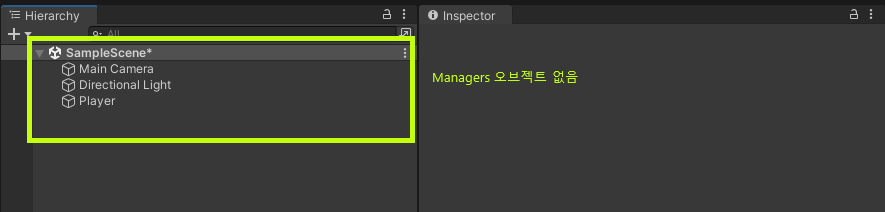
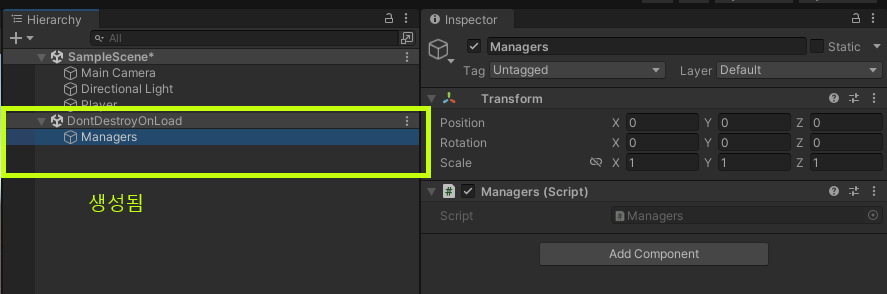
하이얼아키에 Managers 오브젝트가 없는 경우
👇실행 전
👇실행 후 (Managers오브젝트를 만들고 스크립트 컴포넌트를 추가후 DontDestroyOnLoad에 포함)
-
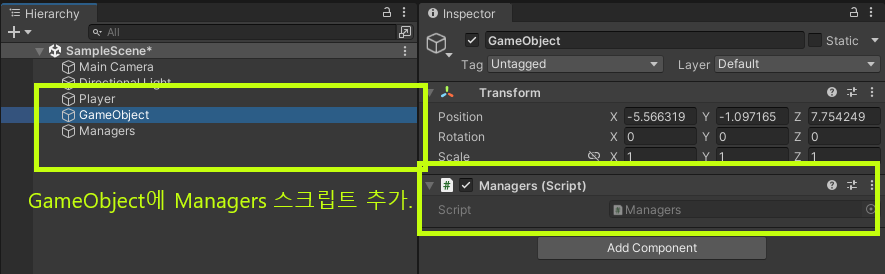
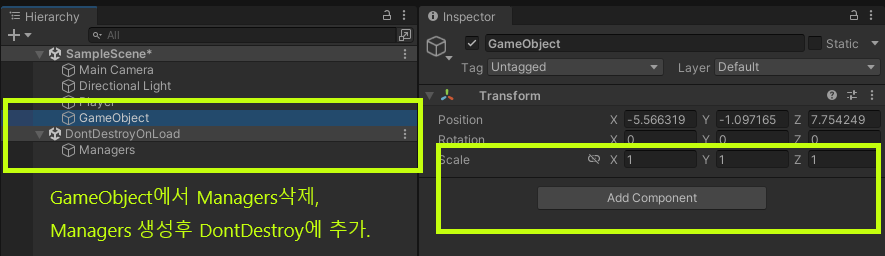
빈 게임 오브젝트에 Managers 스크립트를 중복해서 넣은 경우
👇실행 전
👇실행 후(빈 게임 오브젝트에 있던 컴포넌트만 잘 삭제되었다.)
- Managers가 Singleton 오브젝트(부모 오브젝트)에 포함되어있는 경우
👇실행 전
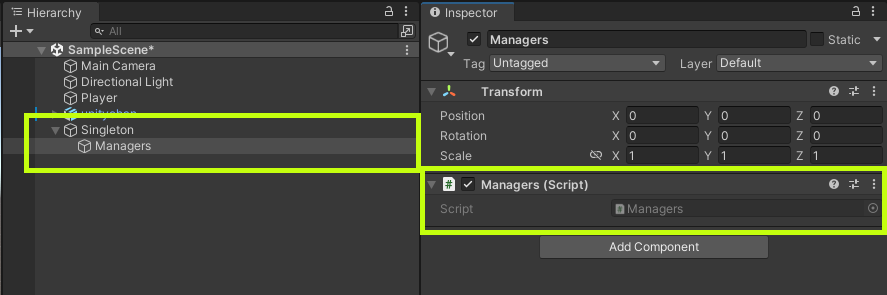
👇실행 후(부모 오브젝트와 같이 DontDestroyOnLoad에 포함 됨)
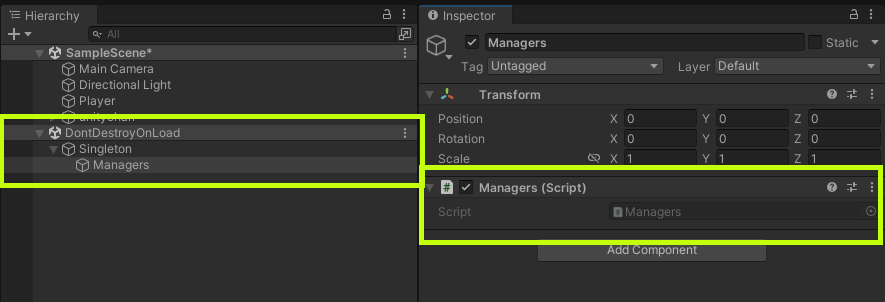
싱글톤을 제네릭 클래스로 확장하기
게임을 만들다보면 매니저 클래스가 많이 늘어나는데, 매번 이 설정을 하는게 번거로울 수 있습니다.
따라서 제네릭 클래스로 만들어 놓으면 필요할때 상속 받아서 간단하게 활용가능합니다.
전체 코드
🌍Singleton< T >
using System.Collections;
using System.Collections.Generic;
using Unity.VisualScripting;
using UnityEngine;

//상속 가능하도록 제네릭 클래스로 만들어준다.
//(where 조건 : 반드시 MonoBehaviour의 파생클래스 여야만 합니다.)
public class Singleton<T> : MonoBehaviour where T : MonoBehaviour
{
    static T s_instance;
    public static T Instance { get { init(); return s_instance; } }

    static void init()
    {
        GameObject go = GameObject.Find(typeof(T).Name);

        if (go == null)
        {
            go = new GameObject(typeof(T).Name);
            go.AddComponent<T>();
        }

        if (go.transform.parent != null && go.transform.root != null)
            DontDestroyOnLoad(go.transform.root.gameObject);
        else
            DontDestroyOnLoad(go);

        s_instance = go.GetComponent<T>();
    }

    void Awake()
    {
        init();
        if (s_instance != this)
        {
            Destroy(gameObject.GetComponent<T>());
        }
    }

}🌍매니저로 만들 클래스에 상속
using System.Collections;
using System.Collections.Generic;
using UnityEngine;

public class UIManager : Singleton<UIManager>	//상속
{
    void Start()
    {

    }

    void Update()
    {

    }

    public void Print()
    {
        //UI매니저에서 해야할 일
    }
}
🌍다른 클래스에서 사용(예시 : 플레이어에서 UI매니저사용)
using System.Collections;
using System.Collections.Generic;
using UnityEngine;

public class Player : MonoBehaviour
{

    void Start()
    {
        UIManager UM = UIManager.Instance;
        UM.Print();
    }
    void Update()
    {

    }

}