개요
서버에 데이터를 보내기 위해서는 오브젝트를 byte array 로 serialize 해야합니다.
저는 모든 데이터를 json으로 관리하기 때문에, json string을 byte array 로 변환하고 compression 하여 보내보도록 하겠습니다.
구현
	public static class Serializer
	{
		public static byte[] JsonToByteArray(string path)
		{
			string jsonData = File.ReadAllText(path);
			return Zip(jsonData.Trim());
		}

		public static T ByteArrayToObject<T>(byte[] bytes)
		{
			string jsonData = Unzip(bytes);
			Debug.Log(jsonData);
			T objectData = JsonUtility.FromJson<T>(jsonData);
			return objectData;
		}

		/** Compressions **/
		private static byte[] Zip(string str)
		{
			Debug.Log("Unzip bytes : " + str.Length);
			var bytes = Encoding.UTF8.GetBytes(String.Concat(str.Where(c => !Char.IsWhiteSpace(c))));

			using (var msi = new MemoryStream(bytes))
			using (var mso = new MemoryStream())
			{
				using (var gs = new GZipStream(mso, CompressionMode.Compress))
				{
					msi.CopyTo(gs);
				}
				return mso.ToArray();
			}
		}
		private static string Unzip(byte[] bytes)
		{
			using (var msi = new MemoryStream(bytes))
			using (var gs = new GZipStream(msi, CompressionMode.Decompress))
			using (var mso = new MemoryStream())
			{
				gs.CopyTo(mso);
				return Encoding.UTF8.GetString(mso.ToArray());
			}
		}
	}
Compression 관련 코드는 해당 글을 참고하였습니다.
JsonUtility를 사용하여 간단하게 구현해보았습니다.
우선 로컬에서 먼저 테스트 해보겠습니다.
테스트 - 로컬
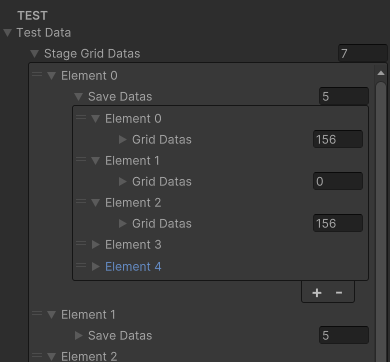
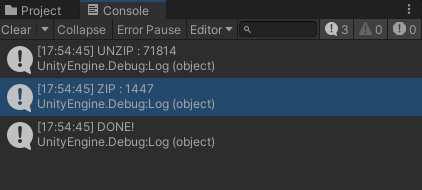
기능은 잘 작동하지만 쓸모없는 데이터들이 많습니다.
우선 쓸모없는 데이터들을 다 없애주겠습니다.
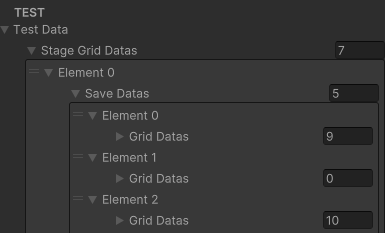
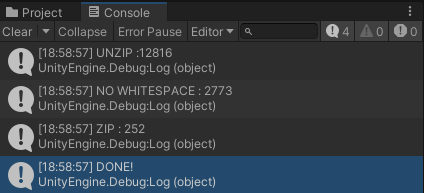
WhiteSpace까지 지워서 네트워크 상에서 이동하는 데이터를 최소화 해주었습니다.
테스트 - 서버
/** ClientManager.cs **/

	public class ClientManager
	{
		public void Init()
		{

		}

		public void SendMessage()
		{
			_ = Task.Run(() => SendMessageAsync());
		}

		private async void SendMessageAsync()
		{
			Debug.Log("SEND MESSAGE");
			TcpClient client = new TcpClient(Constants.IP_ADDR_INHO, Constants.PORT_VM_TCP);
			NetworkStream stream = client.GetStream();

			byte[] buffer = Serializer.JsonToByteArray(Application.persistentDataPath + "/PlayData.json");
			await stream.WriteAsync(buffer, 0, buffer.Length);
			await stream.FlushAsync();

			buffer = new byte[1024];
			int bytesRead = stream.Read(buffer, 0, buffer.Length);
			string response = Encoding.UTF8.GetString(buffer, 0, bytesRead);
			Debug.Log("RESPONSE : " + response);

			client.Close();
		}
	}
전에 작성했던 코드에서 데이터 부분만 직렬화 해주는 코드로 변경했습니다.
/** ServerManager.cs **/


		private async void HandleClient(TcpClient client)
		{
			try
			{
				byte[] buffer = new byte[1024];
				int bytesRead;
				Stream stream = client.GetStream();

				while ((bytesRead = await stream.ReadAsync(buffer, 0, buffer.Length)) > 0)
				{
					GameplayData data = Serializer.ByteArrayToObject<GameplayData>(buffer, bytesRead);
					Debug.Log(data.ToString());

					string result = await RunSimulation();
					byte[] sendBuff = Encoding.UTF8.GetBytes(result);
					await stream.WriteAsync(sendBuff, 0, sendBuff.Length);
					DebugServer.Log("Transmit: " + result);
				}
			}
			catch(Exception ex)
			{
				DebugServer.Log($"Client Error : {ex.Message}");
			}
			finally
			{
				client.Close();
			}
		}
ServerManager 는 해당 byte배열을 GameplayData 로 받고 ToString 으로 데이터가 제대로 들어갔는지 확인하겠습니다.
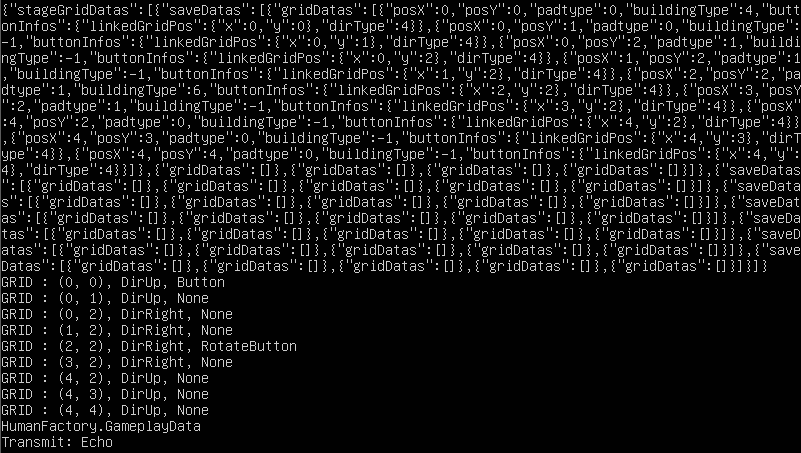
서버에서도 JSON파일을 잘 받는 모습을 확인하실 수 있습니다.
어느정도 정리를 한 후에, 서버 위에서 시뮬레이션을 돌리고 결과를 업데이트 및 echo 하도록 만들어보겠습니다.
참고자료
https://stackoverflow.com/questions/7343465/compression-decompression-string-with-c-sharp