
Torch에서의 자료형
- 텐서(Tensor)란 벡터나 행렬을 일반화 시켜 배열화한것
- 텐서는 데이터 형태(dtype), 저장장치(CPU 또는 GPU), 형태(shape)와 크기(size)등의 속성을 지닌다.
- CPU와 GPU의 구분
1) CPU tensor : 일반적인 컴퓨터 메모리 (RAM)에 저장되어 CPU로 연산됨
2) GPU tensor : CUDA를 지원하는 GPU 메모리에 저장되어 고속 병렬 연산에 사용됨
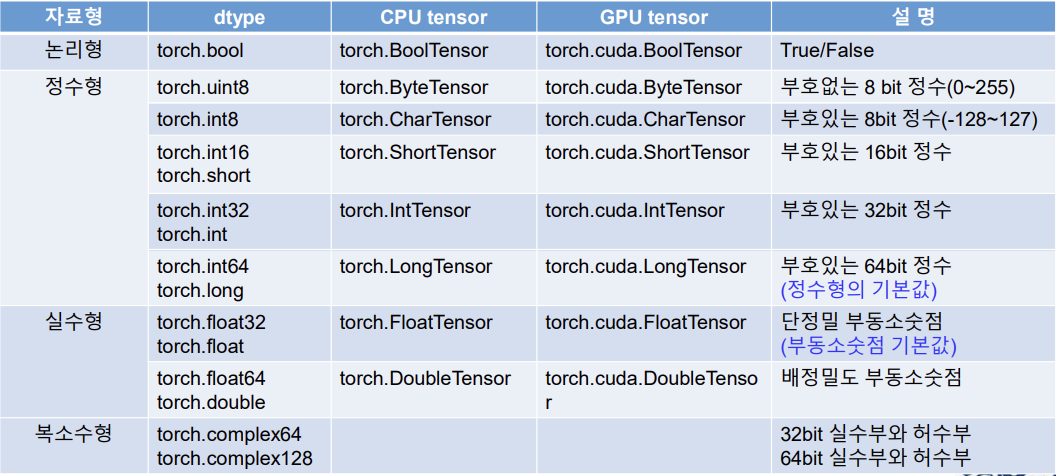
주요 자료형의 구분
텐서 (Tensor) 생성하기
텐서에 자연수를 넣었을때
import torch

x = torch.tensor(1)
print('x=: ', x)

print('dtype:', x.dtype)
print('dim:', x.dim())
print('shape:', x.shape)
print('data:', x.data)
print('number of elements:', x.numel())
print('convert to numpy:', x.numpy())
print('only one element:', x.item())
x=: tensor(1)
dtype: torch.int64
dim: 0
shape: torch.Size([])
data: tensor(1)
number of elements: 1
convert to numpy: 1
only one element: 1
텐서에 소수를 넣었을때
y = torch.tensor(1.0)
print(y)
print(y.dtype)
y = : tensor(1.)
dtype : torch.float32
텐서에 배정밀도소수점을 넣었을때
z = torch.tensor(1, dtype = torch.double)
print(z)
print(z.dtype)
z = tensor(1., dtype = torch.float64)
dtype : torch.float64
x의 식별자를 본다. id(x)는 객체 자체의 신원값을 봄
x = torch.tensor(1)
print('Before : id(x) = ', id(x))
x = torch.tensor(10)
print('After: id(x)=', id(x))
Before : id(x) = 4363833328
After: id(x)= 4363847072
텐서 내부 값 바꾸기
y = torch.tensor(1.0)
y.data = torch.tensor(20)
y.data는 y가 정의가 되었을때만 쓸수 있다.
1차원 텐서 생성하기
data = [1, 2, 3, 4, 5]
x = torch.tensor(data)
print('x=:', x)
print('size:', x.shape)
print('dimension:', x.dim())
print('number of elements:', x.numel())
x=: tensor([1, 2, 3, 4, 5])
size: torch.Size([5])
dimension: 1
number of elements: 5
- data의 자료형 : list
x의 자료형 : tensor - x의 차원은 1차원, x의 크기는 원소의 개수가 5개인 tensor
- Tensor는 numpy의 배열로 변환이 가능하다. y는 Numpy의 ndarray이며, 크기는 5인 1차원 배열이 된다.
텐서를 numpy 형태로 바꾸기
y = x.numpy()
print('type:', type(y))
print('size:', y.shape)
type: <class 'numpy.ndarray'>
size: (5,)
모든 차원의 텐서는 Numpy로 바꿀수 있다. 다만, numpy는 CPU를 써서, 텐서가 GPU를 쓴다면, 코드가 안돌아갈수 있다.
Numpy 배열에서 1D 텐서의 생성
import numpy as np

array = np.array([1, 2, 3, 4, 5])
print('arrary1 type:', type(array1))
x = torch.tensor(array1)
print('x=:', x)
print('type of x:', type(x))
print('data type:', x.dtype)
print('shape of x :', x.shape)
arrary1 type: <class 'numpy.ndarray'>
x=: tensor([1, 2, 3, 4, 5])
type of x: <class 'torch.Tensor'>
data type: torch.int64
shape of x : torch.Size([5])
- array1 자료형 : ndarray
- x는 Numpy array로 만든 텐서 torch의 1D 텐서이고, x의 자료형은 int64인 정수형
- x의 크기는 5.
Numpy를 Tensor로 변환하기
y = torch.from_numpy(array1)
print('y=:', y)
print('type of y:', y.dtype)
print('size of y:', y.size())
y=: tensor([1, 2, 3, 4, 5])
type of y: torch.int64
size of y: torch.Size([5])
- y는 Numpy array로 만든 텐서, y의 자료형은 int64인 정수형
- y는 torch의 1D 텐서이고, y의 크기는 동일하게 5를 유지
- x는 y를 Numpy array로 환원시켜 만든 배열이다.
type()을 통해 배열임을 확인!
Tensor를 Numpy로 변환하기
x = y.numpy()
print('x=:', x)
print('type of x:', type(x))
x=: [1 2 3 4 5]
type of x: <class 'numpy.ndarray'>
Tensor의 자료형 정하기
x = y.numpy()
y = torch.tensor(x, dtype = torch.int)
print('y=:', y)
print('data type:', y.dtype)
y=: tensor([1, 2, 3, 4, 5], dtype=torch.int32)
data type: torch.int32
z = torch.tensor(x, dtype = torch.float32)
print('z=:', z)
print('data type:', z.dtype)
z=: tensor([1., 2., 3., 4., 5.])
data type: torch.float32
- x는 Numpy array
- y는 x를 이용해 만든 1D 텐서이고, 자료형은 정수
- z는 x를 이용해 만든 1D 텐서이고, 자료형은 실수
2D Tensor 생성하기
data_a = [[1,2,3,4,5,6]]
data_b = [[1.,2.,3.],[4,5,6]]

a = torch.tensor(data_a)
b = torch.tensor(data_b)

print('a=:', a)
print('b=:', b)

print('dimension of a:', a.dim())
print('dimension of b:', b.dim())
print('size of a:', a.shape)
print('size of b:', b.shape)
print('number of elements: a', a.numel())
print('number of elements: b', b.numel())
print('data type of a:', a.dtype)
print('data type of b:', b.dtype)
a=: tensor([[1, 2, 3, 4, 5, 6]])
b=: tensor([[1., 2., 3.],
[4., 5., 6.]])
dimension of a: 2
dimension of b: 2
size of a: torch.Size([1, 6])
size of b: torch.Size([2, 3])
number of elements: a 6
number of elements: b 6
data type of a: torch.int64
data type of b: torch.float32
몇 가지 특성 확인하기
x = torch.tensor([[1, 2, 3], [4, 5, 6]], dtype=torch.float32)
print('x=:', x)
print('stride:', x.stride())
print('storage:', x.storage())
print('storage offset:', x.storage_offset())
print('data ptr:', x.storage().data_ptr())
x=: tensor([[1., 2., 3.],
[4., 5., 6.]])
stride: (3, 1)
storage: 1.0
2.0
3.0
4.0
5.0
6.0
[torch.storage.TypedStorage(dtype=torch.float32, device=cpu) of size 6]
storage offset: 0
data ptr: 4805725440
- x처럼 2D 텐서를 직접 생성할 수 있다.
- stride() : 각 차원에서 다음 항목의 위치를 결정해준다.
- storage() : x를 저장하고있는 메모리를 반환한다.
- storage_offset() : 데이터를 저장하는 메모리상의 offset 값을 반환한다.
- storage().data_ptr : 실제 메모리 주소의 포인터값을 반환한다.
Zero Tensor & One Tensor
x1 = torch.zeros(6)
x2 = torch.zeros(size = (2, 3))
print('x1=:', x1)
print('x2=:', x2)

y1 = torch.ones(6)
y2 = torch.ones(size = (2, 3))
print('y1=:', y1)
print('y2=:', y2)
x1=: tensor([0., 0., 0., 0., 0., 0.])
x2=: tensor([[0., 0., 0.],
[0., 0., 0.]])
y1=: tensor([1., 1., 1., 1., 1., 1.])
y2=: tensor([[1., 1., 1.],
[1., 1., 1.]])
z1 = torch.zeros_like(x1)
z2 = torch.ones_like(x2)
print('z1=:', z1)
print('z2=:', z2)
z1=: tensor([0., 0., 0., 0., 0., 0.])
z2=: tensor([[1., 1., 1.],
[1., 1., 1.]])
w = torch.ones(6).zero_()
print('w=:', w)
y1.zero_()
print('y1=:', y1)
w=: tensor([0., 0., 0., 0., 0., 0.])
y1=: tensor([0., 0., 0., 0., 0., 0.])
y1.zero()는 torch.zero(y1)으로 사용해도 무방하다.
초기화 되지 않은 Tensor 생성하기
x = torch.empty((2, 3))
print('x=:', x)
x=: tensor([[0., 0., 0.],
[0., 0., 0.]])
torch.fill_(x, 0.0)
print('x=:', x)
x=: tensor([[0., 0., 0.],
[0., 0., 0.]])
y = torch.full((2, 3), 0.0)
print('y=:', y)
z = torch.full_like(y, 1.0)
print('z=:', z)
y=: tensor([[0., 0., 0.],
[0., 0., 0.]])
z=: tensor([[1., 1., 1.],
[1., 1., 1.]])
- x는 초기화 되지 않은 텐서를 생성하기 때문에 임의의 값이 원소에 섞일 수 있다.
- 앞에서 만들어진 x를 0.0으로 초기화 시켜 변경한 경우이다.
- y는 전체 원소를 0.0으로 채워 2차원 텐서를 생성한 것이다.
- z는 앞에서 생성한 y의 텐서와 동일한 크기를 가지면서, 자료의 원소값을 모두 1.0으로 채워서 나타낸 텐서이다.
규칙을 통한 Tensor 생성하기
x1 = np.arange(5)
y1 = torch.arange(end = 5)
y2 = torch.arange(start=1, end=10)
y3 = torch.arange(start=1, end=10, step=2)
z1 = torch.linspace(start=0, end=10, steps=2)
z2 = torch.linspace(start=0, end=10, steps=5)
print('x1=:', x1)
print('y1=:', y1)
print('y2=:', y2)
print('y3=:', y3)
print('z1=:', z1)
print('z2=:', z2)
x1=: [0 1 2 3 4]
y1=: tensor([0, 1, 2, 3, 4])
y2=: tensor([1, 2, 3, 4, 5, 6, 7, 8, 9])
y3=: tensor([1, 3, 5, 7, 9])
z1=: tensor([ 0., 10.])
z2=: tensor([ 0.0000, 2.5000, 5.0000, 7.5000, 10.0000])
- x1과 y1은 모두 0에서 시작해서 1씩 증가하면서 크기가 5인 리스트와 텐서를 생성한다.
- step으로 시작점에서 다음 원소까지의 상대적인 거리를 지정할 수 있다.
- z1과 z2는 start와 end를 포함한 균등한 간격으로 steps에서 지정된 원소의 수 만큼을 크기로 갖는 텐서를 생성한 결과이다.
중요 : torch.arange()는 end값을 포함하지 않지만, torch.linspace()는 end값을 자료에 포함한다.
무작위 Tensor 생성하기
torch.set_printoptions(precision=2)
torch.manual_seed(45)
x1 = torch.empty(6)
x2 = torch.rand(6)
x3 = torch.rand_like(x2)
print('x1=:', x1)
print('x2=:', x2)
print('x3=:', x3)
x1=: tensor([0., 0., 0., 0., 0., 0.])
x2=: tensor([0.19, 0.96, 0.68, 0.90, 0.05, 0.56])
x3=: tensor([0.79, 0.06, 0.78, 0.15, 0.04, 0.10])
- set_printoptions()는 자료 출력시에 사용자가 정밀도를 지정할 수 있다. 여기서는 소숫점 둘째자리까지 나타내도록 지정하였다.
- x2는 0과 1 사이의 난수로 원소를 채워서 텐서를 생성한다.
- x3은 이미 생성된 텐서의 원소를 다른 난수로 바꾸어 생성한 텐서이다.
x1 = torch.empty(6)
y1 = torch.randperm(4)
y2 = torch.randint(high=5, size = (10, ))
y3 = torch.randint_like(x1, high=5)
z1 = torch.normal(mean=2, std = 3, size=(10, ))
print('y1=:', y1)
print('y2=:', y2)
print('y3=:', y3)
print('z1=:', z1)
z1.normal_(1, 5)
print('z1=:', z1)
y1=: tensor([3, 1, 2, 0])
y2=: tensor([1, 3, 4, 2, 2, 4, 3, 0, 3, 4])
y3=: tensor([2., 2., 4., 1., 3., 4.])
z1=: tensor([ 3.46, 1.93, 0.87, -3.44, 6.13, 4.60, -2.58, -1.23, 0.33, -0.27])
z1=: tensor([-0.43, -3.03, 1.79, 2.51, -0.49, 1.76, 6.27, 6.18, 6.22, 7.92])
- randperm(4)는 0에서 3까지 정수의 난수 순열을 반환한다.
- randint()는 low 값은 포함하고, high은 포함하지 않는 구간의 균등한 정수 난수를 만들어 반환한다.
- randint_like()는 입력텐서와 같은 모양과 크기를 갖는 난수 텐서를 반환한다.
- normal()은 평균과 표준편차를 갖는 정규 분포의 난수 텐서를 반환한다.
- normal_(1, 5)는 [1, 4] 범위의 균등한 정수로 된 난수로 주어진 텐서를 채워 반환한다.
정수형 Tensor와 실수형 Tensor 생성하기
N, C, H, W = 2, 1, 3, 4
x = torch.IntTensor(N, C, H, W).zero_()
print('x=:', x)
print('size of x:', x.shape)
x=: tensor([[[[0, 0, 0, 0],
[0, 0, 0, 0],
[0, 0, 0, 0]]],
    [[[0, 0, 0, 0],
      [0, 0, 0, 0],
      [0, 0, 0, 0]]]], dtype=torch.int32)
size of x: torch.Size([2, 1, 3, 4])
N은 이미지 개수, C는 채널의 숫자(흑백은 1, 컬러는 3), H W는 행과 열의 개수
y1 = torch.FloatTensor(6)
y2 = torch.FloatTensor([0, 1, 2, 3, 4, 5])
y3 = torch.FloatTensor(N, C, H, W).fill_(0)
print('y1=:', y1)
print('y2=:', y2)
print('y3=:', y3)
y1=: tensor([0., 0., 0., 0., 0., 0.])
y2=: tensor([0., 1., 2., 3., 4., 5.])
y3=: tensor([[[[0., 0., 0., 0.],
[0., 0., 0., 0.],
[0., 0., 0., 0.]]],
    [[[0., 0., 0., 0.],
      [0., 0., 0., 0.],
[0., 0., 0., 0.]]]])- x는 CPU tensor인 정수 텐서를 생성한 후, 전체 원소의 값을 0으로 초기화하여 반환한 것이다.
- y1, y2는 CPU tensor인 실수 텐서를 생성하고, y3는 주어진 크기의 실수 텐서를 생성한 후, 전체 원소의 값을 0으로 초기화하여 반환한 것이다.
x1 = torch.tensor([1,2,3,4], dtype=torch.int)
x2 = torch.tensor([1,2,3,4]).float()
x3 = torch.tensor([1,2,3,4]).to(torch.double)
y1 = x1.float()
y2 = x1.to(torch.double)
Tensor로 Tensor 생성하기
x = torch.tensor(())
y = x.new_tensor(data = [1,2])
z = x.new_zeros((5,))
s = x.new_ones((5,))
t = x.new_full((5,), 10.0)
print('x=:', x, 'x.dtype:', x.dtype, 'size :', x.shape)
print('y=:', y, 'y.dtype:', y.dtype, 'size:', y.shape)
print('z=:', z, 'z.dtype:', z.dtype, 'size:', z.shape)
print('s=:', s, 's.dtype:', s.dtype, 'size:', s.shape)
print('t=:', t, 't.dtype:', t.dtype, 'size :', t.shape)
x=: tensor([]) x.dtype: torch.float32 size : torch.Size([0])
y=: tensor([1., 2.]) y.dtype: torch.float32 size: torch.Size([2])
z=: tensor([0., 0., 0., 0., 0.]) z.dtype: torch.float32 size: torch.Size([5])
s=: tensor([1., 1., 1., 1., 1.]) s.dtype: torch.float32 size: torch.Size([5])
t=: tensor([10., 10., 10., 10., 10.]) t.dtype: torch.float32 size : torch.Size([5])
x는 크기가 0인 스칼라 텐서이다.
Tensor 복사
x = torch.tensor([1, 2, 3, 4, 5])
y1 = torch.zeros_like(x)
print('y1=:', y1)
y1.copy_(x)
print('y1=:', y1)
z = x.clone()
print('z=:', z)
w = x.detach()
print('w=:', w)
y1=: tensor([0, 0, 0, 0, 0])
y1=: tensor([1, 2, 3, 4, 5])
z=: tensor([1, 2, 3, 4, 5])
w=: tensor([1, 2, 3, 4, 5])
- x는 1차원 정수 텐서이다.
- y1은 앞에서 만든 x와 같은 크기를 갖는 텐서의 전체 원소를 0으로 변환한 텐서이다.
- y1.copy_(x) 는 y1에 x의 자료의 항목을 복사하여 나타낸 것이다.
- x.clone()은 x전체를 복사하여, z를 생성한 것이다.
- x.detach()는 x를 현재 계산 그래프에서 분리하고, 새로운 텐서를 w로 저장하게 된다. (즉, detach()를 하면, 그래프로 더 이상 연결되지 못하므로, 자동 미분을 하지 않는다.)
CUDA Tensor의 생성
os.environ["CUDA_VISIBLE_DEVICES"] = "0"
print(torch.cuda.is_available())
x_gpu = torch.tensor([1, 2, 3, 4], device = 'cuda')
y_gpu = torch.tensor([1, 2, 3, 4]).to(device = 'cuda')
x_cpu = torch.tensor([1, 2, 3, 4])
x_gpu = x_cpu.to(device = 'cuda:0')- 만약 GPU가 있다면, torch.cuda.is_available을 통해 사용가능한지를 확인할 수 있다.
- x_gpu 처럼 CADA tensor를 gpu를 명시해서 생성하거나, 또는 .to() 를 통해 CPU에서 GPU로 반환할 수 있다.
- x_cpu는 torch의 1차원 CPU 텐서이다.
- .to()를 통해 CPU 텐서를 GPU로 옮길수가 있는데, GPU가 여러개일 경우에는 cuda:0과같이 번호를 통해 GPU를 명시해서 나타낼 수 있다.
CUDA Tensor와 Memory 할당
device = torch.device("cuda" if torch.cuda.is_available() else "cpu")
print(f"Using device: {device}")

x = torch.tensor([[1,2,3],[4,5,6]]).to(device)
print('x=:', x)
print('cuda?', x.is_cuda)

allocated = torch.cuda.memory_allocated()
reserved = torch.cuda.memory_reserved()

print(f"{allocated} bytes allocated")
print("reserved={} byte = {} KB".format(reserved, (reserved/1024)))- 만약 미리 CUDA가 사용 가능한 지를 device로 저장해 두고, .to(device)를 사용할 수도 있다. 'CUDA'가 사용가능한 경우, 아래처럼 CUDA로 옮겨진다.
- cuda.memory_allocated()는 CUDA사용시 할당된 메모리 양을 반환해준다.
- cud.memory_reserved()는 CUDA 사용시 미리 예약된 캐시 메모리의 크기를 반환해준다.
summarized = torch.cuda.memory_summary(device = device, abbreviated = True)
print('memory summary:', summarized)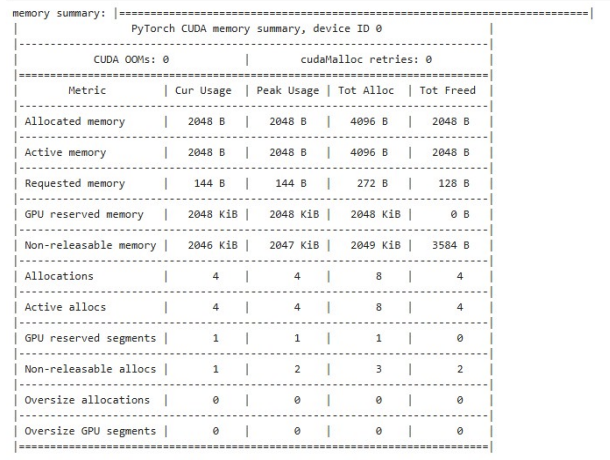
- 메모리의 할당 상태를 좀 더 요약해서 문자열로 확인하고 싶다면, 다음과 같이 cuda.memory_summary()를 통해 확인이 가능하다.