사전캠프
⭐ 팀과제 코드
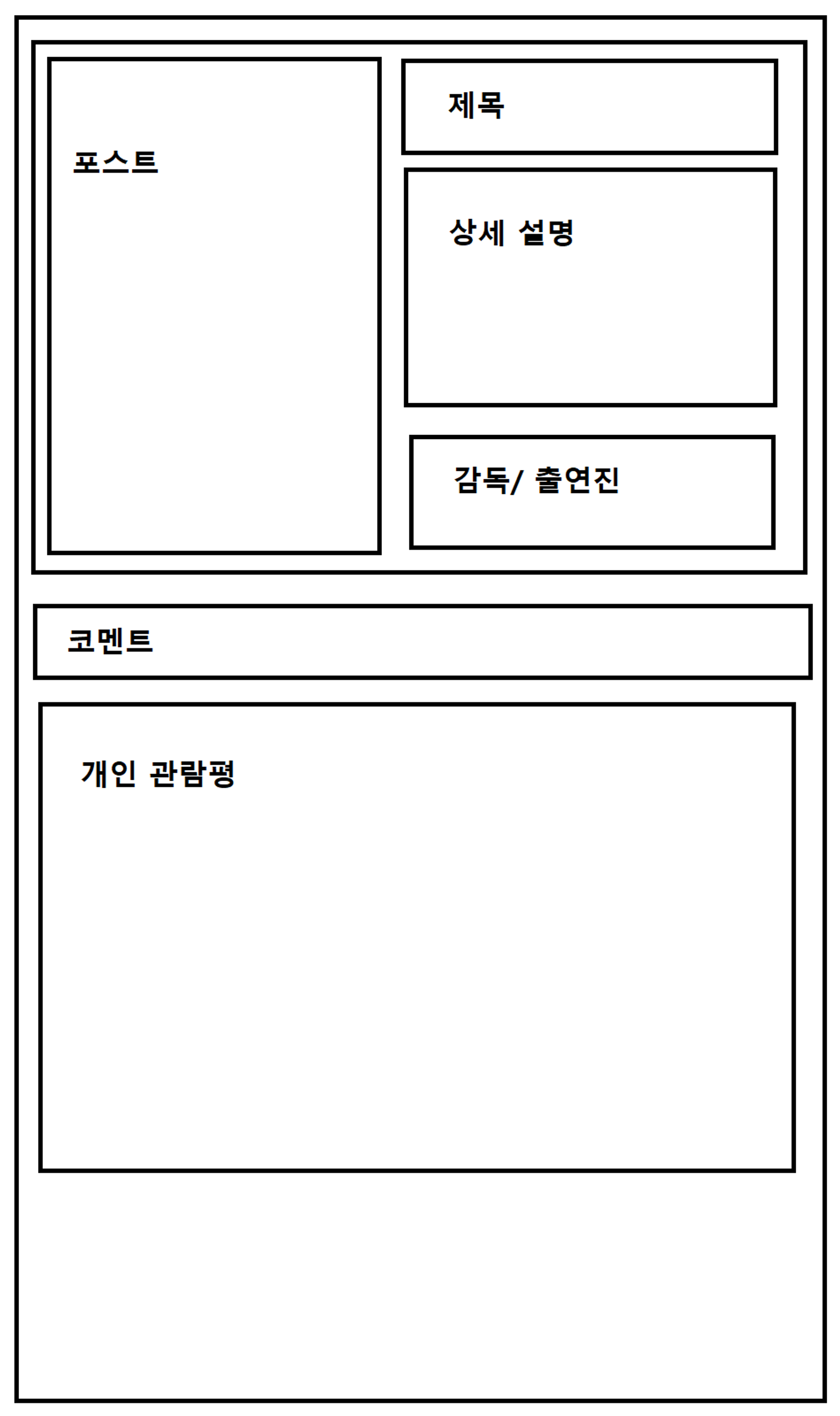
<!DOCTYPE html>
<html lang="en">

<head>
    <meta charset="UTF-8">
    <meta http-equiv="X-UA-Compatible" content="IE=edge">
    <meta name="viewport" content="width=device-width, initial-scale=1.0">

    <link href="https://cdn.jsdelivr.net/npm/bootstrap@5.0.2/dist/css/bootstrap.min.css" rel="stylesheet"
        integrity="sha384-EVSTQN3/azprG1Anm3QDgpJLIm9Nao0Yz1ztcQTwFspd3yD65VohhpuuCOmLASjC" crossorigin="anonymous">
    <script src="https://ajax.googleapis.com/ajax/libs/jquery/3.5.1/jquery.min.js"></script>
    <script src="https://cdn.jsdelivr.net/npm/bootstrap@5.0.2/dist/js/bootstrap.bundle.min.js"
        integrity="sha384-MrcW6ZMFYlzcLA8Nl+NtUVF0sA7MsXsP1UyJoMp4YLEuNSfAP+JcXn/tWtIaxVXM"
        crossorigin="anonymous"></script>

    <title>Document</title>

    <style>
        @import url('https://fonts.googleapis.com/css2?family=Gowun+Dodum&family=Nanum+Myeongjo&display=swap');

        * {
            font-family: 'Gowun Dodum', sans-serif;
            font-family: 'Nanum Myeongjo', serif;
        }

        .mylogo {
            text-indent: 25px;

            position: fixed;

            color: black;
            background-color: #fff;

            width: 100%;
            height: 150px;
            top: 0%;

            display: flex;
            flex-direction: row;
            align-items: center;
            justify-content: flex-start;

            z-index: 3;
        }

        .mypost {
            width: 1000px;
            margin: 20px auto 20px auto;
            padding: 20px 20px 20px 20px;
            box-shadow: 0px 0px 3px 0px gray;
        }

        .mytitle {
            margin: 20px auto 20px auto;
            padding: 20px 20px 20px 20px;
            border: solid 2px;

            display: flex;
            flex-direction: row;
            align-items: center;
            justify-content: center;
        }

        .mytxt {
            text-align: center;
            margin: 20px auto 20px auto;
            padding: 20px 20px 20px 20px;
            border: solid 2px;
        }

        .mybtn>button:hover {
            border: 2px solid black;
        }

        .mybtn {
            display: flex;
            flex-direction: row;
            align-items: center;
            justify-content: center;
        }

        .mybtn>button {
            width: 200px;
            height: 50px;
            background-color: transparent;
            border: 1px solid black;
            color: black;
            border-radius: 50px;
            margin-top: 20px;
            margin-right: 30px;
        }

        .mytitle2 {
            width: 500px;
            height: 400px;
            margin: 20px 0px 20px 20px;
            padding: 20px 20px 20px 20px;
            border: 1px solid black;
        }

        .myposter {
            display: flex;
            flex-direction: column;
            align-items: center;
            justify-content: center;
            margin-right: 30px;
        }
    </style>
</head>

<body>
    <div class=mylogo>
        <br>
        <p style="font-size:50px;"> 비전5 영화 </p>
    </div>
    <br>
    <br>
    <br>
    <br>
    <br>
    <br>
    <br>
    <div class="mypost">
        <div class="mytitle">
            <br>
        <div class="myposter">
            <br>
            <div><img src="https://movie-phinf.pstatic.net/20210728_221/1627440327667GyoYj_JPEG/movie_image.jpg"
            style="width:300px; height:400px;" /> </div>
            <div> <h1> ⭐⭐⭐ </h1> </div>
        </div>

            <div class="mytitle2">
                <div> <h1> 제목 </h1> </div>
                <br>
                <div> <h3> 상세설명 </h3> </div>
                <br>
                <div> <h3> 감독/출연진 </h3> </div>
            </div>
    </div>
        <div class="mytxt">
            <h1> 코멘트 </h1>
    </div>

    <div class="mytxt">
        <h1> 개인 관람평 </h1>
        <div class="form-floating mb-3">
            <input type="text" class="form-control" id="name" placeholder="url" />
            <label for="floatingInput">닉네임</label>
        </div>
        <div class="form-floating">
            <textarea class="form-control" placeholder="Leave a comment here" id="comment"
                style="height: 100px"></textarea>
            <label for="floatingTextarea2">관람평</label>
        </div>
        <div class="mybtn">
                <button type="button" class="btn btn-outline-dark">등록하기</button>
        </div>

        <br>

        <table class="table">
            <thead>
                <tr>
                    <th scope="col">닉네임</th>
                    <th scope="col">관람평</th>
                    <th scope="col">삭제</th>
                </tr>
            </thead>
    </div>
</body>
📌 버튼, 폰트, 배너를 통일시킴.
📌 변경된 레이아웃에 맞춰서 포스터와 별점을 하나의 클래스로 묶음.
<div class="myposter">
            <br>
            <div><img src="https://movie-phinf.pstatic.net/20210728_221/1627440327667GyoYj_JPEG/movie_image.jpg"
            style="width:300px; height:400px;" /> </div>
            <div> <h1> ⭐⭐⭐ </h1> </div>
        </div>
📌 배너가 브라우저 맨 윗부분에서 간격을 유지한 채로 고정되어 있어서 붙이는데 어려움을 겪음. top을 0%로 설정해서 해결.
.mylogo {
            text-indent: 25px;
            position: fixed;
            color: black;
            background-color: #fff;
            width: 100%;
            height: 150px;
            top: 0%;
            display: flex;
            flex-direction: row;
            align-items: center;
            justify-content: flex-start;
            z-index: 3;
        }
📌 배너가 mypost 클래스에 해당하는 박스와 겹쳐져서 박스가 가려지는 것을 막기위해
을 여러 개 추가함으로써 해결함.<body> <div class=mylogo> <br> <p style="font-size:50px;"> 비전5 영화 </p> </div> <br> <br> <br> <br> <br> <br> <br> <div class="mypost"> <div class="mytitle"> <br> <div class="myposter"> <br> <div><img src="https://movie-phinf.pstatic.net/20210728_221/1627440327667GyoYj_JPEG/movie_image.jpg" style="width:300px; height:400px;" /> </div> <div> <h1> ⭐⭐⭐ </h1> </div> </div>
📌 폰트 조절
<p style="font-size:50px;"> 비전5 영화 </p>
