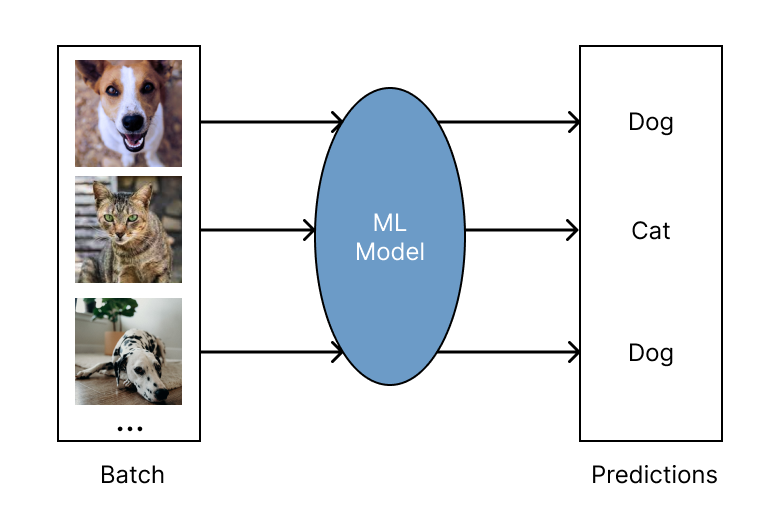
Serving ML Models
이번 포스트에서는 Ray-Serve에서 PyTorch Resnet 모델을 로드하고 배포하기 위해 다음과 같은 작업을 할 것입니다.
- PyTorch의 사전 훈련된 modelzoo에서 모델을 로드하는 방법.
- JSON 요청을 분석하고, 페이로드를 변환하고, 예측하는 방법입니다.
이 포스트에는 PyTorch와 Torchvision이 필요합니다. Ray Serve는 프레임워크에 구애받지 않으며 모든 버전의 PyTorch에서 작동합니다. 또한 이번 작업에서는 모델 배포에 HTTP 요청을 보내기 위해 requests 라이브러리가 필요합니다. 아직 설치하지 않았다면 다음을 실행하여 설치하세요.
pip install torch torchvision requests
tutorial_pytorch.py라는 새 Python 파일을 엽니다. 먼저 Ray Serve와 기타 필요한 라이브러리를 가져옵니다.
from ray import serve

from io import BytesIO
from PIL import Image
from starlette.requests import Request
from typing import Dict

import torch
from torchvision import transforms
from torchvision.models import resnet18
입력 데이터를 파싱하고 이미지를 변환하며 Resnet18 모델을 실행하는 ImageModel 클래스를 정의합니다. 해당 클래스는 Ray Serve에서 배포될 수 있도록 @serve.deployment를 통해 배포됩니다. Serve deployment는 HTTP 경로에 연결되어 있고, HTTP를 통해 모델에 요청이 전송될 때 기본적으로 call 메소드가 호출됩니다.
@serve.deployment
class ImageModel:
    def __init__(self):
        self.model = resnet18(pretrained=True).eval()
        self.preprocessor = transforms.Compose(
            [
                transforms.Resize(224),
                transforms.CenterCrop(224),
                transforms.ToTensor(),
                transforms.Lambda(lambda t: t[:3, ...]),  # remove alpha channel
                transforms.Normalize(
                    mean=[0.485, 0.456, 0.406], std=[0.229, 0.224, 0.225]
                ),
            ]
        )

    async def __call__(self, starlette_request: Request) -> Dict:
        image_payload_bytes = await starlette_request.body()
        pil_image = Image.open(BytesIO(image_payload_bytes))
        print("[1/3] Parsed image data: {}".format(pil_image))

        pil_images = [pil_image]  # Our current batch size is one
        input_tensor = torch.cat(
            [self.preprocessor(i).unsqueeze(0) for i in pil_images]
        )
        print("[2/3] Images transformed, tensor shape {}".format(input_tensor.shape))

        with torch.no_grad():
            output_tensor = self.model(input_tensor)
        print("[3/3] Inference done!")
        return {"class_index": int(torch.argmax(output_tensor[0]))}
이제 Serve 배포를 정의했으므로 배포할 수 있도록 준비합니다.
image_model = ImageModel.bind()마지막으로 터미널을 통해 모델을 Ray Serve에 배포할 수 있습니다.
serve run tutorial_pytorch:image_modelServe가 실행되는 동안 별도의 터미널 창을 열고 대화형 Python 셸 또는 별도의 Python 스크립트에서 다음을 실행합니다.
import requests

ray_logo_bytes = requests.get(
    "https://raw.githubusercontent.com/ray-project/"
    "ray/master/doc/source/images/ray_header_logo.png"
).content

resp = requests.post("http://localhost:8000/", data=ray_logo_bytes)
print(resp.json())
다음과 같은 출력이 표시됩니다(정확한 숫자는 다를 수 있음).
{'class_index': 919}
따라가기도 벅찬 AI Engineer 겸 부앙단